
“At about $6k MRR now and customer support is sucking my soul and time.” That’s a SaaS founder on r/SaaS, asking how to hire someone to take the inbox off their hands. The most useful reply didn’t name an agency or a candidate. It gave an order of things to do first.
SaaS customer support is the help you give people who pay every month or year to use your software. It means answering how-to questions, fixing what breaks, and getting them to the result they signed up for. When you’re the founder, it’s also your best source of product feedback, and the job most likely to eat your week.
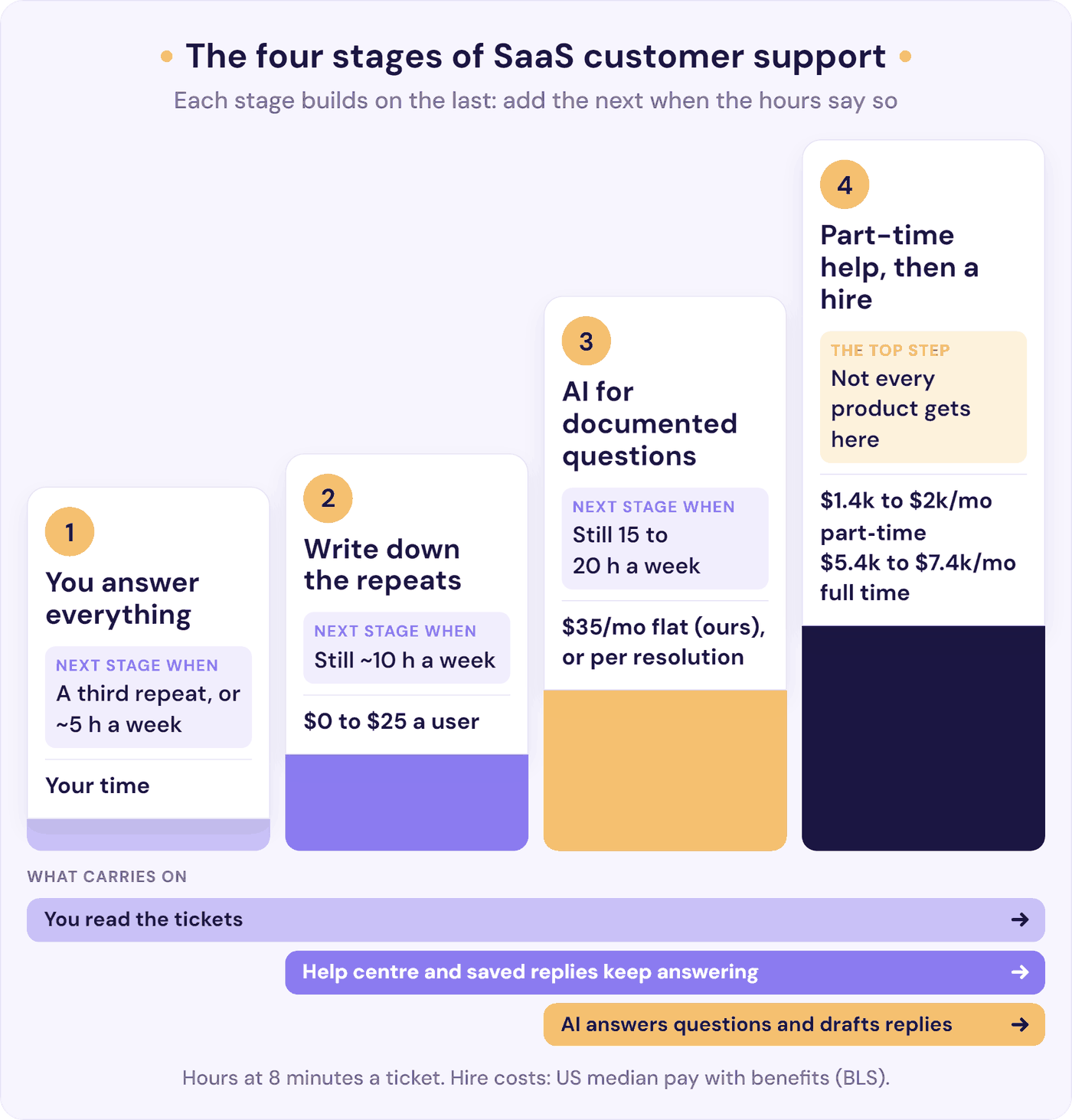
The short version, in four stages that build on each other, each with a trigger you can measure:
- Stage 1: you answer everything. Add stage 2 when a question arrives for the third time, or support passes about 5 hours a week.
- Stage 2: write down what you keep repeating. A help centre and saved replies for your top 10 questions. Add stage 3 if support still takes about 10 hours a week.
- Stage 3: let AI answer what your docs already cover, at any hour, with an easy route to you. Add stage 4 if support still takes 15 to 20 hours a week for a month.
- Stage 4: bring in part-time help first, then your first support hire, while the AI keeps answering the documented questions and drafts replies for the rest.
We’re a small SaaS company ourselves, and we make AI support tools, so stages 3 and 4 are where we come in. We’ve tried to be straight about when AI isn’t the answer.
What Is SaaS Customer Support?
SaaS customer support (also called SaaS customer service) is the help a software-as-a-service company gives its users after they sign up. It covers how-to questions, bugs and account problems, billing, and making sure people get the value they’re paying for, every time they renew.
Three things make customer support for SaaS different from support in most businesses:
- Every ticket is part of a renewal. Customers decide every month or year whether to keep paying. A slow or careless reply isn’t a one-off bad experience. It’s a reason to cancel at the next bill.
- The questions show you what to build. A confused customer is often pointing at a confusing screen. Founders who read their own tickets fix the product, not just the answer.
- Support isn’t customer success. Support answers questions and fixes problems; customer success works proactively on onboarding, adoption, and renewals. Founders often say “CSM” (customer success manager) when they mean support, so be clear which you’re hiring for.
Small companies have an edge here. Asked on Hacker News which companies had blown them away with their support, one commenter answered: “Small ones. I can’t think of a time that I got support that blew me away with a large company.” This playbook is about keeping that edge as the volume grows.
How Many Support Tickets Can One Founder Handle?
There’s no fixed number, because it depends on your product more than your customer count. Someone who runs outreach campaigns for SaaS startups reckons in one r/SaaS thread that solo support “only works if you’re under like 50 customers max”. In the same thread, a founder with 14,000 daily users spends “less than 30 minutes a month on customer support”. And in an older thread, a founder with around 300 customers, paying $49 to $2,500 a month, answers support personally.
What breaks founders is time. So measure hours, not customers: count one week of tickets and time 10 of them, from first read to done, follow-ups included. At, say, 8 minutes a ticket, 75 tickets a week takes 10 hours and 150 takes 20, half your working week.
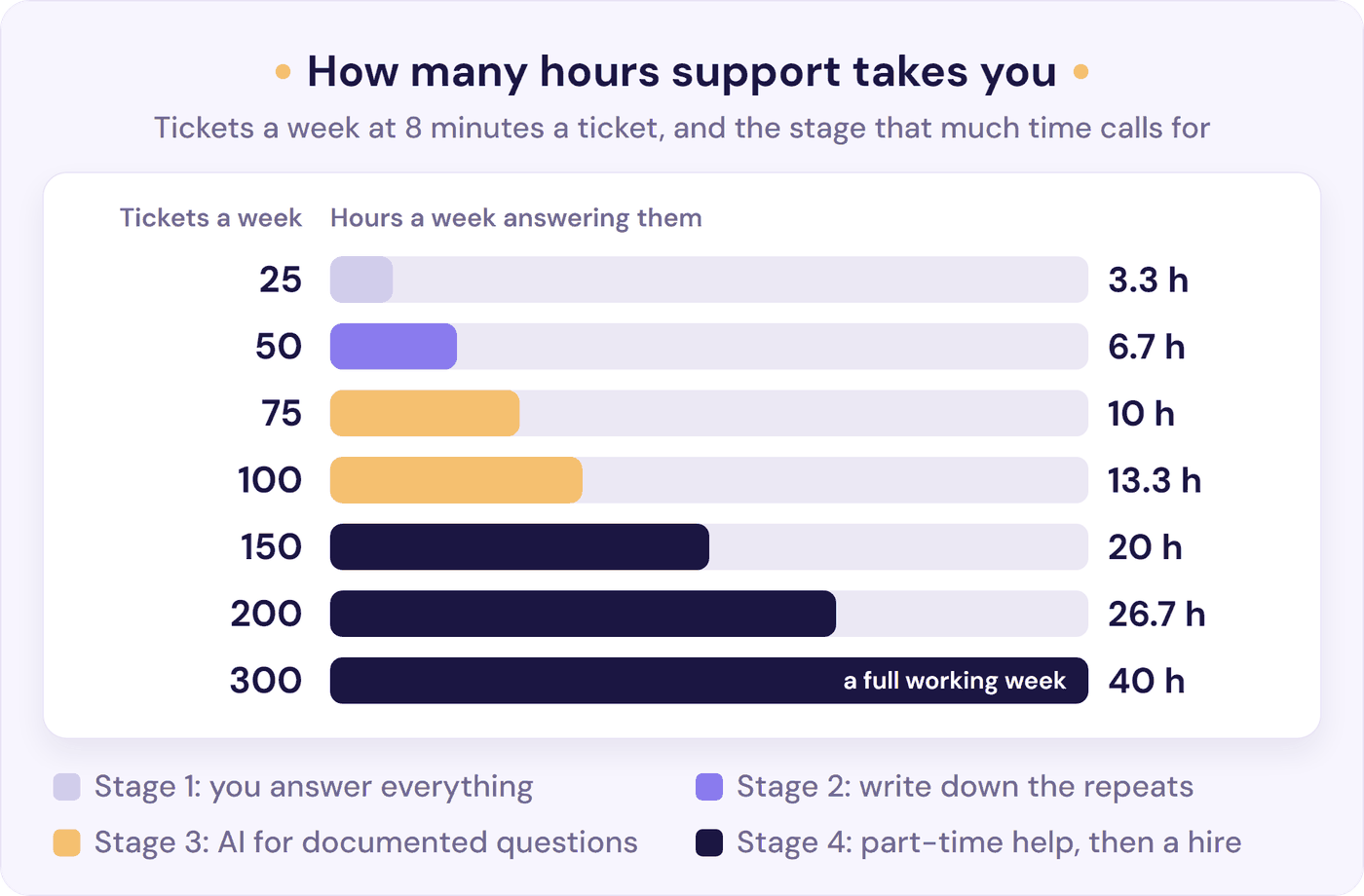
Those figures are handling time only. Switching between support and building costs more than the minutes suggest. One founder described the hardest part as “context switching between customer conversations and deep technical work”. The triggers in this playbook are in hours so they work for any product: swap in your own minutes per ticket.
The Four Stages of SaaS Customer Support
This playbook splits founder-run support into four stages, in the order that tends to work: write things down before you automate, and automate only what’s written down before you hire. Each stage adds to the ones before rather than replacing them: your help centre keeps working when you add AI, and the AI keeps working when you hire. The stages overlap (you’ll write your first help article in week one), and you can skip one. If most of your tickets are bugs, go from stage 2 straight to part-time help.
You don’t add a stage at a revenue milestone or a customer count. You add one when the hours tell you to, or when the same questions keep coming back:
| Stage | Add the next stage when | What to set up | Monthly cost | Keep doing yourself |
|---|---|---|---|---|
| 1. You answer everything | A question arrives for the third time, or support passes about 5 hours a week | One support address and inbox, an auto-reply with a real reply time, stated hours, tags | $0 on a free help desk plan | All of it: it’s product research |
| 2. Write it down | Support still takes about 10 hours a week, or customers wait overnight for documented answers | A help centre for your top 10 questions, saved replies, help links in the app, billing self-service | $0 (a page on your own site, or Help Scout’s free plan for up to 100 contacts a month) to about $25 a user | Reading every ticket, and fixing the product on the fourth repeat |
| 3. AI for documented questions | Support still takes 15 to 20 hours a week for a month, or you miss the reply time you promised | An AI chatbot trained on your help centre that says it’s AI and hands over to you | $35 a month on Resolve247’s flat plan, or $0.50 to $2.00 per resolution or outcome at HubSpot, Help Scout, Fin, or Zendesk, on top of their help desk plan (compare AI chatbot pricing) | Bugs, billing disputes, key accounts, and upset customers |
| 4. Part-time help, then a hire | Go full time when support needs 30 hours or more a week | A part-time contractor for 10 to 15 hours a week, then a full-time generalist. The AI keeps answering, and drafts replies for them | About $1,400 to $2,000 a month for 10 to 15 hours, $5,400 to $7,400 full time (US median pay with benefits), plus your AI plan | Churn conversations, key accounts, and reading a sample of tickets |
Not everyone reaches stage 4. A clear product with good docs can stay in stage 2 or 3 for years, like the founder with 14,000 daily users and under half an hour of support a month.
Stage 1: You Answer Everything (and Learn From It)
Much of the advice on customer support for startups comes from help desk providers, so it starts with software. In the early days, though, answering every ticket yourself is the right call, not a failure to delegate. Y Combinator’s Startup Playbook is blunt about it: “You should not put anyone between the founders and the users for as long as possible.” Paul Graham’s essay Do Things that Don’t Scale goes further: early on, “It’s not the product that should be insanely great, but the experience of being your user.”
Keep the set-up small. “The main thing is don’t overthink it at launch”, as one r/SaaS reply put it. This is enough:
- One support address, one inbox. A support@ address beats your personal inbox, and free help desk plans add ticket history at no cost. In October 2026, HubSpot’s covers 2 users, Zoho Desk’s 3, Help Scout’s 5 (up to 100 contacts a month), and Crisp’s 2 seats (chat only). Pick the one that matches where customers already reach you: email, in-app chat, or your CRM.
- An auto-reply with a real reply time, one you’ll hit every day. As one reply in an r/CustomerSuccess thread put it, “If your team promises 1 hour and can’t keep it, customers notice that more negatively than if you promise 8 hours and actually hit it every day.”
- Stated hours. The founder with about 300 customers replies “within about 1 hour during weekdays” and removes in-app chat “completely when I’m traveling or taking some time off”. Clear limits beat silent ones. (Weighing up live chat? See chatbot vs live chat.)
- Five to eight tags. How-to, bug, billing, account, feature request. Tags are how you’ll spot repeats in stage 2.
- Say who’s answering. Many people assume nobody’s reading. One sole support person found new users “seemed to assume they were talking to a bot or emailing the great void”, and they were surprised when a human replied. Sign with your name, and don’t invent an “Amanda” to look bigger.
- Reach out first. Some users who get stuck cancel instead of asking. Once a week, look for anyone who stalled during setup and email them. One founder credits being proactive with turning free users into paying ones.
Protect your week while you’re at it. Answer at set times (“an hour a day at a fixed time”, one commenter suggests) rather than all day, and check support from your computer, not your phone.
With two founders, take turns by day or by week, as Segment’s founders did: they “basically round-robined support” (Lenny’s Newsletter). And move to a help desk once two of you answer. “Two people replying to the same customer is already the signal,” as one reply in an r/microsaas thread put it.
Add stage 2 when a question arrives for the third time, or support passes about 5 hours a week (about 38 tickets at 8 minutes each).
Stage 2: Write Down What You Keep Repeating
Stage 2 is about answering each question once. A rule of thumb from an r/SaaS thread on cutting tickets as a solo founder sums it up: “Every time you answer something twice, turn it into a canned response. Third time? That’s a knowledge article. Fourth time? That’s a product change.”
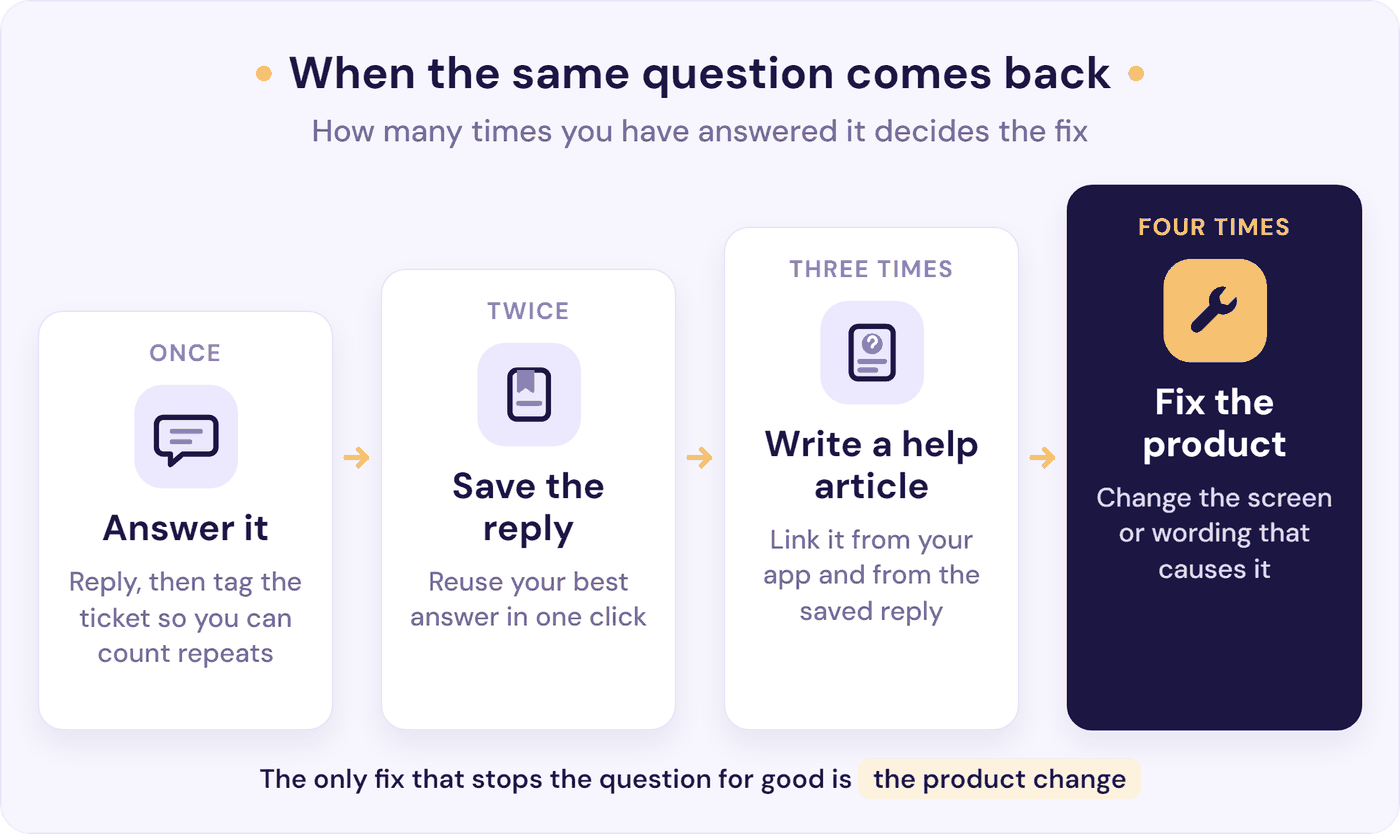
Start with your top 10 questions from your stage 1 tags:
- Write a help article for each. One question per page, the exact steps, and a screenshot. A page on your own site works, as does GitBook, where the founder with 300 customers keeps their FAQs. Skip “some giant knowledge base nobody is going to maintain”. These knowledge base examples show formats that work.
- Put help where the confusion happens. A link or tooltip beside the setting people get wrong does more than a help centre they have to find. One founder says a top-10 FAQ plus question-mark tooltips next to confusing buttons “Cut my tickets by like 40% right there”. That’s self-reported, but it’s a realistic size. To find those spots, note where each customer was when they asked. Our guide to reducing support tickets by reason has a two-week tagging sheet for it.
- Turn the rest into saved replies, written in your own voice so they don’t read as canned.
- Let customers handle billing themselves. Invoices, card changes, plan changes, and cancellations are a whole tag that a self-service billing page shrinks.
- Post incidents on a status page, so an outage is one update rather than 40 replies.
- Update the docs when you ship. Put “update the help article” on your release checklist. An out-of-date article is worse than none, and in stage 3 it’s what the AI will repeat.
Keep your expectations honest. Gartner found only 14% of customer service issues are fully resolved in self-service, and even “very simple” ones only 36% of the time. Docs cut the repeats; they don’t empty the inbox. Our self-service guide for small teams covers how to make them easy to find, with a person still in reach.
They also do three more jobs. They’re what a knowledge base chatbot answers from in stage 3, the training manual for whoever you hire in stage 4, and insurance: if only you know the answers, a week off becomes a support outage.
Add stage 3 when support still takes about 10 hours a week (about 75 tickets) with the docs in place, or customers wait overnight and at weekends for answers your help centre already has.
Stage 3: Let AI Answer What Your Docs Already Cover
In a 2024 r/SaaS thread, one team said it had trained a private ChatGPT bot on its knowledge base to see whether it could take on support. It “kept making up features that didn’t exist, so we decided against launching it.” So pointing a bot at your docs isn’t enough. AI fits after stage 2, kept to your own content, saying “I don’t know” when the answer isn’t there, and tested before customers see it. That lowers the risk without removing it (our guide to AI support chatbot accuracy shows how to test one).
The case for it is coverage: 74% of consumers say AI has made them expect customer service to be available 24/7 (Zendesk CX Trends 2026). A founder can’t be. An AI chatbot can answer the documented questions at 2am and leave the rest for the morning. Our guide to offering 24/7 customer support without a night shift covers the rest of the set-up, including what to do about real emergencies. If most of your support is email, put the chat where people look before they write (contact page, app, help centre), or use AI to draft email replies you check and send.
What good looks like:
- It answers only from your help centre and site, links the page it used, and says “I don’t know” rather than guess.
- It says it’s AI. Klarna’s CEO put it plainly in a 2024 interview: “the customer should always know if they speak to AI or if they speak to human”.
- It hands over easily, with the conversation attached. In a Gartner survey published in September 2026, 87% of customers say access to a human agent is essential when companies use generative AI. Only 27% would try a chatbot again after a bad experience. For the rules and the exact wording, including when you’re offline, see how to hand over from a chatbot to a human.
- It never traps anyone in a loop or hides the way to a person.
- Anything that commits the company goes to you. As one reply in an r/SaaS thread on what should stay human puts it: “a refund, a credit, or any promise that commits the company goes to a human”.
Start small, and plan for mistakes. Before it goes live, ask it your top 10 questions plus a few it shouldn’t be able to answer, then read every conversation for the first two weeks. When it gets one wrong, reply to that customer yourself and fix the help article it used: wrong answers usually trace back to a missing or out-of-date page.
Expect less than the headlines. Providers report high rates on their own definitions: 70% to 76% resolved for HubSpot, Tidio, Help Scout, and Fin, and Resolve247 answers 82% of customer questions on our own figures. Service teams estimated AI handled about 30% of cases in 2025 (Salesforce, November 2025).
Results depend on the product. Someone who set up the same AI tool for two products at a 500-person SaaS company reported “At most, AI catches and correctly deflects 10-15% of our volume” on the technical one, after “6-8 months of hard work”, and a “70-85% deflection rate” on the simpler one within two months.
Two of our own SaaS customers put numbers on it. Tiiny Host, a simple website hosting tool, trained our chatbot on its help articles, and its founder says it “has reduced our support workload by 50%”. Data Fetcher, an Airtable add-on, uses AI drafts instead: the founder still answers support, checking and sending replies the AI has drafted.
Resolve247 has reduced how long I spend on support by 50%!!
Andy Cloke, Founder, Data Fetcher
Those are customers’ own figures, and we picked them from our testimonials, so measure it yourself: a conversation is resolved if the customer doesn’t come back about the same thing.
AI or a person first? Look at your tags. If most tickets are how-to questions your help centre already answers, add AI first. It costs a fraction of a part-timer, covers nights and weekends, and at the 30% service teams reported, turns a 20-hour week into about 14. That pushes a hire back rather than replacing one. The win can also be speed: in the same thread, one team says its AI removed “just over 10% of cases” but “helped our response time go from 3-4 hours to 15-20 minutes”.
If your docs are thin, or most tickets are bugs, account-specific problems, or detailed technical questions, go from stage 2 to part-time help and use AI only to collect details or draft replies (see what to automate and what to keep human). In B2B a wrong answer is expensive: as one of the founders of Pylon, an AI support provider, said on YC’s Founder Firesides, when “a million-dollar customer” asks a question, “you can never answer them wrong”. Many teams end up with both.
On price, flat plans cost the same however many questions the AI resolves, up to the plan’s allowance. Per-resolution pricing ($0.50 at HubSpot, $0.75 at Help Scout, $0.99 per “outcome” at Fin, up to $2.00 at Zendesk) sits on top of that provider’s help desk plan, so it can be cheaper at very low volume if you already pay for one. Our AI chatbot pricing guide compares 13 providers.
Add stage 4 when support still takes 15 to 20 hours a week for a month after adding AI, or you keep missing the reply time you promised.
Where Resolve247 Fits
Resolve247’s AIChatbot is built for this stage, and keeps working after you hire. It trains on your website and help centre, answers from that content, and is set to say it doesn’t know rather than guess. As its own chat widget on any site, it introduces itself as your AI assistant, links the pages it used, and has a “Contact a Human” button that sends the conversation to your email, Help Scout, or Slack. Inside HubSpot or Crisp live chat, it pauses for an hour once you reply. If you answer email in Help Scout or Front, ResponseAssistant drafts replies for you, or your support hire, to check and send (every plan includes seats for it, one on Starter).
Plans start at $35 a month for 2,000 AI messages (each AI reply is one message, so roughly 800 conversations at about 2.5 replies each). If a busy month goes over, it keeps answering: there are no automatic overage charges, and we’ll talk with you about whether a bigger plan fits. And if it ever hallucinates, that month is free. See how it works as an AI chatbot for SaaS, or start a 30-day free trial with no card needed.
Stage 4: Part-Time Help First, Then Your First Support Hire
Back to the founder at $6k MRR. The most useful reply arrived more than a year later, from an agency owner (“so grain of salt”): “At $6k MRR don’t hire a person yet, you’ll spend more time managing than supporting.” Instead, “help docs for your top 10 questions, then a canned-response library, then a part-time contractor at 10-15 hrs/week once volume actually justifies it. Usually somewhere around $15-20k MRR.”
When to Hire Your First Support Person
In hours: bring in part-time help when support still takes 15 to 20 hours a week after stages 2 and 3, and hire full time once it needs 30 hours or more.
We couldn’t find a researched threshold for the first support hire. The most concrete rule of thumb comes from support consultant Suzanne James: a team handling “more than 10-15 customer tickets, emails, or chat requests daily” is stretched thin, and while volume is moderate, the advice is to “Start with a part-time or contract role”. Our triggers come later (15 to 20 hours a week is about 22 to 30 tickets a weekday at 8 minutes each), because stages 2 and 3 absorb much of that volume first.
What a First Support Hire Costs
Budgets point the same way: part-time first. Private B2B SaaS companies spend a median 9% of annual recurring revenue (ARR) on customer support and success combined (SaaS Capital, 2026). Under $1 million ARR the median is about 5%, and from $1 million to $3 million it’s 8%. Bootstrapped companies spend about half what equity-backed ones do.
At a median US customer service rep’s pay plus benefits, about $31 an hour, 15 hours a week of help costs about $2,000 a month. At 5% of revenue, that fits at about $40,000 in monthly recurring revenue (MRR). At $25,000 MRR, 5% is about $1,250 a month: roughly 9 hours a week at that rate, or an AI plan plus a few hours of help. When contractors quote, compare their hourly rate with that $31.
What a first hire costs in the US, with benefits making up about 30% of what private employers pay (US Bureau of Labor Statistics, June 2026):
- A customer service representative: median pay $44,770 a year (BLS, May 2025), or about $65,200 ($5,400 a month) with benefits.
- A help-desk technician (BLS’s computer user support specialist, often closer to a SaaS first hire): median pay $61,860, or about $88,000 ($7,400 a month) with benefits.
Software companies pay more: a median $57,940 for customer service reps and $65,530 for help-desk technicians at software publishers (BLS OEWS, May 2025).
At $1 million ARR, an 8% budget for support and success is $80,000: about one full-time technical hire. In the UK, a customer service assistant earns £20,000 to £30,000 (National Careers Service), plus employer National Insurance and pension.
For cost per ticket, and what AI saves against it, see how to reduce customer support costs.
Who to Hire and How to Hand Over
Hire a generalist who writes well and gets curious about your product. The same agency owner’s advice: “hire for writing ability and product curiosity, not support experience.” Hire for your main problem, too: many low-priced users asking how-to questions need a support person, while a few high-value B2B accounts need someone who can also onboard them, which is closer to customer success.
In the ad, give the hours, time zone, tools, and your three most common ticket types. One hiring manager on r/startups has candidates reply to real customer emails as homework before the interview. And plan where the role can grow (help centre, onboarding, product), because, as one former support lead put it, “support is among the lowest paid positions at a startup”.
How to hand over:
- Your help centre and saved replies are the training manual. That’s why stage 2 comes first.
- Point them at trends, not process. When a startup’s first support hire asked r/ExperiencedDevs for advice, one reply said “I wouldn’t focus on implementing processes this early, since you’re the first support hire”, and another told them to speak up when something new keeps coming in.
- Keep reading a sample of tickets. “It’s important to know what your customers run into so you should be checking the tickets,” wrote one founder who hired support first.
- Keep the conversations that shape the business: churn, big accounts, and angry customers. Agree which issues come back to you, and how fast, before the first one does: our escalation matrix template is built for a team this size.
Since 2013, staff across 37signals have taken turns on support under Everyone on Support. Their lesson six years in: “EOS is not a way to bolster the coverage of the support team” (Signal v. Noise, 2019). Rotations are for learning, not for covering the queue.
Outsourced and offshore support costs less per hour, but product knowledge is the hard part, and much of the loudest advice in founder threads comes from people selling staff. Whoever you hire, your stage 2 docs decide how fast they get good.
Keep the AI Working After You Hire
Hiring doesn’t retire the AI. Once a person joins, it does two jobs:
- It keeps answering the documented questions, at night, at weekends, and while your hire works on everything else. Their hours go on bugs, account problems, and key customers rather than on questions your help centre already answers, which also pushes back the second hire. A senior customer success specialist at a brewery software company says our chatbot is “already saving our team several hours each week, allowing us to focus on higher-value work.”
- It drafts replies for the tickets that need a person. The AI writes a first draft from your help centre and past replies, and your support person checks it, edits, and sends. At October 2026 prices, Help Scout includes AI Drafts on its Plus plan, Front’s Copilot is a $20-a-seat monthly add-on, and Zendesk’s Copilot is $50 an agent a month, billed yearly, on Suite Professional and up. Our ResponseAssistant does the same in Help Scout and Front, and the founder of Growform, a form builder, says its drafts “definitely use my tone of voice, previous tickets and the knowledgebase”.
Make your first hire the owner of what the AI says. Each week they read a sample of AI conversations, fix the help article behind any wrong answer, and write new ones as new questions come in. The AI is only as good as the content it answers from, and your hire is now the person closest to it.
SaaS Customer Support Metrics That Matter at Small Scale
Help desk dashboards show dozens of metrics. At this size, five tell you what to do next:
- Hours a week on support. Your stage trigger.
- Tickets per 100 customers a month. If this rises as you grow, the product is creating confusion: fix screens, not just replies.
- Share of tickets that are repeats. Your stage 2 to-do list.
- First reply time against what you promised. Keeping a 24-hour promise beats missing a 1-hour one.
- Resolved without the customer coming back. The honest test for saved replies, articles, and AI alike (see resolution rate).
Customer satisfaction scores are worth a one-question survey, but at small volumes a handful of replies swings them, so read the comments rather than chasing the number. Our KPI guide shows how many survey replies a score needs before it means something.
Frequently Asked Questions
What is SaaS customer support?
SaaS customer support is the help a software company gives its subscribers after they sign up: answering how-to questions, fixing bugs and account problems, sorting out billing, and helping people get the result they pay for. Because customers renew every month or year, every support conversation feeds their decision to stay.
When should a SaaS startup hire its first support person?
When support still takes 15 to 20 hours a week after you’ve written help articles for your top questions and added AI for the documented ones. Start with a part-time contractor for 10 to 15 hours a week, and hire full time once support needs 30 hours or more. One agency owner puts part-time help at around $15,000 to $20,000 MRR. Keep the AI answering the documented questions after you hire, so your hire’s time goes on the rest.
How many support tickets can one founder handle?
At about 8 minutes a ticket, 75 tickets a week takes 10 hours and 150 takes 20, half a working week. The limit depends more on your product than your customer count: some founders handle support for hundreds of customers themselves. Track hours, not customers.
How much does customer support cost for a small SaaS company?
Early on, almost nothing but your time: HubSpot, Help Scout, Crisp, and Zoho Desk all have free plans. An AI chatbot adds $35 a month on Resolve247’s flat plan, or $0.50 to $2.00 per resolution or outcome at HubSpot, Help Scout, Fin, or Zendesk, on top of their help desk plans. At US median pay with benefits, 15 hours a week of help costs about $2,000 a month, and a full-time hire $5,400 to $7,400.
How can a solo founder offer customer support outside working hours?
State your hours and set an auto-reply with a real reply time, such as “within 24 hours”. Add an AI chatbot trained on your help centre to answer documented questions at any hour, have it say it’s AI, and send everything else to your inbox for the morning. Don’t promise live 24/7 support you can’t staff.
The Bottom Line
SaaS customer support doesn’t have to swallow your week. Treat it as stages that build on each other, and let the hours tell you when to add the next one:
- This week: count your tickets, time 10 of them, and tag them.
- This month: write help articles for your top 10 questions, and set your hours and auto-reply.
- When support passes 10 hours a week: add AI for the questions your docs already answer, with an easy route to you.
- When it’s still 15 to 20 hours: bring in part-time help. Keep the AI answering the documented questions, give your hire AI drafts for the rest, and keep reading the tickets.
If you’re at stage 3 or beyond, start a free 30-day trial and ask it your top 10 questions before your customers do. No card needed. Not there yet? Try Chat With Your Website to see how an AI would answer your top 10 questions from your site today, with no signup.