
Across the online shops on Gorgias, a third of the support tickets an AI hands to a person never get a human reply. The median wait for a person is 10 hours (Gorgias Ecom Lab, April 2026, the provider’s own data). So a chatbot to human handoff doesn’t only fail at the moment the bot gives up. It often fails in the hours after.
A chatbot to human handoff is the moment an AI chatbot passes a customer conversation to a person, along with everything the customer has already said, so they can carry on without starting again. Getting it right is a big part of whether customers trust the bot.
The short version:
- Hand over the first time someone asks for a person, and straight away for refunds, billing disputes, and anything else that commits your business.
- Pass the whole conversation across, so nobody repeats themselves.
- Tell the customer honestly when a person will reply, especially at night and at weekends.
- Test it out of hours, on a phone, before customers do.
We build AI support software, so we see where handoffs break. Here’s how to design one for a small team, with the exact words to use at each step.
What Is a Chatbot to Human Handoff?
A chatbot to human handoff (also called a handover, or an escalation) is when an AI chatbot stops answering and passes the conversation to a person on your team. A good one has four parts, and this guide covers each:
- The trigger: the rule that decides when a person takes over.
- The transfer: what the person receives, so the customer never has to explain twice.
- The takeover: what the customer sees while they wait, and when the person joins.
- The handback: whether, and when, the AI answers again.
“Handoff” is the usual word in the US and “handover” in the UK, so a chatbot handover to a human means the same thing.
When Should a Chatbot Hand Over to a Human?
Sort every situation into one of three groups before the AI goes live. The first group never waits.
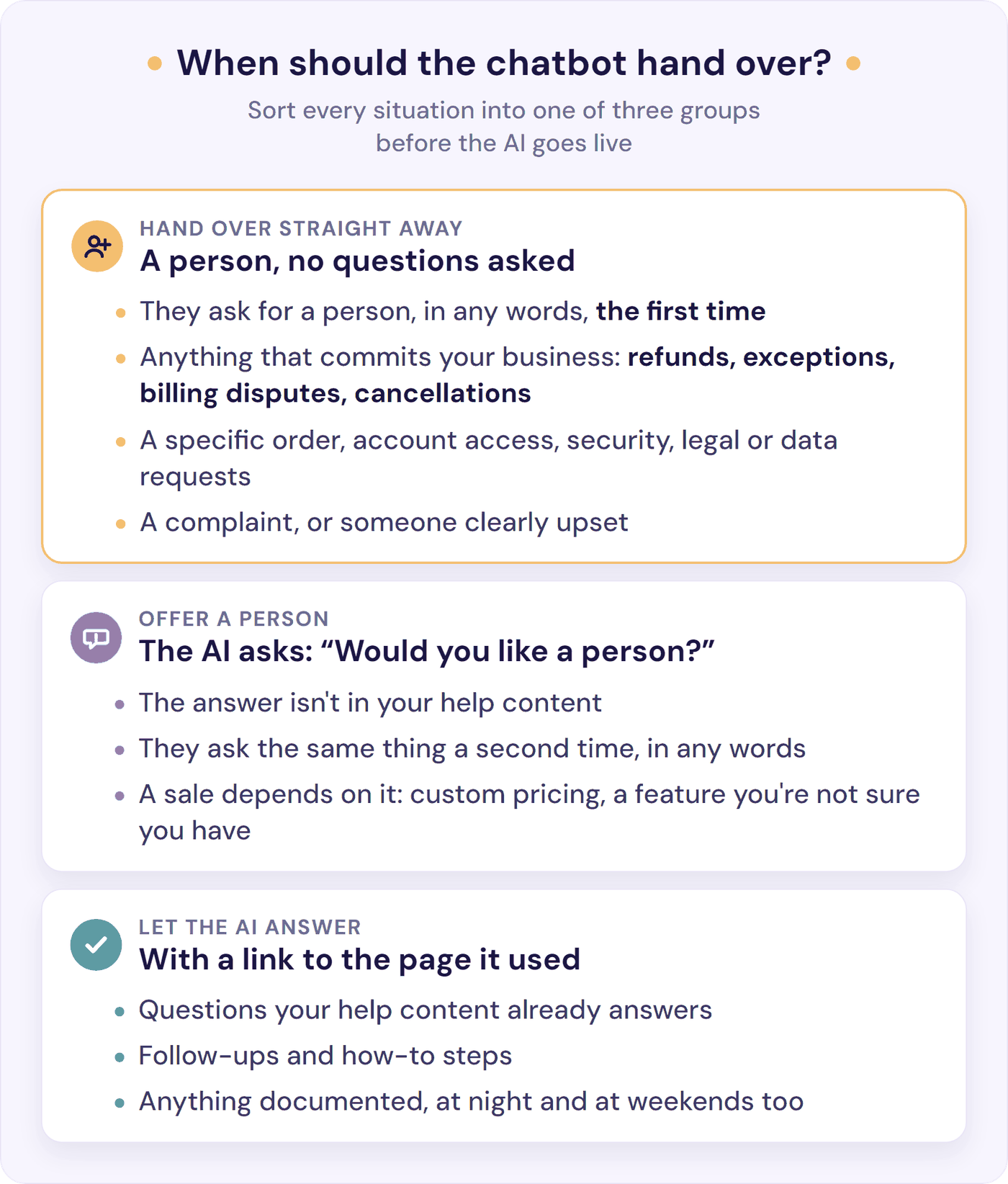
Hand over the first time someone asks. In any words: “human”, “agent”, “can I talk to someone?”. Customers expect this. In a Gartner survey published in September 2026, 87% say access to a human agent is essential when companies use generative AI in customer service. And 81% expect a bot to hand them to a person when needed, while only 38% say it happens (Morning Consult for Zoom, July 2025).
One customer on Reddit called it “absolutely baffling” to have to repeat “human” more than once. A reply in a thread on r/CustomerSuccess was blunter: if someone types “talk to a human,” the bot should transfer. “Full stop.”
Hand over anything that commits your business. Refunds, exceptions, billing disputes, cancellations, account access, questions about a specific order, and legal or data requests go to a person, however sure the bot sounds.
In November 2022, Air Canada’s website chatbot told a grieving customer they could claim a bereavement fare after travelling. The airline’s real policy didn’t allow it, and Air Canada argued it couldn’t be held liable for what its chatbot said.
The tribunal disagreed: “It should be obvious to Air Canada that it is responsible for all the information on its website” (Moffatt v. Air Canada, 14 February 2024). It ordered the airline to pay C$812.02, including interest and fees.
Hand over when someone is upset. A complaint needs a person who can fix it, not a polite loop (our guide to handling angry customers explains why AI shouldn’t try).
Offer a person when the AI is stuck. If the answer isn’t in your help content, the AI should say so and offer someone. Do the same when a customer has to ask again: Fin, Intercom’s AI, offers a person by default when a customer “repeats themselves across three turns” (Fin help, August 2026). For a small business, offer one the second time someone asks the same thing.
And offer a person when a sale depends on an answer your docs don’t give, such as custom pricing or a feature you’re not sure you have. A guess either way can cost you.
You’ll often read that a bot should hand over below “60-70% confidence”. We couldn’t find a source for that number anywhere. For a small business, a simpler test works: is the answer in your content? If it isn’t, a person takes it (more on confidence scores in our glossary).
One of the simplest rules we found comes from Chordify. Its AI writes the first reply and says it’s AI. If the customer replies at all, even “Thanks!”, a person handles it from there (a Chordify team member on r/micro_saas). That’s an easy rule to copy if your support runs on email.
If your tool takes handoff rules in plain English (Fin, Crisp’s Hugo, and Resolve247’s Smart Escalation all do), here’s a starting point to adapt:
“Hand over straight away if the customer asks for a person in any words, is upset, or asks about a refund, a billing dispute, a cancellation, account access, a specific order, or a legal or data request. If the answer isn’t in our help content, say so and offer a person. If the customer asks the same thing a second time, offer a person.”
What the Customer Should See at Each Step
A wait is easier to accept than silence. As one reply in r/CustomerSuccess put it, “The frustration is almost always about uncertainty, not the wait itself.” So write the wording before you need it. Here are the six moments, with examples you can adapt:
- They ask for a person. Confirm at once. Don’t offer “one more answer” first. If you need one detail to route it, such as an order number, ask for it in the same message.
“Of course. I’ll pass this to the team now, with our conversation so far.” - Someone is available. Say who, and roughly how long.
“Alex from our support team usually replies within a few minutes. You can keep asking me anything while you wait.” - Nobody is available. Give an honest time, and ask for an email address, nothing more.
“Our team is offline until 9am UK time on Monday. Leave your email and we’ll reply there, with this conversation attached.” - It’s taking longer than you said. Send a short update rather than silence.
“Sorry for the wait. The team is busier than usual, so it may be another 10 minutes. If you need to go, leave your email and we’ll reply there.” - A person joins. Show you’ve read the chat before you say anything else.
“Hi, I’m Alex. I can see you were charged twice for the annual plan. I’ll sort the refund now.” - The AI is back. Say so, and keep the door open.
“You’re back with our AI assistant. Ask for a person any time.”
Three rules hold the set together:
- Give a time you can hit. “By 10am tomorrow” is better than “shortly”, but only if someone will be there at 10am.
- Say it’s an AI from the first message. In a 2026 Twilio survey, 76% of consumers think an AI should identify itself at the start, but only 22% say brands do. In the EU it’s now the law: since 2 August 2026, the AI Act’s Article 50 requires that people are told they’re talking to an AI system unless it’s obvious.
- Never hide the way out. In the same Twilio survey, 63% wanted a quick, easy way to reach a person at any time, but only 47% of brands offer one. As one Reddit user noticed, “Once a site gets an ai chat bot, you often have to Google their contact details because the site hides them.” Keep your email address and phone number where they were, and don’t make people log in or find a tracking number before they can ask for a person.
What Your Team Needs to See Before They Reply
A handoff that loses the conversation just moves the problem. Nearly all the business leaders Five9 surveyed say they keep the context in an AI-to-human handoff. Yet 83% of consumers say they still have to repeat themselves at least sometimes after a transfer (Five9, June 2026). A commenter in r/SaaS explained why: “The transcript sits in the bot, the ticket opens empty, so the human asks again.”
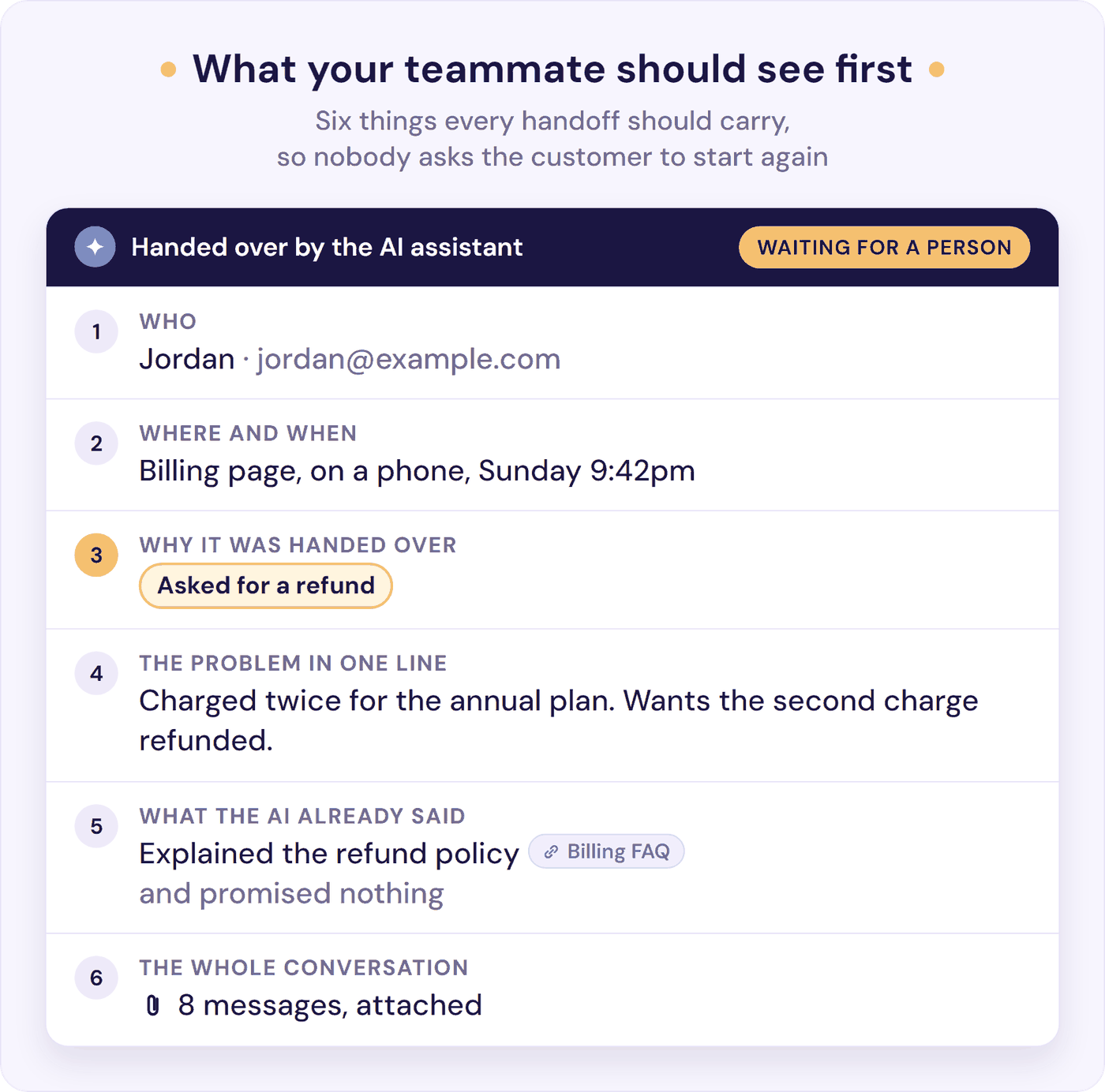
Put the reason, the problem and anything the AI has already told the customer at the top, and the full conversation underneath. If the bot quoted a policy or promised something, the person needs to know before they reply. They should open with “I can see what happened” rather than “How can I help?”.
And someone has to own it. In r/AI_Agents, one reply summed it up: “A beautiful summary with no owner is still a dead end.”
On a small team, owning it starts with hearing about it. Decide where handoff alerts go (your chat tool’s phone app, email, or a Slack channel), who checks them on which days, and who covers weekends and holidays. If nobody is named, everyone assumes someone else has it. When a handoff then needs your developer or the owner, our customer service escalation process covers who takes each kind of issue and the note they need.
Handoffs When Nobody Is Available
For a small team, this is the handoff that matters most. Your AI answers at 11pm on a Sunday. You don’t.
A team whose AI answered a shop’s Instagram messages learned this the hard way. Its best rule was simple: anyone with an order number went straight to a person. But a handoff at 11pm sat in a queue until someone opened the app, and before they fixed it, people “sat there nine hours thinking they were still in a conversation” (r/AI_Agents). The fix: keep answering overnight, and say plainly that a person would pick it up in the morning.
That matches the wider data. Across Gorgias’s online shops, chat handoffs take 8 hours to resolve, and 13% are abandoned. Through a contact form, it’s 36 hours and 42% (Gorgias Ecom Lab).
Gorgias puts the difference down to “real-time pressure”: an open chat forces a reply, while a form or an email can wait. So if your handoffs go to email out of hours, answering them has to be a rule, not good intentions.
Even staffed live chat loses people. LiveChat’s 2024 data puts the average first reply at 35 seconds, but customers who hit a queue wait 4 minutes 18 seconds, and 27.4% of them leave before anyone answers (LiveChat Customer Service Report).
What to do instead:
- Don’t promise live chat when nobody’s in. Switch the message to “we’ll reply by email” out of hours, with the real time.
- Take one contact detail, then reply by email with the conversation attached. The customer doesn’t have to keep the tab open.
- Let the AI keep answering the questions your docs cover while the handoff waits.
- Start each morning with the handoffs, oldest first, before new email.
- Name the day at weekends and on holidays. “Monday morning” beats “as soon as possible”. Our guide to what to tell customers about your hours has wording to copy for your chat, auto-reply, and holiday notice.
Handing Back to the AI
Once a person replies, the AI must stop talking. Nothing undoes a good handoff faster than the bot chiming in over your teammate. Crisp’s Hugo, for example, “will interrupt himself” when a person replies (Crisp help).
When should it come back? Keep it simple: after the person has finished, and only for a new question. Tell the customer when it does. And for anything the person has promised, like a refund or a call back, the AI should stay out of that conversation entirely.
Tools do this in one of two ways: a button the person presses to hand back, or a timer that lets the AI answer again after a quiet spell. Find out which yours uses, and how long the timer is, before a customer does.
How Handoff Works in HubSpot, Intercom, Zendesk, and Other Tools
If your chat tool sells its own AI, the handoff settings live inside it. Here’s how the main providers describe theirs, from their own help pages (read 6 October 2026), with ours at the end:
| Tool | Hands over when | When nobody’s available | Plan needed |
|---|---|---|---|
| HubSpot Customer Agent | It can’t answer, the visitor asks for a person, or you add a guideline (e.g. refunds) | Live, async (follow up later) or no handoff. HubSpot warns it assigns by user availability, not chat widget availability | Professional or Enterprise, plus credits |
| Fin (Intercom) | At once when a customer “clearly asks for a human”; offers one if they’re upset or repeat themselves | Intercom’s office hours tell customers when the team will be back | $49 a month base plan plus outcomes |
| Zendesk AI agents | Escalation steps you add, e.g. “talk to a human” at the start and when it can’t answer | Collects details and escalates as an email ticket | Suite and Support plans, billed per automated resolution beyond the plan’s allowance |
| Crisp (Hugo) | Can’t find an answer, the customer asks, or they’re frustrated | Optional office hours tell customers when to expect an answer | Mini plan and above |
| Tidio (Lyro) | The visitor asks for an agent, or Lyro can’t answer | Says nobody’s available, or opens a ticket with the transcript | 50 free Lyro conversations, then packages |
| Help Scout (Scout, formerly AI Answers) | The customer says they still need help | Offers only the contact options you have open (email if chat is off) | Paid plans after a trial |
| Resolve247 AIChatbot (ours) | In HubSpot or Crisp chat: rules you choose (asks for a person, can’t answer, or your own in plain English, e.g. refunds). In its own widget: a “Contact a Human” button from the first message | Your team picks it up in your HubSpot or Crisp inbox, with optional Slack or email alerts. Its own widget emails the conversation or sends it to Help Scout (more below) | From $35 a month, flat; works on any HubSpot plan, including free |
Whichever you use, check two settings first: what the customer is told when nobody’s online, and whether the person who takes over sees the whole conversation. In Help Scout, check a third: Beacon’s “Self Service” mode makes visitors use Scout before they see any other way to reach you, while “Neutral” shows email and chat alongside it. “Neutral” fits the “never hide the way out” rule above.
Does a Handoff Cost You Money?
If your AI is billed per resolution, it can. The rules differ by provider (their own pages, read 6 October 2026):
- Not billed: Zendesk doesn’t count escalated conversations against your allowance (resolution tiers). Help Scout charges $0.75 per resolution, but not when “The customer requests more help” (Help Scout docs).
- Depends who hands over: Fin charges $0.99 per outcome. It doesn’t bill when a customer asks for a person, but it does bill a “Procedure handoff”, one your own scripted Procedure triggers (Fin pricing). HubSpot charges $0.50 per resolved conversation (HubSpot, April 2026). Only a handoff the visitor triggers (by asking, or by hitting a handoff phrase or guideline you set) within 72 hours of their last reply stops one counting. “Manual agent assignment, including assignment through workflows, is not considered a qualifying handoff” (HubSpot help).
- Billed: Front’s Autopilot charges a “Handoff” outcome at $0.39 a conversation. Its Autopilot help article, edited on 5 October 2026, now lists only a technical failure on Front’s side as free (Front help). Crisp and Tidio bill the AI’s part by usage, whatever happens next.
Design the handoff around the customer first. But if your team usually steps in by assigning chats rather than waiting for the customer to ask, check how your provider counts that. Our AI chatbot pricing guide compares how each one charges.
Where Resolve247 Fits
Resolve247’s AIChatbot hands over in two ways, depending on where it runs:
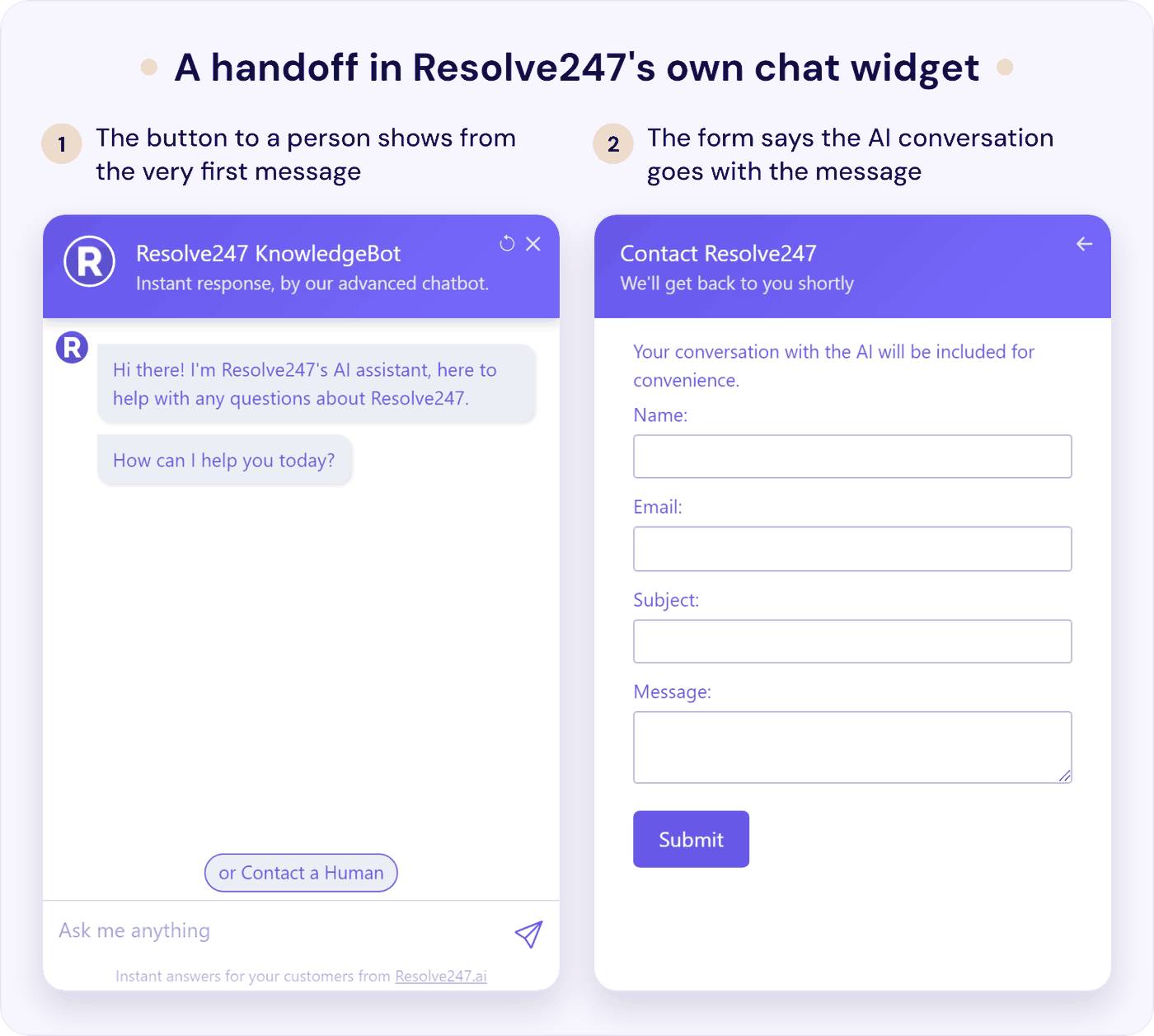
- As its own chat widget on your site, a “Contact a Human” button shows from the first message (you can rename it, hide it, or point it at your own contact page). There’s no live chat inside the widget itself, so this is the “we’ll reply by email” handoff from above. The built-in form asks for name, email, subject, and message, tells the customer their AI conversation will be included, and sends the whole conversation to your email or straight into a Help Scout mailbox, with an optional Slack alert. All four fields are required, which is more than the one detail we suggest above, so if that matters to you, point the button at your own form instead.
- Inside your HubSpot chat (on any HubSpot plan, including the free one) or your Crisp chat, the AI answers in the chat your team already uses, and a teammate can reply in the same window at any point. The AI steps back when they do. It answers again on the customer’s next message once an hour has passed with no human reply, without announcing it’s back, so if your team often promises refunds or call-backs, set that hour high enough that it never returns to a conversation a person has joined.
In HubSpot and Crisp, Smart Escalation hands over when a customer asks for a person, when the AI can’t answer from your content, or in situations you describe in plain English, such as refund requests or an upset customer. It recognises a request for a person with AI rather than a keyword list. For each rule, you choose what the AI tells the customer, whether it asks first, or whether it quietly alerts your team.
In Crisp, an escalation can reassign the chat to a teammate who’s online. In HubSpot, it can open a ticket in the pipeline you choose.
Some of our defaults don’t match the advice above, so change these before your first night or weekend:
- Turn on the handoff rules and their alerts. Smart Escalation rules, and the Slack or email alerts for them, are off until you switch them on. In the widget, add a custom instruction telling the AI to point people to the button when they ask for a person.
- Write your real hours into the handover wording. There’s no business-hours setting, and the default handover instruction has the AI tell customers a human will be there soon, whatever the time. In the widget, the form says “We’ll get back to you shortly” until you change it, and you can edit its confirmation message too.
- Shorten the AI’s pause after an escalation. By default it goes quiet in that conversation for six hours, so it won’t answer the customer’s other questions overnight.
- In HubSpot, switch the AI to reply to customers. Setups start with the AI writing internal comments for your team to check.
Either way, the AI is instructed to say when the answer isn’t in your content rather than guess, and if there is ever a hallucination, you get that month’s chatbot free. Your dashboard shows how many conversations needed a person and which questions it couldn’t answer. Tiiny Host, a website hosting tool, trained our chatbot on its help articles, and its founder says it “has reduced our support workload by 50%” (their own figure). Plans start at $35 a month for a flat fee, so a handoff never adds a charge. Start a 30-day free trial, no card needed.
Test Your Handoff in 10 Minutes
Before customers find the gaps in your chatbot human handoff, play the stuck customer yourself:
- Ask for a person three ways: “human”, “can I speak to someone?”, and something vague like “this isn’t helping”. The first two should hand over at once, and the vague one should at least offer a person.
- Ask something your docs don’t cover. It should say it doesn’t know and offer a person, not guess.
- Ask for a refund. It should go to a person, without the AI promising anything.
- Repeat the test at 9pm and at the weekend. Check the customer is told the truth about when someone will reply.
- Do it on your phone. Can you find the way to a person without scrolling?
- Leave before anyone replies. Does the answer still reach you by email?
- Look at what your team receives. Is the whole conversation there?
- Reply as your team. Does the AI stay quiet?
- Come back later with a new question. Does the AI pick up sensibly?
- Check who gets the alert. It should reach a person who acts on it, not an inbox nobody watches.
Run it again whenever you change your hours, your team, or your tools. Our guide to AI support chatbot accuracy covers testing the answers themselves.
How to Measure Your Chatbot to Human Handoff
Contact-centre metrics don’t fit a team of three. Five numbers do, checked once a week:
| Number | How to count it | What good looks like |
|---|---|---|
| Handoff rate | Conversations handed to a person ÷ all conversations the AI answered | Steady or falling as your docs improve. A sudden drop can mean people gave up |
| Time to a person’s first reply | From the handoff to the first human message | Inside the time you promised, every time |
| Handoffs nobody answered | Handed over, no human reply | Zero. Across Gorgias’s shops, it’s 33% |
| Top five reasons | Read 10 to 20 handed-over chats | Each repeat reason becomes a help article or a rule |
| Came back about the same thing | Same customer, same problem, within a week | Falling |
Your tool may count some of this for you. Help Scout’s reports for Scout log a “Human escalation” whenever a visitor chooses to chat or email your team, and HubSpot marks unclaimed handoffs “Awaiting Human Assignment”, which is your “nobody answered” list.
Don’t treat handoffs as failures to drive down. The r/CustomerSuccess commenter who said “Full stop” also logs every request for a person as a signal. If 40% of chats end in “talk to a human,” they say, “your bot isn’t your problem, your content or product friction is.” To find that friction, see our guide to fixing the reasons behind support tickets. Our glossary explains escalation rate in more detail.
Be wary of comparing your numbers with providers’ headline rates. Fin reports a 76% average resolution rate and counts a customer who goes quiet for 24 hours after its answer as resolved (Fin pricing). HubSpot says 70%, Help Scout 73%, and Tidio 75%, each on its own site in October 2026. Resolve247 answers 82% of customer questions on our own figures.
Gorgias, which counts only tickets closed with no human message at all, puts the median shop at 45%, so 55% of the tickets its AI touched ended with a person. That’s the only cross-company handoff rate we found, and it’s for online shops. Each of the other figures uses its own definition, and none of them is a handoff rate. Our guide to what each provider counts as resolved sets those definitions side by side.
Frequently Asked Questions
What is a chatbot to human handoff?
A chatbot to human handoff is when an AI chatbot passes a customer conversation to a person on your team, with the whole conversation attached. It happens when the customer asks for a person, the answer isn’t in your content, or the topic needs one, such as a refund or a complaint.
Is it called handoff or handover?
Both, and they mean the same thing. “Handoff” is more common in the US, and “handover” in the UK. Support teams also call it a chatbot escalation to a human, and some tools call it a transfer to a live agent.
When should a chatbot transfer a customer to a person?
The first time they ask, in any words. Also straight away for refunds, billing disputes, cancellations, account access, and complaints. Offer a person when the answer isn’t in your help content, or the second time a customer asks the same thing.
What should a chatbot say when it hands over?
Confirm the handoff at once, say who will reply and roughly when, and say the conversation goes with it. If nobody is available, give an honest time and ask for an email address. When a person joins, they should show they’ve read the chat.
What happens to a chatbot handoff outside business hours?
A good setup tells the customer nobody is in, gives the time a person will reply, takes an email address, and sends the whole conversation to your team. The AI can keep answering documented questions meanwhile. Start each morning with these handoffs, oldest first.
What do the rules say about chatbots and human handoff?
In the EU, the AI Act has required since 2 August 2026 that people are told they’re talking to an AI unless it’s obvious. In the US, Maine treats a chatbot that passes as human without clear notice as an unfair trade practice.
California’s AB 1609, signed on 28 September 2026, goes further for businesses with over $500 million in revenue. Their customers must be able to ask for a person during business hours on every service channel, including chatbots. The business must then make a good-faith effort to connect them within 15 minutes, or book a time within one business day. Small businesses aren’t covered, but it shows where expectations are heading.
In 2023, the US CFPB also warned financial firms about chatbot “doom loops” with no “offramp to a human”. In the UK, we found no general law requiring AI disclosure or a route to a person, though the FCA expects financial firms not to put “unreasonable barriers” in customers’ way.
The Bottom Line
A chatbot to human handoff decides whether your AI feels like help or a wall. The rules are short:
- This week: run the 10-minute test, out of hours and on your phone.
- Before you go live: set the handoff rules (the first request, anything that commits your business, anyone upset) and write the six messages.
- Every week: read 10 to 20 handed-over chats, and turn each repeat reason into a help article.
The AI keeps answering your documented questions around the clock. A good handoff makes sure everyone else reaches a person, with nothing to repeat.
Running live chat alongside the AI? Our guide to chatbot vs live chat covers how the two work together. If you run a software product, our SaaS customer support playbook shows where the handoff fits as you grow.
If you’d like an AI chatbot that keeps a “Contact a Human” button on screen in your own widget, or hands over by rules you set in HubSpot or Crisp, start a free 30-day trial. Turn on your handoff rules, then run the 10-minute test on it. No card needed.