
A tourism business owner in a remote part of the country has no phone signal for most of the day. Many of their customers still “will send 3 texts, an email and leave a voicemail within the span of a working day when trying to get a hold of me” (r/SmallBusinessCanada).
Customers like that usually aren’t demanding a person at 3am. Often, they just don’t know whether their first message landed. That’s the real job of 24/7 customer support in a small team: an answer, or at least a clear next step, at any hour.
Customers do want 24/7 customer service. In Shep Hyken’s 2025 survey of 2,119 US adults, 55% expect 24/7 availability to be essential within the next few years, the top answer for the fourth year running (Hyken, 2025). But you don’t need a night shift to offer it.
This guide is for teams of one to ten. It covers what customers need out of hours and eight ways to cover those hours, each costed by the month. Then it gives you the wording to use, a plan for real emergencies, and the morning routine that keeps the promise. We build AI support software, so we’ve costed the options that don’t use it too. Jump straight to the costs, the 7 steps, the wording, the emergency plan, or what to offer when a customer asks for 24/7.
The Short Version
- 24/7 support means an answer at any hour, a time for when a person replies, and a route for real emergencies, not a person awake at 3am.
- Count when your messages arrive before you pay for anything.
- Most small teams can cover the week with four things: clear hours with an honest auto-reply, a help centre, an AI chatbot that answers from it, and someone on call for emergencies only.
- Covering every hour outside Monday to Friday, 9am to 6pm, costs from $0 to about $16,700 a month. The table below costs eight options, in dollars and pounds.
- Say when a person will reply, in the same words everywhere, then clear the overnight queue first each morning.
What 24/7 Customer Support Means for a Small Team
24/7 customer support (or 24/7 customer service) means customers can get help at any hour of any day. For a small team, that rarely means someone awake at 3am. It means a fast, accurate answer to common questions at any hour, a clear promise of when a person will reply, and a route for the few problems that can’t wait.
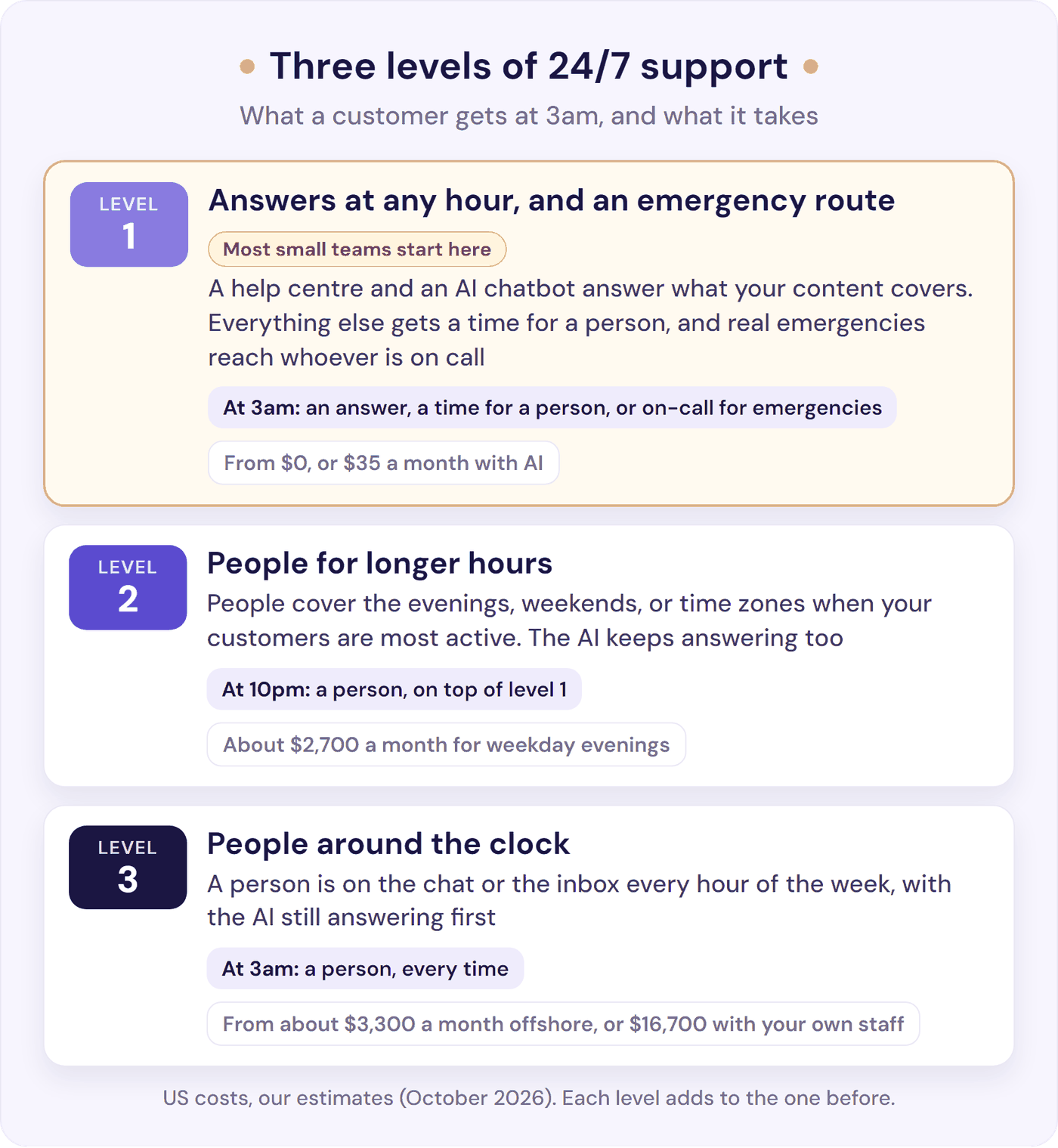
It helps to think in three levels:
- Answers at any hour, and an emergency route. A help centre and an AI chatbot answer what your content covers. Everything else gets a reply saying when a person will pick it up, and real emergencies reach one person on call.
- People for longer hours. People cover the evenings, weekends, or time zones when your customers are most active.
- People around the clock. A person is on the chat or the inbox every hour of the week.
Most small teams need level 1, and add level 2 when out-of-hours volume or customers’ time zones call for it. Level 3 is for businesses whose customers lose money or access every minute something waits. Each level adds to the one before: the help centre and the AI chatbot keep answering, so your people spend their hours on the questions that need them.
Level 1 works because the documented questions get an answer straight away, and for the rest, a known wait is easy to accept. Hyken’s respondents would wait 9 hours 31 minutes, on average, for an email reply before getting upset, and only 15% expect one within 10 minutes.
People on the front line see the same thing. One support worker replied the same day to an email sent at 1:26am. They’ve had “so many people thank me for getting back to them so quickly, when in reality it was just the next business day during our normal operating hours” (r/CustomerService).
Do You Need 24/7 Customer Service?
Most small teams need answers at any hour, not people at any hour. To check, count a month of chats and emails by hour and day of the week, in your own time zone: use your help desk’s busiest-hours report, or export the conversations to a spreadsheet. Split new leads from existing customers, and note what the out-of-hours messages ask.
You may find more out-of-hours messages than you expect. Two support providers have published counts from their own customers. Their customers may not look like yours, so use these as a guide and check them against your own count:
- Gorgias (an e-commerce help desk): the median brand gets 53% of its pre-purchase questions outside Monday to Friday, 9am to 6pm, and one in five at weekends. After hours, a person’s first reply takes about 15 hours, against 2.2 hours in working hours (Gorgias, July 2026).
- Small Business Chatbot (an AI chatbot provider): of 7,159 chats at 19 US small businesses, 38% arrived outside 8am to 6pm on weekdays, and 18% at weekends (Small Business Chatbot, 2026).
The hours outside Monday to Friday, 9am to 6pm, are 123 of the week’s 168. So per hour, nights are quieter than the working day, but together they carry a big share of the week’s questions.
Then read your count:
- Most out-of-hours messages ask what your site already answers: answers at any hour (level 1) cover you, and nobody has to be awake. For customers, that speed matters. As one puts it, it’s “very irritating when all I needed to do was ask a basic question” and the answer had to wait until the next day (r/CustomerService).
- Many are leads, or come from one time zone in its working day: add a person for those hours (options 5 and 6 below). Speed can win the sale. One seller of high-value items says: “Our business is to respond to a lead in 5 minutes or less” (r/SmallBusinessCanada).
- Any could stop customers using what they paid for, such as an outage, failed payments, or locked accounts: set up the on-call route, however few there are.
- Hardly any arrive at all: clear hours and an honest auto-reply may be all you need. B2B customers are often more patient than shoppers, too.
8 Ways to Offer 24/7 Customer Support, With Costs
Here’s what each option gives a customer who writes at 3am, and roughly what it costs a month to cover the 123 hours outside Monday to Friday, 9am to 6pm.
| Option | What a customer gets at 3am | Rough monthly cost (US) |
|---|---|---|
| 1. Clear hours and an auto-reply | A reply saying when a person will answer | $0 |
| 2. A help centre | Answers to the questions you’ve written up | Your time |
| 3. An AI chatbot | An instant answer from your content, and a way to leave a message | From $35 (flat plans) |
| 4. On call for emergencies | A person, for real emergencies only | $0 in cash; costs sleep |
| 5. Longer or staggered hours | A person until, say, 10pm, or at weekends | About $2,700 for weekday evenings; $2,400 for weekend days |
| 6. Someone in another time zone | A person, working their daytime | About $3,300 at offshore rates (3.3 people) |
| 7. An answering service for chat | A person following your script | $279 to $520 for 50 chats |
| 8. Your own night rota | A person from your own team | About $16,700 (3.1 people) |
Staff costs use the US median pay for customer service representatives, $21.53 an hour (BLS, May 2025), plus benefits: about $31 an hour in all, or $5,400 a month for each full-time person. They’re before holiday cover or any night premium, and a month is 4.33 weeks. Prices were checked on 9 October 2026. These are our estimates, not quotes.
In the UK, at the £12.71 National Living Wage, weekday evenings to 10pm cost about £1,100 a month, weekend days about £1,000, and every out-of-hours hour about £6,800. All three are before employer National Insurance, pension, and any night or weekend premium.
1. Clear Hours and an Honest Auto-Reply
Post your support hours everywhere customers contact you, and send an automatic reply out of hours that says when a person will answer. It costs nothing, and it works as long as you keep the promise. One owner has done it for nearly 15 years: “set hours and auto messages, through chat or email work great. You just have to follow through” (r/smallbusiness).
Best for: every business, as the base layer. Watch out for an auto-reply that says “shortly” at 11pm. Give a time.
2. A Help Centre for Your Top Questions
Most out-of-hours questions are the same few: shipping, sizing, setup, and billing dates. Write those answers up, and put each one where people get stuck: shipping costs on the product page, setup steps in the welcome email. Every question your page answers is one nobody has to ask at 2am. Our guide to reducing support tickets covers which fixes to make first.
Best for: everyone, before anything else. Watch out for answers people can’t find: a help centre only helps those who land on the right page. Our guide to self-service customer support covers how to put answers where people look.
3. An AI Chatbot That Answers From Your Content
An AI chatbot trained on your help content answers the documented questions in seconds, at any hour. When it can’t answer, it should say so and show the customer how to leave a message, so a person can reply in the morning. Our flat plans start at $35 a month. AI built into a help desk is usually billed per resolved conversation instead, from $0.50 (HubSpot’s Customer Agent) to $2.00 (Zendesk, pay as you go), on top of the seats you already pay for (our AI chatbot pricing guide).
Best for: businesses whose out-of-hours questions are answered somewhere on their site. Watch out for a bot that hides the way to a person. The rules for running one overnight are below.
4. On Call for Emergencies Only
One person keeps their phone on for real emergencies, and only those. If it’s you, it costs nothing in cash, but it does cost sleep. In a sleep-lab study, people told they might be called that night slept worse and did worse on next-day tests (Sprajcer et al., 2018). As the researchers put it, just knowing you might be “called in is enough to disrupt your sleep, even if the call never comes” (CQUniversity, 2026). If staff are on call, pay them for it. In a 2025 study of more than 60 UK employers, typical standby pay was around £250 a week (Incomes Data Research, 2025).
Real emergencies are often rarer than owners fear. One IT firm has run 24/7 on-call for about 10 years, with a call centre answering its overnight calls first, and its on-call person gets “1 call every 3 months if that” (r/msp).
Best for: anything that can stop customers using what they paid for. See the emergency plan below. Watch out for “urgent” creeping: write down what counts first, and keep the list short.
5. Longer or Staggered Hours
Stretch your hours to match when customers write: evenings for consumer businesses, early mornings if your customers are hours ahead of you. Staggered shifts do it without a night shift. As one commenter in an IT support forum describes their company’s rota, “Half of every team work 08.00 to 16.30 the other half 10.00 to 18.30” (r/msp).
Covering weekday evenings until 10pm adds 20 hours a week, which comes to about $2,700 a month at US median pay plus benefits. Saturday and Sunday, 9am to 6pm, add 18 hours, about $2,400. For a weekend backlog there’s a lighter version: one person spends half an hour each weekend morning on anything that can’t wait, and leaves the rest for Monday. It suits a store like one with four people on calls and chats, whose owner found “weekend messages piling up and then Monday felt like wading through mud” (r/smallbusiness).
Best for: businesses whose evening or weekend volume is predictable. Watch out for stale hours: update every place that shows them.
6. Someone in Another Time Zone
Hire someone whose working day is your night, directly or through an agency. One r/SaaS commenter hired three support people in the Philippines at “about $1K USD per month” each, with an AI chatbot answering first. Their verdict: “That combined with an AI support bot as the front line of defense gives me 24/7 coverage with a reasonable expense footprint” (r/SaaS). A full-time virtual assistant from Wing Assistant is $999 a month for 160 hours (Wing price list), so covering all 123 out-of-hours hours a week takes about 3.3 full-time assistants, or about $3,300 a month.
Best for: customers in other time zones, or growing out-of-hours volume. Watch out for cover that can’t decide anything. Give them your documentation, the same inbox, clear limits on refunds and account changes, and their own login with only the access they need.
7. An Answering Service That Covers Chat
Answering services staff chat and phones around the clock and charge per chat or per minute. For 50 chats a month, PATLive charges $279, Smith.ai $300, and Ruby $520, which works out at $5.58 to $10.40 a chat (PATLive, Smith.ai, Ruby, checked 9 October 2026). Their agents answer from the script you give them and take messages for the rest.
Best for: phone-led businesses that want a human voice at night. Watch out for paying for cover that still wakes you. As a contact-centre company’s own rep warns, “you can pay for 24/7 coverage and still be the actual overnight support team” (r/SaaS). Check what they can resolve without you.
8. Your Own Night Rota
Covering every hour outside Monday to Friday, 9am to 6pm, takes about 3.1 full-time people. At US median pay plus benefits, that’s about $16,700 a month, before holiday cover or any night premium. Full 24/7 cover takes 4.2 people before holidays and sick days (here’s the live chat staffing maths).
In the UK there’s no legal night rate above the National Living Wage, but in a 2025 study of more than 60 UK employers, night shifts typically paid 30% to 35% more (Incomes Data Research, 2025). Night workers can’t average more than 8 hours in 24 (GOV.UK), and must be offered a free health assessment.
Best for: businesses whose customers lose money every minute something waits. Watch out for quiet nights: if only a few messages arrive, you’re paying people to wait, and an AI chatbot with an on-call route, or a person in another time zone, covers it for far less.
What Most Small Teams Combine
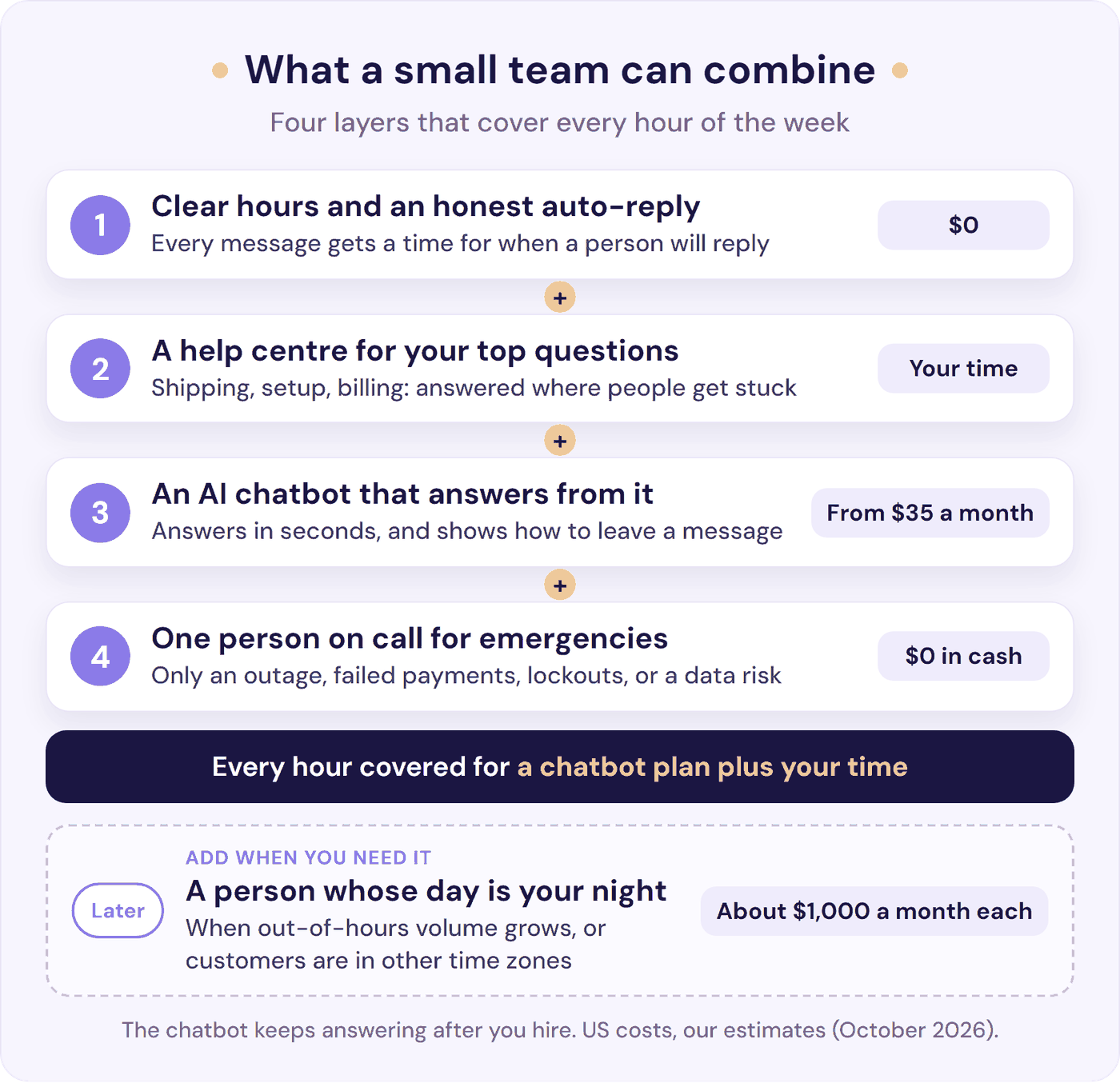
For most small teams, the first four are enough: clear hours and an auto-reply, a help centre, an AI chatbot that answers from it, and one person on call for real emergencies. Together they cover every hour of the week for the price of a chatbot plan plus your time.
When out-of-hours volume grows, or your customers’ working day is your night, add a person in their time zone. The chatbot doesn’t go away when you hire. It keeps answering the documented questions, and your new hire takes the ones that need a person. Our SaaS customer support playbook shows how those stages stack as you grow.
How to Set Up 24/7 Customer Support in 7 Steps
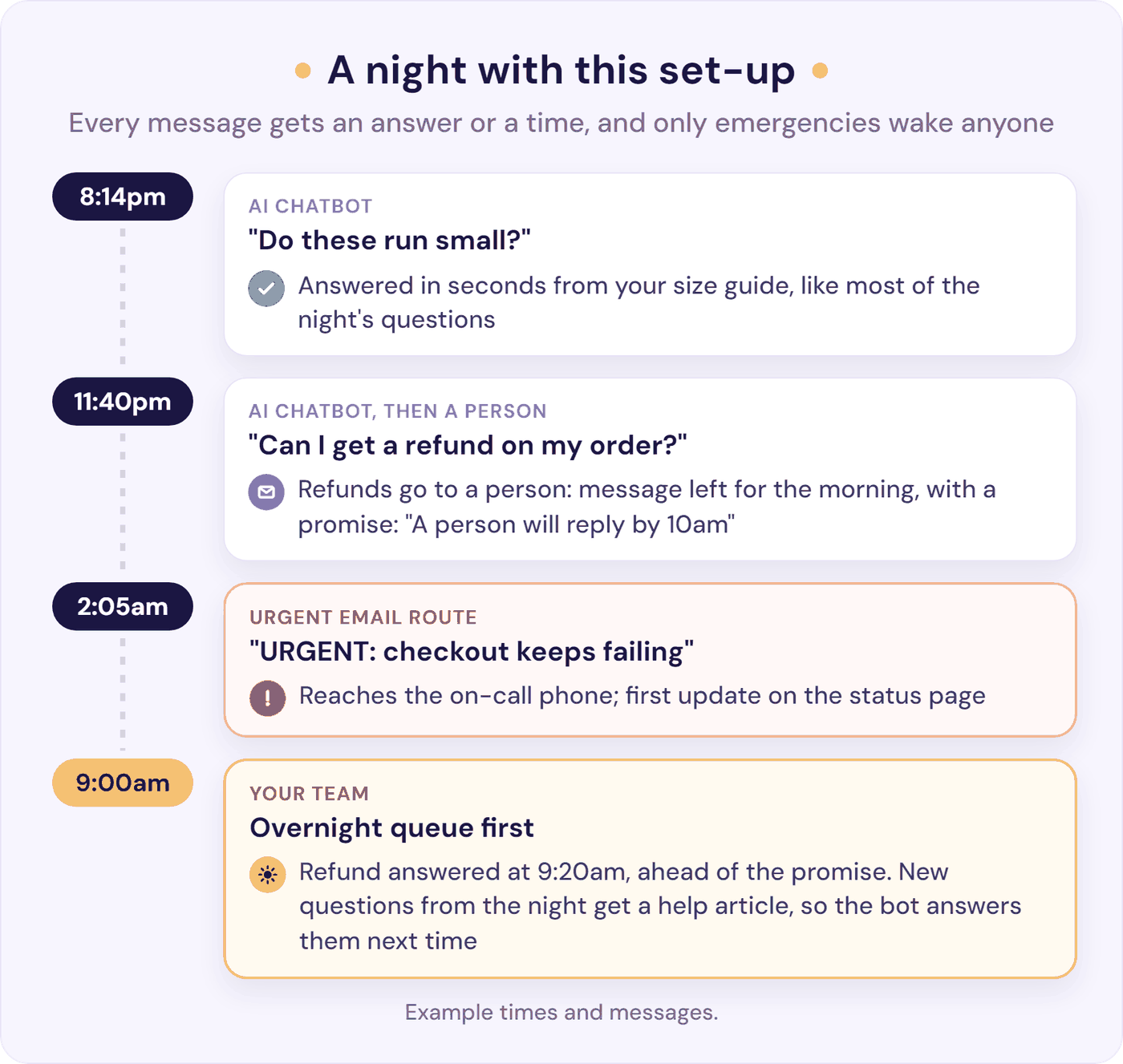
- Count when messages arrive. Take a month of chats and emails, count them by hour and day, and sort the out-of-hours ones into leads, questions your site already answers, and things that couldn’t wait.
- Decide what can’t wait, and who it wakes. Write one line, such as: “Out of hours, we act on the product being down, payments failing, customers locked out, or data that may be exposed.” Everything else waits until morning. Then name who’s on call, and set up the route that reaches them (emergency plan below). If you have an escalation matrix, mark those rows as worth a call out of hours (our escalation matrix template already does).
- Publish your hours and reply times. Put them on your contact page, help centre, chat window, and email auto-reply, in the same words each time (wording below).
- Write up your top 10 questions. Take them from step 1, and put each answer where people get stuck: shipping on the product page, setup in the welcome email.
- Put an AI chatbot on your chat. Train it on those answers, have it say it’s AI, and tell it your hours and how customers can leave a message, so it can say when a person will reply. Out of hours, it answers what your content covers and points customers to your contact form for everything else. You can try Resolve247 free for 30 days to see it on your own content.
- Send everything else to one inbox, with the conversation attached. Pick one place your team checks each morning, and never a personal phone or email. Our chatbot to human handoff guide shows how to set this up and test it.
- Clear the overnight queue first. Start each morning with the overnight messages, and beat the time you promised. As one small business in r/SmallBusinessCanada puts it: “An auto-reply outside business hours helps, then we follow up first thing the next morning. Most customers are okay with waiting as long as they know they’ve been acknowledged” (r/SmallBusinessCanada). After a weekend or a holiday, promise a later time, such as noon on Monday. Then add an answer for anything the chatbot couldn’t handle.
Test it before customers do. At 10pm, on your phone:
- Ask a common question, and check the answer.
- Ask for a person, and check the reply gives a time and the message reaches your team with the conversation.
- Report an urgent problem, and check it reaches the on-call phone, not just an inbox.
What to Tell Customers About Your Hours
Three rules: give a time, not “shortly”; use one official channel; and be consistent. Replying late on some nights and not others teaches customers to chase. As one commenter in r/smallbusiness warns: “When you answer at 11pm some nights and go dark others, you’ve basically built a slot machine” (r/smallbusiness). If you do work late, schedule your replies to send when you open.
Wording you can copy (swap in your own hours and time zone):
- Contact page and help centre: “Our team answers chats and emails from 9am to 5pm UK time, Monday to Friday, usually within two hours. Our help centre and AI assistant answer common questions at any time.”
- On your site, to say what your 24/7 support covers: “24/7 help: our AI assistant answers common questions straight away, at any hour, and our team replies by 10am UK time on working days.”
- Your chatbot’s instructions: “Our team works 9am to 5pm UK time, Monday to Friday. We reply within two hours in those hours, and by 10am UK time on the next working day to anything sent outside them. If you can’t answer from our help content, say so, ask the customer to leave a message using [the contact button or form], and tell them when our team will reply.”
- Contact form thank-you: “Thanks, we’ve got your message. Our team replies within two hours, 9am to 5pm UK time, Monday to Friday. If you wrote outside those hours, we’ll reply by 10am UK time on the next working day.”
- Email auto-reply: “Thanks for your email. We’re closed right now and will reply by 10am UK time on the next working day. Many answers are in our help centre: [link]. If our service is down or a payment has failed, reply with URGENT in the subject line and our on-call person will pick it up.”
- For customers in other time zones: “We’re based in the UK, so if you write to us in a US evening, you’ll usually have a reply by the time you wake up.”
- Running late: “Sorry, we promised a reply by 10am and we’re running behind after a busy weekend. [Name] will reply by 2pm today.”
- Holiday notice: “We’re closed from Thursday 24 to Monday 28 December. Our help centre and AI assistant are here as usual, and our team will reply from noon on Tuesday 29 December. If our service is down, [urgent route].”
If you use social inboxes, put the same promise in their away messages where the platform supports one. And if you’re going to miss the time you promised, say so before the customer has to ask (the “Running late” line above does it).
Give customers one official address or number, never a personal one. One IT business owner set up a separate business number with office hours back when they worked alone, and says: “This gave me mental downtime” (r/msp).
Out-of-Hours Emergencies: A Plan for Small Teams
Most out-of-hours messages can wait. A few can’t, and they’re the ones that lose customers. A plan has five parts:
- Define urgent in one line. For most SaaS businesses and online shops, it’s the product being down, payments failing, customers locked out, or data that may be exposed.
- Give urgent its own route, and keep the rest quiet. Point an uptime monitor at your site and your login or checkout page, so it calls or texts the on-call phone, not just emails. Give customers one route, such as URGENT in an email subject line, and set a rule that sends those messages somewhere the on-call phone will sound. Turn off notifications for the rest of the inbox at night. A small step in front of “urgent” keeps it for real emergencies: one IT firm put a fee behind its after-hours option, and weeks with 20 “emergencies” became about one paid call in three years (r/msp). For email and chat, the step can be the definition: list the four urgent cases next to the route.
- Name who’s on call. One person a week, in a rota if there’s more than one of you. Whoever had a bad night shouldn’t open the inbox the next morning.
- Tell customers what’s happening. Use a simple status page with a first update written in advance, such as: “We know [checkout / the app] isn’t working for some customers, and we’re fixing it now. Next update by [time].” Add the same line as an instruction to your chatbot, so it can tell anyone who asks what’s happening. Then fix it, roll it back, or switch off the broken part.
- Follow up afterwards, with everyone who was affected: “Between [time] and [time] last night, [what broke]. It’s fixed, and we’ve [what changed]. Sorry for the trouble. If anything still isn’t right, just reply.”
One SaaS team launched on Product Hunt, went to bed, and woke to hours of downtime: “over 100 people who signed up during the night couldn’t get in” (r/SaaS). Email alerts hadn’t woken anyone.
They got it back up and replied to everyone they could. A commenter suggested what had helped their own team, “a dead simple status page and having alerting on our phones for downtime”, and the co-founder put the idea straight into Slack. Later that day, the team had been in touch with about five of the people who couldn’t get in, and “most of them have been net happy (or what it seems like) to get back on our tool”. “People are more reasonable than i thought,” one of the co-founders wrote.
If a Customer Asks You for 24/7 Support
A large prospect once asked a one-person SaaS for a 30-minute response to emergencies, 24/7. “I am one person, and I love to sleep,” the founder wrote on Hacker News. Another commenter did the maths: “There are 168 hours in a week. That’s 4.2 FTE’s.” (Hacker News).
You rarely have to say no. Ask what they need covered at night: as another commenter suggested, they “may just be concerned about ticking a box that your product has 24/7 support”. Then offer cover by severity, the way one r/SaaS commenter with Fortune 500 clients does: “If the website is totally out. Like Kaput, I have 1 hour to resolve it. If a page is broken, I have the next day to fix” (r/SaaS).
| Severity | What it covers | First reply from a person |
|---|---|---|
| Critical | The product is down, payments are failing, or data may be exposed | Within 1 hour, any time |
| High | A key feature is broken for many users, with no workaround | Within 4 working hours |
| Normal | Questions, one user’s bug, and requests | By the next working day |
Wording for the proposal: “We cover critical incidents 24/7: if [product] is down, payments are failing, or your data may be at risk, a person responds within 1 hour, day or night. Everything else is answered in our working hours, 9am to 6pm UK time, Monday to Friday, and our help centre and AI assistant answer common questions at any hour.”
Define “responds” as a person starting work, not a fix. Then price the on-call part. The one-person founder offered the customer “Change the response times by a lot and find a price for that”, or ending the talks. Whoever carries the phone should be paid for it.
What an AI Chatbot Can Cover Overnight
An AI chatbot is the only option in the table that answers a customer’s own question at 3am for the price of a software plan.
Customers are used to it now. Half of US customers (50%) have solved a customer service issue with AI, without a person, up from 32% a year earlier (Hyken, 2025). In the UK, 60% of people had used an AI chatbot in the previous three months, in a 2024 government survey (DSIT, 2024). That’s the job overnight: answer what your content covers, at any hour, with a clear route to a person for the rest.
Five rules make it work overnight:
- Answer only from your own content. When the answer isn’t there, it should say so and show how to leave a message, not guess.
- Say it’s AI. As one commenter in r/marketing puts it, “it helps with trust if you make it clear it’s not a real person” (r/marketing).
- Keep money and account decisions for a person. Refunds, billing changes, and account access wait for your team.
- Never trap anyone. “Customers usually don’t mind automation when it’s accurate and there’s an easy path to a real person. They hate getting trapped in a bot loop” (r/Entrepreneur). In Gartner’s 2026 survey, 50% of customers said interactions are easier when companies use generative AI, and 87% said an option to reach a person is essential (Gartner, 2026).
- Promise a time. When it passes something on, it should say when a person will reply.
Each morning, read a few of the overnight conversations and add an answer for anything it couldn’t handle. If you’re still choosing a bot, our guide on how to choose an AI customer support chatbot covers what to test.
Where Resolve247 Fits
Resolve247’s AIChatbot answers 82% of customer questions without a human (from 71% to 94%, depending on the business), using your own website, help centre, and documents, at any hour. It runs on your website as its own chat widget, or inside your HubSpot or Crisp live chat. Elston Baretto, founder of Tiiny Host, says it “has reduced our support workload by 50%” (from our testimonials page).
Out of hours, it gives you:
- A route to your team when it’s needed. If it isn’t sure of an answer, it says so and hands the customer to your team. On our website widget, a “Contact a Human” button is also on screen from the first message. Overnight, the message arrives in your inbox (or a new Help Scout conversation) with the whole AI conversation, ready for the morning.
- Your reply time, in your words. Change the form’s text to say when you’ll reply, and tell the AI your hours in plain-English instructions. Add a holiday closure or a known outage as an extra instruction you switch on and off.
- Overnight requests waiting in HubSpot or Crisp. Switch on the escalation rules you want. “Customer wants to speak to a human” is built in, and you can add your own in plain English, such as a customer saying a payment failed. A rule can create a HubSpot ticket in the stage you choose, or tag a Crisp conversation or move it to a sub-inbox. You decide what the AI tells the customer.
- Your customers’ language. It replies in the language each customer writes in, so someone abroad writing during your night still gets an answer they can read.
- A clear view of the night. Chat history shows every conversation and the time of each message.
Before your first night, set it up for your hours. In HubSpot and Crisp it starts in preview, so you see exactly what it would say before customers do: in HubSpot it posts its answers as internal comments for your team, and in Crisp it answers only messages sent from the Resolve247 demo page. When you’re happy, switch HubSpot to reply to customers and Crisp to live mode. Then switch on the escalation rules you want and the alerts for them (both start off). Set your time zone, put your reply time in any text that says “soon” or “shortly”, and choose whether the AI keeps helping after it alerts your team. Alerts go out the moment a request arrives, so send routine ones to an inbox you’ll read in the morning. Finally, run the 10pm test.
Plans start at $35 a month, and you can start a free 30-day trial: no card needed, and if it ever hallucinates, that month is free.
How to Measure Out-of-Hours Support
Measure your after-hours customer service on its own, or a good working-day average will hide a slow night. Track five numbers each month:
- First response time, in hours and out of hours, separately.
- Time to a person for anything passed on overnight, against the time you promised.
- The share of out-of-hours conversations answered without a person.
- The morning queue: how many messages are waiting at opening time, and how long they take to clear.
- Chasers: customers who wrote again, or on a second channel, before you replied.
If the morning queue keeps growing, you miss your promised time more than once a week, or customers in one time zone keep waiting, that’s your signal to add a person for those hours, alongside the chatbot. Until then, more hours of people won’t buy you much. For the chatbot’s own numbers, our guide to chatbot analytics has a 30-minute weekly check, and our guide to customer service KPIs covers your team’s other numbers.
Frequently Asked Questions
What does 24/7 customer support mean?
24/7 customer support means customers can get help at any hour of any day. For a small team, that usually means instant answers to common questions from a help centre and an AI chatbot, a clear time for when a person will reply, and a route for real emergencies. It rarely means a person awake at 3am.
What kind of 24/7 support does a small business need?
Most small businesses need answers at any hour, not people at any hour. Count when your messages arrive for a month. A help centre and an AI chatbot answer common questions at any hour. Add people at night, alongside the chatbot, only if customers lose money or access every minute something waits, or work in other time zones.
How much does 24/7 customer support cost?
It ranges from $0 to about $16,700 a month in the US. Clear hours and an auto-reply cost nothing, and standalone AI chatbots usually start at $35 to $59 a month. Answering services charge about $5.58 to $10.40 a chat on a 50-chat plan, and offshore cover runs about $3,300 a month. Your own staff on every out-of-hours hour costs about $16,700.
How can a small team offer 24/7 support without a night shift?
Publish your hours and an honest auto-reply. Write a help centre for your top questions, and put an AI chatbot on your chat that answers from it and shows customers how to leave a message for the rest. Put one person on call for real emergencies only. Then clear the overnight queue first each morning.
What should an after-hours auto-reply say?
Say when a person will reply, with a specific time, such as “by 10am UK time on the next working day”. Link your help centre for common answers. Give one route for real emergencies, such as URGENT in the subject line. Avoid “shortly”, and keep the promise every time.
What can an AI chatbot handle outside business hours?
An AI chatbot can answer anything your help content covers, at any hour: how-to questions, pricing, shipping, returns, and setup steps. For a shop, link your order-tracking page in your help content. It should show customers how to leave a message for the rest, and leave refunds, billing changes, and account access to a person.
What is follow-the-sun support?
Follow-the-sun support passes the queue between people in different time zones, so someone is always working in daylight. Large companies use offices on several continents. A small team can do a simpler version with one person whose working day is your night, sharing the same inbox and documentation.
How do I take a holiday when I’m the only person doing support?
Tell customers the dates in advance, and put them in your auto-reply and your chatbot’s instructions. Make sure your help centre covers the common questions. Arrange one person, or a paid service, for real emergencies only, and check your monitoring alerts them rather than you.
The Bottom Line
24/7 customer support for a small team isn’t a night shift. It’s an answer at any hour, a time customers can trust, and a plan for the rare night something breaks.
This week:
- Count when your messages arrive.
- Write your hours and an honest auto-reply, and use the same words everywhere.
- Put an AI chatbot on your chat, trained on what your site already says.
This month:
- Write up your top 10 questions, so the chatbot can answer those too.
- Decide what counts as urgent and who it reaches.
- Start each morning with the overnight queue.
The chatbot then answers the documented questions at any hour, with a clear route to your team for everything else: start a free 30-day trial of Resolve247. No card needed, and if it ever hallucinates, that month is free.