
The one person doing support at an eight-person startup asked Reddit which customer service KPIs to track, because “a lot of the information I am reading online pertains to bigger companies with larger CS teams” (u/MidnightCashew, r/CustomerSuccess). The most useful reply opened with one line: “Survival: track number of tickets received, number of tickets resolved, mean time to resolve.” (u/dodgebot)
That’s the trouble with most lists of customer service KPIs. Service leaders “have over 200 metrics” to choose from (Gartner, 2024), and many of the lists that rank on Google are written for call centres. A team of 1 to 10 people needs a handful of numbers that show whether customers wait too long, whether problems get solved, and when it’s time for more help.
This guide shows how to measure customer service at that size with five KPIs, where to find each one in HubSpot, Help Scout, Crisp, or Front, and targets with their sources. It ends with a one-page customer service scorecard, with a free spreadsheet template, which is also your answer when a boss or investor asks how support is doing. We build AI support software, and everything here works with or without it. Jump to the five KPIs, where to find them, benchmarks, or the scorecard.
The Short Version
- Track five: first response time against your promise, resolution time, first contact resolution, customer satisfaction (CSAT) with the number of replies, and tickets per 100 customers.
- Measure times as medians in business hours, counting replies from a person. Report a chatbot’s answers on their own, and leave out auto-replies.
- Set targets from your own promise and last month. As a sanity check, a small team doing well replies to email the same business day (1 to 4 business hours is good), answers live chat in under a minute, scores 80% to 90% on CSAT, and solves 70% of issues first time.
- At small volumes, read the comments and look at a three-month view before reacting to a score.
- If you use a chatbot, report its numbers separately, so you can see what the bot handles and what your team handles.
Start here, depending on your setup:
- A shared Gmail or Outlook inbox: download the free scorecard, log 20 customer emails a month in its sample tab, and time one normal week of support. Hours a week is the number that tells you when to get help.
- Help Scout Free: Reports > All Channels, Email, and Happiness give you a number for each of the five, as averages in calendar hours. Use them for the trend, and the monthly sample for the scorecard.
- HubSpot Free or Starter: build a dashboard from the “Email Overview” and “Chat Overview” templates. Satisfaction surveys need Professional, so collect ratings with a Google Forms or Microsoft Forms link.
- A chatbot already live: report the bot and your team separately, and add one KPI: the time to a person after a handover (how to measure it).
What Are Customer Service KPIs?
Customer service KPIs (key performance indicators) are the few numbers a support team agrees to judge itself by: how fast customers get a reply, whether their problem gets solved, how they feel about it, and how much support the business needs. Customer service metrics are everything you could count. A metric becomes a KPI when it has a target and someone who acts on it.
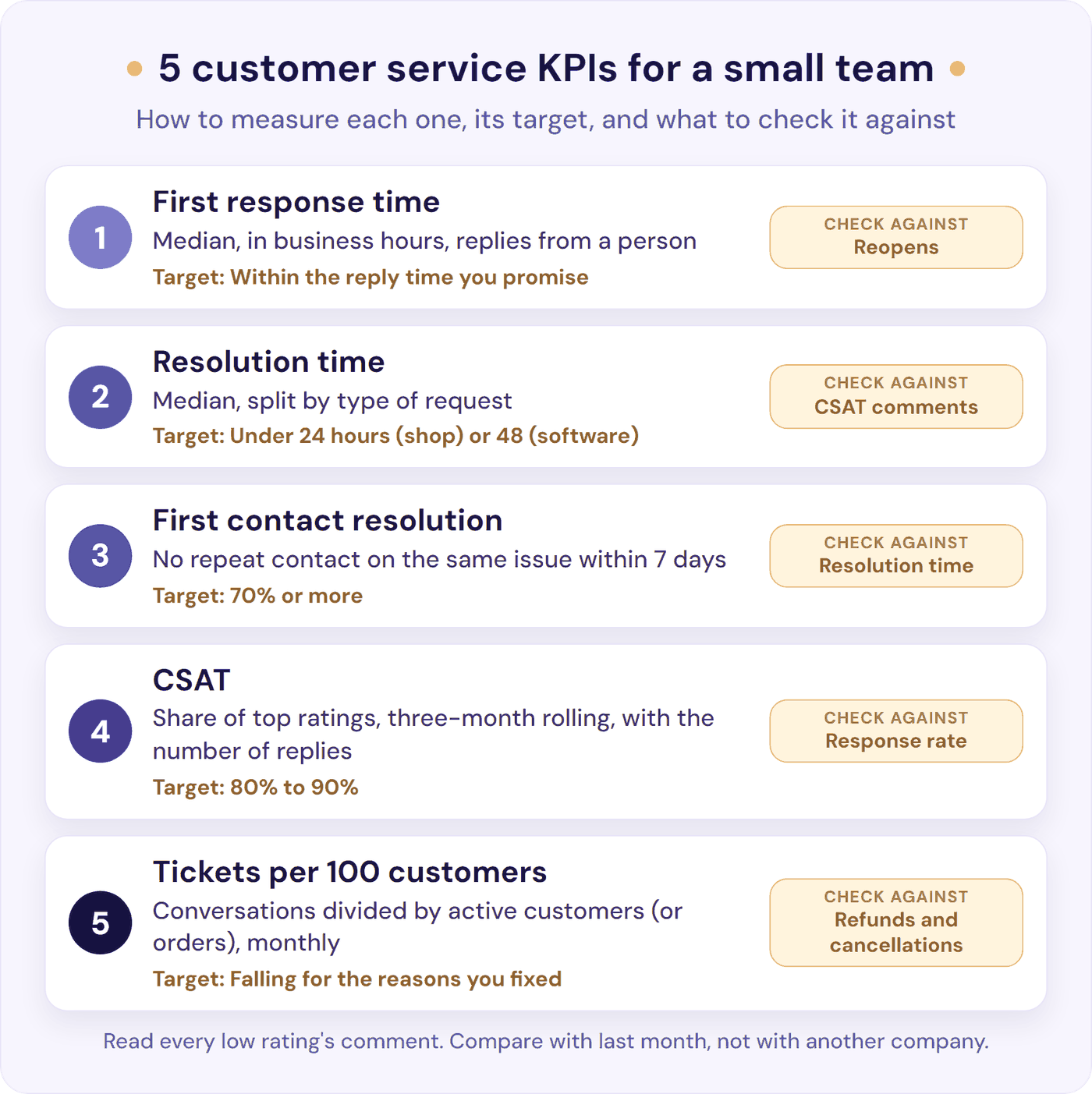
Most lists sort them into three families: speed, quality, and how customers feel. Five is enough for a small team, and each answers a question you’d ask anyway:
- Are customers waiting too long? First response time.
- How long until it’s fixed? Resolution time.
- Did we fix it the first time? First contact resolution.
- How did it feel? CSAT.
- Is support growing faster than the business? Tickets per 100 customers.
For the bigger picture of what customers value, see our guide to good customer service.
The 5 Customer Service KPIs Small Teams Should Track
If five feels like too many, start with the three in our customer service tips: first response time, first contact resolution, and CSAT.
1. First Response Time, Against Your Promise
Formula: the time from a customer’s first message to the first reply from a person. Report the median (the middle value when you line them all up) in business hours, plus the share of conversations answered within the reply time you promise.
Three settings change this number more than your team does:
- Median or average. One email that waits three working days for a developer adds about 24 business hours to the total. In a week of 40 tickets, that one email lifts the average by more than half an hour; the median barely moves. HubSpot, Help Scout, and Front only show averages (Crisp offers a median in custom charts).
- Business or calendar hours. One team replies within five minutes during its 8 a.m. to 4 p.m. shift, yet its help desk showed an average of more than five hours, because overnight emails were logging “a 12-15 hour response time” in calendar hours (u/Forsaken_Piece4933, r/Freshservice). The fix the replies suggested: report in business hours, set to the hours the team works. On Help Scout Free, HubSpot below Professional, and Front Starter, reports run in calendar hours. Measure out-of-hours support on its own, so a good working day doesn’t hide a slow night.
- Who counts as replying. An auto-acknowledgement isn’t a reply. A chatbot’s answer is, but it isn’t your team’s, so report the two separately: Crisp, for example, shows an “AI First Response Time” next to a “Human First Response Time” (Crisp help).
If your help desk can’t give you medians in business hours, use its report for the trend, and take the scorecard figures from a monthly sample of 20 (see the scorecard): the median in business hours, and the share answered within your promise, which one slow email can’t distort.
Fast but empty is the trap. After one team was given a response-time target, people started sending boilerplate replies, and “the only thing that has changed is that we now have shorter response times in the ticket statistics” (u/Look-Its-a-Name, r/managers). Count the first reply that moves the problem forward.
Target: the reply time you publish. No promise yet? Measure four weeks, then promise a time you already meet on about 9 in 10 conversations, and put it on your contact page and in your auto-reply. A promise you keep beats a faster one you miss: a solo software founder aimed to reply by the next business day and hit it for about 98% of customers in the first few years (patio11, Hacker News).
Check it against: reopens and repeat contacts. Full definitions: first response time and, for chat, average response time. The glossary gives the average and counts a chatbot answer that solves the question, which is the customer’s view; for your team’s KPI, count replies from a person and use the median.
2. Resolution Time
Formula: the time from a customer’s first message to the problem being solved. Report the median, split by type of request (tag conversations as you close them).
A password reset and a bug that needs a developer don’t belong in one average. Split by your two or three most common types, and you’ll see which ones are slow and why.
This is the speed customers feel most, because it ends when their problem does. If a customer reopens a conversation, count it from the first message to the last close, as Help Scout does, so a quick close followed by a reopen doesn’t flatter the number.
Target: a median under 24 hours if you sell online, where stores on Gorgias typically take 15 to 22 hours, and under 48 hours for a software product, where Freshdesk’s software and IT customers averaged 51 hours. Technical questions take longer, which is why you split by type. Check it against: reopens and CSAT comments, because closing early makes this number look better. Full definition: average resolution time.
3. First Contact Resolution (or Repeat Contacts Within 7 Days)
Formula: conversations solved without the customer coming back about the same issue, divided by all conversations solved. On email and chat, the practical test is no repeat contact on the same issue within 7 days.
Help Scout and Front both report “Resolved on first reply”, which counts conversations closed after one reply. It’s a different number from the 7-day measure, so don’t hold it to the same target: Freshdesk found 71% of tickets were resolved with one response (around 2018). Watch it for the trend, and put the 7-day figure on your scorecard.
Closing isn’t solving, either. If your status after replying is Closed, as Help Scout recommends, every answered conversation counts as resolved until the customer writes back. One help desk team found “like 12 tickets from last week where customers replied saying the issue is still happening but the ticket was already closed” (u/NinjaNebulah, r/helpdesk). Count a reopen against the original close.
Check from the customer’s side, too. In CEB research (now part of Gartner), companies believed they solved 76.7% of issues in one contact, while their customers said 40% (CEB, 2016). You don’t need to check every conversation: once a month, take 20 closed conversations from the week before last and see whether the customer wrote again within 7 days. If you ask customers, do it in a short survey a few days after closing, not at the end of your reply: the same research calls “Have I fully resolved your issue today?” the worst question a rep can ask.
Target: 70% or more on the 7-day measure (our target). For comparison, North American call centres average 71% and tech support 64%, measured by post-call surveys and quality reviews (SQM Group, August 2026). Check it against: resolution time, because one thorough reply beats three quick ones. Full definitions: first contact resolution and resolution rate.
4. CSAT, With the Number of Replies
Formula: ratings of 4 or 5 on a 1 to 5 scale, divided by all ratings, times 100. On a three-point survey, like Help Scout’s (Great, Okay, Not Good) or HubSpot’s, count only the top rating. Neutral ratings stay in the total. Always show how many replies the score is based on: “85% (n=100), not 85%”, as SurveyMonkey puts it, where n is the number of replies.
Tools score CSAT differently, so a number from one tool isn’t comparable with another’s. Help Scout’s Happiness Score is the share of “Great” ratings minus the share of “Not Good”, so it can go below zero (Help Scout docs); for CSAT, use the share of Great ratings instead. Crisp shows an average star rating, and Front’s CSAT score is the share of 4 and 5 star ratings.
Few customers answer. A typical post-contact survey gets a 3% to 10% response rate (SQM Group, 2021), and 6.7% of chats on LiveChat get rated (LiveChat). Put a one-click rating in the reply that closes the conversation. The section on small samples shows how far a score can swing.
Our free CSAT calculator works out your score from a 1 to 5, 1 to 7, 1 to 10, star, or thumbs-up survey (counting 4s and 5s as satisfied on a five-point scale, by default), compares it with a sourced benchmark for your industry, and exports a one-page PDF. If effort matters more to you than satisfaction, the customer effort score asks how easy it was to get help.
Target: 80% to 90% on a three-month view. Check it against: the response rate, shown next to the score.
5. Tickets per 100 Customers (Contact Rate)
Formula: conversations this month, divided by active customers (or orders), times 100.
Raw volume misleads both ways. It rises when you grow, and it can fall because customers gave up. The support specialist from the opening had already worked this out, keeping track of complaints and “dividing them by our total orders each month” (u/MidnightCashew). Pick customers or orders, and stick with it.
Read it with the top three reasons people contacted you. That list is your to-do list: a clearer help page or a fixed bug takes a whole category out of the inbox. Our guide to reducing support tickets covers how, with e-commerce benchmarks.
If you’re a founder, track one more number alongside it: hours a week spent on support, because that, not the ticket count, tells you whether you need help. Our SaaS support playbook sets a trigger for each step: write down your repeat answers at about 5 hours a week, add AI for the questions your docs cover at about 10, and bring in part-time help when support still takes 15 to 20 hours a week for a month, or you keep missing the reply time you promise. Each step adds to the last: the AI keeps answering the documented questions after you hire, and can draft replies for the person you hire to check and send.
Target: falling for the reasons you’ve fixed. Check it against: refunds, reviews, and cancellations, which show whether customers got answers or gave up.
If a Number Is Off Target
- First response time: look at when the slow ones arrived. If it’s evenings and weekends, set an auto-reply that says when a person will reply, and measure out-of-hours support on its own. If it’s all day, write saved replies for your most common questions and answer the oldest conversation first.
- Resolution time: find the slowest type of request and give it an owner and a clear next step, so it doesn’t wait between people. If it waits on someone outside support, agree a reply time with them, as in our escalation guide.
- First contact resolution: read five repeat contacts and note what the first reply was missing: usually a step, a link, or a question you could have asked up front. Add it to the saved reply or the help page.
- CSAT: group the comments on low ratings. If most are about the product or a policy rather than the reply, pass the count to whoever owns it.
- Tickets per 100 customers: fix the top reason, not the inbox: a clearer help page, a bug fix, or a better order email.
Where to Find Each KPI in HubSpot, Help Scout, Crisp, and Front
Most help desks already report these numbers, but not always on the plan you’re on. Here’s where each of these help desk metrics lives, and the first plan that includes it, from each provider’s help pages (HubSpot, Help Scout, Crisp, Front), read on 13 October 2026.
| KPI | HubSpot | Help Scout | Crisp | Front |
|---|---|---|---|---|
| First response time | Free: Chat and Email Overview dashboards (average) | Free: Email report, “First Response Time” (average) | Essentials: “Human First Response Time” (average; median in custom charts) | Starter: “First reply time” (average; auto-replies left out) |
| Resolution time | Free: time to close, by rep | Free: Email report, “Resolution Time” | Essentials: “Resolution time” | Starter, with ticket statuses on: “Resolution time” |
| First contact resolution | Enterprise: “One-touch tickets”; otherwise by hand | Free: “Resolved on First Reply” | No report; count repeats by hand | Starter, with ticket statuses on: “Resolved on first reply” |
| CSAT | Professional: customer satisfaction survey (3 points) | Free: Happiness report (Great, Okay, Not Good) | Essentials: conversation ratings (1 to 5 stars) | Professional: customer satisfaction (5 stars) |
| Volume, for tickets per 100 customers | Free: email and chat volume | Free: “New Conversations” | Essentials: “Conversations” | Starter: “New conversations” |
| Business hours in reports | Professional (“SLA hours” versions) | Standard (Office Hours toggle) | Essentials (Office Hours option) | Professional |
- HubSpot: the free tools already show first response time, time to close, and counts per rep: go to Reporting > Dashboards > Create dashboard and pick the “Email Overview” or “Chat Overview” template. Satisfaction surveys, service level agreements (SLAs), and the help desk dashboards need Service Hub Professional ($90 a seat a month billed annually, or $100 monthly, plus a $1,500 onboarding fee). HubSpot’s own pages disagree on whether some service reports are on Starter, so if you’re on Starter, check Reports in your account before upgrading.
- Help Scout’s Free plan (up to 100 contacts a month) includes the pre-built reports, with 30 days of history: Reports > Email for first response time, resolution time, and “Resolved on First Reply”, and Reports > Happiness for ratings. Because Free keeps only 30 days, fill in the scorecard each month. Office-hours reporting and exports start on Standard ($25 a user a month billed annually, $30 monthly).
- Crisp has no analytics on its Free or Mini plans. Reports start on Essentials ($95 a month per workspace), under Analytics > Messaging: Responsiveness for response times and Ratings for satisfaction. Ratings show an average out of 5 stars, not a CSAT share, so label it as an average on your scorecard.
- Front Starter covers response and resolution times in Analytics > Workload (resolution needs ticket statuses switched on). CSAT, business hours, and exports need Professional ($65 a seat a month billed annually, $85 monthly).
- A shared inbox has no response or resolution reports in Gmail or Outlook. A monthly sample of 20 emails in a spreadsheet does the job (see the scorecard), and a Google Forms or Microsoft Forms link at the end of your replies collects ratings.
Switching tools? Zendesk’s ready-made reports show medians in calendar hours, while HubSpot, Help Scout, and Front show averages, so the same team can look slower after a move with nothing changed.
Customer Service KPI Benchmarks: What Good Looks Like
Set your targets from your own promise and the last four weeks. Use published customer service benchmarks as a sanity check, and check who measured what: of the 172 benchmark figures we found in other guides on this topic, 72% had no source.
| KPI | Figure | Source and method |
|---|---|---|
| First response, email | 6.6 hours average for companies with 1 to 10 employees | Freshdesk benchmark 2022, 2021 data, Freshdesk customers’ tickets |
| First response, email | 6.3 hours median for stores in the $10M sales (GMV) band | Gorgias Ecom Lab, March 2026, e-commerce stores on Gorgias |
| First response, email | 7 hours median; 1 hour puts a team in the fastest 15% | Jitbit, 2017 data, about 1,000 SaaS help desks |
| First reply on time | 84% of tickets met their first-response target at companies with 1 to 10 employees | Freshdesk benchmark 2022, each team’s own target |
| What customers expect, email | Replying within an hour meets the expectations of 88% of consumers | Toister, 2020, survey of 3,200+ people, sponsored by SuperOffice |
| What customers tolerate, email | About 9.5 hours before getting upset | Hyken, 2025, survey of 2,119 US adults |
| First response, live chat | 35 seconds average | LiveChat, 2024 data, 1.67 billion chats |
| Resolution time | 39.1 hours average for companies with 1 to 10 employees; software and IT 51 hours | Freshdesk benchmark 2022 |
| Resolution time, e-commerce | 15 to 22 hours across industries, stores in the $10M sales (GMV) band | Gorgias Ecom Lab, March 2026 |
| First contact resolution | 71% average; tech support 64% | SQM Group, August 2026, North American call centres, post-call surveys and quality reviews |
| CSAT | 79.3% for companies with 1 to 10 employees | Freshdesk benchmark 2022, share of satisfied ratings |
| CSAT | 78% average; 85% or more is world-class | SQM Group, 2022, call centres, top rating only |
Most of these datasets don’t say whether they count business or calendar hours, so compare loosely. For reopen rate and backlog, we found no traceable public benchmark at all: track your own trend.
Our targets for a team of 1 to 10 (our reading of the data) are in each KPI above and in the scorecard. In short: email the same business day (1 to 4 business hours is good), staffed live chat under a minute, 85% to 90% of conversations within your promise, and CSAT of 80% to 90% on a three-month view.
You may see “under 2 hours for email, under 30 seconds for chat” quoted as the standard. It’s a common rule of thumb, but we couldn’t find published data behind it.
Why Your CSAT Score Jumps Around
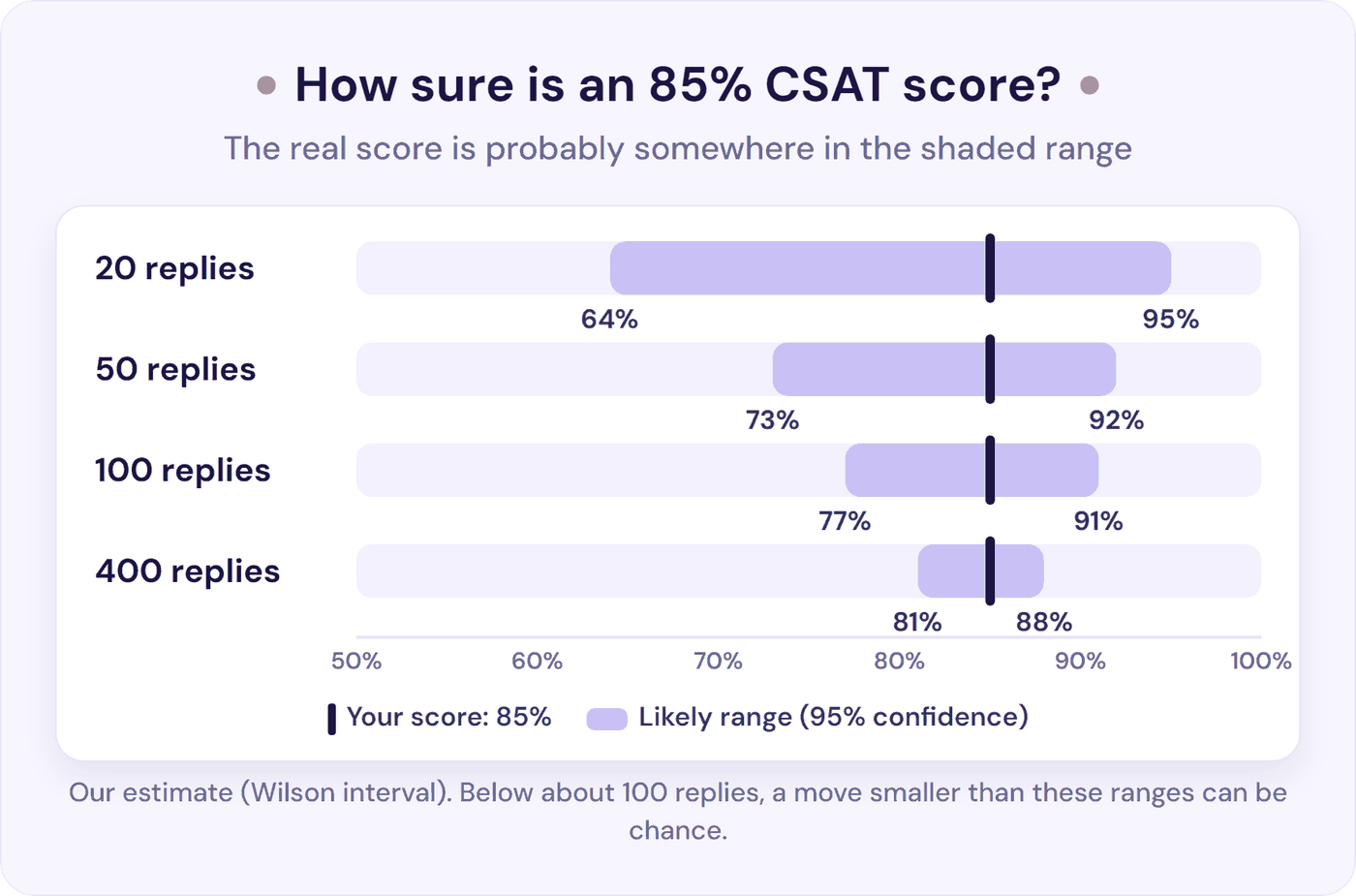
A small team’s CSAT rests on a small number of replies, and small samples swing. Here’s how wide the likely range is around a score of 85% (our estimate, at 95% confidence):
| Survey replies | The real score is probably between |
|---|---|
| 20 | 64% and 95% |
| 50 | 73% and 92% |
| 100 | 77% and 91% |
| 400 | 81% and 88% |
Now look at how many replies you’ll get. At 300 conversations a month and a 10% response rate, that’s about 30 replies a month. To tell reliably whether a drop from 85% to 80% is real, you’d need about 900 replies in each period (our estimate). At 30 a month, that’s two and a half years of replies.
One team put it bluntly: “Our CSAT sits around 87% but the response rate is like 4% on a good week. it’s basically meaningless at that point.” Moving the survey from email to SMS lifted responses to about 12% (u/UnaccountableSnark, r/customerexperience).
So:
- Show the number of replies next to every score.
- Use a three-month rolling score. SQM Group, which benchmarks call centres, recommends three-month rolling averages for the same reason.
- Below about 100 replies, a move is only real if it’s bigger than the range in the table. At 50 replies, an 85% score could be anywhere from 73% to 92%, so even a 10-point drop can be chance.
- Act on the comments, not the move. Read every low score’s comment and follow up on it: the comments tell you what to fix.
How an AI Chatbot Changes Your Customer Service KPIs
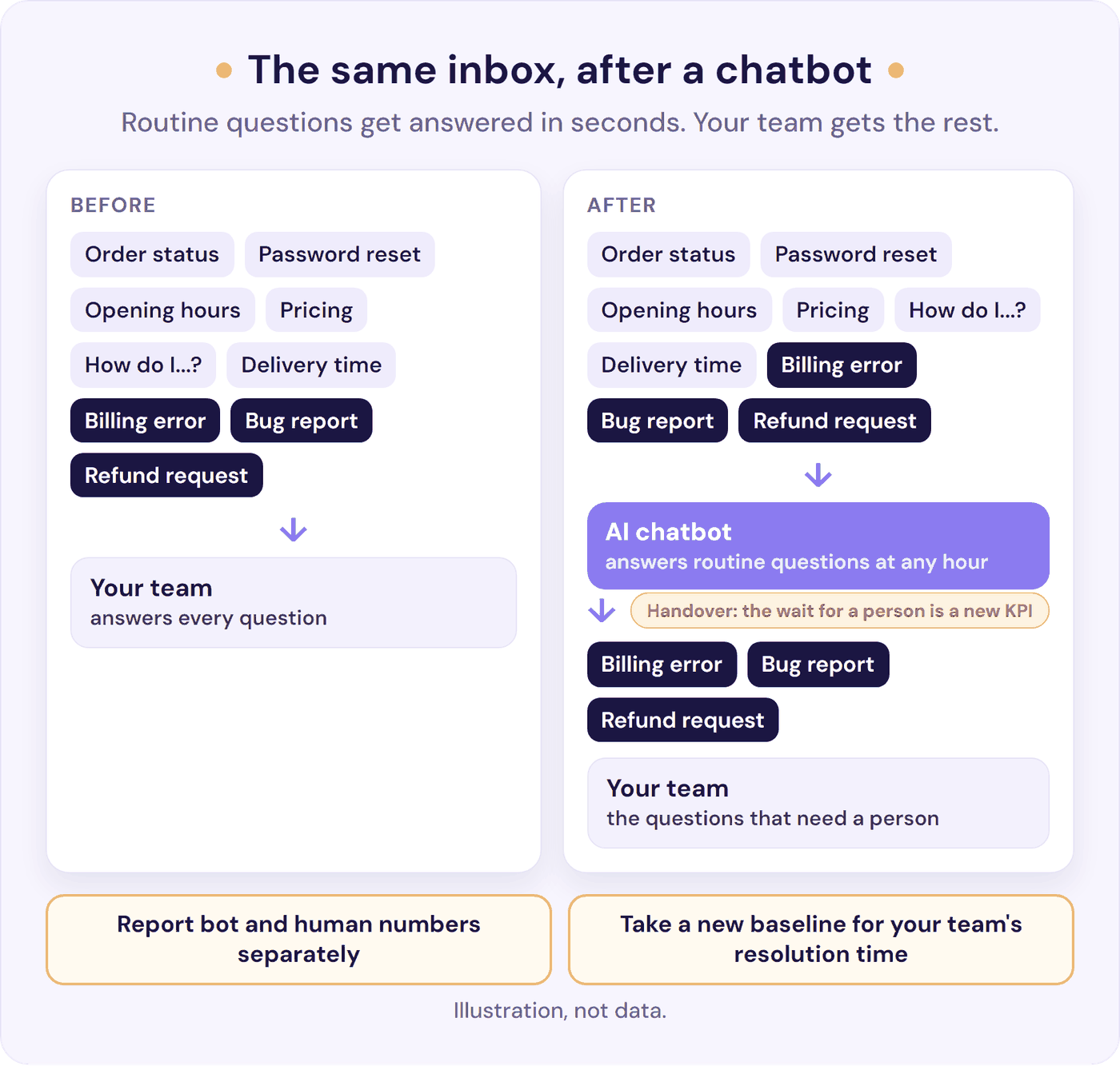
A chatbot answers routine questions in seconds at any hour, so customers wait less and your team’s time goes to the questions that need a person. Measure it so your numbers show what changed. Three things change:
- First response time. With a bot answering first, customers get a first reply in seconds. Report that as the bot’s number, and your team’s first response time next to it, so you can still see how long people wait for a person. In Crisp, the default “Response Time” includes AI, and “Human First Response Time” only covers conversations a person answered first, so neither shows the wait after the bot hands over. Check how your bot’s replies are labelled, too: if it replies under a teammate’s name, your help desk may count those replies as your team’s. Either way, take your team’s number from the handover: once a month, pick up to 20 conversations the bot passed on, and note when the customer asked for a person and when a person first replied.
- Your team’s time goes to the questions that need a person. Once the bot answers the routine questions, the conversations that reach your team are mostly the ones that need investigating, so the mix changes. Keep splitting your team’s resolution time by type of request, so you compare like with like, and take a new baseline for the overall figure after launch.
- Add one KPI: the time to a person after a handover. That’s the wait customers feel when they ask the bot for a person. Give handovers the same reply-time promise as email, say it where customers ask for a person, and report the median from the monthly sample in point 1. Our guide to the chatbot to human handoff covers how to keep the wait short.
Agree what success means before you launch. Judge the bot on the routine questions it answers, and your team on the questions that need a person, not on tickets closed per person (one of the metrics to skip, below). Tickets per 100 customers should fall for the topics the bot answers, so check it by topic.
The bot needs its own numbers too: our guide to chatbot analytics covers which ones to track and a 30-minute weekly check.
Resolve247 answers 82% of customer questions without a human (from 71% to 94%, depending on the business). Tiiny Host, a simple website hosting tool, trained our chatbot on its help articles, and its founder says it “has reduced our support workload by 50%”. In Resolve247’s AIChatbot, the analytics show every “Contact a Human” request and escalation, with the time and a click-through to the conversation, the questions it couldn’t answer grouped by topic, and an estimate of the time saved. It can email your team, or post in Slack, when a customer asks for a person, and on the website widget you can edit the message customers see when they ask, so it states the reply time you promise.
For the conversations that reach your team, ResponseAssistant drafts replies in Help Scout and Front from your help content and past replies, for a person to check and send, so each reply takes less time. Resolve247 reports the bot’s numbers in its own analytics, so you can set them next to your help desk’s. Plans start at $35 a month, with a 30-day free trial and no card needed.
Customer Service Metrics to Add Later, and Ones to Skip
Add these when you need them:
- Backlog by age, once tickets regularly wait overnight. See support queue.
- SLA compliance, once you publish response times. See SLA breach.
- Cost per ticket: monthly support cost divided by conversations. Our cost per ticket benchmarks show the formula and what’s typical.
- Escalation rate, once you have tiers. See escalation rate and our monthly escalation review.
- Net Promoter Score (NPS), as a quarterly survey about the whole relationship, not per ticket.
- Handle time, for planning capacity only: minutes per ticket times tickets gives you hours. See average handle time.
Skip these, or read them with care:
- Handle time as a target. It pushes people to rush, and on email it punishes the careful reply that prevents a repeat contact.
- Tickets closed per person. In a shared inbox, a count rewards the easy tickets: “you’ve taught them to focus on the low hanging fruit” (u/drteq, r/smallbusiness). For coaching, read five of each person’s conversations with them each month instead.
- CSAT or NPS in anyone’s pay. At one company that tied bonuses to CSAT and surveyed customers several times a quarter, “customers stopped filling them out and nobody was getting their bonus” (u/Bigman2047, r/CustomerSuccess). NPS’s own creators say linking scores to frontline bonuses made staff care more about the score than the customer, and warn of pleading and manipulation to get a 10 (Bain, 2021).
- Phone-queue metrics: average speed of answer, average wait time, after-call work, and schedule adherence belong to call centres, not a chat and email team.
A Simple Customer Service KPI Scorecard
Fill this in once a month. It fits on one page, so it’s also what to send when someone asks how support is doing. Copy it into a spreadsheet, or download the scorecard as a free template, which opens in Excel, Google Sheets, or Numbers and works out your rolling CSAT, tickets per 100 customers, and, from a monthly sample, first response time in business hours.
| KPI | How we measure it | Target | This month | Last month | Replies or sample (n) | Note |
|---|---|---|---|---|---|---|
| First response time | Median, business hours, replies from a person | Within our promise | ||||
| Share within promise | Conversations answered within our published time | 85% to 90% | ||||
| Resolution time | Median, by type of request | Under 24 hours (shop) or 48 (software) | ||||
| First contact resolution | No repeat contact on the same issue within 7 days | 70% or more | ||||
| CSAT | Share of top ratings, three-month rolling | 80% to 90% | ||||
| Tickets per 100 customers | Conversations / active customers x 100 | Falling for fixed reasons | ||||
| Hours a week on support | Time one normal week each month | Below your next-step trigger | ||||
| Questions the chatbot answered without a person (with a chatbot) | From the chatbot’s own analytics; read 20 of its conversations a month to check the answers | Rising for the topics it covers | ||||
| Time to a person after a handover (with a chatbot) | Median from a monthly sample of handovers, from the request to a person’s first reply | Within our promise |
A few lines are enough when you send it, for example:
Support in [month]: first reply median [x] business hours, [x]% within our 4-hour promise (sample of [n]). Resolution median [x] hours; [billing questions] are the slow ones. CSAT [x]% from [n] ratings over three months, steady. Tickets per 100 customers [x], down from [x] after [the new setup guide]. Next month: [one fix].
Each week (10 minutes): check first response time against your promise, look at what’s waiting, and read any new low ratings.
Each month (20 minutes):
- Fill in the scorecard and the sample of 20.
- Read every low CSAT comment and five repeat contacts.
- Pick the top reason people contacted you and one fix for it.
- Check your out-of-hours numbers on their own.
- Decide one change for next month.
Each quarter: check your targets still fit.
On a shared inbox with no help desk? Once a month, take 20 customer emails from the week before last, for example the first four each weekday, so every one has had 7 days to come back. In Gmail, search to: [email protected] after:2026/10/05 before:2026/10/12; in Outlook, search the shared mailbox with received: and the dates. For each, note when it arrived, when a person first replied, how many replies it took, and whether the customer came back within 7 days. That takes about 20 minutes and gives you median first response time, the share within your promise, and a rough first contact resolution.
When counting by hand becomes a chore, move to a help desk. HubSpot’s free tools and Help Scout’s Free plan (up to 100 contacts a month) both report first response time; the table above shows what else each one includes.
Frequently Asked Questions
What are customer service KPIs?
Customer service KPIs are the few numbers a support team uses to judge its performance: how fast customers get a reply, whether problems get solved, how customers feel, and how much support the business needs. For a small team, five are enough: first response time, resolution time, first contact resolution, CSAT, and tickets per 100 customers.
Which customer service KPIs should a small team track first?
Start with three: first response time against your promise, first contact resolution, and CSAT shown with the number of replies. Once those are steady, add resolution time, to see where the time goes, and tickets per 100 customers, to see whether support is growing faster than the business.
How do you measure first contact resolution on email?
Count the conversations where the customer didn’t come back about the same issue within 7 days, and divide by all conversations solved. Help desks such as Help Scout and Front report “resolved on first reply”, which is a quick stand-in for the trend. A short survey a few days after closing gives you the customer’s view.
How does an AI chatbot change your customer service KPIs?
Customers get answers to routine questions in seconds, at any hour, and your team’s time goes to the questions that need a person. Report the bot’s numbers and your team’s separately, so you can see both. Split your team’s resolution time by type of request, with a new baseline after launch. And add one KPI: the time to a person after a handover.
How often should you review customer service KPIs?
Spend 10 minutes a week checking first response time against your promise and reading any new low ratings. Once a month, spend 20 minutes filling in the scorecard, reading low CSAT comments, and choosing one fix for the top reason people contact you. Look at your targets once a quarter.
What is a good first response time for customer service?
By email, reply the same business day; within 1 to 4 business hours is good and under an hour is excellent, against a typical 6 to 7 hours in help desk data from Freshdesk, Jitbit, and Gorgias. On live chat, aim for under a minute while it’s staffed.
How many survey replies do you need for a reliable CSAT score?
About 100 replies puts an 85% score somewhere between about 77% and 91% (our estimate). Below that, use a three-month rolling score and rely on the comments.
How do I report customer service performance to my boss or investors?
Once a month, send the five numbers with last month’s figures and the number of replies behind each, plus the top reason customers got in touch and your one fix. The scorecard section has an example you can copy.
The Bottom Line
Customer service KPIs only help if they fit your team. For 1 to 10 people, that means five numbers measured the same way every month, not 20 customer service metrics borrowed from a call centre.
- This week: download the scorecard, fill in last month from your help desk reports (on a shared inbox, log 20 emails in its sample tab instead), and write down the reply time you promise.
- This month: set each target from last month’s numbers and your promise, and pick one fix.
- Every month: read the comments before the averages, and fix the top reason people contact you.
If routine questions are what’s pushing your first response time out, an AI chatbot can answer them in seconds while your team handles the rest. Try Resolve247 free for 30 days, no card needed. If it ever hallucinates, that month is free.