
A customer on Reddit described a familiar problem. Before contacting a company, they always check its FAQ page. In their experience, about 85% of the time, the question isn’t there or the answer isn’t clear. So they phone, only to be told that “most questions are answered on the website” (u/whizzdome, r/talesfromcallcenters).
Self-service customer support is meant to close this gap between what customers ask and what they can find. And it’s a common gap. In a survey of 5,728 customers by the research firm Gartner, only 14% of service issues were fully resolved through self-service. The most common reason self-service failed, in 43% of cases, was that customers couldn’t find content relevant to their issue (Gartner, August 2024).
Even with a team of 1 to 10 people, you can close the gap, as long as you start from the questions customers already ask and keep a person one click away.
This guide covers what to set up first and how long each step takes, and what help desks such as HubSpot, Help Scout, Crisp, and Front already include. It also has examples by type of business, and a monthly routine to keep answers current, starting with a 30-minute check. We build an AI chatbot that answers from your help content. You won’t need it for the first four steps: they work with the tools you already have.
The Short Version
- List the 10 to 20 questions you answer most, using your last two or three months of emails and chats.
- Write one short answer per question, with the question as its title, worded the way customers ask it. An FAQ page on your own website is enough to start, or see what your help desk already includes.
- Put each answer where the question comes up: your contact page, your order and welcome emails, your product pages, and your app.
- Link to the self-service pages you already have from your help articles and chat, such as your order tracking page, billing portal, and password reset page.
- Expect those four steps to take about 5 to 13 hours, by our estimate. Free tools will do if you don’t have a help desk yet.
- Keep a person one click away, and decide which topics always go straight to a person.
- Add an AI chatbot that answers from the same content and hands over to a person when it can’t help.
- Spend 30 minutes a month checking what people searched for on your help pages and didn’t find, and what your chatbot couldn’t answer.
What Is Self-Service Customer Service?
Self-service customer service lets customers find answers and finish simple tasks themselves, without waiting for a person. For a small business, the usual self-service options are a help centre or FAQ page and an AI chatbot that answers from your content. Then there are pages where customers can track an order, update their card details, or change a booking. Self-service customer support and self-service support mean the same thing, and many help desk providers (the companies that make software for answering customer emails and chats) call it customer self-service.
Big companies add phone menus and kiosks. Two other terms often get mixed up. A customer portal is where a signed-in customer does things, such as downloading invoices or viewing past orders. A help centre is where anyone finds answers.
Most small teams already have a portal through their shop, billing, or booking software. The help centre is the part they need to build.
Is an AI chatbot self-service? Yes, when it answers from your own content and a person is one click away. The help centre is the content, and the chatbot is a quicker way for customers to reach it.
For a team of 1 to 10 people, self-service customer support pays off in two ways. Customers get quick answers at any hour. And the same articles become ready-made replies for your team: a link to paste instead of an answer to retype. Both are part of good customer service at any size.
If you need the business case, Gartner puts the median cost of a self-service contact at $1.84, against $13.50 when a person handles it (more in what support costs).
Self-Service or a Person? It Depends on the Task
Most people would rather check opening hours, track an order, or book a slot themselves. When something has gone wrong, or they need a refund, they want a person.
So offer both, and make both easy. In a 2025 survey of 2,119 US adults by customer service author Shep Hyken, 53% had stopped doing business with a company because its self-service was too hard to use, and 34% because there wasn’t any. Half (50%) had already resolved a customer service issue using AI with no human help, up from 32% in 2024 (Hyken, State of Customer Service and CX 2025).
In Gartner’s 2026 survey of 3,566 customers, half said generative AI makes service easier. And when a company uses it, 87% said a route to a person is essential (Gartner, August 2026).
| Let customers help themselves | Keep a person one click away |
|---|---|
| Opening hours, delivery times, and prices | Refunds outside your policy and billing disputes |
| Order status and tracking | Damaged, missing, or wrong items |
| Password resets and login help | Account security and anything involving personal data |
| How-to steps and settings | Bugs and anything that’s broken |
| Booking, rescheduling, and cancelling | Complaints, and anything urgent or upsetting |
| Returns policy and how to start a return | Unusual requests that don’t fit a policy |
Two rules make “keep a person one click away” work in practice. First, keep the way to reach a person visible on every help article and in the chat. If it’s hidden, customers are angrier by the time they find it.
Second, when someone asks for a person, pass the conversation so far to your team with the request, so the customer never has to explain twice. Tell them when a person will reply, too. Our 24/7 support guide has wording you can copy.
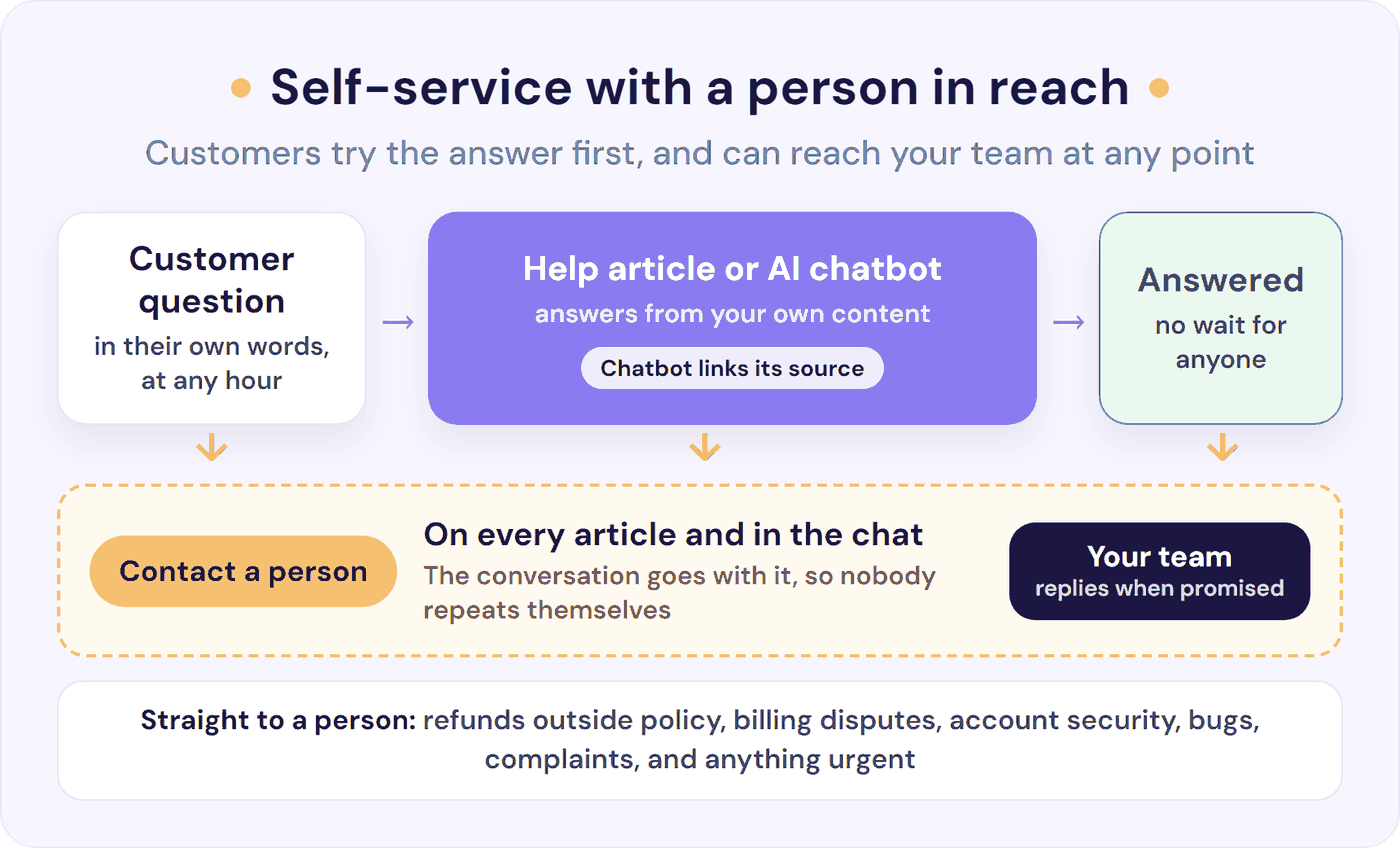
Our guides cover the wider question of what to automate and what to keep human, and how a chatbot to human handoff should work.
What to Set Up First: A Self-Service Build Order
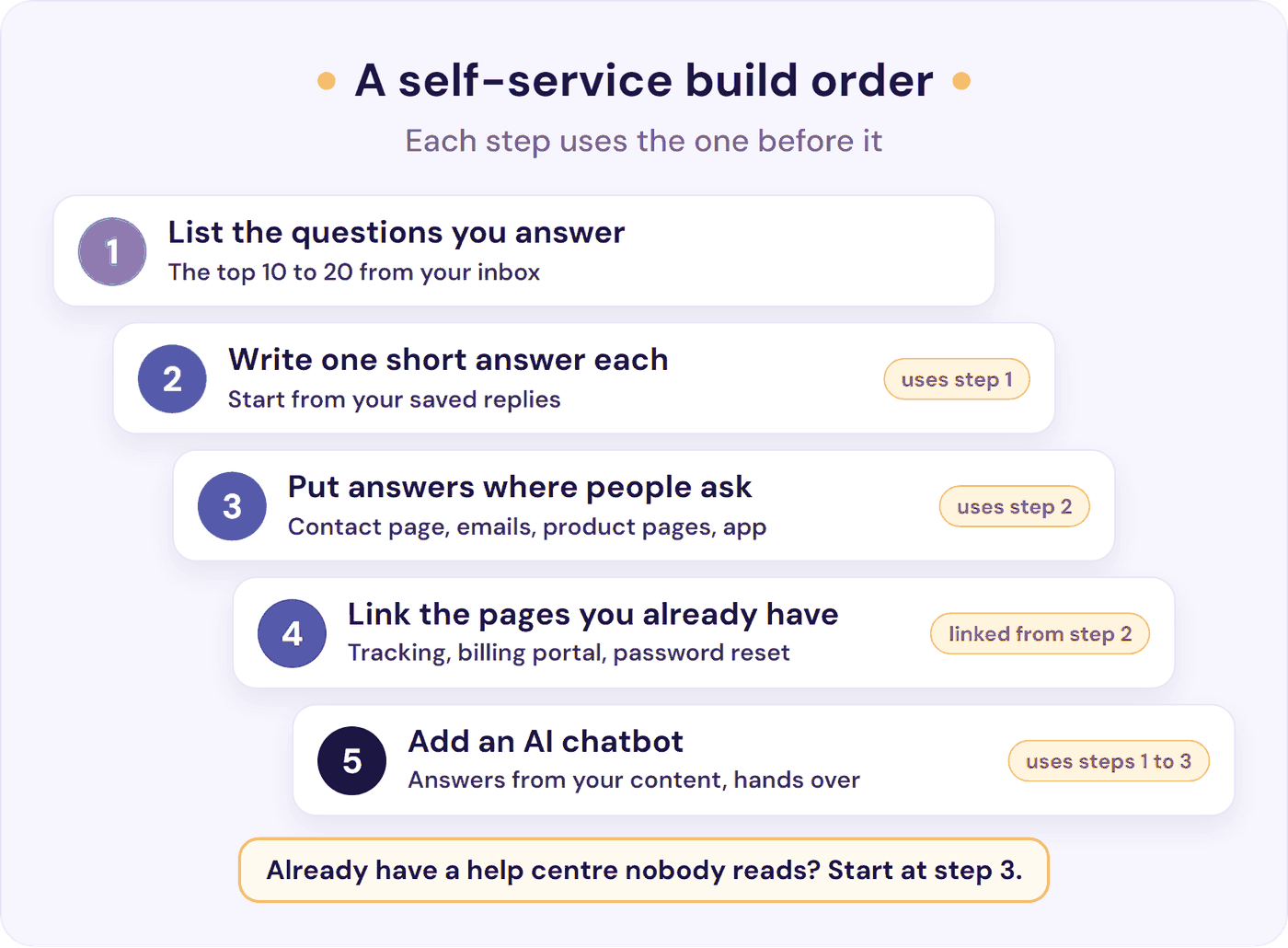
Each step builds on the one before. Most small teams can finish steps 1 to 4 in about 5 to 13 hours, or a week of spare evenings. Already have a help centre that nobody reads? Start at step 3, then work through why self-service fails.
Step 1. List the Questions You Already Answer
Go through the last 60 to 90 days of emails and chats and count how often each topic comes up. If you’d rather count new questions as they arrive, our guide to reducing support tickets has a two-week sheet for tagging each one by topic. The saved replies or templates you paste most often are your first articles. Pick the top 10 to 20.
You don’t need more than that to start. A simple rule keeps the list growing: when a question arrives for the third time, write the article.
A few articles get a large share of the views. In a 2018 Zendesk Benchmark study of 500 help centres, the top five articles got about 40% of each day’s views (Zendesk, 2018). Nobody has published a credible benchmark for how many articles a small business needs, so let your own list decide.
Before you write anything, ask whether a change to your product, checkout, or emails would remove the question altogether. If most “how do I set this up?” questions come from one setting, filling that setting in automatically removes the question for everyone.
Step 2. Write One Short Answer per Question
Title each article the way customers ask (“How do I change my delivery address?”), put the answer in the first line, and add one screenshot if it helps. For anything that takes several clicks, a short screen recording works better. Write the steps out too, so search tools and a chatbot can use them. And keep the video short, because it’s harder to update than a screenshot.
A support lead at a software company, whose team adds very short videos to its articles, says about 90% of their users find their answer in the help centre. For context, their support is in writing only, and customers know a reply can take up to a day (u/Mammoth-Evie, r/CustomerSuccess).
Give every article an owner, the person who keeps it up to date, and a “last checked” date.
If you have fewer than about 10 questions, one FAQ page is enough. Beyond that, or once people need to search, move to a help centre. By our estimate, turning a saved reply into a short article takes 15 to 20 minutes, so 10 to 20 articles is an afternoon or two. For structure and a template, see these knowledge base examples (a knowledge base is another name for a help centre).
Then test what you’ve written. Paste the links to up to 10 of your help pages into our free Chat With Your Website tool (no sign-up needed). Next, ask it your top 10 questions, worded the way customers ask them. Any it can’t answer are gaps in your articles.
Step 3. Put Answers Where the Question Comes Up
A help centre only helps the people who reach it, so take the answers to them:
- Your contact page: the top five answers above the form, with the form still there.
- Order, shipping, and welcome emails: the answers to “where is it?” and “how do I start?”
- Product and pricing pages: answers to the questions people ask before they buy.
- Inside your app or account area: a short link to the answer, next to the setting people get stuck on. If you use Help Scout, its help widget, Beacon, can suggest different articles depending on the page.
- Your email auto-reply and chat welcome message: a line such as “These answer most questions”, followed by links to three articles.
Here’s how the top of an online shop’s contact page could look. Swap in your own questions, times, and links where the words are in italics:
Quick answers
- Where’s my order? Most orders arrive in 3 to 5 working days. Track your order
- How do I return something? You have 30 days. Start a return
- Can I change my delivery address? Yes, until it ships. How to change it
- Do you deliver to your country? Where we deliver and what it costs
- Your most-asked product question One-line answer. More detail
Still need us? Use the form below, and a person will reply by time.
A trades business, such as a plumber, would list the areas it covers, its call-out fee, and the booking link. Its voicemail message can send callers to the same page.
A long-time online shop owner answered every likely shipping and returns question on the site, and put each product’s own questions on its product page. They say this cut phone calls and emails by roughly 80 to 90% (u/camaro2ss, r/ecommerce). They warned that results vary, but putting answers where the questions come up costs little to try.
Keep help pages public so Google and AI tools can read them. Gartner found that more than half (51%) of customers’ attempts to get help now start on another platform, such as a search engine or an AI assistant (Gartner, July 2025).
When you do reply by email, answer the question first, then link to the article. In Gartner’s survey, customers whose support person pointed them to self-service were about twice as likely to say they’d use it next time (Gartner, June 2025).
Step 4. Link the Self-Service Pages You Already Have
Most small businesses already pay for tools with self-service built in. Your shop platform has an order status page. Your billing provider has a customer portal where people update their card details or download invoices. Your booking tool sends reschedule links, and your login page already sends password reset emails.
If your shop platform lets customers request a return from their order page, link that from your returns article too.
Link each one from the matching help article and from your chat. If you run software, a public status page (a page that shows whether your service is working) answers “is it down?” in one place.
For an online shop, “where’s my order?” needs three things. The shipping email gives the tracking link and the expected delivery date. Your auto-reply and chat welcome message link to the order status page. And a “Where’s my order?” article says how long delivery takes, and how many days to wait without a tracking update before getting in touch.
A tracking link can’t help a customer whose parcel is stuck, so the advice on when to get in touch is what saves you the follow-up email.
Step 5. Add an AI Chatbot That Answers From the Same Content
An AI chatbot is the quickest way for customers to reach the answers from steps 1 to 3. It can start with the pages already on your website, and each answer you write gives it more to work from. Gartner advises customer service leaders to keep content current and give customers one front door on the website, a single place to start, such as a generative AI chatbot (Gartner, August 2024).
Before you switch it on, delete or merge articles that give different answers to the same question, such as an old and a new returns policy. That way, the chatbot can’t answer from the out-of-date one. Then switch it on for the questions your content answers well, and let it hand the rest to a person.
In Gartner’s 2026 survey, 49% of customers said they would have been willing to use a chatbot if the company had provided one. Gartner’s advice is to put reliability before reach: get the answers right before you put the chatbot in front of more customers (Gartner, September 2026). The section on where an AI chatbot fits, further down, covers what a good one does.
| Step | What you need | Time to set up (our estimate) | Each month |
|---|---|---|---|
| 1. List your top questions | 60 to 90 days of emails and chats | 1 to 2 hours | 10 minutes for new questions |
| 2. Write the answers | Your saved replies | 15 to 20 minutes an article, so 2.5 to 7 hours for 10 to 20 articles | Part of the monthly routine |
| 3. Put answers where questions come up | Access to your contact page, emails, and product pages | 1 to 3 hours | Update when something changes |
| 4. Link your self-service pages | Your shop, billing, and booking tools | Under an hour | Rarely |
| 5. Add an AI chatbot | Your website, plus the answers from steps 1 to 3 | About an hour, plus testing your top questions | Review what it couldn’t answer |
Estimates assume one person who knows the product, writing from replies they’ve already sent.
A community forum, where customers answer each other’s questions, can come later, if ever. At this size, you rarely have enough customers to make one work.
What HubSpot, Help Scout, Crisp, and Front Already Include
If you use one of these help desks, you may already pay for most of what you need. We checked each provider’s own pricing and help pages on 20 October 2026. Prices are in US dollars a month, billed annually, with the price for monthly billing in brackets (Crisp publishes a monthly price only).
The plan name in each cell (such as Professional or Essentials) is the plan you need for that feature. A “seat” or “user” is one team member’s login, and “per resolution” means per conversation the provider counts as solved by its AI.
| HubSpot | Help Scout | Crisp | Front | |
|---|---|---|---|---|
| Public help centre | Service Hub Professional: HubSpot $90 a seat ($100) plus a $1,500 onboarding fee. Not on Free or Starter | Free plan: one Docs site (Help Scout’s help centre), up to 10 articles. Unlimited from Standard: Help Scout $25 a user ($30) | Essentials: Crisp $95 a month per workspace (your team’s account), up to 10 seats. Not on Free or Mini | Starter: Front $25 a seat ($35), with Front branding and no custom domain (your own web address) |
| Articles inside the chat widget | Help tab in live chat (Professional) | Beacon, Help Scout’s help widget, suggests articles based on the page, on every plan. Set it to Neutral mode so the options to contact you stay in view | A help widget, and article search in the chat box (Essentials) | Knowledge base in the chat widget (Professional) |
| Report of searches that found nothing | “Search terms with no results” (Professional) | “Failed searches” in the Docs report (from Standard) | No report of failed searches, only “Popular Searches” (Essentials) | A list of searched keywords with the average number of results for each (Professional) |
| AI answers from your articles | Customer Agent (Professional): HubSpot $0.50 per resolution, paid in credits | Scout, Help Scout’s AI chatbot (formerly AI Answers), sold as the Envoy add-on (paid plans): Help Scout $0.75 per resolution | Hugo, Crisp’s AI agent, from Mini (Essentials if you want it to answer from a Crisp help centre). Paid in Crisp credits: about $0.05 to $0.10 a conversation, by Crisp’s estimate | Autopilot, Front’s AI add-on: Front $0.05 to $0.89 a conversation, depending on the outcome |
Sources: HubSpot pricing and knowledge base set-up; Help Scout pricing and Free plan; Crisp pricing and Hugo billing; Front pricing and Autopilot billing. HubSpot’s UK page lists Service Hub Professional from £85 a seat a month, billed annually. Help Scout and Front price in US dollars.
The cheapest route depends on which help desk you use now:
- HubSpot Free or Starter: put an FAQ page on your own website, or host the help centre somewhere else, and link it from your chat welcome message. Help Scout lets you use its help centre, Docs, without using its inbox (Help Scout Docs). Its Free plan can host your first 10 articles, and Standard for one user (Help Scout $25 a month, billed annually) removes the limit and adds the report of searches that found nothing. HubSpot’s own AI agent also needs Professional. For an AI chatbot that answers inside HubSpot’s chat on any plan, see the AI chatbot section.
- Help Scout: stay on Free if 10 articles and 100 contacts (people you help) a month are enough. Otherwise, move to Standard for one user.
- Crisp Free or Mini: put an FAQ page on your own website, or use one of the free options below, and link it from your chat welcome message. Move to Essentials when you want your help centre and chat in one place.
- Front: Starter covers a basic public knowledge base (help centre). Professional adds your own web address (custom domain) and puts the knowledge base in the chat widget.
No help desk yet? Start with an FAQ page on your own website or shop, where customers already are. Once you need a search box, a free Notion site, Google Sites, or a WordPress plugin such as BetterDocs can host your first help centre.
There are two catches. These free options don’t show what people searched for and didn’t find. And Notion warns that a published page’s metadata (information stored behind the page) includes the names, profile photos, and email addresses of the people who edited it.
For reference, Zendesk’s help centre starts on its Suite Team plan, at Zendesk $55 an agent (team member) a month, or $69 billed monthly (Zendesk pricing). Its UK page lists Suite Team at £45 an agent, billed annually. Intercom’s help centre starts on its Essential plan, at Intercom $19 a seat, billed annually (Intercom pricing).
Customer Self-Service Examples for Small Businesses
Most lists of customer service self-service examples feature Netflix and airlines. Here’s what self-service looks like at a small business. The table shows the questions customers can answer themselves, where the answer lives, the first thing to set up, and what still needs a person.
| Business | Customers answer themselves (and where) | Start with | Keep a person for |
|---|---|---|---|
| Online shop | Order status, delivery times, returns, sizing (order and shipping emails, the tracking page, product pages) | The tracking link and delivery time in your shipping email | Damaged items, refunds outside policy |
| Software (SaaS) | Password reset, invoices, how-to steps, integrations (help centre, billing portal, links inside the app) | A billing portal link, and a help link next to the setting people get stuck on | Bugs, data problems, customers who want to talk before they cancel |
| Agency or consultancy | What’s included, turnaround times, file formats (FAQ page, proposal and onboarding emails) | A “how we work” page linked from every proposal | Scope changes, complaints |
| Local or trade service | Areas covered, call-out fees, booking (FAQ page, booking link) | Areas, call-out fee, and booking link on your contact page and in your voicemail message | Quotes, emergencies |
| Hotel or holiday let | Check-in times, parking, Wi-Fi (pre-arrival email, booking confirmation) | A pre-arrival email with check-in, parking, and Wi-Fi | Special requests, problems during the stay |
| Online course or membership | Logging in, access, certificates (help centre, account page) | A login help link on the login page | Refunds, accessibility needs |
Treat these as starting lists and check them against your own top questions from step 1.
Why Self-Service Fails, and the Fix for Each Reason
Gartner’s finding that only 14% of issues were fully resolved through self-service has clear causes. The most common reason self-service failed, in 43% of cases, was that customers couldn’t find relevant content. And 45% of customers who started in self-service said the company didn’t understand what they were trying to do (Gartner, August 2024). Most failures come down to missing answers, or answers people can’t find, and both are cheap to fix.
If you already have a help centre that nobody seems to read, first check whether people reach it. On the plans in the table above, your help centre’s report shows visits or views. You’ll find it under Help Scout: Reports > Docs; HubSpot: Service > Knowledge Base > Analyze; Crisp: Analytics > Knowledge Base; Front: Analytics > Knowledge base.
If visits are low compared with the number of conversations you get, people aren’t finding it, so start with the “Nobody knows it’s there” and “Asking is quicker” fixes below. If visits are high but the same questions keep arriving, the answers need work, so start with “The answer isn’t there” and “It’s out of date”. Then work down the rest of the list:
- The answer isn’t there. Write from the questions people ask (step 1), and check what they searched for and didn’t find.
- People can’t find it. Use the customer’s words in titles and put answers where the question comes up. Search matters too, because even a help desk’s own search can miss. An experienced Zendesk admin who has set up Zendesk six times wrote: “You can sometimes search a term that only one article has in it and somehow not be presented with that article.” (u/Brosenjew, r/Zendesk)
- Nobody knows it’s there. Link it from your main menu, contact page, auto-reply, and chat welcome message, and label it “Help”. A product manager at a large travel brand says renaming its “FAQ” section to “Help Center” increased clicks on it by over 40% (u/lockstep782, r/talesfromcallcenters).
- Asking is quicker. As one Reddit commenter put it, if contacting support feels faster than hunting through help pages, people will contact support. AI chatbots work here, they add, because they skip the search (u/lifecycleloops, r/CustomerService). Bring the answer to where the question starts (step 3), and let customers ask a chatbot in their own words.
- It’s out of date. Give every article an owner and a “last checked” date, and review it whenever a price, policy, or feature changes.
- It’s a dead end. Put a way to reach a person on every article and in the chat.
- The chatbot isn’t tied to your content. Use one that answers only from your content, shows the source of every answer, and says when the answer isn’t there.
Remember who you hear from. Customers who found the answer never write in, so the inbox only shows you the ones self-service missed. As one commenter on Reddit’s r/SaaS forum put it, “You’re only hearing from the people who don’t use it, so don’t give up on it.” (u/SameCartographer2075, r/SaaS)
How to Tell If Self-Service Customer Support Is Working
You don’t need a lot of data. These three checks work even at 200 conversations a month:
- Contact rate. This is the number of conversations per 100 customers or orders, compared month on month. If customers or orders grow and conversations don’t, self-service is doing its job. Our customer service KPIs guide shows how to track it.
- What people looked for and didn’t find. Check the searches with no results in your help centre, and the questions your chatbot couldn’t answer. These are your next articles. If you only have an FAQ page, with no search report, your inbox does the same job. An email asking something the page doesn’t cover is a missing answer. One asking something it does cover means that answer is hard to find or unclear. A line at the foot of the page helps too: “Didn’t find your answer? Tell us what you were looking for,” linked to your contact form.
- People who read an article and still wrote in. If you use Help Scout, its Docs report counts the conversations started from its help centre (Docs) or help widget (Beacon). It gives a total, not a count per article (Help Scout). To find the articles behind them, note which article a customer quotes or was reading. Those articles need rewriting.
Fewer emails is a good sign. But if you use a chatbot, check that its answers did the job. Read 20 of its conversations from the week before last, and see whether anyone came back about the same thing within 7 days. Our chatbot analytics guide has a 30-minute weekly check.
What’s a good result? There’s no small-business benchmark.
The nearest guide is a rule of thumb from the Consortium for Service Innovation. It’s the group behind Knowledge-Centered Service (KCS), a method for writing and updating help articles as part of answering customers. It says that if people find something helpful 40% to 50% of the time, they’re likely to use self-service again (KCS v6 Practices Guide).
The closest thing you can measure is the “Was this helpful?” rating on your articles, which HubSpot, Help Scout, Crisp, and Front each offer on some plans. Track how it changes from month to month.
Keep It Current: A Monthly Routine
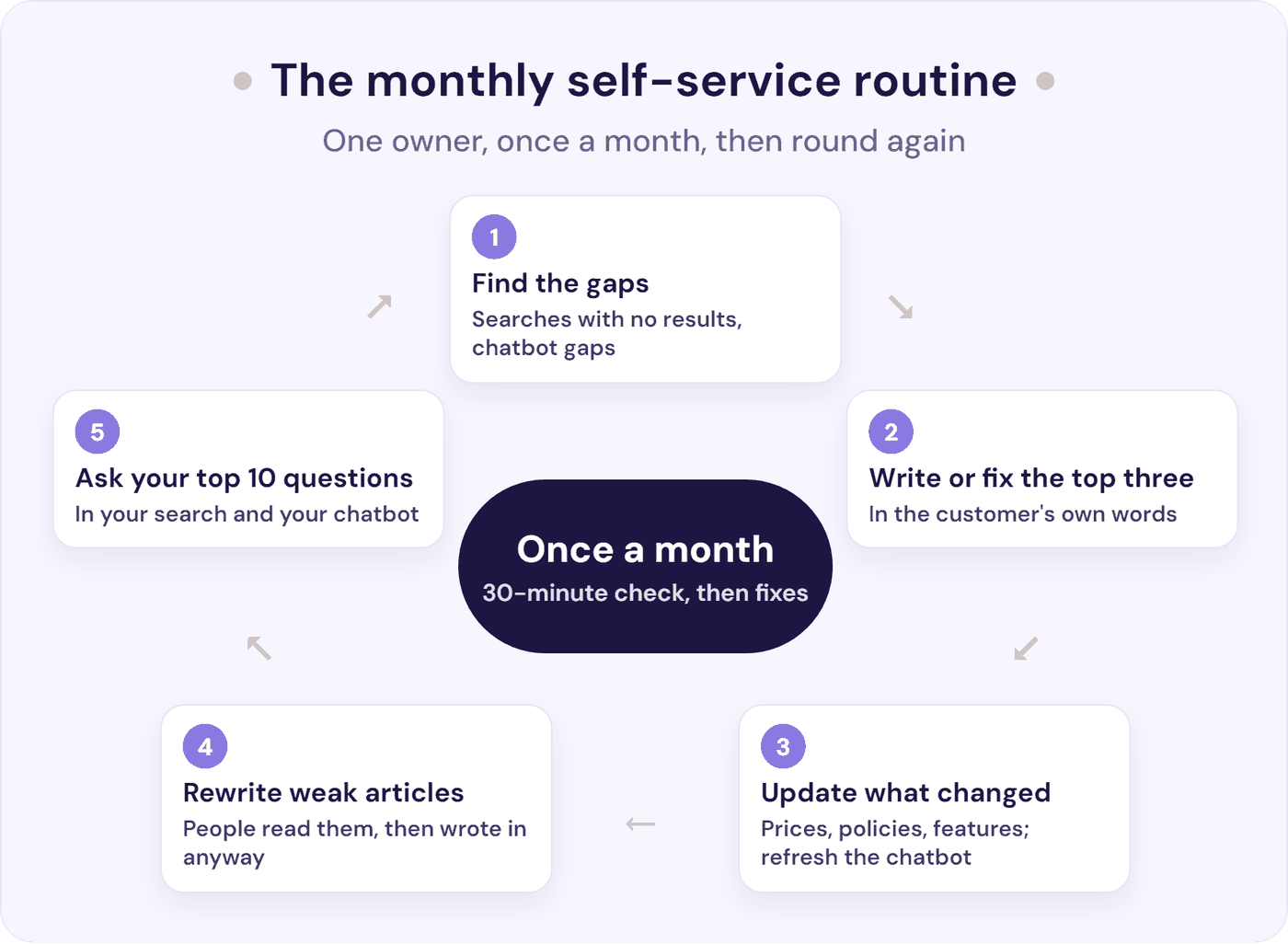
Answers go out of date as prices, policies, and products change. Once a month, spend about 30 minutes on the checks below, then fix what they turn up. Allow about 15 to 20 minutes for each new article, as in step 2.
- List the searches that found nothing and the questions your chatbot couldn’t answer. If you only have an FAQ page, use this month’s emails about things the page misses or explains badly. Write or fix the top three.
- Re-read your five most-viewed articles. They get the most views, so they matter most.
- Update anything that changed this month: prices, delivery times, policies, and features. If your chatbot doesn’t re-read your pages on a schedule, refresh it after each change so it answers from the new version.
- Rewrite any article that still leads to emails.
- Type your top 10 questions into your help centre search and your chatbot, and check the answers. If you have neither, use the free test from step 2.
At your size, keeping answers current comes down to a 30-minute check each month, an owner’s name on each article, and fixing an article whenever a customer conversation shows it’s wrong. That’s a small-team version of the KCS method.
Where an AI Chatbot Fits in Self-Service Customer Support
An AI chatbot is the front door to the content you’ve written. Customers ask in their own words, at 10 p.m. or on a Sunday, and get the answer from your articles with a link to the page. A good one:
- Answers only from your content, and says when the answer isn’t there.
- Shows the source of every answer, so customers can check it.
- Keeps a person one click away and passes the conversation to them.
- Replies in the customer’s language.
- Shows you the questions it couldn’t answer, which feeds your monthly routine.
Test it on your top questions before customers see it. Here’s how to test an AI support chatbot.
And when you hire someone for support, keep the chatbot. It goes on answering the repeat questions, so your new hire can spend their time on the problems that need a person. AI can also draft their replies to the emails that still arrive. Our SaaS customer support playbook covers when to hire.
Resolve247’s AIChatbot answers 82% of customer questions without a human (from 71% to 94%, depending on the business). You train it on your help centre and website (one page, a sitemap listing your pages, or the whole site from one link), plus files, Notion pages, and short question-and-answer snippets. Every answer shows its sources, so customers can check them.
When you update a page, one click refreshes all your pages in the chatbot. Auto-retraining (on the Core plan and above, or as an add-on on Starter) checks your pages on a schedule.
On your website, a “Contact a Human” button is there from the first message. Your team gets the whole conversation by email, in Slack, or as a new conversation in your Help Scout mailbox.
Inside HubSpot or Crisp chat, you choose when the AI hands over, for example whenever a customer asks for a person. The AI then tells the customer someone is on the way and leaves the chat to your team. Your own “Help” buttons and links can open the chat too.
A regular review in your dashboard groups the questions the chatbot couldn’t answer by topic, so you know which articles to write next.
The chatbot runs on any website, including WordPress, as a floating chat button or as a chat window built into your help or contact page. It also runs inside HubSpot’s live chat or Crisp’s live chat. So a team on HubSpot Free or Starter, which have no HubSpot knowledge base, can still answer from help pages hosted anywhere. See how it works as a knowledge base chatbot.
Tiiny Host’s founder says our chatbot, trained on their helpdesk articles, “has reduced our support workload by 50%” (their own figure). Virgil’s Head of Sales wanted a chatbot “that could answer user questions based on our documentation”, and says: “It took me 15 minutes to set up”. Plans start at a flat $35 a month, with a 30-day free trial and no card needed. If it ever hallucinates (makes up an answer), that month is free.
Every plan also includes ResponseAssistant for the emails that still reach your team. In Help Scout and Front, it drafts replies from the same help content and your past replies, for a person to check and send. To see how AI answers from your own help pages first, use the free test in step 2.
Frequently Asked Questions
What is self-service customer support?
Self-service customer support lets customers find answers and finish simple tasks themselves, without waiting for a person. For a small business it usually means a help centre or FAQ page, an AI chatbot that answers from that content, and pages for tracking orders, updating payment details, or changing bookings. And a person stays one click away.
What are examples of self-service customer support?
Common examples are a help centre with how-to articles, an FAQ on the contact page, and an AI chatbot that answers questions from your help content. Others are an order tracking page, a billing portal where customers update a card or download invoices, password reset emails, and booking reschedule links.
How many help articles does a small team need to start?
Start with the 10 to 20 questions you answer most often, taken from the last two or three months of emails and chats. There’s no credible benchmark for article counts, but a few pages get a large share of the views. In a 2018 Zendesk study of 500 help centres, the top five articles got about 40% of daily views.
How do you know if self-service is working?
Track three things each month: conversations per 100 customers or orders, searches and chatbot questions that found no answer, and articles people read before contacting you anyway. If you use a chatbot, check that its answers did the job. Look at 20 of its conversations from the week before last for anyone who came back about the same issue within 7 days.
When should customers reach a person instead of self-service?
Whenever they ask for one, and straight away for refunds outside your policy, billing disputes, account security, bugs, complaints, and anything urgent or upsetting. Keep the contact option visible on every help article and in the chat, and pass the conversation along so the customer doesn’t repeat themselves.
How much does self-service customer support cost a small team?
Mostly your time. By our estimate, setting it up takes about 5 to 13 hours, of which 2.5 to 7 go on writing your first 10 to 20 articles. After that, it’s a 30-minute check each month, plus the time to fix what it finds.
Hosting can be free: an FAQ page on your own website or a Notion site costs nothing, and Help Scout’s Free plan holds up to 10 articles. A help centre built into your help desk starts at Help Scout $25 a user a month (Standard), Front $25 a seat (Starter), Crisp $95 a month per workspace (Essentials), or HubSpot $90 a seat plus a $1,500 onboarding fee (Service Hub Professional). Prices assume annual billing where the provider offers it.
An AI chatbot on top is either your help desk’s own add-on or a flat plan. Help desk add-ons are priced per resolution or per conversation (HubSpot $0.50 and Help Scout $0.75 per resolution, for example). A flat plan such as Resolve247’s starts from $35 a month.
The Bottom Line
Self-service customer support works for a small team when it’s built from the questions in your inbox and keeps a person in reach.
- This week: list your top 10 questions and turn the three replies you paste most into articles. Already have a help centre? Put its top five answers above your contact form and check which of your top 10 it doesn’t answer yet.
- This month: put those answers on your contact page and in your order or welcome emails, and put a 30-minute review in your calendar for the first of each month.
- Next: add an AI chatbot that answers from the same content, with a person one click away.
Resolve247’s AIChatbot answers from your help centre and website with its sources shown, and hands customers to your team when it can’t help. Start your 30-day free trial, no card needed. If it ever hallucinates, that month is free.