
Most people never open a support ticket. They search, they scan your help centre, and they either find the answer or give up. Harvard Business Review put a number on it years ago: fully 81% of customers “attempt to take care of matters themselves before reaching out to a live representative.” So your knowledge base isn’t a nice-to-have sitting behind your “real” support. For most customers, it is their first support experience.
The problem is that most of it fails. Gartner found that only 14% of issues are fully resolved in self-service, and the single most common reason was blunt: in “43% of cases, customers couldn’t find content relevant to their issue.” Not that they didn’t try. They tried, and the content let them down. Our guide to setting up self-service customer support covers where to put the answers so people find them, with a person in reach when they don’t.
So this is a knowledge base examples post with a difference. You’ll get 12 genuinely good help centres worth stealing from, a clear checklist of what makes them work, and a template you can copy today. But it also covers the part almost nobody writes about: the same qualities that make a knowledge base great for a customer are exactly what make it good enough for an AI chatbot to answer from accurately. Get the knowledge base right and you fix self-service and the AI on top of it at the same time. If you want the wider context first, our guide to what good customer service looks like sets the foundation this builds on.
What a knowledge base actually is
A knowledge base is the organised library of articles that answers your customers’ questions: how-tos, troubleshooting steps, FAQs and policies, all in one searchable place. People use “knowledge base” and “help centre” interchangeably, and it barely matters, but if you want the distinction: the knowledge base is the library of content, and the help centre is the shopfront around it (search, categories, contact options, sometimes a community).
There are two broad types, and they do different jobs:
- Customer-facing (external): the public help centre your customers self-serve from. This is what we focus on here, and what our examples are drawn from.
- Internal: the team-facing wiki of onboarding docs, standard procedures and runbooks your staff rely on.
They share a surprising amount of DNA, which we’ll come back to, but the customer-facing knowledge base is the one that quietly handles most of your support volume before a human is ever involved. It’s what customers reach for first: Salesforce found that “61% of customers would rather use self-service channels for simple issues,” so a good help centre isn’t only cheaper for you, it’s what many people actually prefer for the everyday stuff.
What makes a great knowledge base
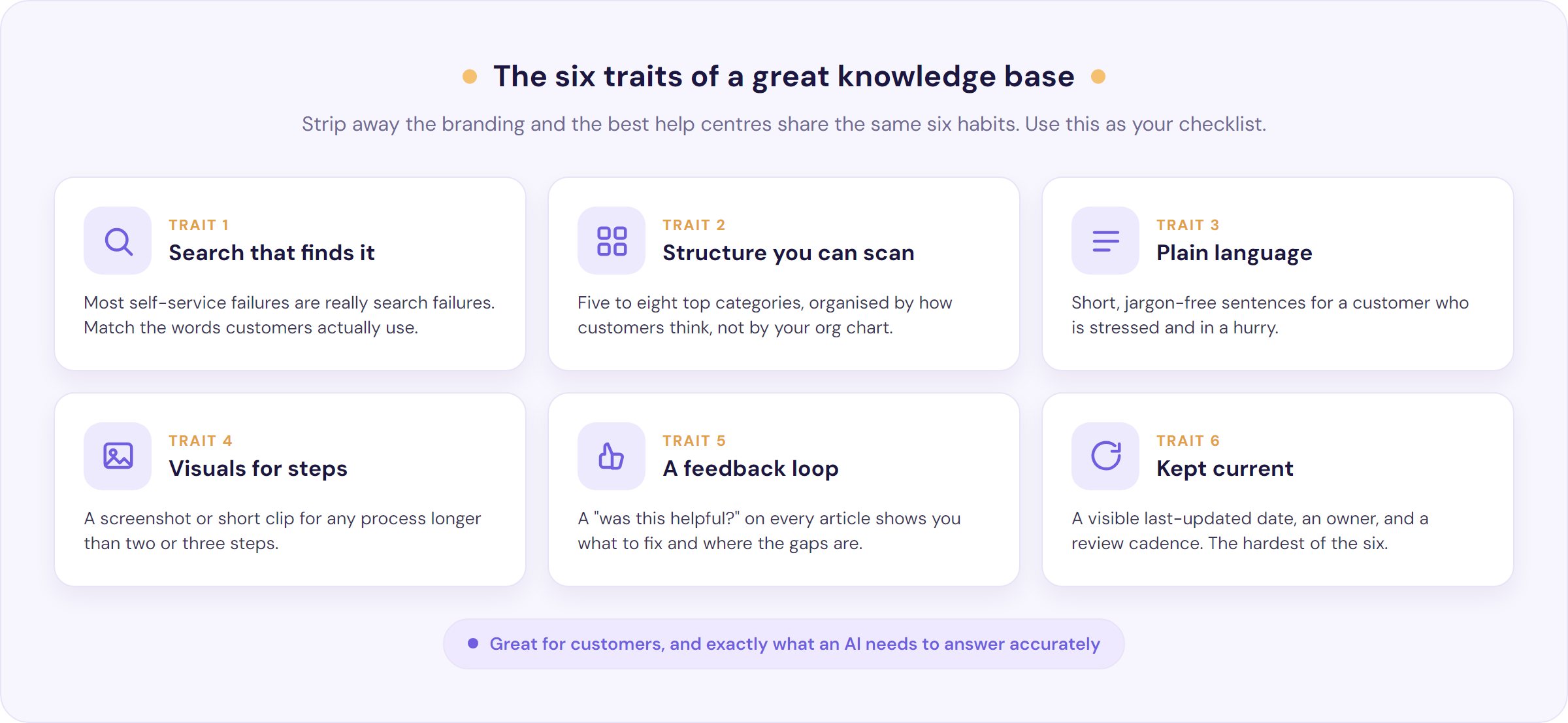
Strip away the branding and the best help centres share the same six traits. Use this as your checklist.
- Search that actually finds the answer. Most self-service failures are really search failures. If someone types their problem in their own words and gets nothing useful, they’re gone. Autocomplete, good synonyms and surfacing the right article first matter more than any visual polish.
- Structure you can scan. As one Zoho Desk walkthrough put it, “the one thing that can make or break your knowledge base is structure.” Aim for five to eight top-level categories organised by how customers think (“Billing”, “Getting started”), not by your internal org chart.
- Plain language. Remember who’s reading: someone “distressed, frustrated and trying to solve a problem,” in Zoho’s words. Short sentences, no jargon, no internal shorthand. Say what to do, plainly.
- Visuals for anything multi-step. A screenshot or a short clip beats a wall of text for any process with more than two or three steps. Show the button, don’t just name it.
- A feedback loop. A simple “was this helpful?” on every article tells you which ones to fix, and low-traffic or low-rated articles tell you where your content has gaps.
- Kept current, visibly. Stale content is worse than none, because it actively misleads. The best help centres show a “last updated” date and mean it. More on how to make that stick later, because it’s the hardest of the six.
Nail these and you’re already ahead of most. The examples below each do at least one of them exceptionally well.
12 knowledge base examples worth stealing from
You don’t need to reinvent this. Here are 12 knowledge base examples, grouped by type, with the one specific thing worth stealing from each. Notice how often the thing that makes them good for a human is also what would make them a clean source for an AI assistant, a point we’ll pull together right after.
SaaS and product help centres
- Notion organises around what you’re trying to do, not around its feature list, and leans on short, visual articles. Steal this: name your categories after user goals, and keep each article to one job.
- Asana pairs written how-tos with short embedded videos and clear, numbered steps. Steal this: give people the choice of reading or watching, and never make a multi-step task text-only.
- Airtable builds a whole universe of use-case walkthroughs and templates that show the product solving real jobs. Steal this: teach the outcome, not just the feature.
- Slack is ruthlessly simple: a handful of top categories and tight, single-purpose articles. Steal this: fewer, clearer categories beat an exhaustive tree nobody can navigate.
Developer and technical docs
- Stripe sets the bar for developer documentation with progressive disclosure: a short answer up top, depth below, code sitting right beside the prose, and search that just works. Steal this: let a beginner and an expert both get what they need from the same page.
- Twilio starts almost every doc from the task the reader came to do, with copy-paste quickstarts. Steal this: lead with the job, not the concept.
- OpenAI treats its docs as a living product, updated alongside each release with worked examples. Steal this: tie doc updates to your release process so nothing drifts.
- 1Password explains security and setup in genuinely plain language, with a screenshot for every step. Steal this: write for the nervous non-expert, not the engineer who already knows.
Consumer and retail help centres
- Spotify puts search front and centre and runs a large community forum that constantly surfaces the questions its articles miss. Steal this: let a community show you the gaps in your content.
- Canva organises everything around “what do you want to do,” visual-first. Steal this: lead with the outcome the customer wants, then show the steps.
- Square writes for non-technical small-business owners, explaining the “why” behind each policy in plain words. Steal this: assume zero jargon and your answers travel further.
- Nordstrom makes its highest-volume answers (returns, shipping, order status) impossible to miss, with strong search over them. Steal this: put your most-asked policies where nobody has to hunt.
Here’s the pattern that runs through all 12. The qualities that make these help centres easy for a human, clear structure, one answer per article, plain canonical wording, freshness, are the exact qualities that make them a good source for an AI chatbot to answer from. That’s not a coincidence, and it’s the thing almost no one talks about.
| Knowledge base | Steal this | Why it also makes a good AI source |
|---|---|---|
| Stripe | Progressive disclosure: short answer, then depth | Canonical, well-structured answers are easy to retrieve and quote |
| Twilio | Start every doc from the task | Task-scoped articles map cleanly to how customers ask |
| Notion | Organise by user goal, one job per article | Atomic articles give the AI one unambiguous answer to pull |
| Slack | Fewer, clearer categories | Clean structure means no conflicting duplicate answers |
| OpenAI | Update docs with every release | Current content stops the AI citing something stale |
| Square | Zero jargon, explain the why | Plain wording matches the customer’s own phrasing |
The part no one mentions: your knowledge base is what makes an AI chatbot accurate
Here’s the shift that changes how you should think about all of the above. A knowledge base is no longer read only by humans. It’s increasingly read by an AI answering your customers on your behalf: Zendesk found that 75% of CX leaders expect 80% of customer interactions to be resolved without human intervention in the next few years, and the only way that works well is if the knowledge underneath it is complete and current. A knowledge base that’s good enough for an AI is a higher bar than one that’s merely good enough for a person, because a person can ask a colleague when the doc is unclear. The AI just answers with whatever it found.
That raises the stakes, and practitioners feel it. In one thread, an enterprise architect at a financial institution described exactly the right fear about putting AI on their knowledge base: “if the knowledge base starts giving incorrect answers, agents could lose confidence over time, eventually leading them to stop using the tool altogether.” A senior engineer described the same spiral for documentation generally: “the moment an engineer is misled by a doc, he will look at code itself or ask around.”
One wrong answer and people abandon the tool. Trust is slow to build and quick to lose, and the data backs that up: Gartner found that “only 27% of customers say they would be willing to try a chatbot again after a negative experience.” A bot grounded in a shaky knowledge base often doesn’t get a second chance.
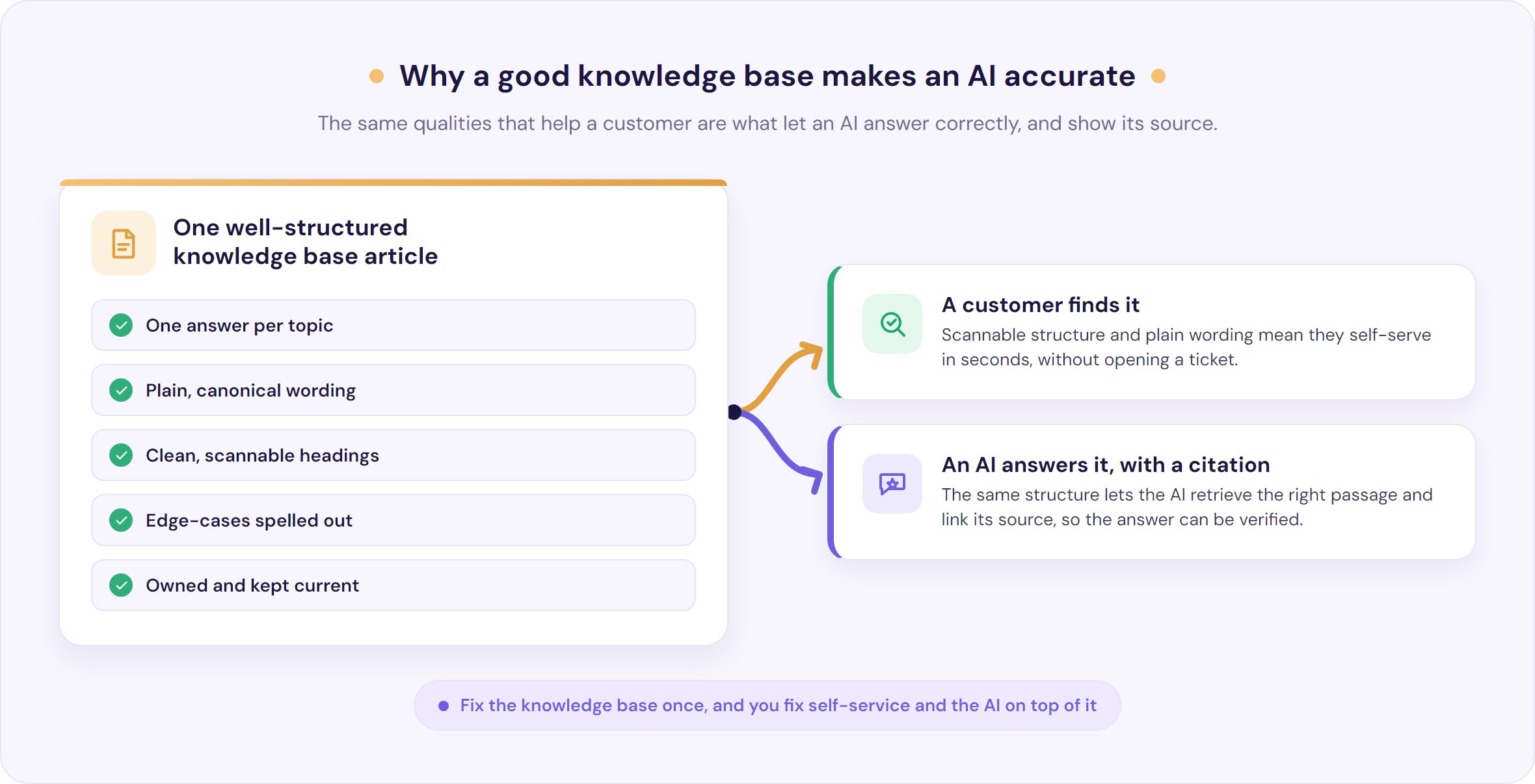
The good news is that the fix is the same work that makes self-service good for humans. An AI support chatbot answers by retrieving from your content, so the qualities that make an article findable and clear for a person are the qualities that let the AI answer correctly:
- One answer per article, in canonical wording. If two articles answer the same question differently, a human gets confused and an AI can retrieve the wrong one. A single source of truth per topic fixes both.
- Clean structure and headings. The same scannable structure a customer skims is what a retriever parses to find the right passage.
- Explicit edge-cases. “If that didn’t work, do this” saves a human a second ticket and gives the AI a real answer instead of a guess.
- Kept current. Gartner’s “43% couldn’t find content relevant to their issue” is the human version of the exact failure that makes a bot say “I don’t know” or, worse, invent something. Stale or missing content poisons both.
There’s one more thing practitioners ask for by name, and it’s worth listening to. In that same finance thread, another commenter said the key was to “provide links to the original data so that agents can verify the results,” and to “share a confidence level with the user so they know when to do further research.” That’s citations. It’s the difference between a black box you have to trust and an answer you can check.
This is exactly how we’ve built our knowledge base chatbot. Our AIChatbot answers only from your own knowledge base, with citations on by default so every answer links back to the article it came from, and a money-backed accuracy guarantee behind it. It doesn’t answer from the whole of the internet, it answers from your content, using retrieval over the same help centre your customers read. And when a question is complex, sensitive or just outside what your content covers, it hands off to a real person with the full conversation attached.
We’re honest about the limits: no responsible vendor should claim an AI “cannot” get things wrong, and if your data can’t leave your environment, that’s a real constraint to weigh. But grounded in a good knowledge base, with citations and a clean human escape, an AI answers the routine questions accurately and around the clock, and leaves your team the ones that need a human.
What a bad knowledge base looks like (and why it breaks AI too)
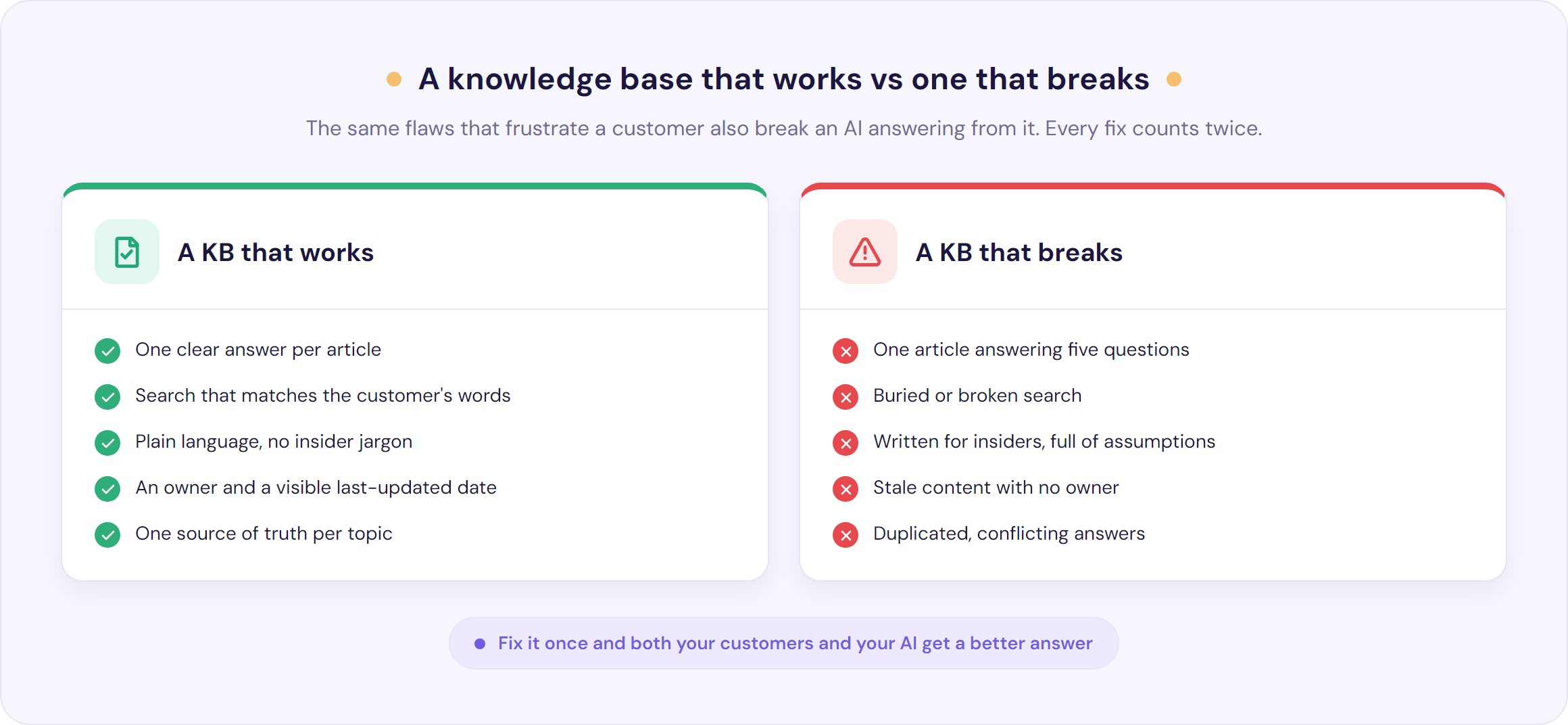
It’s easier to spot the anti-patterns once you know that every one of them hurts a human and an AI in the same breath.
- One article answering five questions. A wall of text where the answer is buried in paragraph six. Humans skim past it, and an AI retrieves a muddle instead of a clean answer. Split it: one job per article.
- Buried or broken search. If your search can’t handle the words customers actually use, your content might as well not exist. This is the number one cause of self-service failure, full stop.
- Stale content with no owner. A senior engineer’s warning applies to any team: “every doc created is a forever commitment to keep it maintained.” Neglected articles don’t just sit there quietly, they mislead, and they teach an AI to be confidently wrong.
- Written for insiders. As one support writer described the trap, internal docs get “built on a ton of assumptions and ‘common knowledge’ internally that nobody expressed.” The distressed customer and the AI both need the unstated step spelled out.
- Duplicated, conflicting answers. Two articles, two different answers, is how you lose a customer’s trust and how you make an AI’s answer a coin flip. Pick one source of truth and link everything else to it.
None of these are exotic. They’re the slow rot that turns a launched-with-fanfare help centre into a graveyard, and the same rot that turns an AI assistant from an asset into a liability.
How to build a knowledge base that stays useful
Building one is the easy part. Keeping it useful is the hard part, and it’s where most fail. Here’s a sequence that holds up.
- Start from your real tickets. Don’t guess what to write. Pull your most common inbound questions and write those first. Every recurring ticket is an article waiting to be written, and it’s one of the most effective ways to reduce your ticket volume. For a small SaaS team, our stage-by-stage SaaS support playbook turns this into a rule: answer a question three times and it gets an article.
- Pick a simple structure. Five to eight top-level categories, named the way customers think. You can always go deeper inside them.
- Write each article for the distressed customer. One job per article, answer first, plain language, then the steps. Assume they know nothing internal.
- Add a visual to anything multi-step. A screenshot or short clip per step. It’s the single fastest way to cut follow-up questions.
- Give every article an owner and a review date. This is the anti-rot mechanism, and it’s non-negotiable. As one engineer laid out the rule: each topic should have “one, clearly identified, source of truth,” because “if it’s the duty to everyone to write the doc, nobody will. The doc goes stale with time.” Assign an owner, set a review cadence, and show the last-updated date so everyone can see what’s fresh.
- Measure deflection and close the gaps. Watch what search and your bot couldn’t answer, and write those next. The dream everyone half-jokes about is documentation that could “write and update itself.” You can’t get all the way there, but mining unanswered questions gets you closer every month.
A knowledge base article template you can copy
Most articles should follow the same shape. It’s friendly to a skimming customer, to Google’s featured snippets, and to an AI retrieving an answer, all at once. Copy this:
Title: the exact question a customer would type (“How do I reset my password?”)
Short answer: one or two sentences that resolve it up front, for the person in a hurry.
Steps: numbered, one action each, with a screenshot per step.
If that didn’t work: the common edge-cases and what to do about each.
Related articles: two or three links to the obvious next questions.
Last updated / owner: the date and the person or team responsible.
It helps to know the four article types you’ll be writing into that shape: how-to guides (step-by-step tasks), troubleshooting articles (something’s broken, here’s the fix), FAQs (short, direct answers to common questions), and reference or product-feature articles (what something is and does). Most help centres are mostly how-tos and troubleshooting, so start there.
Internal knowledge base examples, in a sentence
If you searched for internal knowledge base examples, the shapes are familiar: a company handbook, an engineering runbook, an onboarding wiki, standard operating procedures, usually living in something like Notion, Confluence or a docs-as-code setup. The job is different (it faces your team, not your customers), so the tone and depth differ.
But the one rule that matters most travels straight across from the customer-facing side: single source of truth, with a named owner and a review date. An internal knowledge base rots the same way a public one does, just more quietly. Our focus and our product sit on the customer-facing side, where a stale answer reaches a paying customer, but the discipline is identical.
Frequently asked questions
What is a good example of a knowledge base?
Strong public examples include Stripe and Twilio for developer docs, Notion and Slack for clean SaaS help centres, and Spotify, Canva and Square for consumer support. What makes them good is consistent: search that finds the answer, a scannable structure organised by customer goals, plain language, visuals for multi-step tasks, and content that’s kept current with a visible last-updated date.
What should a knowledge base include?
A customer-facing knowledge base should include a prominent search bar, five to eight clear top-level categories, how-to guides, troubleshooting articles, FAQs and policy pages, visuals for any multi-step process, a “was this helpful?” feedback option, and an easy path to a human when self-service falls short. Each article should answer one question in plain language.
How do I structure a knowledge base?
Structure it around how customers think, not your internal teams. Use five to eight top-level categories (such as Getting started, Billing, Account, Troubleshooting), and keep each article to a single job. A shallow, scannable structure with strong search beats a deep tree nobody can navigate, and it’s also far easier for an AI assistant to retrieve accurate answers from.
What is the difference between a knowledge base and a help centre?
A knowledge base is the organised library of articles that answer customer questions. A help centre is the wider experience around it: the search, categories, contact options and sometimes a community forum. In everyday use the terms are interchangeable, but strictly, the knowledge base is the content and the help centre is the front door to it.
Can an AI chatbot answer accurately from my knowledge base?
Yes, when it’s grounded in your content rather than answering from the open internet. Accuracy depends on the quality of the knowledge base: one clear answer per topic, current content, and plain wording. Look for a chatbot that shows citations so customers can verify each answer, and that hands off to a human when a question is complex or falls outside your content. No responsible vendor should claim an AI can never be wrong.
How do I stop my knowledge base going out of date?
Give every article a named owner and a review date, and show the last-updated date publicly. Schedule periodic reviews rather than relying on people to volunteer, and use your feedback ratings and unanswered searches to flag what needs fixing first. The single-source-of-truth rule matters most: one canonical article per topic, so there’s only ever one thing to keep current.
The bottom line
The best knowledge base examples don’t share a design language. They share a discipline: findable, scannable, written plainly for a stressed customer, kept current, and owned by someone. That same discipline is what lets an AI answer from your content accurately instead of guessing, which is why fixing your knowledge base fixes self-service and your AI support at the same time.
Four things to do this week:
- Pull your top questions from real tickets and make sure each has one clear article.
- Cut your structure to five to eight categories named the way customers think.
- Add an owner and a last-updated date to every article, starting with your most-viewed.
- Rewrite your worst-performing article so it answers one question, plainly, with the edge-cases spelled out.
When your knowledge base is in good shape, an AI can do the rest of the heavy lifting. Our AIChatbot answers your customers from your own knowledge base, with citations on by default so every answer can be verified, a money-backed accuracy guarantee, and a human handover built in for the questions that need one. You can start a 30-day free trial with no credit card, from $35 a month, and turn the help centre you already have into instant, accurate answers.