
OpenAI Agent Builder had a short life. It launched at OpenAI’s DevDay in October 2025, and barely eight months later, on 3 June 2026, OpenAI told developers it was being deprecated. On 30 November 2026, it shuts down for good.
If you built something on it, you now need a plan. And the right plan depends on what you actually built. This piece lays out the facts (with dates you can trust, straight from OpenAI), what happens to the agent you already have running, the alternatives OpenAI points people towards, and the honest catch in each. Then, if what you built was a customer-support bot, the part most of the coverage steps around: you’ve got a simpler option than any of them, a grounded, done-for-you chatbot you never have to migrate at all. If that’s you, skip straight to it below.
What OpenAI announced, and when
On 3 June 2026, OpenAI added Agent Builder to its official deprecations list. Two dates matter, and they’re worth getting exactly right, because plenty of write-ups have fudged them.
| Date | What happens |
|---|---|
| 3 June 2026 | OpenAI announces Agent Builder is deprecated |
| 31 October 2026 | The related Evals platform becomes read-only |
| 30 November 2026 | Agent Builder shuts down for good |
“Deprecated” and “shut down” aren’t the same thing. OpenAI uses deprecated to mean a product is on its way out: announced, no longer recommended, but still working. Shut down (OpenAI also says “sunset”) means it stops. So Agent Builder is deprecated today and keeps running until 30 November 2026, when it’s switched off.
It wasn’t alone. The same 3 June announcement also retired OpenAI’s Evals platform and reusable prompts, both with the same 30 November shutdown. This is a platform tidy-up, not Agent Builder failing on its own. And ChatKit, the chat interface layer many people paired with it, stays available. You can read the notice yourself on OpenAI’s deprecations page.
Does my existing agent still work?
Yes, until 30 November 2026. Nothing breaks the day of the announcement. Your Agent Builder workflow keeps running right up to the shutdown date, then it stops, unless you’ve moved it somewhere else first.
So there’s no emergency today. But there is a deadline. And because the move is more than a button (more on that next), it’s not one to leave to the final week. If that workflow is a customer-support bot and you’d rather not rebuild it at all, there’s a calmer option further down.
What you’re actually losing
Agent Builder was OpenAI’s visual, no-code canvas for wiring up agents: drag nodes onto a board, connect the steps, add tools, preview, ship. The appeal was that you didn’t have to write much code, and OpenAI hosted the moving parts for you.
That hosted convenience is the bit going away. The building experience and the managed backend behind it both disappear on 30 November. What survives is the option to export your workflow as code and run it yourself, which is a different job with a different cost, as we’ll see.
That gap was there from the start. After building a customer-query agent in it, one launch-era reviewer concluded that “there is no way to actually use this kind of agent” without dropping into code to deploy it (Riccardo Vandra, YouTube). Tellingly, his demo was a support bot. The no-code layer was always resting on OpenAI keeping the lights on.
OpenAI’s two official migration paths
OpenAI isn’t leaving people with nothing. Its migrate guide points to two routes, and it’s worth being fair about both.
- Agents SDK, for building agents in code. You open your workflow in Agent Builder, export it as TypeScript or Python, drop that into your own application, install the SDK, and run it on infrastructure you control.
- ChatGPT Workspace Agents, a no-code route where you describe the agent in natural language and share it with your team. It needs a ChatGPT Business, Enterprise, or Edu workspace with workspace-agents access.
| Agents SDK | Workspace Agents | |
|---|---|---|
| Best for | Building in code | No-code, sharing with a team |
| Who can use it | Any developer | Business, Enterprise, or Edu plans |
| You maintain | Your app and its hosting | Less, but gated to those plans |
| The move | Export code, rebuild, test | Paste the export, recreate, test |
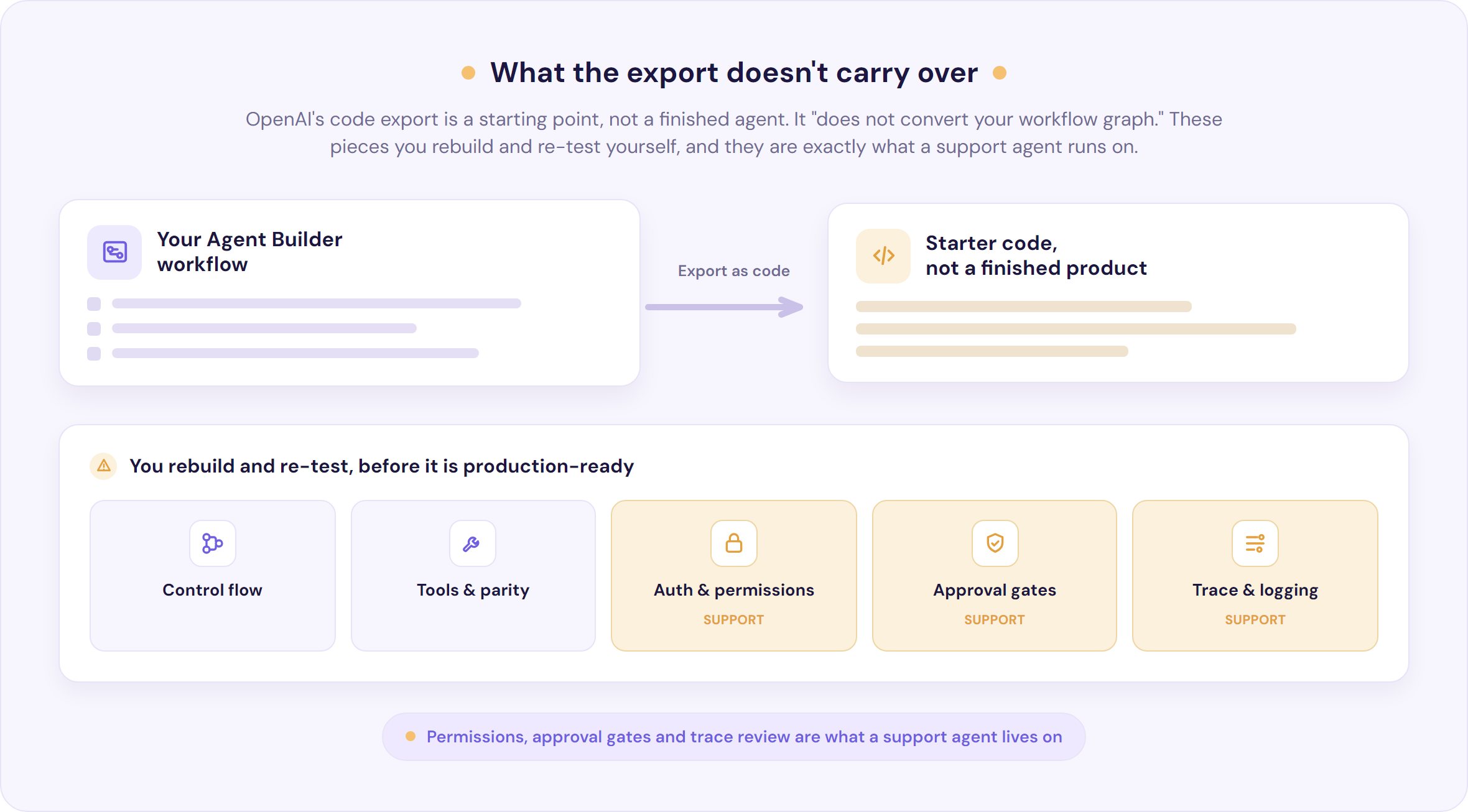
The honest catch is the same for both, and OpenAI says it plainly: the export “does not convert your workflow graph or guarantee that every behavior transfers unchanged.” Treat what comes out as starter code, not a finished product. You’ll be manually rebuilding and re-testing control flow, tool calls, authentication and permissions, approval gates, and logging. Workflows “with strong determinism at their core may not migrate faithfully,” and connected apps and permissions “require separate review.”
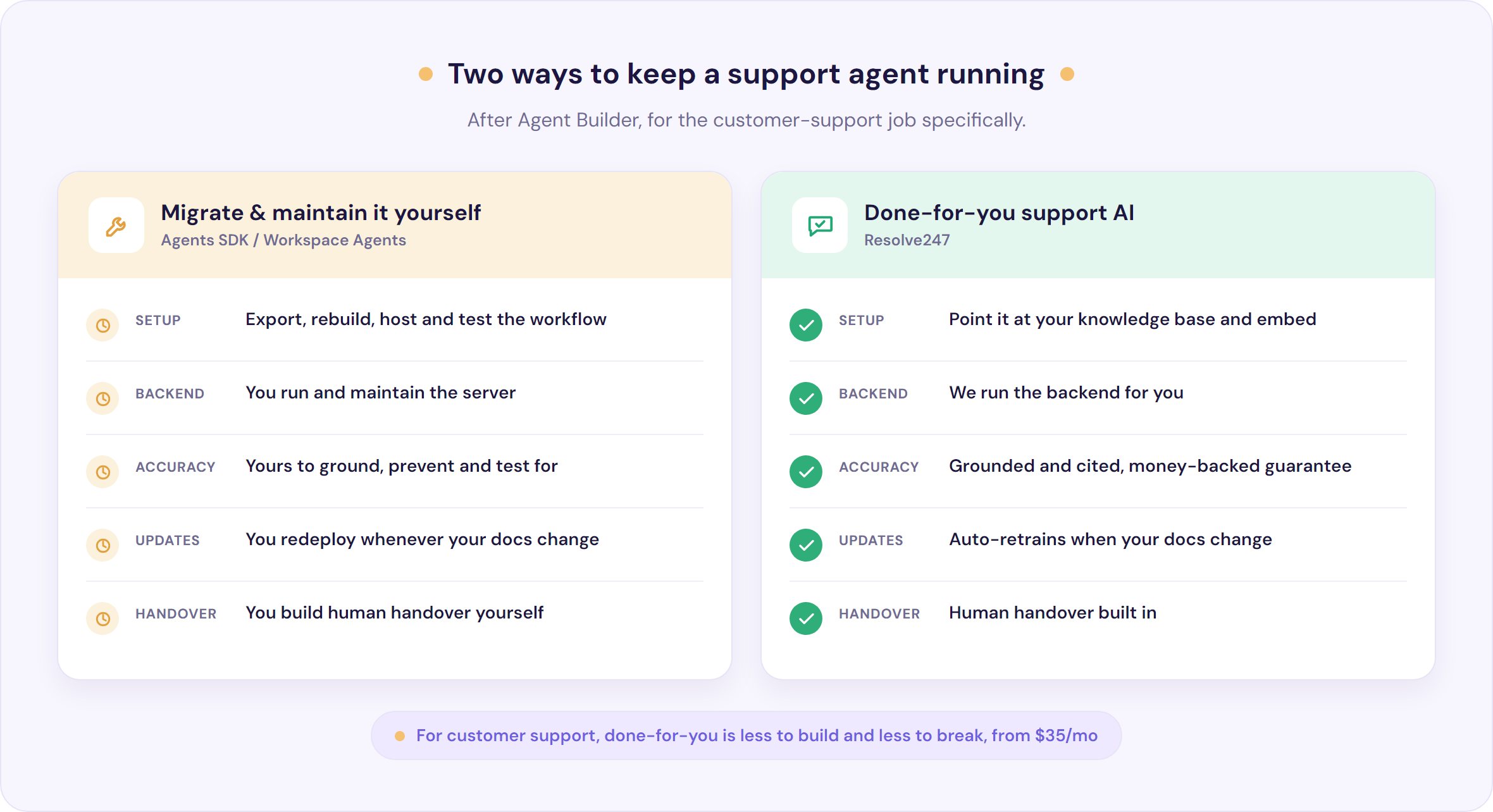
That’s the part that hit the developer forums hardest. On OpenAI’s own community forum, the people scrambling hardest are the agencies and solo builders who’d sold clients a managed no-code bot: now they’re standing up their own servers, fighting cold starts and a dependency clash between OpenAI’s guardrails library and Python 3.14. One called having to run the backend himself “economically unviable.”
The capability didn’t get worse. The ownership changed hands.
If you need a general-purpose agent (operations, data lookups, internal tools), that ownership is simply the price of admission, and the SDK or Workspace Agents is genuinely where you should go, as is one of the many general no-code builders (n8n, Make, LangGraph, Copilot Studio) if you’d rather leave OpenAI’s stack entirely. For the deep technical migration, OpenAI’s own guide is the best reference, and there’s no point us rewriting it.
Why support agents are the hardest to migrate
Here’s the distinction nobody in the alternatives listicles is drawing. “What replaces Agent Builder?” is the wrong question if you were using it for one specific job. And the single job it’s hardest to move is customer support.
Look again at what the export drops: control flow, tool permissions, approval gates, trace and logging review. Those aren’t edge cases for a support agent, they’re the whole thing. Escalation logic (when to hand a conversation to a human), permissions (what the bot is allowed to touch), approval gates (don’t issue that refund without a check), and a reviewable log of what it told customers. One migration checklist names “a support escalation agent with API deployment, custom Python tools, approval gates, and trace review” as exactly the kind of complex case that has to take the full code route.
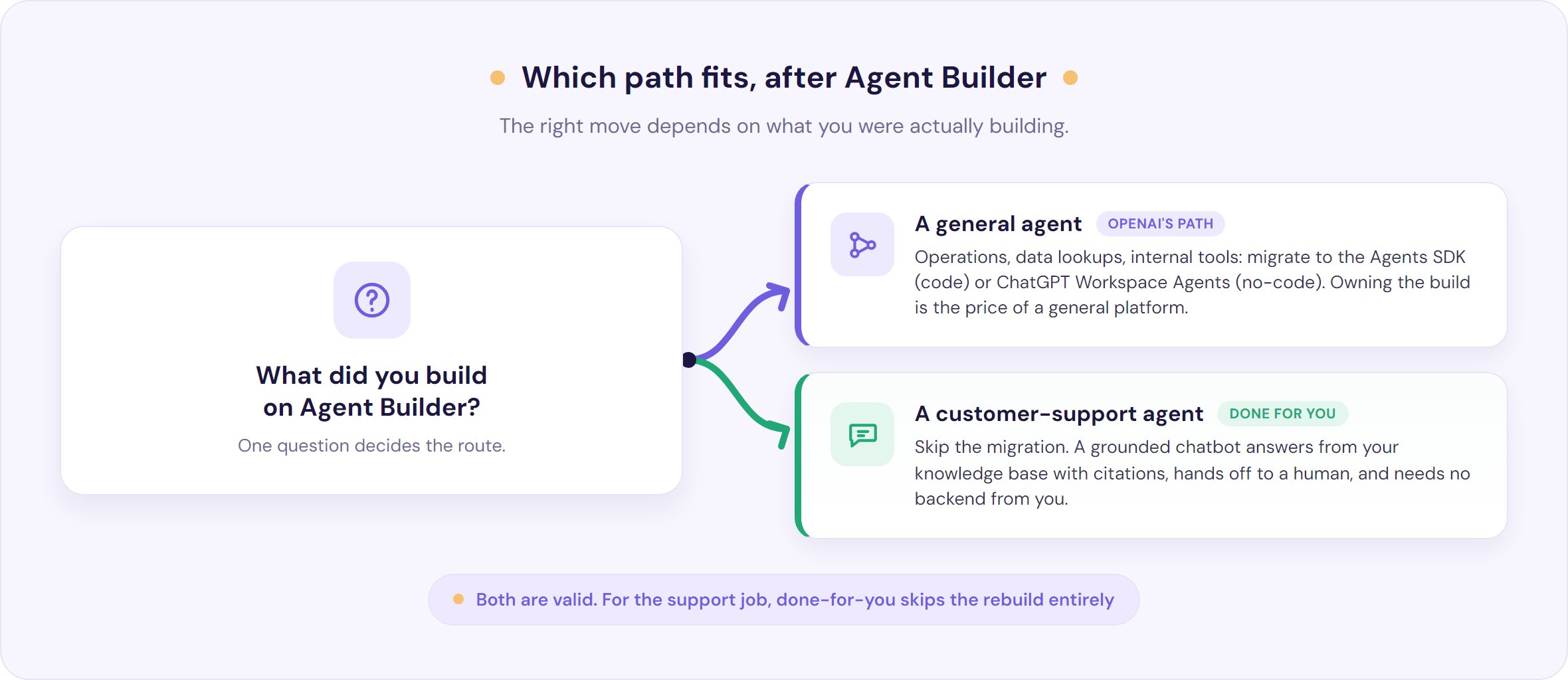
So if you built (or were about to build) a support agent on Agent Builder, your real choice isn’t “which platform do I rebuild the same DIY agent on.” It’s a different question altogether: do you want to own the build-and-maintain burden for a support bot at all?
The simpler path for a customer-support agent
For customer support specifically, there’s an option that skips the migration entirely: a done-for-you support AI built for this one job. That’s what we do at Resolve247. Instead of exporting code and standing up a backend, you point our AIChatbot at your existing knowledge base and help docs, customise it, and embed it. Setup takes minutes, not a rebuild, and when your docs change, it retrains itself.
Here’s what actually changes for you. The moment you own the whole stack, you also own whether the agent is accurate.
Hallucinations, wrong answers, a bot confidently inventing a returns policy: on a DIY build, that’s your problem to prevent and test for. A grounded support chatbot is built to answer from your knowledge base rather than guesswork, shows its sources with citations on by default, and hands off to a human when it isn’t sure, all standing behind a money-backed accuracy guarantee, meaning we put money behind getting answers right. (If you want to go deeper, we’ve written a whole piece on whether AI support chatbots hallucinate and how to test for it.)
It also plugs into the tools you already run, HubSpot, Help Scout, Crisp, and Front, so you’re adding AI on top of your existing setup rather than switching platforms. You can see how support teams use it and try it against your own docs before you commit to anything.
This is scoped on purpose. If you need a general agent platform, we’re not it, take the OpenAI route with a clear conscience. But for the customer-support job specifically, done-for-you beats DIY-and-maintain for most small teams. Try it free and see how close it gets to your docs.
How to choose what to do instead, in four questions
- Is it a customer-facing support bot? If yes, a done-for-you grounded support AI is likely the lowest-effort, lowest-risk path. If it’s general automation, read on.
- Do you want to own and maintain code? If yes, the Agents SDK is built for you. If no, that’s a strong signal against a DIY rebuild.
- Are you on ChatGPT Business, Enterprise, or Edu? Workspace Agents needs one of those plans. On anything lower, it’s off the table.
- Do you need cited, grounded answers on day one? If accuracy is non-negotiable (and for support it is), favour a tool that grounds and cites out of the box over one you have to make accurate yourself.
If you’re weighing options more broadly, our guide to AI agents for customer service walks through agent versus chatbot, cost, and how to choose, and our comparison of customer-service chatbot platforms lines up the main tools.
Frequently Asked Questions
Is OpenAI Agent Builder really shutting down?
Yes. OpenAI added Agent Builder to its official deprecations list on 3 June 2026 and scheduled it to shut down on 30 November 2026. It keeps working until then. ChatKit, the chat interface layer, remains available.
When does OpenAI Agent Builder shut down?
30 November 2026. OpenAI announced the deprecation on 3 June 2026, so there’s roughly a six-month window from announcement to shutdown. The related Evals platform becomes read-only on 31 October 2026 ahead of its own shutdown.
Does the code export just migrate my agent for me?
No. OpenAI states the export “does not convert your workflow graph or guarantee that every behavior transfers unchanged.” Treat it as starter code. You rebuild and re-test control flow, tools, permissions, approval gates, and logging yourself before it’s production-ready.
Do I have to run and maintain my own backend now?
With the Agents SDK, yes: you host and maintain the application. Workspace Agents is no-code but needs a ChatGPT Business, Enterprise, or Edu plan. A done-for-you support chatbot like Resolve247 needs neither, because we run the backend for you.
What is the best Agent Builder alternative for customer support?
It depends on what you want to own. For a general agent, OpenAI’s Agents SDK or Workspace Agents. For a customer-support bot specifically, a grounded, done-for-you chatbot that answers from your knowledge base with citations is usually less work and lower risk than rebuilding one yourself.
Is ChatKit going away too?
No. OpenAI says ChatKit remains available. It’s Agent Builder, the visual canvas and its hosted backend, that’s being retired, not the ChatKit interface layer, though on its own ChatKit still needs a backend you provide.
What to do before 30 November
Agent Builder’s short life is a reminder that the convenient layer can move, and when it does, the work lands on you. You’ve got until 30 November 2026, so there’s time to do this properly rather than in a scramble.
- This week: take stock of what you built on Agent Builder and what it actually does (escalation, tools, permissions, logging). You can’t plan a move without the inventory.
- If it’s general automation: read OpenAI’s migrate guide and pick the SDK or Workspace Agents. Export early and test for behaviour parity, don’t trust the export blind.
- If it’s customer support: decide whether you want to keep owning the build. For most small teams, a done-for-you grounded chatbot is the calmer answer.
If support is your case, you can point Resolve247 at your knowledge base and have a grounded, cited chatbot live in minutes, with a 30-day free trial and no card required. That’s the whole pitch: no migration, no backend to babysit, and accuracy that’s our job to guarantee rather than yours to debug.