

One four-person SaaS team found that the quickest answer to how to reduce support tickets wasn’t a support tool. Support was eating about 15 hours a week, almost all of it repeat questions. When they tagged each ticket by where in the app the customer was, about 70% came from just two screens.
A week of fixes (some inline copy, a tooltip, one reworked toggle) cut their volume by almost half, before they touched any support tool (their comment on r/SaaS). As they put it, repeat questions are “a product problem wearing a support costume.” After that, they added a chatbot trained on their docs to answer the repeat questions that were left.
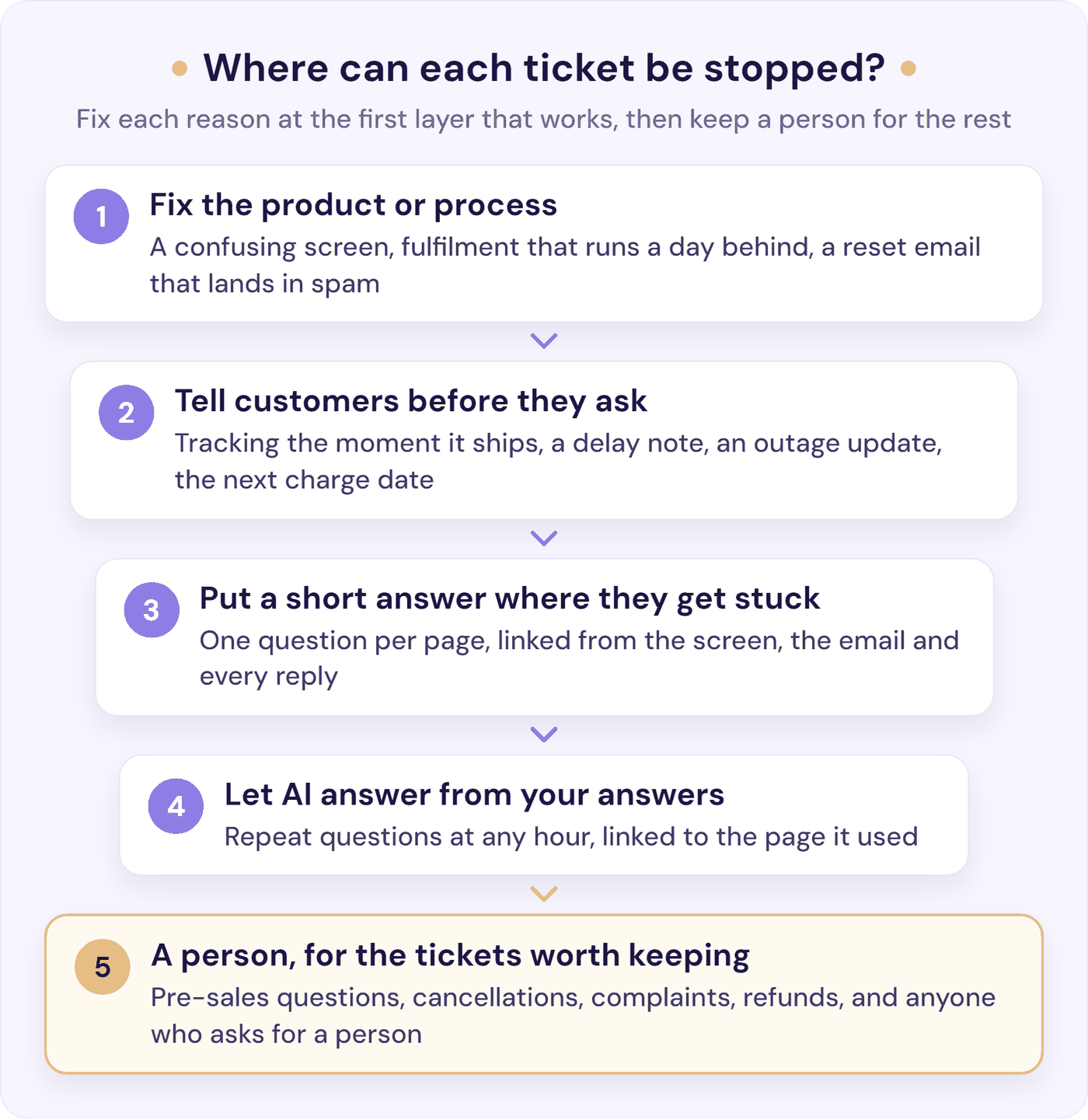
If you have too many support tickets, that’s the whole method in miniature: find out why people contact you, remove each reason at the quickest layer that works, then let an AI chatbot answer the repeats that are left. It works whether you sell software, products, or your time.
The short version:
- Find out why people contact you. Tag your last 100 tickets today by reason, and by where the customer was, then keep tagging new ones for two weeks.
- Fix the cause where you can. A confusing screen or a late tracking email creates tickets that no help article will stop.
- Tell customers before they need to ask. Delivery updates, outage notes, renewal dates, price changes.
- Put a short answer where people get stuck, and link it in every reply.
- Let an AI chatbot answer from those answers, with a person one click away.
- Measure tickets per 100 orders or customers, not the raw count.
First, Find Out Why People Contact You
Working out how to reduce support ticket volume starts with knowing what the tickets are about. You probably know billing comes up a lot. You may not know whether it’s people hunting for an invoice or people disputing a charge, and those need different fixes.
Start today: tag your last 100 tickets in one sitting, then every new one for two weeks. For each ticket, log the reason and where the customer was (a screen, a page, or an email they’d just had). Answer the last three questions once per reason, not per ticket. A spreadsheet works:
| Reason | Where were they? | Could they have found the answer? | What would stop it? | Worth keeping? |
|---|---|---|---|---|
| Order status (“Where’s my parcel?”) | Waiting for the shipping email | No: it hadn’t been sent | Message: send tracking the moment it ships | No |
| How do I (“How do I export my data?”) | The export screen | Yes, but it’s buried in a long article | Content: a short answer, linked from that screen | No |
| Account access (“I can’t log in”) | The login page | No: the reset email went to spam | Product: fix the email sender | No |
| Pre-sales (“Do you work with Xero?”) | Your pricing page | Partly | Genuine: a fast, honest reply | Yes |
| Bug (“The export button errors”) | The export screen | No | Product: fix the bug | Only until it’s fixed |
The “What would stop it?” column sorts each reason into one of four fixes: product or process (something confusing, missing, or broken), a message at the right moment (a tracking link, a renewal date), content that’s missing or hard to find, or genuine, where only a person can handle it (a refund decision, a complaint, or a sale).
If you’re not sure which reasons to use, start with these and add your own:
- Software (SaaS): how do I, login and account access, billing, bugs, “can it do X?”, feature requests.
- Online shops: where’s my order, returns and exchanges, delivery problems, product and sizing questions, discount codes.
- Service businesses: booking changes, prices and quotes, availability, invoices.
Keep it to five to eight reasons plus “Other”, and if several people tag, write one line defining each.
You don’t need a new tool to tag:
- HubSpot: add a dropdown ticket property called “Reason” and filter your tickets by it. (Custom reports need a Professional plan, and HubSpot’s own AI ticket category needs Service Hub Enterprise.)
- Help Scout: tag each conversation; the All Channels report shows your top tags and how each is trending against a comparison period.
- Crisp: add a conversation segment for each reason; Crisp Analytics (Essentials plan and up) counts conversations per segment.
- Front: tag each conversation; the Tags report (Professional plan and up) shows how many conversations carry each tag over time.
- Gmail, Outlook, or another help desk: one label or tag per reason. For Instagram or WhatsApp messages, a tally in the spreadsheet is enough.
After two weeks, count each reason and sort by place. You’ll often find that several different questions share one cause, or one screen.
Your top three to five causes are your plan. Rank them by count, then move up anything slow to answer or risky for revenue, such as billing errors or cancellations. The “Could they have found the answer?” column tells you which fix to try first. If the answer already existed and people still asked, the problem is where it lives or how it’s written, not that it’s missing.
Before you change anything, write down last month’s ticket count and your orders or active customers for the same month. That’s your baseline. (If you also want to know what each ticket costs you, here’s how to work out your cost per ticket.)
The Quickest Fix for Each Common Ticket Reason
These reasons come up again and again in software, shop, and service-business inboxes. Start with whichever topped your sheet.
| Ticket reason | Quickest fix | Lasting fix | Can AI answer it? |
|---|---|---|---|
| Where’s my order? | A “Track your order” link in every order email | Fulfil on time; send delay notes | Delivery times, yes; one parcel, only if connected to your orders |
| How do I…? | A short answer where people get stuck | Fix the confusing screen | Yes, from your help pages |
| I can’t log in | Make sure the reset email arrives | Clearer errors, sign-in links | The steps, yes; locked accounts, no |
| Billing | Self-serve invoices and plan details | A statement name people recognise | Where and when, yes; disputes, no |
| Returns, cancellations, bookings | A link in every confirmation | Self-serve changes | The policy, yes |
| Is something broken? | A status page and an incident note | Fix the bug | Known issues, yes |
| Can it do X? | A fast, honest answer | A page per common question | Yes, then a person for serious buyers |
“Where’s My Order?”
For an online shop, order status is the classic repeat ticket. You’ll see claims that it’s anywhere from 10% to 40% of support contacts, and over half at peak season, but nobody has published those figures with a method behind them. A tracking company followed them back in August 2026 and found only blog posts citing each other (Ship24). Your tagging sheet will tell you your real share.
Often the cause is upstream. On Shopify, the shipping confirmation email with the tracking number goes out when you fulfil the order, so if fulfilment runs a day or two behind, so does the email, and customers ask. Fix that first. Then add a “Track your order” link to your site menu and every order email, and show your delivery times next to the price and at checkout.
Next, rewrite the emails you already send. According to the team that made the changes, one store’s order-status tickets dropped noticeably within a couple of weeks after three edits:
- Tracking in the confirmation email, the moment it existed.
- A short note whenever a delivery slipped: “running about 2 days behind schedule, updated estimate here”.
- A line on the delivery email: “if anything looks off when it arrives, just reply here”.
Most of the drop came from the delay note. What kept coming back were sizing questions, a product-page problem no email can fix: put the measurements and fit notes people keep asking for on the product page. That’s the tagging sheet doing its job.
“How Do I…?”
How-to questions come from two places: a screen that doesn’t explain itself, or an answer people can’t find. Watch two or three customers use the confusing part, on a screen recording or a quick call, and fix what trips them up: a label, a missing button, a default.
For everything else, write one short answer per question. Use the customer’s words as the title, put the answer in the first two lines, and add a short video where showing beats telling. Then link it where people get stuck: next to the setting, in the onboarding email, on the contact form.
Findability matters as much as the answer. In a Gartner survey published in 2024, the most common reason self-service failed was that customers couldn’t find content relevant to their issue, in 43% of cases (Gartner). If your help centre reports searches that found nothing, read them: each one is a page to write. An AI chatbot helps here too, because customers can ask in their own words instead of guessing the right search term. These knowledge base examples show how good help centres lay this out. Our self-service guide covers where to put answers so customers find them.
“I Can’t Log In”
Login tickets are often a product problem with a support label on it. Check the basics first: does the password reset email arrive within a minute, and does it land in spam? Does the error message tell people what to do next? Sign-in links and “sign in with Google” take away most forgotten-password questions.
An AI chatbot can walk people through the reset steps. Locked, hacked, or merged accounts need a person, every time.
Billing
Many billing tickets aren’t how-to questions. As one commenter in r/SaaS put it, the customer “isn’t confused about how the product works, they just don’t know their own account state” (r/SaaS). Show the plan, the next charge date, and the amount where customers can see them, and flag a failed payment inside your product, not only by email.
Let customers download their own invoices and update their own card details. Billing tools often include this, such as Stripe’s customer portal.
Check how your business name appears on card statements, too. One shop owner said “half the chargebacks I used to get was just customers not recognizing the name on their statement” (r/dropshipping). Refunds, disputes, and exceptions are different: a person decides, and an AI chatbot should never promise money.
Returns, Cancellations, and Booking Changes
For shops, a clear returns page linked from the order and delivery emails answers “how do I send this back?” before anyone asks. For service businesses, put a reschedule link in every booking confirmation and reminder, so changing a time doesn’t need a conversation. Booking tools such as Calendly can add one for you.
Make cancelling easy to find. A customer who can’t cancel may dispute the charge with their bank instead, and a chargeback costs you more than the cancellation would have. Offer a quick conversation to anyone who’d rather talk it through.
“Is Something Broken?”
When something breaks, lots of customers write in about the same problem at once. A status page and a short note to the people affected (“we know, here’s what’s happening, next update at 3 p.m.”) answers them all in one go. Send the same kind of note before a price rise or a redesigned screen. Keep a “known issues” page for bugs you haven’t fixed yet, then treat a cluster of tickets about one bug as what it is: a product job with a count attached.
“Can It Do X?” and Feature Requests
A page for each common question, including the things you don’t do, saves buyers from having to ask at all. An AI chatbot can answer “do you work with X?” from your pages at 2 a.m. and pass a serious buyer to a person.
Feature requests are different. Point them to a public feedback board or roadmap, so customers can vote instead of writing in, and reply to the ticket with the link.
Make Every Reply Prevent the Next Ticket
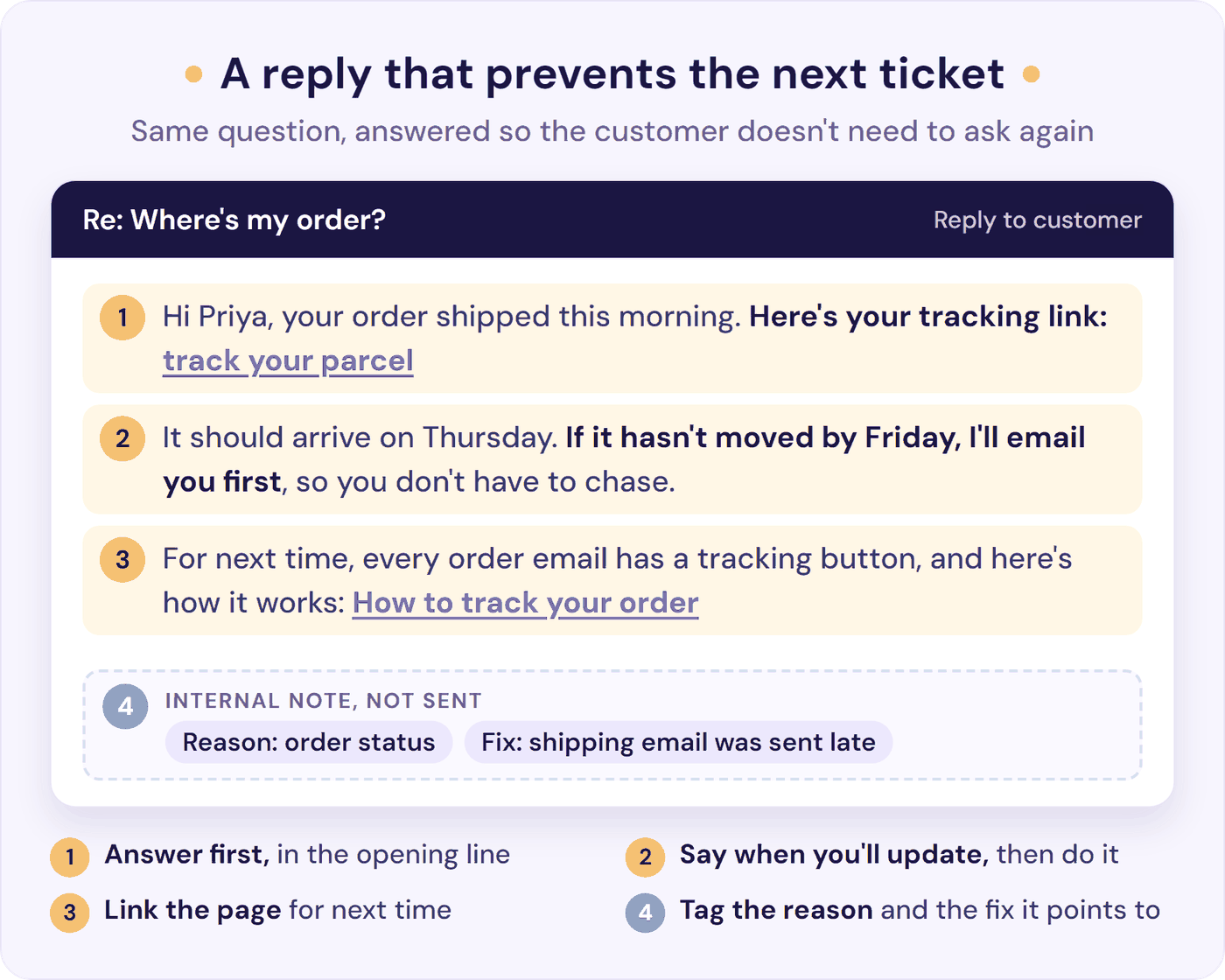
The tickets that still reach you are your best source of fixes, as long as each reply does a little more than answer:
- Link the answer, every time. Customers told Gartner in 2025 that 60% of service agents didn’t point them to self-service, and those who were pointed to it were about twice as likely to say they’d use it next time (Gartner). End each reply with “here’s the page for next time”.
- Stop the chase. In SQM Group’s call-centre research, the first cause it lists for repeat contacts is customers checking on an issue that isn’t resolved yet (SQM Group). Say when you’ll next update the customer, and update them before they ask.
- Tag as you reply. Add the reason before you send, so the sheet fills itself.
- Close the loop the same day. When you fix a cause, update the help page, your saved reply, and anything your AI chatbot learns from. Stale answers create their own tickets.
- Don’t confuse faster with fewer. Saved replies make each answer quicker to write, but the ticket still arrives. They belong after the fixes above, not instead of them.
The Tickets You Should Keep
Not every ticket is a cost. Some are where sales and loyalty are won, and pushing them away to lower a number is a bad trade:
- Pre-sales questions. Someone asking “will this work for my team?” is halfway to buying. Answer fast, and make a person easy to reach.
- Cancellations and complaints. These are your last chance to fix things. Our guide to dealing with angry customers covers what to say.
- Refunds and exceptions. A person decides. Our customer service escalation guide covers who decides what, and how quickly.
- Anyone who asks for a person. Give them one.
Making contact harder will lower your ticket count, and it will also cost you customers. In Shep Hyken’s 2025 survey, 63% of US adults said they had stopped doing business with a company because they couldn’t reach its customer support (Hyken). Some friction is fine: an email form with a clear reply time is reasonable for a non-urgent how-to question. A hidden contact page isn’t.
How to Reduce Support Tickets with AI
An AI chatbot answers from your answers, so the steps above are what make it good. If the tracking email is late and the returns page is vague, it has nothing good to work with. Once the causes are fixed and the answers written, it catches the repeats around the clock, in the chat window customers already use.
That’s the order the four-person team followed. The better your answers, the more of the repeats it takes off your team.
Three things decide whether it reduces tickets or just moves them:
- It answers only from your content and links the page it used, so customers can check the answer instead of writing in to confirm it.
- It says when it doesn’t know, instead of guessing. The four-person team set theirs to open a ticket whenever it wasn’t sure, because “a bot that gives a wrong answer with confidence is way worse than no bot at all.”
- A person is one click away, with the conversation attached. In Gartner’s 2026 survey, 87% of customers said an option to reach a human agent is essential when companies use generative AI (Gartner, August 2026). Our chatbot to human handoff guide shows how to set that up.
Start with your top three reasons. Before it goes live, ask it the real questions from your sheet, worded the way customers write them, and fix any thin answer at the source. Then put the chatbot where people decide to contact you: your contact page, your help centre, and the screens your sheet flagged.
Every week, read the conversations it couldn’t answer: those are the next answers to write. For the bigger picture, customer service automation covers what to automate and what to keep human, and our glossary explains ticket deflection.
Where Resolve247 Fits
Resolve247’s AIChatbot answers your customers from your own help pages, files, Notion pages, and short snippets, inside your existing HubSpot or Crisp chat, or in its own website widget on any site, Shopify included. Across our customers, it answers 82% of customer questions without a human (from 71% to 94%, depending on the business).
- Answers you can check. Answers drawn from your help pages link to the page they came from (on by default), and when the answer isn’t in your content, the AI is instructed to say so rather than guess. If it ever hallucinates, that month’s chatbot is free.
- A person from the first message. In the website widget, “Contact a Human” is on screen from the start, and your team gets the whole conversation. In HubSpot or Crisp, it answers inside the chat your team already works in, and you can switch on a rule to hand a chat over automatically when the AI can’t answer.
- Check its answers first in HubSpot. It starts by posting its answers as internal comments, so your team sees exactly what it would say. When you’re happy, switch it to reply to customers directly.
- The next answer to write. The dashboard shows how many conversations ended without anyone asking for a person, and how many went to your team. Knowledge Gaps lists the questions the AI couldn’t answer, grouped by topic and ranked by how often they come up. It also sorts every chat by category, such as billing or how-to, a head start on your tagging sheet.
Tiiny Host, a website hosting tool, trained our chatbot on its help articles, and its founder says it “has reduced our support workload by 50%” (their own figure). If you run a shop, give it your delivery times and a link to your tracking page, so “where’s my order?” gets an instant answer and a way to check the parcel. Then measure the drop where your tickets live, in your helpdesk, using the contact rate below.
For the tickets that should reach a person, ResponseAssistant drafts replies in Help Scout or Front, reusing your team’s past answers to similar questions, so each one takes less time to answer. Plans start at $35 a month, flat. Start a 30-day free trial, no card needed.
How to Know Your Support Ticket Volume Is Really Falling
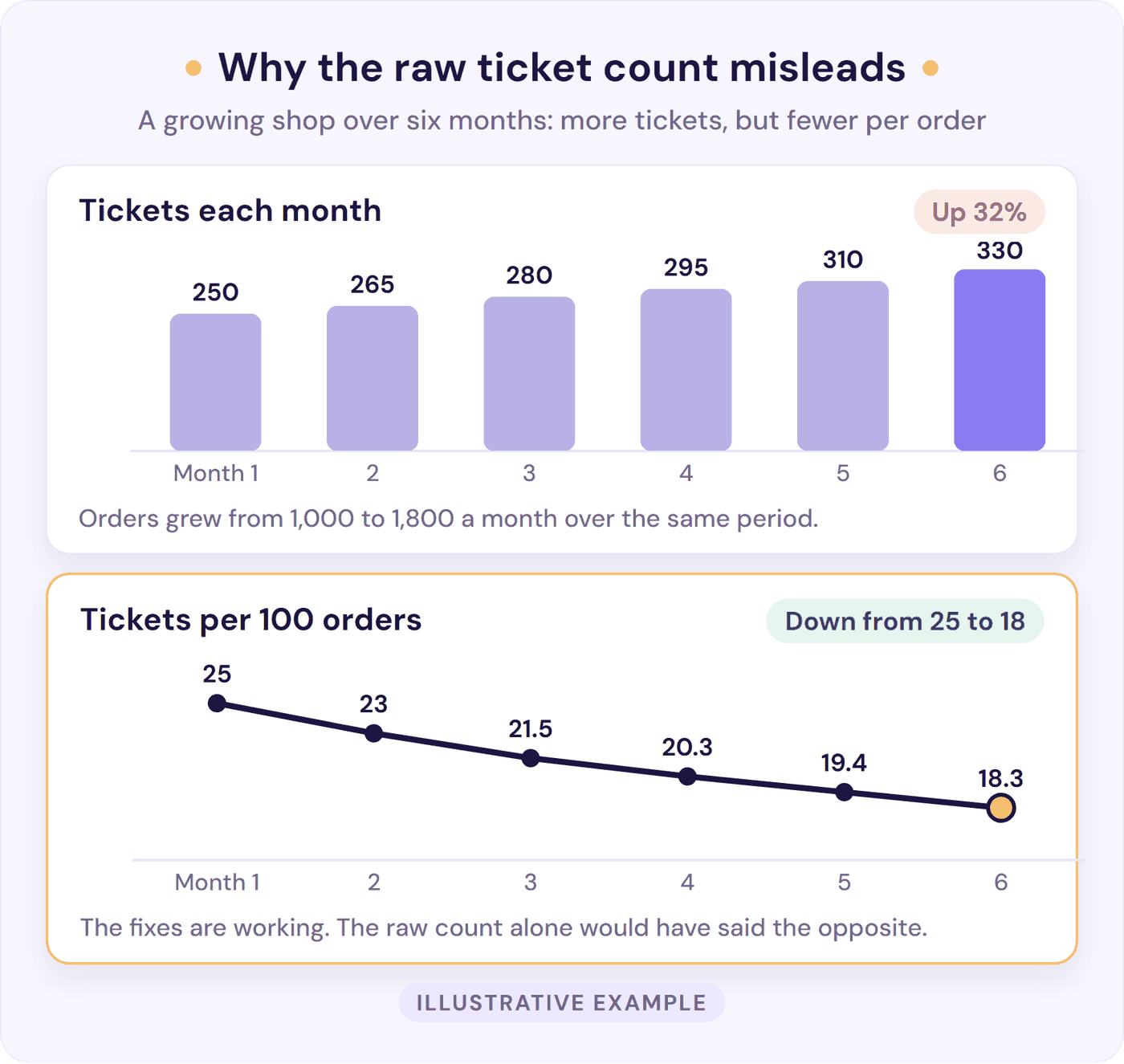
A growing business gets more tickets, and a shrinking one gets fewer. Neither tells you whether your fixes worked. Once a month, check these:
- Contact rate. Tickets per 100 orders for a shop, or per 100 active customers for software and services (paying accounts, for B2B), so growth doesn’t look like failure. Pick one denominator and keep it (it’s one of our five customer service KPIs for small teams). Among online shops in Gorgias’s $10 million sales band, electronics brands get about 46 tickets per 100 orders and food and drink brands about 20. Gorgias says the gap reflects product complexity rather than a problem to fix (Gorgias Ecom Lab, April 2026). Compare yourself with your own last quarter, or with shops like yours, not with an average. There’s a worked example below.
- Volume by reason. Keep tagging. Give each fix 30 days, then compare that reason’s count with the 30 days before. Anything new that appears is your next job.
- Repeat contacts. Each week, take 20 closed conversations, your team’s or your chatbot’s, and check whether the same person got back in touch about the same thing within seven days. One support team’s bot showed a 41% “deflection” rate, but its resolution rate, checked 24 hours later, was 19%: much of the gap was people giving up and emailing the next day. Measuring that way removed the incentive to keep building decision-tree flows that only looked good in the dashboard (r/CustomerSuccess). Our guide to deflection vs resolution shows how to turn that check into a resolution rate.
- Signs people are giving up. Watch for complaints moving to reviews, social media, refund requests, or chargebacks, and for pre-sales questions, watch conversion. A quieter inbox is only good news if problems are being solved.
If you’ve been set a target, such as 30% fewer tickets this quarter, set it per reason, not for the whole inbox, and report the contact rate beside the count. Big drops come from removing one big cause, as the four-person team found. McKinsey saw the same in large contact centres: the organisations that have cut interaction volume by 10% to 15% or more a year since 2022 did it by fixing broken processes and system problems, work AI can’t do on its own (McKinsey, 2025).
What to Do First
If you have too many support tickets right now, here’s the quickest way to reduce ticket volume, in order:
- Today: tag your last 100 tickets and note your baseline.
- Today: fix the one message your top reason needs, such as the tracking email, the status page, or the invoice download.
- This week: write five short answers to your most common questions, and link them where people get stuck.
- Week 2: read the sheet and fix the biggest product or process cause.
- Week 3: put an AI chatbot on those answers, with a person one click away.
- Every month: check your contact rate, your top reasons, and what the AI couldn’t answer.
If you’re a founder still answering every ticket yourself, our SaaS customer support playbook shows when to add each layer as you grow.
Frequently Asked Questions
What causes a high volume of support tickets?
High ticket volume usually comes down to a few repeat causes: customers can’t find something they need (order status, an invoice, how to do something), something in the product or process is confusing or broken, or nobody told them something before they had to ask. Tag your last 100 tickets by reason to see which of these drives yours.
How can you reduce customer support tickets without annoying customers?
Remove the reasons people need to write in, rather than making it harder to write in. Fix confusing screens, send updates before customers ask, put short answers where they get stuck, and keep a person one click away. Then check that the quieter inbox means solved problems, not customers giving up.
Can an AI chatbot reduce support tickets?
Yes. An AI chatbot trained on your own help pages answers repeat questions instantly, day and night, and a good one passes the rest to a person with the conversation attached. Across Resolve247’s customers, our AI chatbot answers 82% of questions without a human (71% to 94%, depending on the business). The more your help content covers, the more it answers.
How do you measure a reduction in support tickets?
Measure your own trend rather than chasing a benchmark, because ticket rates vary so much with what you sell. Track tickets per 100 orders or customers, volume by reason, and whether customers come back about the same thing within seven days, so a lower count means problems are solved, not that people gave up. Our glossary explains the deflection rate formula.
How many support tickets per customer is normal?
It depends on what you sell. Among online shops in Gorgias’s $10 million sales band, electronics brands get about 46 tickets per 100 orders and food and drink brands about 20 (Gorgias Ecom Lab, April 2026). For software, track tickets per 100 active customers. The useful comparison is with your own last quarter.
How do you reduce support tickets as a solo founder?
Start small. Tag your last 100 tickets, fix the one cause behind most of them, and write short answers to your five most common questions. Link those answers in every reply. Once they exist, an AI chatbot can answer them around the clock, nights and weekends included, while you keep the tickets worth answering yourself.
The Bottom Line
The answer to how to reduce support tickets isn’t making contact harder. It’s removing the reasons people need to get in touch, at the quickest layer that works, and judging the result by your contact rate, not the raw count.
Tag your last 100 tickets today, and put the answers you already have to work: start a free 30-day trial of Resolve247 and train an AI chatbot on your help pages, with a person one click away. Its Knowledge Gaps show you which answers to write next. No card needed, and if it ever hallucinates, that month is free.