

An online store owner’s payouts were stuck on hold, so they logged four support tickets over three weeks. Every ticket was marked “escalated”. Every request for an update went unanswered. The answer turned up in the end, in their junk folder: support had replied by email, outside the tickets they were watching (their thread on r/shopify).
Someone did pick up that customer service escalation and answer it. The handover is what failed.
In a small team, it’s easy to do the same by accident: the developer replies in Slack, the founder emails the customer from their own inbox, and the ticket says nothing. Customers notice. In Shep Hyken’s 2025 survey of 2,119 US adults, 69% said they were likely to leave a company that kept transferring them and made them repeat their story (Hyken, 2025).
Most guides to handling escalations assume a tier 2 team, and some assume an on-call engineer. This one is for a team where tier 2 is your developer or the founder. You’ll get a six-step process, time limits you can keep, and where an AI chatbot fits. If you came for a template, jump to the escalation matrix, the handover note, or the customer messages.
The short version:
- Try first, for a set time, and look for a workaround the customer can use today. Urgent issues go straight on.
- Pick who takes it, from your escalation matrix: a named person, never just “engineering”.
- Write a handover note they can act on without asking you anything.
- Keep the customer. Pass on the problem, not the conversation.
- Tell the customer who, what, and when. Promise the next update, not the fix, and keep the promise.
- Close the loop: tell everyone affected when it’s fixed, then fix the cause so it doesn’t come back.
What Counts as a Customer Service Escalation (and When to Escalate)
A customer service escalation is when the person handling a customer’s issue passes it to someone with more skill, access, or authority. In a small team, there are two kinds of customer escalation.
You pass on a problem when it needs someone who can do something you can’t, like your developer for a bug. You pass on a decision when it needs someone who can say yes to something you can’t, like the owner for a refund outside your policy. Our glossary covers escalation management and the formal names for these (functional and hierarchical). Calming an upset customer down is a different job, de-escalation, and our guide on how to deal with angry customers covers it.
The most common escalation in a small team is the quietest one: you ask a colleague for help and keep the conversation yourself. One sysadmin’s advice for first-line staff on a new escalation process is “No silent passing of tickets.” The first person keeps the ticket and asks for help first, and hands it over only when the fix needs someone else’s permissions or a deeper investigation (r/sysadmin).
Escalate when:
- It needs skills or access you don’t have: a bug, a data fix, a change in a system you can’t touch.
- It needs a decision above your limit: a refund or credit outside policy, an exception, a contract change.
- It touches money, personal data, or security, affects many customers at once, or mentions a lawyer or a chargeback.
- You’ve made no progress after your time box.
- The customer asks for someone else, and you’ve already done what you can.
If you’re new and worried about bothering the developers, a clear note at the agreed time isn’t a bother. A vague message in a DM is. When you’re unsure, escalate with a good note. The person you pass it to can always send it back.
Hold off when:
- The answer is already in your help content. Send the link (or let your chatbot answer it), then make that page easier to find.
- You haven’t tried an obvious workaround.
- It’s a feature request. Log it where product decisions happen, and tell the customer you have.
Give the first attempt a real time box, say 30 minutes to an hour of actual work. The time box is for ordinary problems: outages, failed payments, lost data, and security worries go straight to the person who can fix them. A box that’s too tight just produces escalations with nothing in them. One sysadmin describes help desks with rules like “8 mins or escalate”, where “it’s basically impossible” for first-line staff to do “the actual job” (r/sysadmin).
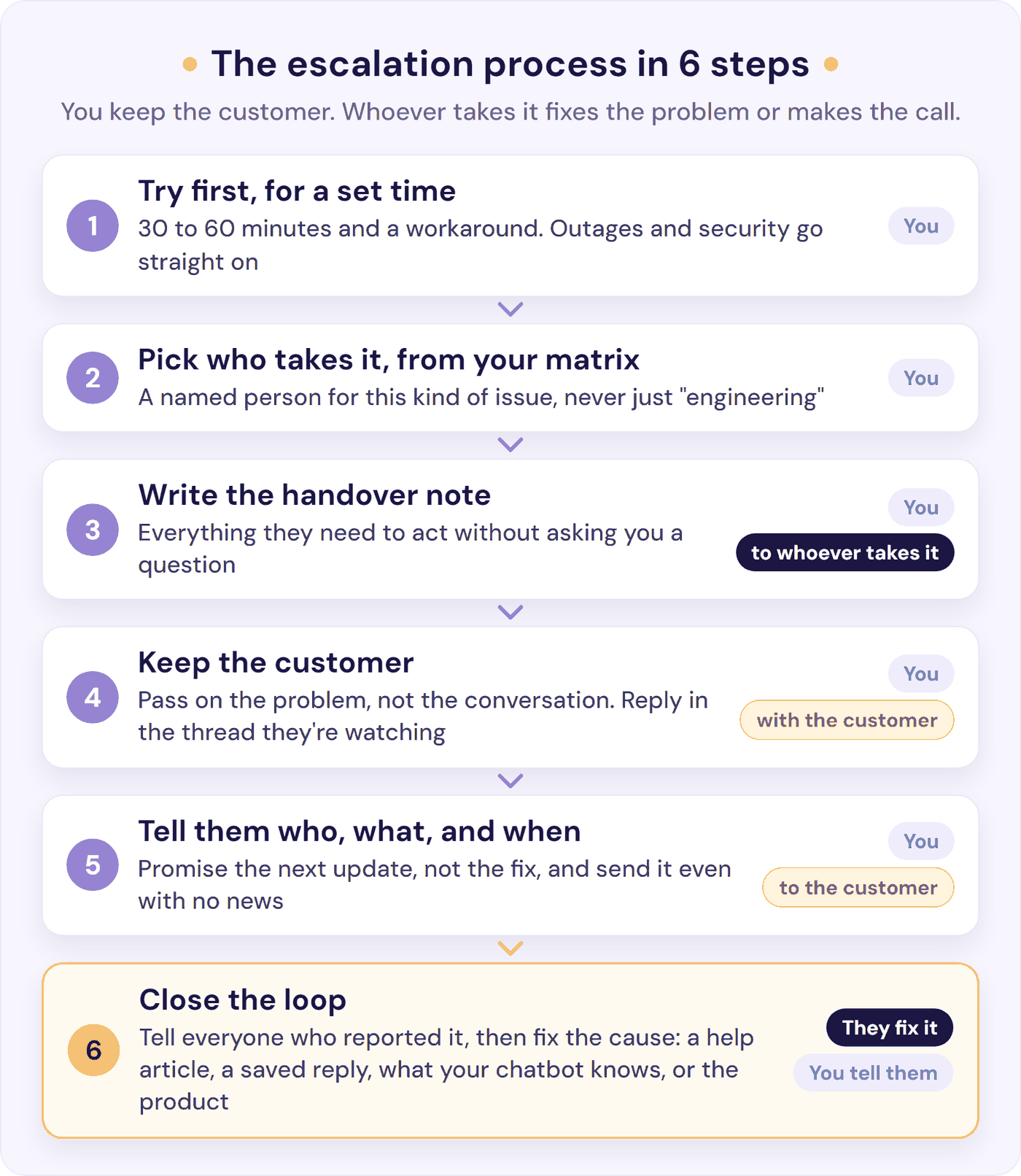
The Customer Service Escalation Process in 6 Steps
-
Try first, for a set time. Work the problem for your time box. Look for a workaround the customer can use today: a manual export while the button is broken, or a temporary licence while billing sorts out a failed payment. A workaround turns an urgent escalation into a normal one. Skip the time box for the urgent rows in your matrix: if the site is down, payments are failing, data is lost, or there’s a security worry, pass it on straight away.
-
Pick who takes it, from your matrix. Every kind of escalation should have a named person: “Priya for bugs, Ali (the founder) for refunds over $100”. “Send it to engineering” with no name attached is how tickets sit untouched. The matrix template below is a starting point.
-
Write the handover note. The person picking it up should be able to act without asking you a single question. Hyken’s advice, beside that 69% figure, is that “the first person to hear the story needs to document it properly in the customer’s record”. The handover note template is below.
-
Keep the customer. Pass on the problem, not the conversation. You stay the customer’s contact, and replies go out in the channel and thread they’re already watching, so nothing ends up in a junk folder. If your developer needs to ask the customer something, you ask it. When the owner takes over a decision, they reply in the same thread and say who they are.
-
Tell the customer who, what, and when. Say who is looking at it, what happens next, and when you’ll update them. Promise the next update rather than the fix, and send it on time even when there’s no news. SQM Group, which benchmarks call centres, finds customers can stay fairly satisfied when a hard issue isn’t fixed first time, as long as the agent shows “ownership” and “a clear path toward resolution” (SQM Group).
-
Close the loop. When it’s fixed, tell the customer, and everyone else who reported the same problem. One software company contacts the users who reported a bug once a fix is available: “They will be super appreciative of that.” (r/ProductManagement). Then tell the person who escalated how it was solved, and fix the cause: a help article, a saved reply, what your chatbot knows, or the product itself.
Who Handles What When There’s No Tier 2
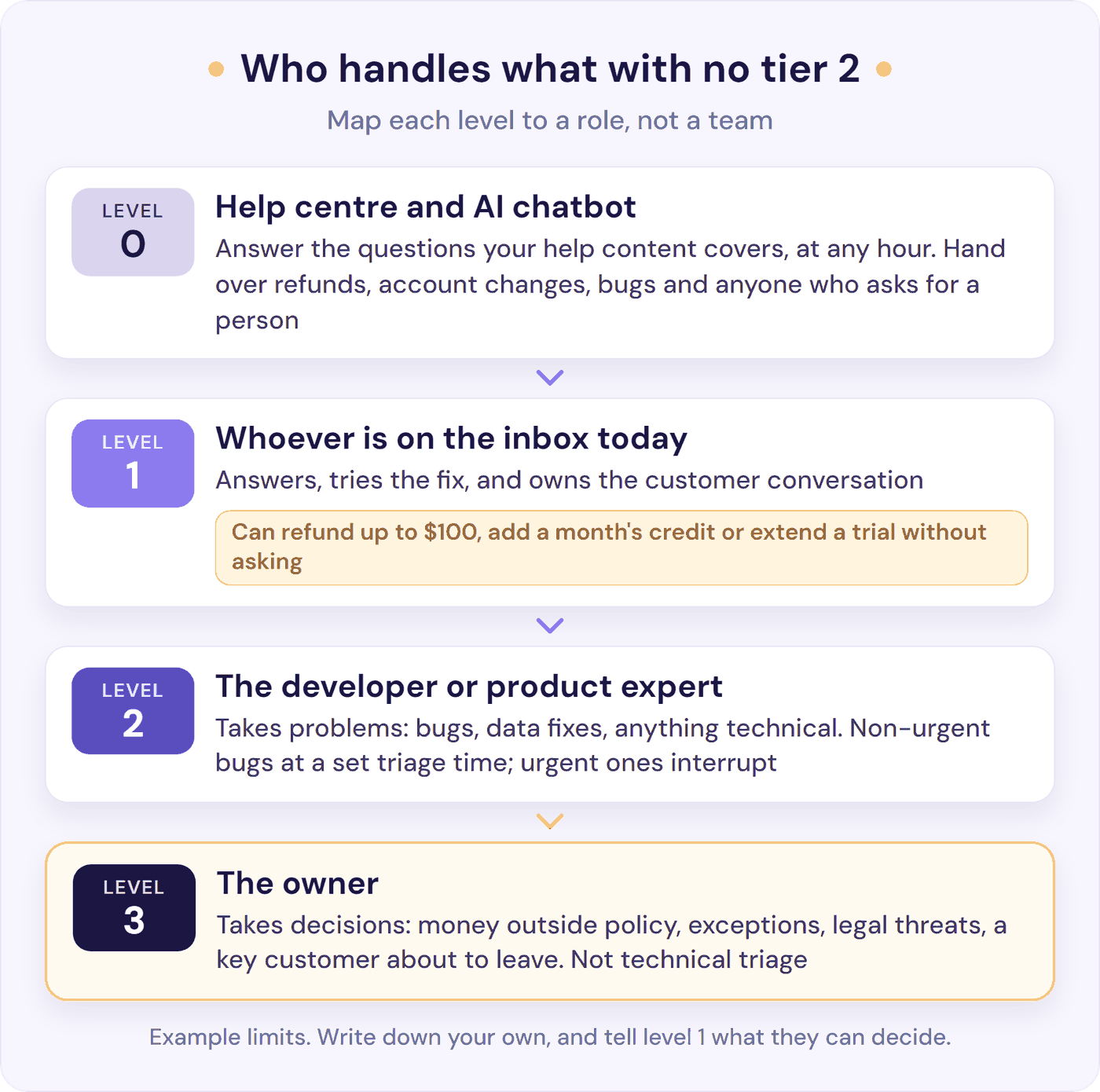
Big support teams have tiers of agents. Yours probably has people who wear several hats. The tiered support model still works if you map each of its escalation levels to a role instead of a team:
- Level 0: self-service. Your help centre and an AI chatbot answer the questions that already have answers, at any hour.
- Level 1: whoever is on the inbox today. They answer, try the fix, and own the customer conversation.
- Level 2: the person who knows the product best, often your developer. They take problems: bugs, data fixes, anything technical.
- Level 3: the owner. They take decisions: money outside policy, exceptions, legal threats, a key customer about to leave. Not technical triage.
If you run support on your own, levels 1 and 3 are both you, and often level 2 as well. The note and the triage day still matter. Write the note even when the bug is yours to fix, because by Thursday you won’t remember the details. If your developer is part-time, tell the customer the day, not “soon”: “Priya is in on Thursday, and I’ll update you then.” And if you’re planning your first support hire, our founder’s playbook for SaaS customer support covers when to hire and how to hand over.
The most useful thing you can write down is what level 1 can do without asking: a refund up to a set amount, a month’s credit, a trial extension, a waived fee. Without that list, every exception waits for someone senior. One front-line agent describes the cost: “instead I have to send it to my manager and oh cool they just left for the day, hope this customer doesn’t call back in the morning to yell at me” (r/CustomerService).
Protect your developer’s time too. Agree when non-urgent bugs get looked at, daily or weekly, and let only urgent ones interrupt. A team of seven at one startup reviews its support triage board every Thursday, and one of the four outcomes is “Return to customer support to retrieve more context” (r/ExperiencedDevs). That outcome is fine, as long as it says what’s missing.
Escalation Matrix Template for a Small Team
An escalation matrix is the cheat sheet for your escalation path: who takes each kind of issue, and how fast. Many templates online assume an on-call engineer and a 15-minute response, apparently around the clock. This one is built for a small team, and it adds two things most of them leave out: which issues are worth a call out of hours, and what to tell the customer.
| Reason | Who takes it, and how fast | Tell the customer |
|---|---|---|
| Site down, payments failing, or data lost Worth a call out of hours |
Developer, then the owner. Within 1 hour | “We know, and we’re fixing it now. Next update by [time].” |
| Security or privacy worry Worth a call out of hours if data may be exposed |
The owner. Within 2 working hours | “Thank you for telling us. [Name] is looking into it today.” |
| Bug blocking one customer | Developer. Same working day | “I’ve passed this to [name], our developer, with everything you sent.” |
| Bug with a workaround | Developer, at the next triage | “Here’s how to get it done today while we fix it.” |
| Billing problem, like a failed payment or a double charge | Whoever runs billing. Same working day | “[Name] looks after billing and will reply by [day].” |
| Refund or exception above your limit | The owner. Same working day | “[Name] makes this call. You’ll hear by [day].” |
| Legal threat or chargeback | The owner. Same working day | “I’ve passed this to [name], who will reply personally.” |
| “I want to speak to the manager” | The owner, after you’ve tried | “[Name] runs the company. I’ve shared our conversation with them.” |
| Feature request | Nobody: log it. Not an escalation | “I’ve added it to our list, and I’ll tell you if we build it.” |
The timings are examples, in working hours unless a row says it’s worth a call out of hours. Set your own, count a part-time developer’s working days rather than yours, and only tell customers the timings you can keep. If your team has no billing role, drop that row.
Keep the matrix short enough to use, and put it where escalations happen: a pinned note in your inbox, a saved reply, or a custom ticket field in your helpdesk. After the first month, check it against what really happened.
The Handover Note: A Template Your Developer Will Act On
Most escalations go wrong at the note. “Customer says it’s broken” starts a round of questions while the customer waits. At one company, support struggled to reproduce bugs before sending them on, so “it becomes this massive back and forth between the user – support – dev, and everyone gets frustrated” (r/CustomerSuccess).
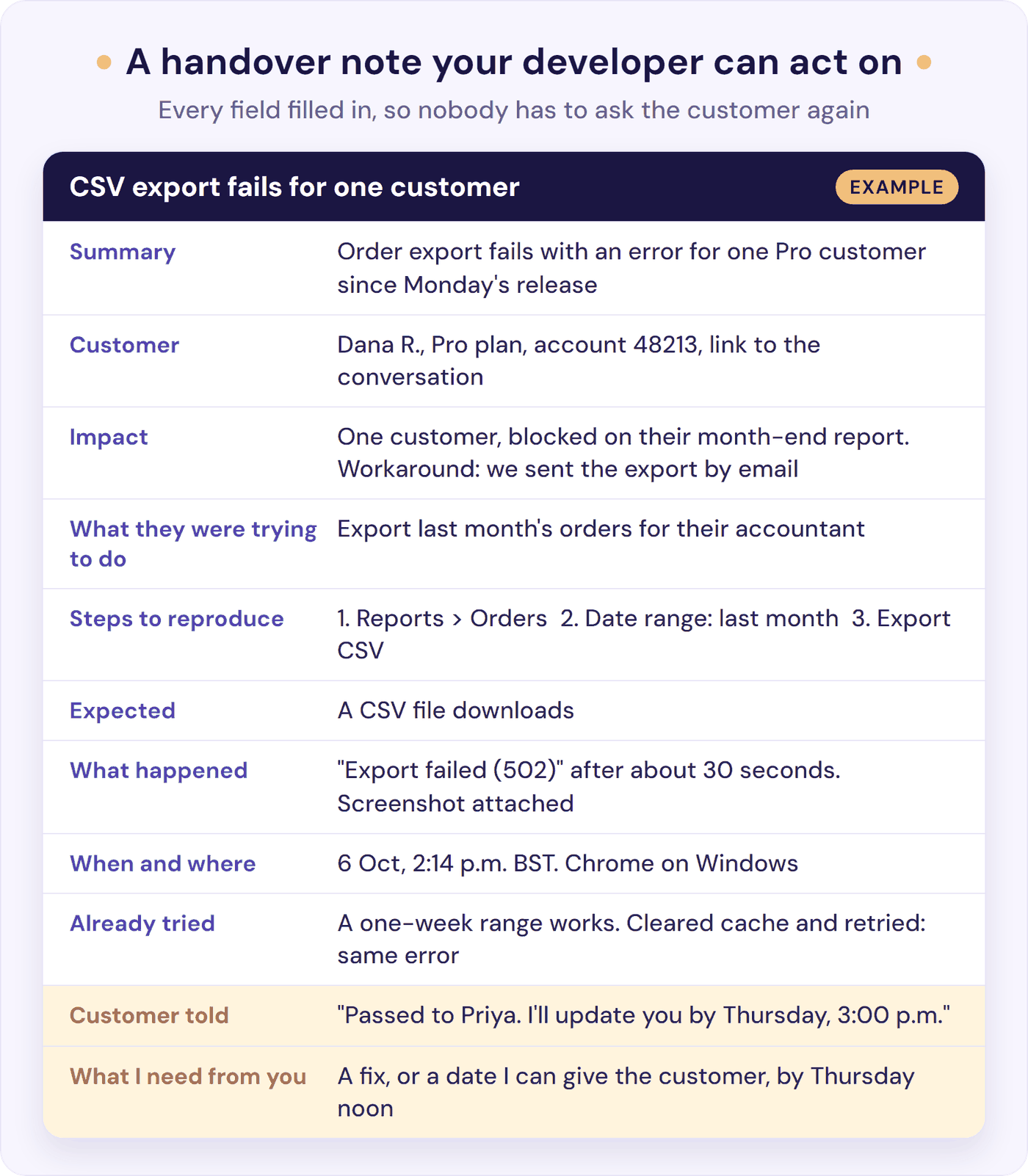
A fixed set of fields stops that. Put the note on the ticket as a private note, so it stays with the customer’s conversation, and save the template as a snippet or saved reply so it’s one click away:
| Field | What to write |
|---|---|
| Summary | One line: what’s wrong, and for whom |
| Customer | Name, plan, account ID, link to the conversation |
| Impact | How many customers; blocked, or is there a workaround? |
| What they were trying to do | The goal, in one sentence |
| Steps to reproduce | 1, 2, 3 |
| Expected | What should have happened |
| What happened | The exact error text, plus a screenshot |
| When and where | Date, time, and time zone; browser or device |
| Already tried | What you did, and what changed |
| Customer told | What you said, and when you promised the next update |
| What I need from you | The fix, decision, or answer you need, and by when |
For a decision rather than a bug, swap the middle rows for the decision you need, the options, and what each one costs. Or paste this straight into your note:
Summary:
Customer and account:
Impact (how many? workaround?):
Trying to do:
Steps to reproduce:
Expected:
What happened (error, screenshot):
When and where:
Already tried:
Customer told (next update due):
Need from you, by when:
Let whoever receives the note send it back quickly when something’s missing, as long as they say what. That’s faster than a back-and-forth in Slack, and the template gets better each time. One IT team with a template like this treats repeated bounces as a design problem: when enough come back for the same reason, they “add it to the template” (r/sysadmin).
Use Slack, or wherever your developer looks, for the nudge, not the note. Keep the note and their answers on the ticket, so whoever picks up the customer tomorrow can see them. A nudge can be one line:
- The nudge: “Hi Priya, there’s a bug on ticket #4821 for Thursday’s triage, with steps to reproduce. The customer has a workaround, and I’ve promised them an update on Thursday. Shout if it looks worse than I think.”
What to Tell the Customer When You Escalate
Customers have learned to distrust “I’ve escalated this”, because it’s so often followed by silence. In Hyken’s survey, 64% said they had contacted a company more than once to complain or get a problem resolved and never heard back. An escalated ticket with no update looks exactly the same from the outside.
So say who has it, what happens next, and when you’ll update them, then keep that promise. Five messages worth saving as templates:
- Passing it on: “Thanks, that’s really helpful. I’ve passed this to Priya, our developer, with your screenshots, so you won’t need to explain it again. I’ll update you by 3:00 p.m. [time zone] on Thursday, sooner if it’s fixed.”
- Progress, no date yet: “Quick update: Priya has reproduced the problem and is working on a fix. There’s no date yet, but I’ll update you again by Monday. Until then, [workaround] will get you through.”
- No news yet: “Quick update: Priya is still working on this, and there’s nothing new to report yet. I didn’t want you to wonder. I’ll update you again by [day].”
- Out of hours: “Thanks for letting us know. Our team is offline until 9:00 a.m. [time zone], and we’ll pick this up first thing. If [your site is down or payments are failing], [how to reach us out of hours], and someone will look tonight.”
- Fixed: “Good news: this is fixed. [What changed, in one line.] Could you try it and let me know it works for you? Thank you for reporting it. It helped us fix it for everyone.”
When a Customer Asks for a Manager (and You’re the Owner)
In a small business, “the manager” is usually the owner, and sometimes that’s you. Customers usually ask because they want someone who can decide, or at least look at the decision again. So say what you can do now, and what the next person can and can’t change.
Don’t say “my manager will tell you the same thing” before you pass it on. A former call-centre supervisor explains why: the customer then assumes the supervisor is “just blindly backing the rep” (r/callcentres). If they’ve already spoken to several people, pass it up straight away.
When you are the owner, say so, and decide. At one small family-owned petrol station, a customer threatened to call the owner over a sale price, so the clerk called him first. The owner had the clerk give her the sale price, then told her, on the phone and in front of the clerk, that from now on whatever price the clerk gave was the price (r/CustomerService). Back your front line once, in front of the customer, and customers learn that the first answer counts. If they’re upset as well, calm things down first.
Time Limits a Small Team Can Keep
Escalation targets borrowed from enterprise templates (15 minutes for urgent issues, around the clock) set a small team up to fail. Run three clocks in working hours instead:
- Acknowledge. The customer hears from you when you pass it on, not when your developer gets to it. Customers in Hyken’s survey said they’d wait, on average, about nine and a half hours for an email reply before getting upset. The person who takes it says “got it” within the time in your matrix.
- Update on a rhythm set by how bad it is: every few hours for an outage, every day or two for a bug with a workaround.
- Escalate again when there’s no progress after a set time, such as two working days on a bug. In a small team, that usually means asking whoever sets priorities, often the founder, what should move. Don’t promise a fix date until your developer gives you one.
For outages, decide the customer message in advance. One support team has a rule: if a critical bug can’t be fixed within 30 minutes, “we’ll email clients and notify them with an in-app banner” (r/CustomerSuccess).
Out of hours, write down the short list that justifies interrupting someone: the site or app is down, payments are failing, or data is lost or exposed. Every other escalation waits for the morning, with an honest auto-reply that says when you’ll be back. Then make sure a real emergency can reach someone: an alert from your uptime monitor, and a line in the auto-reply that tells customers how to flag one. Our out-of-hours emergency plan for small teams covers the on-call rota, the status page, and the follow-up.
Slower targets at night and at weekends are fine if you write them down. One person who runs an IT support business alone suggests doubling emergency targets at weekends and allowing 24 hours for everything else (r/msp). Those targets are for the issues that need a person: your help centre and an AI chatbot keep answering the routine questions overnight. If the same thing wakes someone up twice, fix the cause.
Where an AI Chatbot Fits in Your Escalation Process
An AI chatbot is level 0 in your matrix. It answers the questions your help content already covers, at any hour, so your team’s time goes on the conversations that need a person. That makes its handovers part of your escalation process, so give it the same rules:
- Decide what it always hands over: refunds and billing disputes, account or data changes, security questions, legal threats, bug reports, and anyone who asks for a person. In a 2026 Gartner survey, 87% of customers said an option to reach a human is essential when a company uses AI for service (Gartner, August 2026).
- Pass the whole conversation, so whoever picks it up starts with the story.
- Tell the customer when a person will reply, in your real hours.
- Count its handovers in your monthly review. Each one is either a rule doing its job or a gap in your help content.
Our guide to chatbot to human handoff covers what the customer should see and what your team needs before they reply.
Where Resolve247 Fits
Resolve247’s AIChatbot answers 82% of customer questions without a human (from 71% to 94%, depending on the business), and makes the handover clean when a person is needed. “The chatbot is already saving our team several hours each week, allowing us to focus on higher-value work,” says Tom, a Senior Customer Success Specialist at a brewery software company (from our testimonials page).
In Resolve247’s own website widget, a “Contact a Human” button is always on screen, so anyone can ask for a person at any point. The request reaches your team by email, or straight into your Help Scout mailbox, with the whole AI conversation attached. In HubSpot or Crisp live chat, it follows the four rules above:
- What it hands over. You write escalation rules in plain English: a refund request, a mention of a chargeback, a bug report, a customer who is clearly frustrated, or a request for a manager. While it’s handling the chat, the AI checks each new message against them, so customers don’t need magic words. Two rules are built in: the customer asks for a person, or asks something your content doesn’t cover.
- The whole conversation. The AI answers in the chat your team already uses, so whoever picks it up has the whole conversation in front of them. Email alerts (with the full chat) or Slack alerts (with the latest messages) name the rule that fired and link to the conversation. HubSpot can open a ticket in the pipeline and stage you choose, and Crisp can reassign the chat or add an “escalated” segment.
- What the customer hears. For each rule, you choose what the AI does: tell the customer a teammate is on the way, ask first, or keep helping while it quietly alerts your team. Put your team’s real hours in the reply. When a rule hands the conversation over, the AI steps back for as long as you set (six hours by default), so it doesn’t talk over your team.
- Counting handovers. Your analytics show how many conversations the AI answered without a human, and how many needed a person. Your chat history shows each escalation and the rule behind it, and you can filter it to just the escalated ones.
Switch on the rules you want, then test each one with a few real customer questions before you go live. In HubSpot, it starts by posting its answers as internal comments, so your team sees exactly what it would say. When you’re happy, switch it to reply to customers directly. Plans start at $35 a month, and you can start a free 30-day trial: no card needed, and if it ever hallucinates, that month is free.
How to Reduce Escalations Without Hiding Them
Don’t aim for zero. A missed escalation, where a customer needed someone and never got them, does far more damage than an extra one.
Track your own numbers month to month instead: how many escalations you had, how many notes bounced back more than once, and how many came back as the same problem. Our glossary explains the escalation rate formula. There’s no reliable public benchmark for small teams, so your own trend is the one that counts.
Then run a 20-minute review once a month. For each escalation, ask:
- Was escalating the right call, and did it go to the right person?
- Did it move on time?
- Did the customer hear from us before they had to chase?
- What do we change: a help article, a saved reply, what the chatbot knows, someone’s authority limit, or the product?
Most fixes come down to knowledge or authority. When a software company gave its chat agents an AI assistant that suggested answers, customers asked to speak to a manager almost 25% less often (Brynjolfsson, Li and Raymond). Answers plus authority at level 1 is usually the cheapest escalation fix.
Watch your release calendar too. One product manager describes the pattern: “customers contact support, agents don’t know the new stuff yet, escalations go through the roof” (r/ProductManagement). Tell support what’s changing before it ships, and update your help content at the same time, so your chatbot can answer the new questions too. And once the repeat questions are fixed at the source (our guide to reducing support tickets shows how), the escalations left are the ones worth a person’s time.
Frequently Asked Questions
What is the escalation process in customer service?
It’s the agreed way an issue moves from the first person who handles it to someone with more skill, access, or authority. A simple version has six steps: try for a set time; pick who takes it; write a handover note; keep the customer; tell them who, what, and when; and close the loop once it’s fixed.
When should a small support team escalate a ticket?
Escalate when the fix needs skills, access, or a decision you don’t have; when it affects many customers, money, data, or security; when there’s a legal threat; or when you’ve made no progress after your time box. Questions your help centre already answers don’t need escalating: send the link, or let an AI chatbot answer them. Log feature requests instead.
What should an escalation note include?
A one-line summary, the customer and their account, the impact, what they were trying to do, steps to reproduce, what should have happened and what did, when and where it happened, a screenshot, what you’ve tried, what the customer has been told, and exactly what you need from the next person, by when.
How often should you update a customer while an issue is escalated?
Set the time of the next update when you escalate, then keep it, even if there’s no news. Every few hours suits an outage; every day or two suits a bug with a workaround. Promise the next update rather than the fix, because the fix isn’t in your control.
What should you say when a customer asks for a manager and you’re the owner?
Tell them you’re the owner and that you can make the decision, then make it. Explain what you can and can’t change, and why. Customers usually ask for a manager because they want someone with authority, so having that person already in the conversation settles most requests.
What can you say instead of “your ticket has been escalated”?
Say who has it and when you’ll update them: “I’ve passed this to Priya, our developer, with your screenshots. I’ll update you by 3:00 p.m. tomorrow.” Naming the person and the time tells the customer something is happening, which “escalated” on its own no longer does.
How do you escalate a bug to your developer?
Write one complete note on the ticket: what the customer was trying to do, the steps to reproduce it, the impact, what you’ve tried, and what you need by when. Then send a one-line nudge where your developer will see it. Agree a triage time for anything that isn’t urgent, so only real emergencies interrupt them.
The Bottom Line
A good customer service escalation process doesn’t need a bigger team. It needs a note nobody has to ask about, one person who keeps the customer, and an update that arrives before they have to chase.
This week, write your matrix with the people named on it, save the handover note and the messages as templates, and agree what level 1 can do without asking. This month, run your first 20-minute review and fix the top cause it shows. Meanwhile, let an AI chatbot take the repeat questions, with a clean handover to your team when a person is needed: start a free 30-day trial of Resolve247. No card needed, and if it ever hallucinates, that month is free.