
Your chatbot’s report says it handled 70% of last month’s conversations without a person. That’s a lot of questions your team didn’t have to answer. It’s also two groups in one number: customers who got what they needed, and customers who left without asking for anyone.
Read a sample of the conversations behind it and you’ll know how big each group is, and which questions to fix next.
That’s what chatbot analytics is for: knowing what your bot does, so you can grow the share of problems it solves. Support teams are investing: in a 2026 Gartner survey of 199 service and support leaders, AI spending had risen 38% while their overall budgets grew 2%. “The challenge is ensuring those investments produce measurable business value,” said Gartner’s Kim Hedlin (Gartner, August 2026).
This guide shows how to measure chatbot success with nine chatbot metrics that answer three questions: is your bot answering, is it solving problems, and is it worth it? You’ll see what each provider counts as “resolved”, a benchmark table, an ROI sum for a small team, and a 30-minute weekly check you can run yourself. We build AI support software, so we’ve written this to work with any chatbot, ours included. Jump to what each provider counts as resolved, the nine metrics, benchmarks, the ROI sum, or the weekly check.
The Short Version
- Start with four numbers: conversations handled without a person, your checked resolution rate, handovers with the wait for a reply, and the questions your bot couldn’t answer.
- Read the definition before the percentage. Every provider counts “resolved” its own way, so rates aren’t comparable between products.
- Check 20 conversations a week against the sources your bot cited, in a 30-minute weekly check you can run yourself.
What Is Chatbot Analytics?
Chatbot analytics is measuring what your chatbot does in real conversations: how many it handles, whether its answers are right and solve the problem, when it hands over to a person, and what that’s worth to you. For a support bot, it comes down to three questions. Is it answering? Is it solving problems? Is it worth it?
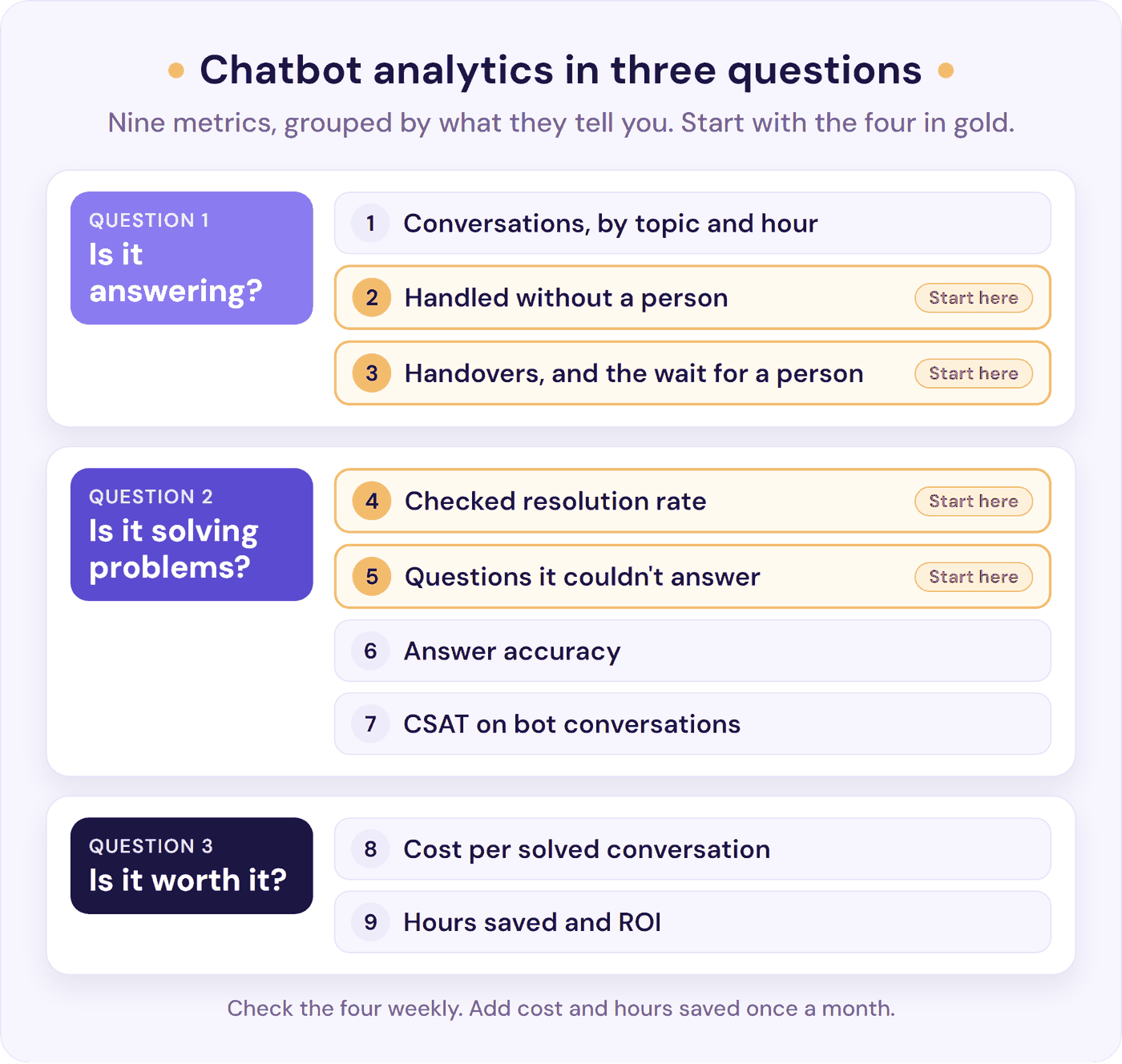
A chatbot metric is anything you can count. Your chatbot KPIs are the few you’ve agreed to judge it by. Four are enough to start, marked start here in the list below.
One warning before the numbers: small volumes swing. With 30 conversations, one customer moves a rate by more than three points. As a rule of thumb, below about 100 conversations a month, read the conversations themselves, treat each percentage as a rough guide, and compare months rather than weeks.
Deflection, Containment, and Resolution: What Your Bot’s Rate Counts
Three measures get used as if they meant the same thing. They don’t:
| Term | What it counts | How to read it |
|---|---|---|
| Deflection (or containment) | Conversations the bot handled with no person joining | How much the bot takes off your plate. It also counts customers who gave up, so pair it with a check |
| Resolution | Conversations where the customer’s problem was solved | Only true once confirmed, by asking the customer or reading the conversation. Not coming back is a weaker sign, since some people give up and go elsewhere |
| Automation rate | Conversations the bot solved, out of all conversations | The hardest to flatter, because it counts every conversation. It still uses the provider’s own count of solved |
Providers say this themselves. HubSpot’s help docs explain that “Deflections do not always indicate resolution,” because a customer can leave without asking for a person when the bot couldn’t answer (HubSpot). Microsoft’s guide for its Copilot Studio bots adds that “Each organization defines deflection rate differently” (Microsoft).
So what does each provider count as resolved? Here are their own definitions, read on 10 October 2026:
| Provider | Counts a conversation as resolved when… |
|---|---|
| Fin (formerly Intercom) | The customer confirms the answer, or “exits the conversation without requesting further assistance”. 24 hours of silence after Fin’s last answer counts |
| HubSpot Customer Agent | It shared a source or took an action, and the visitor didn’t ask for a person within 72 hours of their last reply |
| Help Scout AI Answers | The customer doesn’t escalate, search the knowledge base, or ask for more help after a response |
| Tidio Lyro | The visitor “either left the conversation or hasn’t asked for a live agent’s assistance” |
| Front Autopilot | No teammate follows up within 24 hours on chat, or 72 hours on email |
| Zendesk AI agents | An AI check of the conversation confirms it was resolved (“verified”). Finished but unconfirmed is “contained”, and doesn’t count against the allowance |
None of these is wrong. Most answer “did the customer need a person?”, which is useful to know. They aren’t the same as “was the problem solved?”, and they can’t be compared with each other. Zendesk’s split between contained and verified is worth copying in your own reporting.
What you divide by matters just as much. In an update published on 31 August 2026, Fin changed how its resolution rate is calculated, dropping conversations Fin “didn’t have the opportunity to answer”. In Fin’s own example, it took part in 750 of 1,000 conversations, had the chance to answer 500, and resolved 250. That was 250 out of 750, a 33% resolution rate, before the change, and 250 out of 500, or 50%, after it. The share of all conversations Fin resolved, its automation rate, stayed at 25% (Fin help centre). Fin’s update says so itself: the automation rate, the number of resolutions, and billing don’t change.
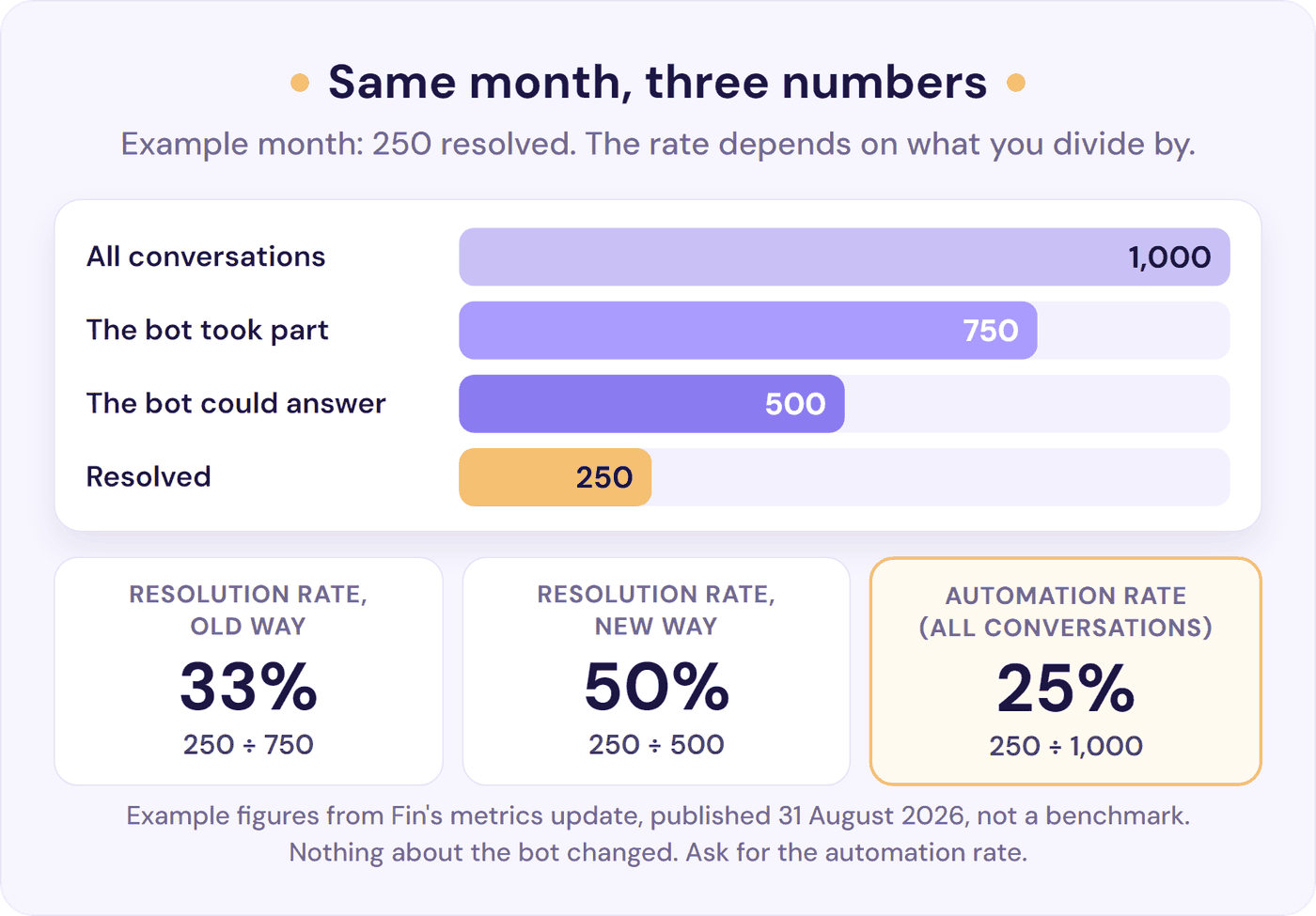
Nothing about the bot changed. Ask any provider for that last number, the automation rate, or work it out yourself: conversations solved ÷ all conversations, including the ones the bot never answered.
Resolve247 answers 82% of customer questions without a human (from 71% to 94%, depending on the business). Alongside it, Resolve247 runs a check of its own: an AI review of each conversation judges whether the AI was able to help, and groups the ones it couldn’t by topic, on the same analytics page.
Choosing a chatbot? Ask each provider four things before you sign: how it counts a conversation as resolved, and what that’s out of; whether you can read every conversation with the sources the bot used; whether it shows the questions the bot couldn’t answer; and how a customer reaches a person, with every request counted. If the answers are yes, you can run the checks in this guide from your first week, and you can expect the rate to climb as you fill the gaps. Our guide to choosing an AI customer support chatbot covers the rest.
9 Chatbot Metrics Worth Tracking (and How to Read Each One)
These are grouped by the three questions. For each one you get what it is, a one-line formula, where to find it, and what to watch out for. The four marked start here are enough to start with.
Is it answering?
1. Conversations, by Topic and Hour
Volume tells you how much the bot is doing, not how well. Split it two ways. By topic, because simple questions like order status come back far less often than billing exceptions. By hour, because conversations at night behave differently: there’s nobody to hand over to, so measure them separately (our 24/7 customer support guide covers what to promise out of hours).
Formula: conversations per week, grouped by topic and by hour.
Watch out for reading more conversations as success. It can mean customers needed more tries.
2. Handled Without a Person (Start Here)
This is your deflection rate: how much the bot takes off your plate. Contact-centre teams call it containment rate.
Formula: conversations with no request for a person ÷ all conversations.
Where to find it: usually your tool’s headline “resolved” or “automation” figure: the Customer Agent performance page in HubSpot, the Fin report, or Lyro Analytics in Tidio. In Resolve247, it’s the “No Escalation Triggered” share on the analytics page. Check what the figure is out of. If it only counts the conversations the bot answered, multiply it by the share the bot answered, so it covers all conversations. Fin’s report also shows confirmed resolutions on their own, which makes a useful floor.
Watch out for customers who give up. They count as handled too, so read this number alongside metric 4, never on its own.
3. Handovers, and the Wait for a Person (Start Here)
Formula: conversations where someone asked for a person ÷ all conversations, plus the median time from that request to a person’s first reply.
The rate is the other side of metric 2 (together they make 100%), so the new information here is why people asked and how long they waited. Note a reason for each: no answer, a wrong answer, something only a person can do (a refund, an account change), or they wanted a person from the start. The first two are content fixes; the third is the bot doing its job. While you’re there, check the customer didn’t have to explain everything again. Our chatbot to human handoff guide covers how to set handovers up.
Where to find it: your chatbot counts the requests, but the wait is in your help desk or inbox, where your team replies. With a handful a week, note the time of each request and of the first reply, and take the middle one. Keep out-of-hours requests apart, or a quiet night makes a good day look slow.
Watch out for aiming for zero. A low escalation rate can mean customers can’t find the way to a person. Customers want both: 50% say their interactions are easier when companies use generative AI, and 87% say it’s essential to have an option to reach a person (Gartner, August 2026).
The wait is where handovers go wrong. In its own data from online shops, the help desk provider Gorgias found a 10-hour median wait for a person after an AI handover, across email, contact forms, and chat (Gorgias, April 2026). There’s no neutral benchmark for handover rates, so track your own trend.
Is it solving problems?
4. Checked Resolution Rate (Start Here)
This is the number the others hang on: the share of all conversations you know were solved. It’s the automation rate from the table above, checked by you.
Formula: handled without a person (metric 2) × the share marked solved in your weekly sample of 20.
For example, if 600 of 800 conversations had no request for a person (75%), and 15 of your 20 were solved (75%), your checked resolution rate is 56%: about 450 conversations.
Three ways to confirm a conversation was solved:
- Read it, and judge whether the customer got what they needed.
- Look for the same customer back within 7 days, on any channel, about the same thing. That counts against the bot, whatever its status says.
- Ask at the end (“Did that solve it?”), and treat the answers as a small sample.
The weekly check below does the first two in 15 minutes. More on the measure itself: resolution rate and first contact resolution.
Watch out for using your provider’s “resolved” figure here instead. It’s built on its own definition.
5. Questions It Couldn’t Answer (Start Here)
The most useful report you’ll get: what customers ask that your help content doesn’t cover. Fix the list, and every other number improves.
Formula: count of conversations the bot couldn’t answer, grouped by topic.
Where to find it: many tools have an unanswered-questions or knowledge-gap report. If yours hasn’t, search the conversations for the phrase your bot uses when it can’t answer, and add the handovers where the reason was a missing answer. In Resolve247, a regular review of each conversation builds this list for you, grouped by topic (see how AIChatbot works).
How to use it: each week, take the top three topics, add or fix the help article or bot content, and check those topics a week later. Our guide to reducing support tickets covers fixing the page first.
Watch out for chasing the rate down instead of working through the list. A new product launch will push it up, and that’s useful information.
6. Answer Accuracy
Formula: answers that were right ÷ answers checked, from the same weekly sample (everything not marked wrong or incomplete).
You don’t need an AI evaluation tool. Open each sampled answer, click the source the bot used, and check the answer matches it. Fix any wrong source page first, because wrong answers often trace back to a missing or out-of-date page.
It matters because a company answers for what its bot says. A Canadian tribunal held Air Canada responsible for its chatbot’s wrong answer about bereavement fares: it made “no difference whether the information comes from a static page or a chatbot” (Moffatt v. Air Canada, 2024). A bot that answers from your own pages, with the source linked, helps keep the two saying the same thing.
Watch out for “accuracy” that only means the bot didn’t say “I don’t know”. Some guides define it that way, so a bot that never admits a gap scores close to 100%. Answering only from your own documents (grounding) ties the bot’s answers to your pages and sharply cuts hallucinations. The weekly sample catches the rest, and often points to the page to fix. Our guide to testing a support bot for hallucination has a 20-minute test you can run on any bot.
7. CSAT on Bot Conversations
Formula: satisfied ratings ÷ all ratings, for conversations the bot handled alone.
In LiveChat’s data (last updated in 2024), bot-handled chats scored about the same as all rated chats (64.7% satisfied against 64.2%), but only 6.7% of chats were rated at all (LiveChat). That holds for any CSAT score, bot or human: people who gave up rarely leave a rating, so the score mostly hears from customers who stayed. And a score for “bot only” means something different from “bot, then a person”, so keep them apart: Zendesk, for example, collects a separate bot score (Zendesk).
Watch out for averaging a handful of ratings. With a few a week, read the comments instead, and use your help desk’s own CSAT survey for conversations that reached a person. Our CSAT calculator works out the score.
Is it worth it?
8. Cost per Solved Conversation
Formula: what the bot costs a month ÷ conversations you’ve checked were solved.
On per-resolution pricing, the bill follows the provider’s count, not yours, so it can be higher than your checked numbers suggest (see the worked ROI example). A flat plan costs the same whatever the definition: Resolve247’s Starter plan is $35 a month for 2,000 AI messages (each AI reply is one message).
Watch out for dividing by every conversation, or by the provider’s resolved count. Divide by the ones you checked.
9. Hours Saved and ROI
Formula: hours back = solved conversations × minutes a person would have spent on each. ROI = (value of those hours minus total cost) ÷ total cost.
Count your checking time as a cost. The worked ROI example shows the sum for a two-person team.
What Is a Good Chatbot Resolution Rate?
There’s no single good number. Fin, HubSpot, Help Scout, and Tidio publish averages of 70% to 76%, each on its own definition. Your own rate depends on your definition, the questions the bot takes, how complete your help content is, and how long it’s been live, so compare it with your own last month.
Here’s what providers publish (read 10 October 2026):
| Who | Published figure | What it counts |
|---|---|---|
| Fin | 76% average resolution rate | Confirmed, or the customer left without asking for more |
| HubSpot Customer Agent | 70% average resolution rate | Shared a source or took an action, with no visitor request for a person within 72 hours |
| Help Scout AI Answers | 73.19% average resolution rate | No escalation or request for more help |
| Tidio Lyro | 75% average resolution rate | Leaving, or not asking for a person, counts |
| Gorgias research | 45% of AI-touched tickets, median shop | Closed with no message from a person at all |
| Resolve247 | Answers 82% of customer questions without a human (from 71% to 94%, depending on the business) | No request for a person logged |
Gorgias publishes both kinds of number: 45% for the median shop in its platform research, where any message from a person counts against the AI, and 60% of tickets auto-resolved on its AI Agent page, an average across five featured brands. Same provider, two definitions and samples, two honest numbers.
The kind of questions matters as much as the bot. Someone who set up the same AI provider for two brands at a 500-person public SaaS company shared their numbers. On the consumer product, used by parents of school-age children, it deflected 70% to 85% of the volume, about five to ten people’s worth. On the technical product, used by veteran network and systems admins, it correctly deflected at most 10% to 15% (r/CustomerSuccess).
Simple, repeated questions answered in good help articles are where a bot does best. So don’t chase a published number. Fill the gaps in metric 5, and watch your checked rate climb.
How to Measure Chatbot ROI (With a Worked Example)
The sum is the same as for any customer service ROI. ROI = (value of the hours back minus total cost) ÷ total cost, where hours back = conversations × your checked resolution rate × minutes a person would have spent on each.
Here it is for a two-person team with 800 conversations a month on a $35 flat plan. We’ve assumed 8 minutes of a person’s time for each conversation the bot solves, valued at the US median customer service rep’s pay ($44,770 a year, BLS) plus benefits: about $31 an hour. That’s the same model as our guide to reducing support costs, so the numbers agree. The 30-minute weekly check comes to about 2.2 hours a month, or $68, so the total cost is $103 a month:
| Checked resolution rate | Hours back a month | Worth | Left after costs |
|---|---|---|---|
| 30%, cautious (240 solved) | 32 | $1,003 | $900 |
| 50%, middle (400 solved) | 53 | $1,671 | $1,568 |
| 70%, strong (560 solved) | 75 | $2,339 | $2,236 |
Our estimate. In the UK, at about £13.73 an hour (a £25,000 salary plus employer National Insurance and the minimum workplace pension), the same hours are worth £439, £732, and £1,025 a month, against the $35 plan and about £30 of checking time.
Even in the cautious row, the hours back are worth almost ten times what the bot and the checking cost. As an ROI, that’s about 870%. Percentages that big are normal when the tool costs $35, so the money left after costs is the more useful number.
Use your own minutes if you can: time ten replies to the kind of questions the bot now answers. They’re often the quicker ones, so your figure may be lower than 8 minutes. The sum still holds: at 2 minutes a conversation, the cautious row covers its costs more than twice over.
Thirty-two hours is about four working days a month, and 53 is about a third of one person’s month. They only become money when they go somewhere: the harder tickets, the help articles nobody had time to write, or growth without adding hours.
Check the sum against your inbox. The hours are an estimate; your inbox is the proof. Count the conversations and emails that reached a person, by topic, for four normal weeks before launch, and again for four weeks a couple of months after. If the topics the bot answers have shrunk, the hours are real. If you haven’t launched yet, count two normal weeks now, so you have a before.
On per-resolution pricing, do the same sum on the provider’s count. If a provider counts 70% of those 800 conversations as resolved and your check finds 50%, you’re billed for 560. At list prices on 10 October 2026, that’s $280 with HubSpot’s Customer Agent ($0.50), $420 with Help Scout’s AI Answers ($0.75), or $554 with Fin ($0.99), before seats or plans. With those three providers, each conversation you know was solved costs $0.70 to $1.39, against about $4.18 of a person’s time saved on each. So per-resolution pricing can still pay well; the number to watch is the gap between their count and yours (our AI chatbot pricing guide compares them in full). Before you sign, run the same sum on your own numbers: your monthly conversations × the share you expect the provider to count as resolved × its price per resolution.
What the sum leaves out: set-up time, the time to write your fixes, the speed customers get at night and at weekends, and any sales the bot helps with. Speed is worth something even when a person still has to follow up. To measure sales the bot helps with, hide the chat for a random share of visitors and compare, because people who chat are already keener to buy.
Want to see your own numbers? Start a free 30-day trial of Resolve247, with no card needed, and run this sum on a month of your real conversations.
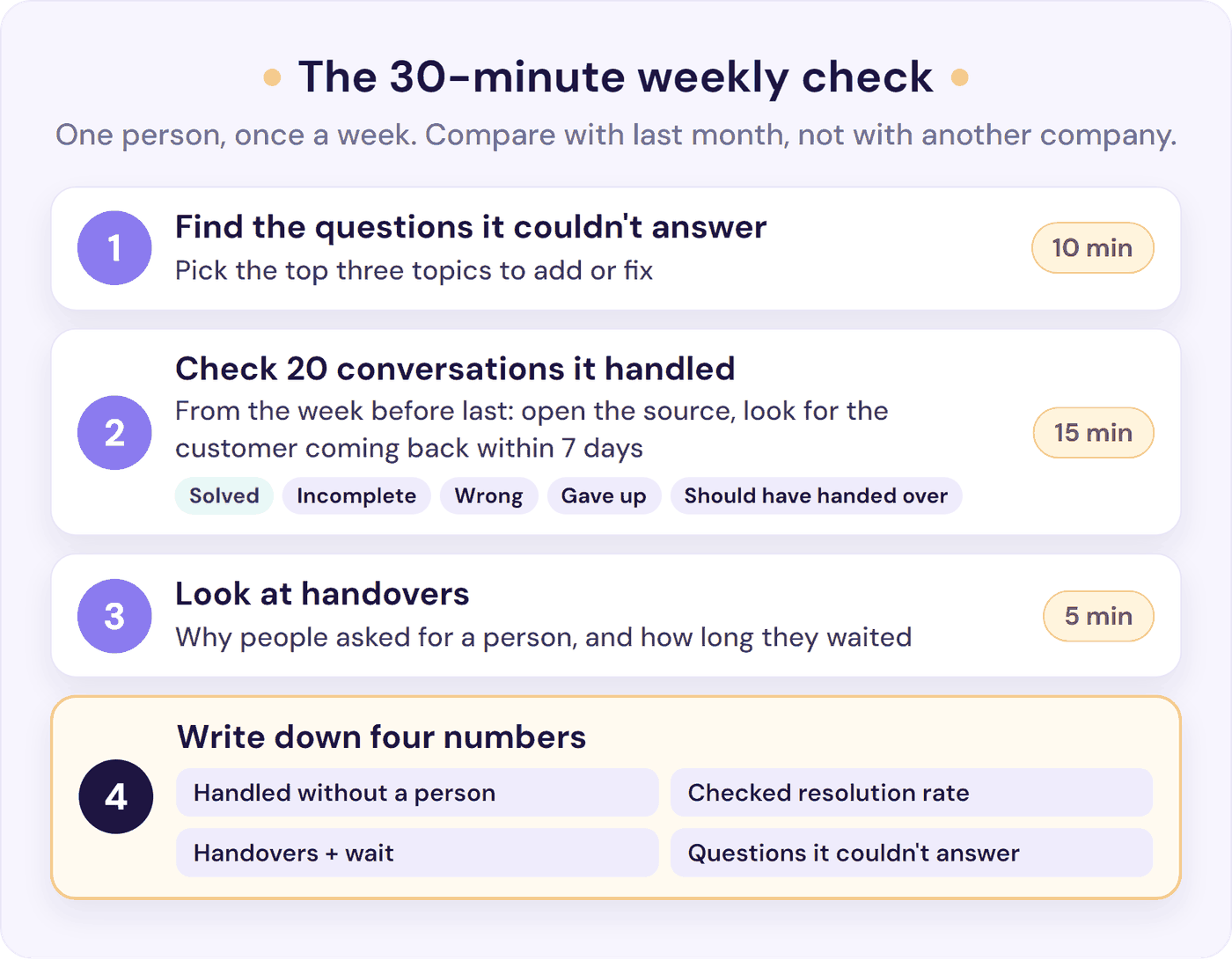
How to Check Your Chatbot in 30 Minutes a Week
One person, once a week, is enough for a small team:
- Find the questions it couldn’t answer (10 minutes). Open your tool’s unanswered-questions or knowledge-gap report, or search the week’s conversations for the phrase your bot uses when it can’t answer. Pick the top three topics, and note the content to add or fix. After a price or policy change, check that topic first: the bot answers from whatever the page said last.
- Check 20 conversations the bot handled (15 minutes). Take them from the week before last, spread across the days, so each one is at least 7 days old. For each one, open the source behind the answer, then look for the customer in your inbox or help desk over the next 7 days. Mark it solved, incomplete, wrong, gave up, or should have handed over. Anyone who came back about the same thing isn’t solved. If the chat was anonymous, judge it on the conversation alone, and if you can’t tell, don’t count it as solved.
- Look at handovers (5 minutes). For each one, note why the customer asked for a person and how long they waited for a reply, keeping out-of-hours waits apart. Anything slower than the reply time you promise needs a fix.
- Write down four numbers:
- Handled without a person: from your tool, for the week.
- Checked resolution rate: handled without a person × the share of your 20 marked solved.
- Handovers: the share, and the median wait in and out of hours.
- Questions it couldn’t answer: how many this week, and the three topics to fix.
Keep one row a week in a spreadsheet. For the monthly figure, add up the four weeks’ samples (80 conversations), because one conversation moves a single week’s 20 by 5 points. Once a month, add cost per solved conversation and hours back, and compare with last month, not with another company. Writing the fixes takes extra time, but each one also stops the same question coming back.
When a Number Moves
| If this happens | It usually means | Do this |
|---|---|---|
| Checked resolution rises | Your fixes are working | Take the next three topics from the questions it couldn’t answer |
| Handled without a person rises, checked resolution doesn’t | More customers leaving without an answer | Read the “gave up” ones; check the way to a person is easy to see |
| Checked resolution falls | Wrong or out-of-date answers | Fix the pages behind the “wrong” marks first |
| Questions it couldn’t answer jump | Something new: a launch, a price change, an outage | Add content for the new topic this week |
| Handovers rise | The same, or a topic that needs a person | Read the reasons: add content, or send that topic to a person |
| Handovers fall close to zero | Customers may not see how to reach a person | Check the way to a person is visible |
| The wait for a person grows | Your team’s hours, not the bot | Reset the reply time you promise, or add cover |
| CSAT on bot chats falls | Usually a wrong answer or a hard-to-find person | Read the low ratings’ comments, then the rows above |
The gap between handled without a person and your checked resolution rate is your to-do list. Read those conversations first: they show you what to fix next.
Chatbot Metrics That Mislead (and What to Track Instead)
Some popular metrics look useful and aren’t, for a support bot:
- Bounce rate. Guides to chatbot metrics use at least five different definitions. Track handovers and the questions it couldn’t answer instead.
- Conversation length. Longer isn’t engagement, and shorter isn’t success. Read a sample instead.
- Return visits. A returning customer may love the bot, or their first answer may have failed. Use metric 4’s 7-day check instead.
Your team’s own numbers will move too. “The easy tickets disappear when the ai works well, so your metric for nb of tickets resolved/agent will drop,” as one commenter put it (r/CustomerSuccess).
People are left with the harder cases, so handle time can rise too. Agree what success means before you switch the bot on. The glossary covers the team measures, such as first response time and average resolution time.
Chatbot Analytics in Resolve247: Where the Four Numbers Live
Resolve247’s AIChatbot answers 82% of customer questions without a human (from 71% to 94%, depending on the business), and its analytics page puts the four starter numbers in one place:
- Handled without a person: for any date range, the “No Escalation Triggered” share, with how many conversations your AI handled and how many messages it sent, split by your website widget, HubSpot, or Crisp.
- Checked resolution rate: Resolve247 reviews each conversation regularly and shows the share the AI was able to answer, with the ones it couldn’t one click away. Read your weekly 20 to confirm it on your own questions.
- Handovers: every “Contact a Human” request and escalation is counted, with a click through to those conversations, and email or Slack alerts you can switch on for the moment someone asks for a person. The wait for a reply is in HubSpot, Crisp, or the inbox where your team answers.
- Questions it couldn’t answer: the conversations the review marked as ones the AI couldn’t help with, grouped by topic, so you can see exactly what to add to your knowledge base.
You can read every conversation the AI had, with the sources it used, search and filter by topic, handover, channel, visitor, or date, and edit the topics conversations are sorted into. Source links are on for your customers by default, so checking an answer takes one click.
The analytics page also estimates the time saved, at 3 minutes per qualifying AI reply. For the ROI sum, multiply it by the share of your weekly sample marked solved.
Plans start at $35 a month, you can start a free 30-day trial with no card, and if it ever hallucinates, that month is free. See how AIChatbot works.
Frequently Asked Questions
What is chatbot analytics?
Chatbot analytics is measuring what your chatbot does in real conversations: how many it handles, whether its answers are right and solve the problem, when it hands over to a person, and what that’s worth. For a support bot, it answers three questions: is it answering, is it solving problems, and is it worth it?
What are the most important chatbot KPIs for a small team?
Start with four: the share of conversations handled without a person, your checked resolution rate from a weekly sample of 20, handovers with the wait for a reply, and the questions your bot couldn’t answer. Add hours saved and cost per solved conversation each month, and always state the definition, so months compare like for like.
What is the difference between deflection and resolution?
Deflection counts conversations the bot handled without a person joining: the work it took off your team, including any customers who gave up. Resolution counts conversations where the customer’s problem was solved. Confirm it by reading a sample or asking the customer, and count anyone who comes back about the same thing within 7 days as not solved.
What is a good chatbot resolution rate?
Fin, HubSpot, Help Scout, and Tidio publish averages of 70% to 76%, each on its own definition. Your rate depends on that definition and on the questions your bot takes, and it climbs as you fill the gaps in your help content, so compare your checked rate with your own last month.
How do you measure chatbot ROI?
Multiply the conversations you’ve checked were solved by the minutes a person would have spent on each, and value those hours at your hourly staff cost, including employer costs. Subtract the tool’s cost and your checking time, then divide by that cost. Hours only become money when they go to other work.
How many conversations do you need before chatbot metrics mean anything?
As a rule of thumb, below about 100 conversations a month, read the conversations themselves and treat each percentage as a rough guide. With 30 conversations, one customer moves a rate by more than three points, so compare months rather than weeks.
The Bottom Line
Chatbot analytics is knowing what your bot does, so you can make it do more.
- Start with four numbers: handled without a person, your checked resolution rate, handovers with the wait, and the questions it couldn’t answer.
- Read the definition before the percentage, yours included.
- Do the ROI sum on hours you actually got back, with your checking time counted as a cost.
This week: check 20 conversations and fix the top three gaps. This month: write down the four numbers and set up the 30-minute check.
Want a chatbot that answers 82% of customer questions without a human (from 71% to 94%, depending on the business), and groups the ones it couldn’t answer so you know what to add next? Try Resolve247 free for 30 days, no card needed. It answers from your own content with source links, hands over when a customer asks for a person, and if it ever hallucinates, that month is free.