
An AI customer support chatbot answers your customers’ questions in chat, day or night, using your own help content, and passes anything it can’t answer to a person on your team. With dozens of providers and pricing models that are hard to compare, the choice is easy to get wrong. This guide gives you a nine-point framework for that choice. It also gives you the questions to ask each provider and a one-week test you can run in any free trial.
Want to compare specific tools instead? See our comparison of the best AI customer service chatbots. Still deciding whether you need one at all? Start with our chatbot vs live chat guide, then come back here to choose.
How do you choose an AI customer support chatbot?
A support chatbot is only one part of broader customer support automation, so be clear on what you want to automate first. Start with the job you need done, then judge every option against the same nine criteria: answer accuracy, the real pricing model, setup speed, knowledge training, channels and integrations, human handover, 24/7 coverage, oversight and control, and data security. Two of these decide most bad outcomes: whether the bot answers only from your own content, and what its pricing model truly costs once real customers use it. Get those two right, and the rest is fit.
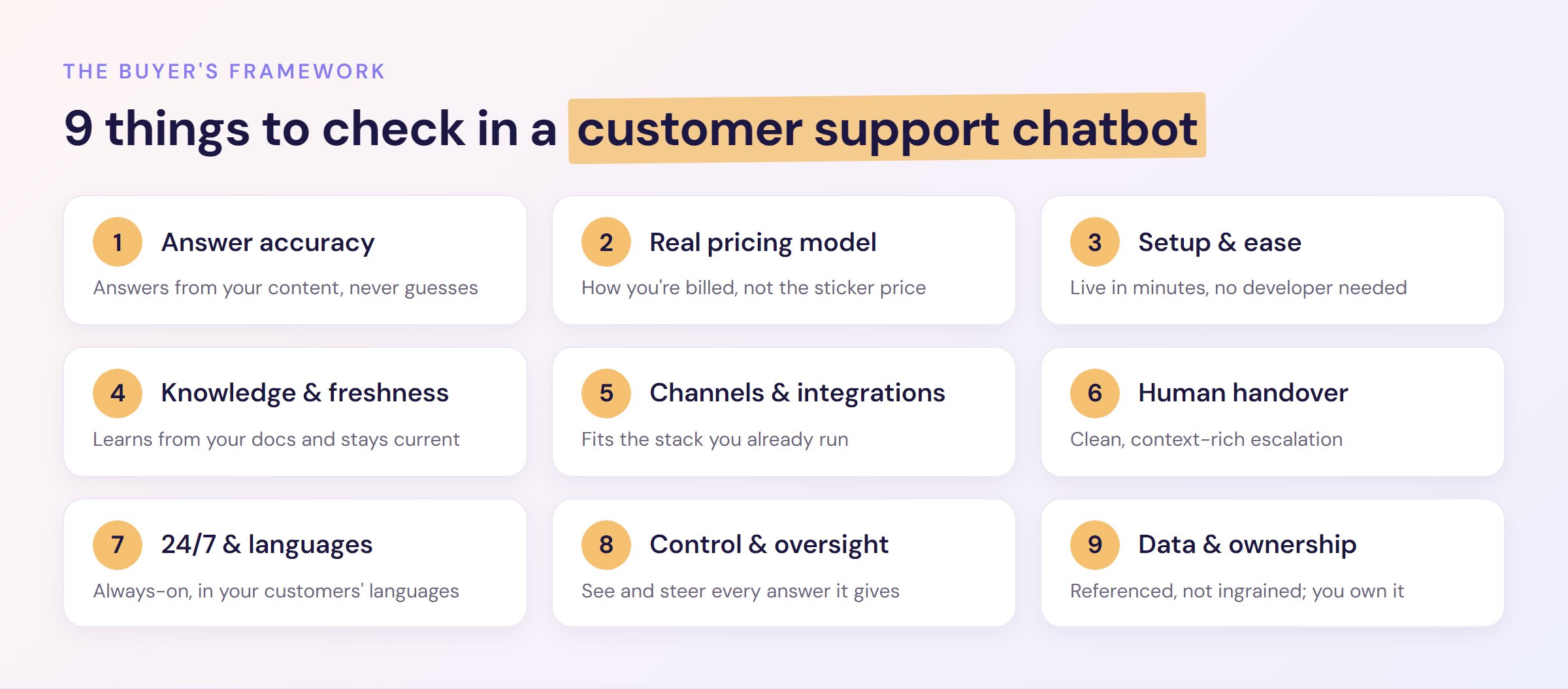
Here is the whole framework at a glance. The sections below explain how to judge each one.
- Answer accuracy and anti-hallucination: does it answer from your content, or guess?
- The real pricing model: how you are billed matters more than the sticker price.
- Setup speed and ease: how fast can it be live, and do you need a developer?
- Knowledge training and freshness: what it learns from, and how it stays current.
- Channels and integrations: does it sit on the stack you already run?
- Human handover: how cleanly it passes a customer to a person.
- 24/7 coverage and languages: always-on, in the languages your customers speak.
- Control, analytics and oversight: can you see and steer what it says?
- Data, security and ownership: where your data lives and who owns it.
First, decide which type of support chatbot you need
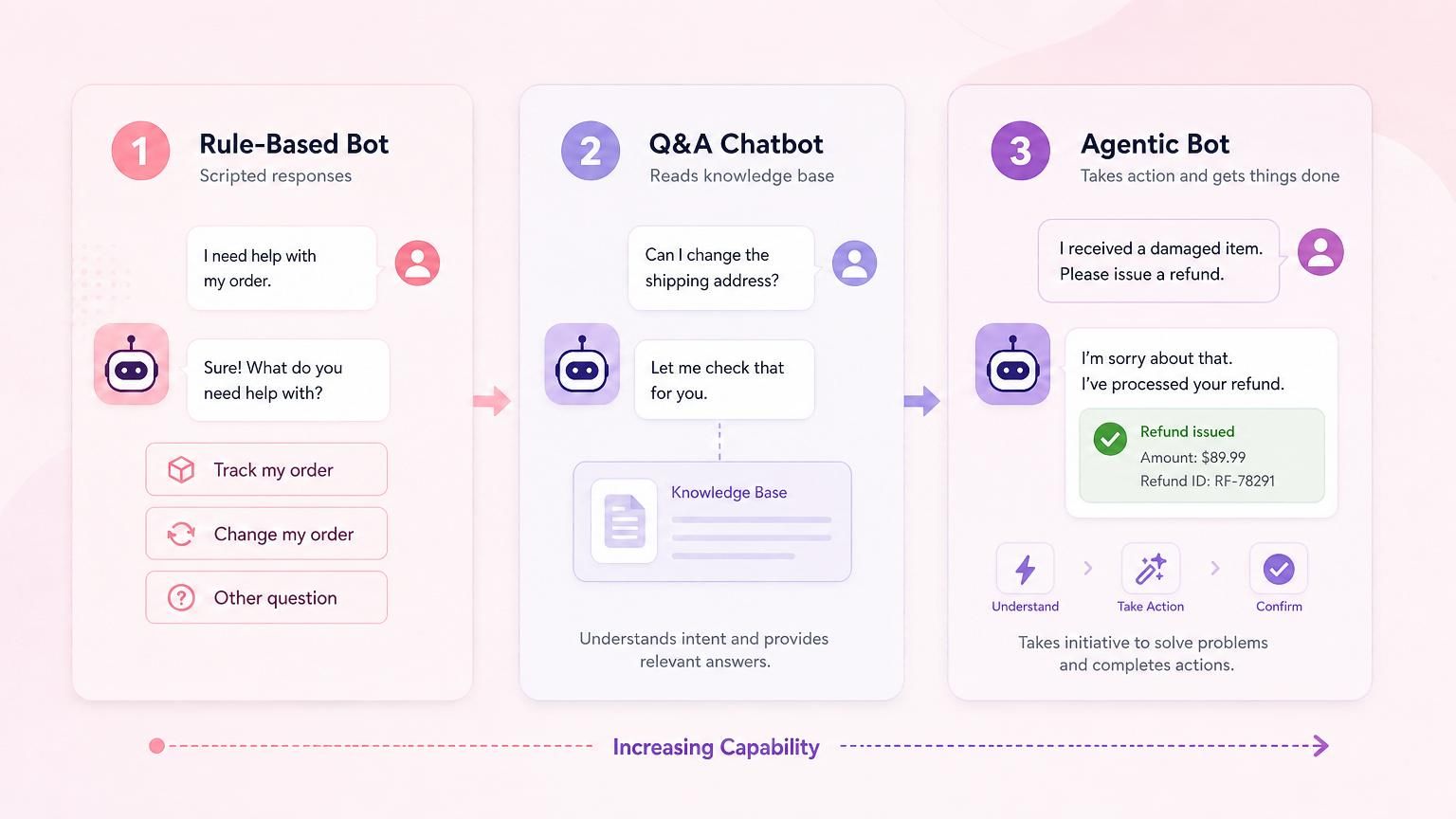
Before you compare products, get clear on the type, because “chatbot” now covers three quite different things.
- Rule-based bots follow scripted decision trees. The customer clicks buttons and the bot replies with answers you wrote in advance. They are reliable but rigid, and they only handle questions you thought to script.
- Q&A chatbots read your content and answer open-ended questions in their own words, including ones you never scripted. For customer support, where people ask the same thing a hundred different ways, this is usually the right type.
- Agentic bots go further and take actions, such as issuing a refund, checking an order or updating a subscription, rather than only answering. This is the newest tier and the fastest-growing: Gartner predicts that by 2029, agentic AI will autonomously resolve 80% of common customer service issues, cutting operational costs by 30%. If that agentic tier is what you need, our guide to AI agents for customer service covers how to choose one.
In practice these labels blur. Plenty of tools labelled as “AI chatbots” take actions on their own, and some sold as “AI agents” answer from your help docs without taking any action. A more useful test than the label is this: can the bot make its own decisions and change course to suit the situation? Or does it answer from your content and hand the rest to a person?
Here is what the hype tends to skip. An agent that takes the wrong action is even worse than one that gives a wrong answer, so accurate, grounded answering is the foundation any agentic system is built on. Get that right first.
For most small and medium teams, an accurate answering bot with clean handover handles the bulk of support volume on its own. Deeper back-office actions, such as issuing a refund, start to matter for high-volume ecommerce stores, or when you want the bot wired into your systems. Decide which type your job needs before you fall for a feature you will never use.
What to look for in an AI customer support chatbot: the 9-point framework
Once you know the type, score every shortlisted tool against these nine criteria. They are ordered roughly by how often they decide a good or bad outcome, so start at the top.
1. Answer accuracy and anti-hallucination
How do you judge a support chatbot’s accuracy? Check whether it answers only from your own content and what it does when it does not know. The best support bots are grounded in your help docs and refuse to guess, saying “I don’t know” and handing over rather than inventing an answer. That behaviour is the single biggest predictor of whether the bot helps or embarrasses you.
This is the number-one buyer fear, and for good reason. In 2024 a tribunal held Air Canada liable after its chatbot invented a bereavement-fare policy and ordered the airline to honour the answer the bot had made up. An ungrounded bot’s mistakes become your responsibility. Ask any provider a direct question: “What does your bot do when it is unsure?” A confident “it always tries to answer” is a red flag; “it says it doesn’t know and escalates” is what you want.
2. The real pricing model
Why does the pricing model matter more than the price? Because per-seat, per-resolution, per-credit, per-conversation and flat-monthly plans are hard to compare like-for-like, and the “cheap” tool can quietly become the expensive one at scale. Do not compare sticker prices; compare billing units, and work out your likely true cost per resolved conversation. This is where small and medium teams get burned, so we break the models down in full below.
3. Setup speed and ease
How long should setup take? For a modern AI support chatbot, minutes to a few hours, not weeks. No-code should mean no code: you point the bot at your website or help centre, it trains itself, and you test it the same afternoon.
Enterprise platforms can take one to four months and a dedicated team, which is fine if you have both. If you are a lean team, prioritise a tool you can launch and evaluate quickly. A “free trial” is only useful if you can get started inside it without a sales call.
4. Knowledge training and freshness
What should an AI support chatbot learn from? Your real support knowledge: help centre articles, website pages, PDFs, product docs, and the Q&As you add yourself. Check how the bot ingests those sources, how many it supports, and how it stays current when your content changes.
A bot that updates its knowledge in one click, or automatically, will always beat one that needs a manual re-upload every time you edit a policy. Ask how retraining works and how quickly a corrected answer takes effect.
5. Channels and integrations
Do you have to replace your existing stack? You should not. Look for a bot that runs on the channels your customers use, such as your website and your live chat. It should also plug into the help desk or CRM you already run. If a tool forces you onto a whole new platform to use its AI, factor that migration into the real cost.
Teams already committed to a CRM sometimes assume its built-in bot is the only option. It rarely is, as our guide to HubSpot AI chatbot alternatives shows.
6. Human handover
What makes a good handover? A clean, context-rich pass to a human at the moment the bot reaches its limit. AI will not resolve everything, and it should not try to.
The customer should never have to repeat themselves: the bot hands the full conversation, and any customer detail it has gathered, straight to your team on your existing channel. Weak handover is where otherwise good bots frustrate people, so test it yourself before you buy, playing the part of a stuck customer. Our 10-minute chatbot handover test gives you a script to follow during any free trial.
7. 24/7 coverage and languages
Can it cover your customers around the clock? A core reason to add an AI support chatbot is always-on coverage, so it answers the 11 p.m. question your team is asleep for. Confirm the bot resolves questions on its own, without needing one of your agents online at the same time, and check which languages it handles well if any of your customers are international.
Many buyers start with exactly this question: “how to choose a chatbot for 24/7 customer service”. The answer is a bot that replies around the clock, with no one from your team online, in the language each customer writes in. For what a bot can cover overnight and what still needs a person, see our guide to 24/7 customer service for small teams.
8. Control, analytics and oversight
How much control do you keep? Enough to see every conversation and steer the answers. Look for full transcripts and a quick way to correct an answer. You also want reports on how many questions the bot answers on its own, how many it hands over, and which ones it can’t answer.
Good analytics turn the bot from a black box into something you improve week by week, spotting the questions it handles badly and feeding better answers back in. Without oversight, you are trusting a system you cannot inspect. Our guide to chatbot analytics covers which numbers to watch once it’s live.
9. Data, security and ownership
Where does your data go, and who owns it? Know before you sign. The question that matters most is whether your content is baked into the underlying AI model or simply referenced at answer time. Referenced is what you want: the bot draws on your data to answer, but it is never ingrained in the model, so if you remove a page it stops informing answers almost immediately.
Check that your data is quickly revocable, that it is never used to train the provider’s base models or anyone else’s, and that you keep ownership of your transcripts if you leave. This matters more the more regulated your industry is, but every business should know the answers.
How much does an AI customer support chatbot cost?
AI customer support chatbots range from around $35 a month for a flat-rate SMB tool to tens of thousands a year for a quote-only enterprise platform. But the headline price is the least useful number. What decides your real bill is the pricing model, because each one bills a different unit and hides a different trap.
| Pricing model | How it bills | Often suits | The trap to watch |
|---|---|---|---|
| Flat monthly | A fixed fee for a set allowance of messages or conversations | Predictable budgets, small and medium teams | Check the allowance and what an overage costs |
| Per seat | A fee per human agent, per month | Teams that size by headcount | The AI’s value doesn’t scale with seat count |
| Per resolution / outcome | A fee each time the bot resolves (or “handles”) a conversation | Buyers happy to pay for results | The bill climbs as the bot succeeds and volume grows |
| Per credit / token | Credits burned per message, more for premium models | Variable or technical usage | A traffic spike or a chatty model drains credits fast |
| Per conversation | A fee for every conversation, resolved or not | High-deflection, high-volume use | You pay even when the bot doesn’t resolve the question |
The universal rule: do not compare sticker prices, compare what a resolved conversation truly costs once your customers are using the bot at your real volume. A usage-based tool that looks cheap at 200 conversations a month can overtake a flat plan well before you hit 2,000. Model your actual volume against each billing unit, and read our guide to how AI chatbots reduce support costs to see where the savings come from.
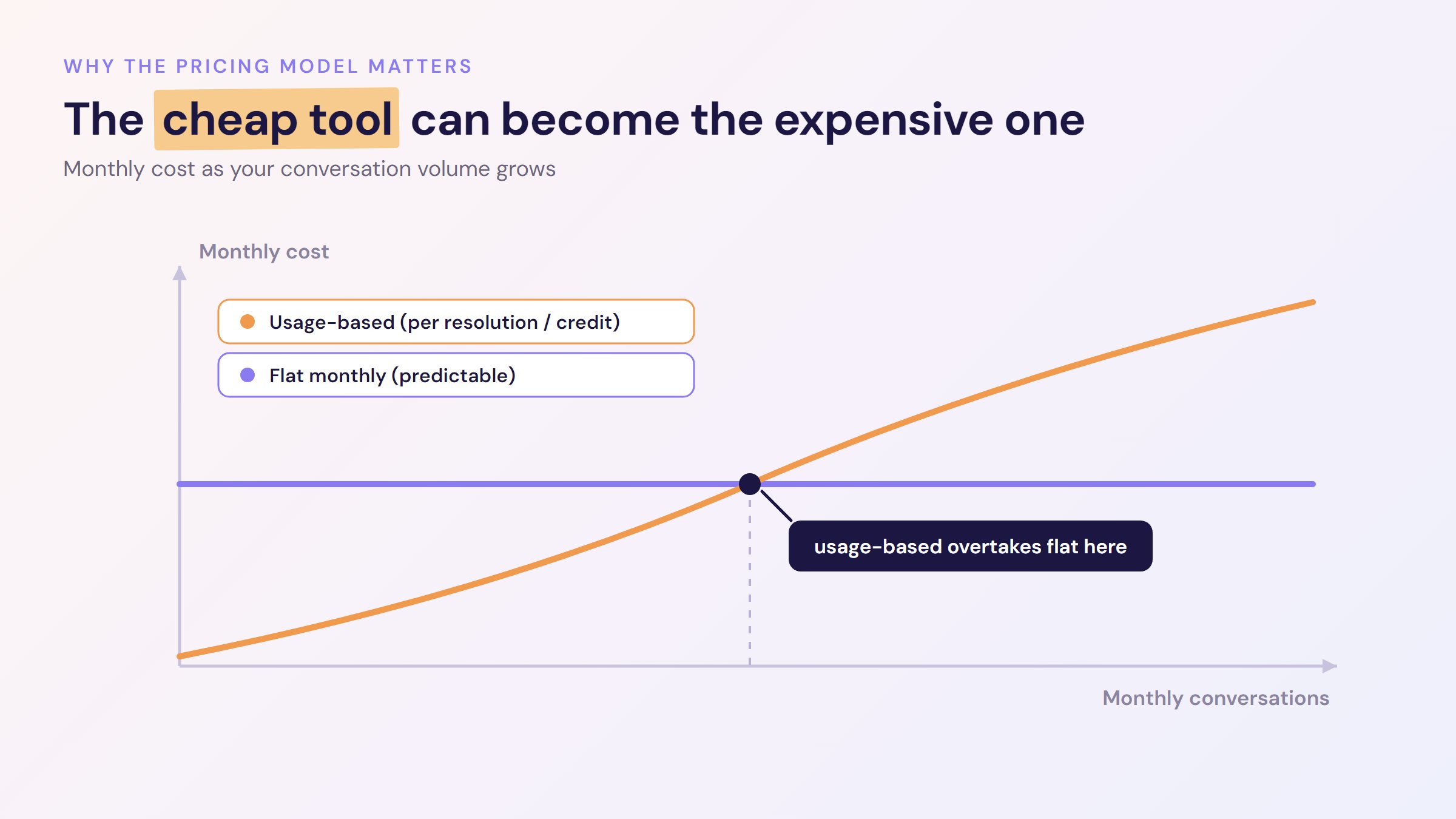
The flat-monthly model exists precisely to remove this guesswork: you know the bill on day one and it does not climb with every conversation. That is the logic behind Resolve247’s pricing, which starts at $35 a month with no credits, no per-resolution meter and no surprise overage. Whichever model you choose, choose it with your eyes open.
Match the framework to your situation
The nine criteria are not equally important for everyone. Weight them by the job you need done. Here is how the priorities shift for common situations.
| If this sounds like you | The criteria that decide it | The trap to avoid |
|---|---|---|
| High volume of repetitive questions (order status, resets, FAQs) | Accuracy (1), knowledge training (4), 24/7 coverage (7) | A bot that guesses instead of admitting it doesn’t know |
| Accuracy-critical or regulated answers | Anti-hallucination (1), oversight (8), data ownership (9) | “Creative” general-purpose bots that invent policy |
| A tight or fixed budget | Real pricing model (2), setup and ease (3) | Usage-based billing that climbs with your traffic |
| Ecommerce order actions (refunds, returns, tracking) | Agentic actions, integrations (5), handover (6) | Paying for agentic power a non-store won’t use |
| Already run a help desk or CRM | Integrations (5), handover (6) | A bot that forces you onto a whole new platform |
| Global or out-of-hours customers | 24/7 and languages (7), channels (5) | Coverage gaps and single-language limits |
Notice that accuracy and the pricing model appear again and again. Those two are close to universal; the rest is about fit. Once you have named your situation and weighted the criteria, you are ready to compare specific tools. We applied this framework to eight platforms, from options for small and medium teams to enterprise ones, in our comparison of the best AI customer service chatbots. There you can see how real products measure up.
Questions to ask every chatbot provider
Each of the nine criteria comes down to one question you can put to a provider, in a demo or by email. Use this table as your checklist. Ask every provider on your shortlist the same questions, and get the answers in writing so you can compare them side by side.
| Criterion | Ask the provider | A good answer |
|---|---|---|
| 1. Accuracy | “What does your bot do when it isn’t sure of an answer?” | It says it doesn’t know and hands the customer to a person. |
| 2. Pricing model | “What would we pay at our monthly volume, and what happens if we go over?” | A figure you can check against your own numbers, and a clear, written answer on what happens if you go over. |
| 3. Setup | “Can we set it up on our own content and go live in a free trial, without a sales call?” | Yes, the same day. |
| 4. Knowledge training | “When we change a policy, how soon does the bot’s answer change?” | Within minutes or hours, with one click or automatically. |
| 5. Channels and integrations | “Does it work on our website and with the live chat, help desk, or CRM we already use?” | Yes, on your website or inside the live chat you already run, without moving your team to a new platform. |
| 6. Human handover | “What does our team see when the bot hands a customer over?” | The full conversation and any details the bot collected, on a channel your team already uses. |
| 7. 24/7 and languages | “Does it answer on its own overnight, and in which languages?” | Yes, with no one from your team online, and in the language the customer writes in. |
| 8. Oversight | “Can we read every conversation and fix a wrong answer ourselves?” | Yes. Full transcripts, and a fix you can make yourself, such as adding the right answer for the bot to use. |
| 9. Data | “Is our content used to train your AI models, and what happens when we delete it?” | It’s never used for training, and the bot stops using it in answers as soon as you delete it. |
Then test your shortlist in a free trial
Answers in a demo are a promise. A week in a free trial shows you what each customer support chatbot does with your own customers’ questions.
- Give each bot the same help content you would use when you go live.
- Ask each bot 20 real questions from last month’s inbox, plus three about your business that your help content doesn’t cover. Count the right answers. For the three, check that it says it doesn’t know and offers a person. When it misses one of the 20, check whether your help content covers that question. For a fuller test of whether a bot makes things up, see how to test a support bot for hallucination before you buy.
- Play a stuck customer and ask for a person. Check what reaches your team, and whether the customer would have to repeat anything.
- Work out the monthly cost at your real volume under each provider’s pricing model.
- If you go live during the trial, check three things after a week: how many conversations the bot handled without a person, how many it handed over, and which questions it couldn’t answer.
Frequently Asked Questions
How do I choose an AI customer support chatbot?
Define the job you need done, then score each option against nine criteria: answer accuracy, pricing model, setup speed, knowledge training, channels and integrations, human handover, 24/7 coverage, oversight, and data security. Two decide most outcomes: whether the bot answers only from your own content, and what its pricing model really costs at your true volume.
What should I look for in an AI customer support chatbot?
Above all, look for grounded accuracy: a bot that answers only from your help content and says “I don’t know” rather than guessing. Then check the pricing model (how you are billed, not just the headline price), how fast it goes live, how it trains on your knowledge, whether it fits your existing channels and help desk, and how cleanly it hands complex questions to a human.
Are AI customer support chatbots accurate?
They can be very accurate when they are grounded in your own content rather than answering from general internet knowledge. The key is choosing one that replies only from your help docs and admits when it does not know. That “anti-hallucination” approach is what prevents the invented-policy mistakes that make headlines, so accuracy is really a question of how a bot is built, not whether AI can be trusted at all.
How much does an AI customer support chatbot cost?
It varies widely, and the pricing model matters more than the headline figure. Flat-monthly tools start around $35 a month for a set allowance. Usage-based tools charge per resolution (roughly $0.50 to $2.00), per credit, or per conversation, so costs rise with volume. Enterprise platforms are typically quote-only and can run into tens of thousands a year.
Can I use ChatGPT for customer support?
Yes, but not raw ChatGPT on its own. To answer customers reliably, the model needs grounding in your own content so it does not invent policies or prices. Purpose-built support tools handle that grounding for you, or you can wire it up yourself; our guide to embedding ChatGPT in your website explains how to control what it says.
How do AI support chatbots handle questions they can’t answer?
A well-built one recognises the limit of its knowledge, tells the customer so, and hands the conversation to a human with full context on your existing channel, so nobody has to repeat themselves. A poorly built one guesses. Testing this handover behaviour yourself, by playing a stuck customer, is one of the most revealing checks you can run before buying.
What is the best AI customer support chatbot?
There is no single best one; the right choice depends on your size, budget and stack. Small and medium teams that want accuracy and predictable pricing are served well by tools like Resolve247. Large enterprises, and stores that want the bot to handle refunds or returns without a developer, are better matched to other tools. Our full comparison of customer service chatbots matches specific tools to each situation.
The bottom line
Choosing an AI customer support chatbot comes down to naming the job and weighting these nine criteria for your situation. Then check the two things that decide most bad outcomes: whether the bot answers only from your own content, and what its pricing model costs once your customers start using it. Get those right and you avoid both the invented-policy mistakes that make headlines and the usage bills that quietly balloon.
Everything else is fit. An enterprise with 300,000 conversations a year and a Shopify store doing order refunds need very different tools, and that is fine; the framework is what lets you tell them apart. When you are ready to look at real products, our comparison of the best AI customer service chatbots weighs eight platforms against these criteria.
If your priority is accurate answers, flat and predictable pricing, and a support chatbot live on your site in minutes, that is the gap Resolve247 was built to fill. It answers 82% of customer questions without a human (from 71% to 94%, depending on the business), and if it ever hallucinates, that month is free. You can try it free for 30 days, with no credit card required. See our pricing to get started.