
Search “customer service tips” and you get the same list every time: be empathetic, listen actively, respond quickly, personalise. All true, none of it wrong. But it skips the reason your team struggles to do any of it on a busy Tuesday, which is that they’re buried under the same handful of questions asked fifty different ways.
As one support rep put it in a forum thread, “customers say the same crap, all of them, all day.” Another described being “dead inside by the third hour.” You can’t deliver warm, personal service from that place.
So this guide does two things at once. It gives you 12 customer service tips that genuinely make a difference, and it shows you how to clear the repetitive load so your team has the time and headspace to use them. We build AI support software and run our own support desk, so none of this is theory.
A quick note before the tips: great service and busywork pull against each other. The more of your day that goes on “where’s my order?”, the less of you is left for the customer who really needs a person. Keep that tension in mind, because it shapes every tip below. If you want the bigger picture first, our guide to what good customer service looks like sets the foundation this article builds on.
Why better customer service pays off
It’s worth being honest about the stakes, because they’re bigger than most teams assume. Qualtrics estimates that “businesses around the world risk $3.8 trillion in sales due to bad customer experiences,” and found that “more than half (53%) of consumers say they will cut spending after a bad customer experience.” You don’t get many chances to get it wrong.
Zendesk reports that 63% of customers are “willing to switch to a competitor due to just one bad experience,” a figure that has grown 9% year on year, and Salesforce found that “43% of consumers say poor customer service experience will stop them from making a repeat purchase.”
The flip side is the opportunity. Handle the moment well and you keep the customer, and often earn the kind of word of mouth no ad budget can buy. These 12 tips are how you stay on the right side of those numbers.
12 customer service tips that actually work
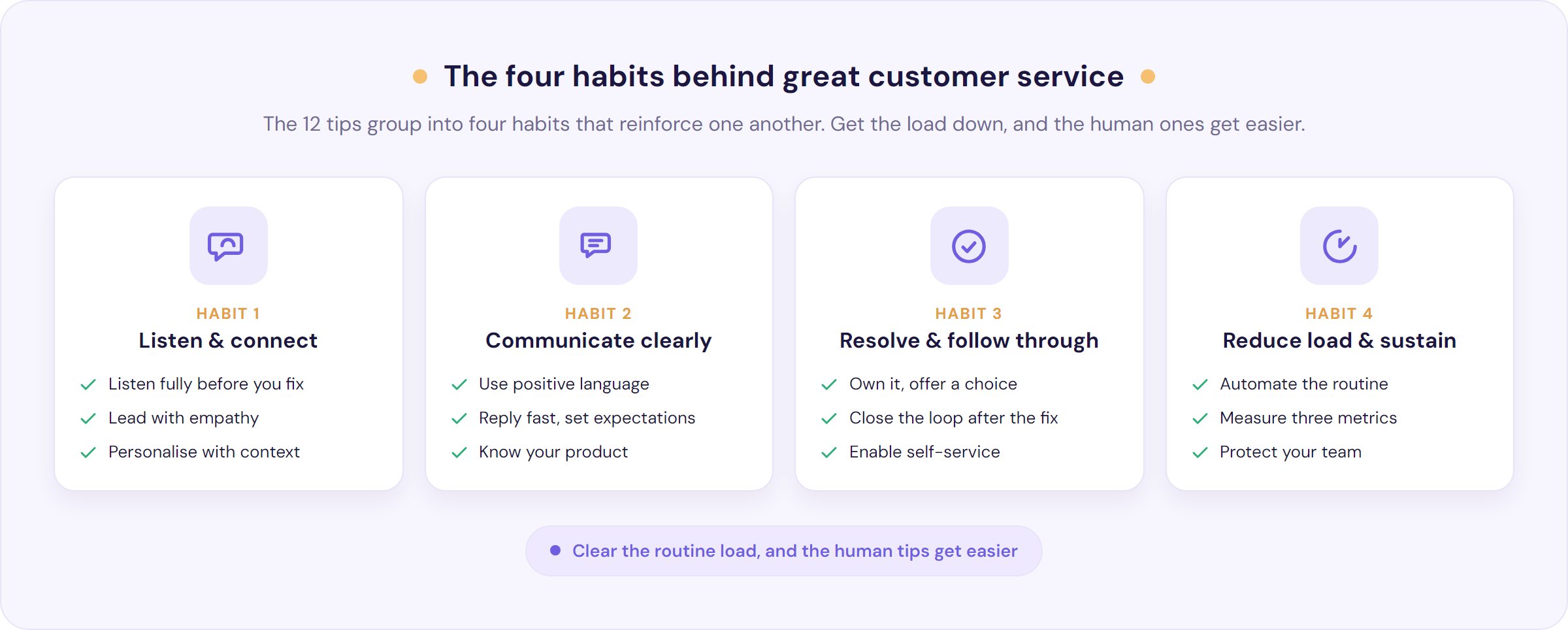
Here are twelve customer service tips you can start using today:
- Listen fully before you jump to the fix.
- Lead with empathy, and remember it is not personal.
- Use positive language and drop the jargon.
- Reply quickly, and set expectations when you cannot.
- Know your product, and keep your help content current.
- Personalise with context, not just a first name.
- Own the problem and give the customer a choice.
- Close the loop and follow up after the fix.
- Turn repeat questions into self-service.
- Automate the routine so your humans get the hard stuff.
- Measure three things, not thirty.
- Protect your team with clear boundaries.
Here is what each one looks like in practice.
1. Listen fully before you jump to the fix. Most reps start solving before the customer has finished the sentence. Resist it. Let them lay out the whole problem, then play it back: “So the payment went through twice and the second order never confirmed, is that right?” That one habit catches the gap between the first thing a customer says and what is actually wrong, and it makes them feel heard before you have done anything else.
2. Lead with empathy, and remember it’s not personal. When a customer unloads, they’re venting at the situation, not at you. Naming the feeling costs nothing and lowers the temperature fast: “I can see why that’s frustrating, I’d want it sorted too.” Empathy does the heavy lifting here, and it makes every other tip land.
3. Use positive language and drop the jargon. Tell people what you can do, not what you can’t. “Here’s how we’ll fix this” beats “that’s against our policy” every time, even when the outcome is the same. And skip the internal shorthand, error codes and acronyms that mean nothing to the person on the other end. One small habit worth stealing: when a customer thanks you, don’t say “no problem,” which quietly frames their request as a burden. “Happy to help” is warmer and does the opposite.
4. Reply quickly, and set expectations when you cannot. Speed is now the baseline expectation. Salesforce found that “30% of consumers, even more among Gen Z and millennials (37%), would work with an AI agent instead of a person for faster service,” which tells you how much people value a quick answer over who gives it. When you genuinely can’t resolve something on the spot, say so and give a time: “I need to check with our warehouse, I’ll come back to you by 2pm.” Silence is what inflames people, not honest waiting.
5. Know your product, and keep your help content current. Nothing erodes trust faster than a confident, wrong answer. Your team should know the product cold, and your help centre should be the single source of truth they and your customers both draw on. Stale docs are a hidden tax: every out-of-date article is a ticket waiting to happen, and a rep about to give bad information.
6. Personalise with context, not just a first name. Real personalisation isn’t “Hi Sarah,” it’s knowing that Sarah has messaged twice this week about the same delivery. Zendesk found “61% of consumers expecting AI-driven interactions to feel tailored to them,” and the bar keeps rising. Pull up the customer’s history before you reply, so nobody has to repeat themselves. Salesforce found “69% of consumers expect consistent interactions across departments,” and repeating the story from scratch is the fastest way to fail that test.
7. Own the problem and give the customer a choice. Whoever picks up the conversation owns it until it’s resolved, no “that’s another team’s job.” And where you can, offer two options rather than one take-it-or-leave-it answer: “I can refund it today, or send a replacement on next-day delivery, which would you prefer?” A choice hands control back to someone who feels they’ve lost it.
8. Close the loop and follow up after the fix. The step nearly everyone skips. A short message a day or two later, checking the fix held, is what turns a rescued conversation into a loyal customer. It signals the resolution was about them, not about closing the ticket.
9. Turn repeat questions into self-service. If the same question comes in again and again, the answer belongs somewhere customers can reach without you: a clear help centre, a good FAQ, a searchable knowledge base. Salesforce found that “61% of customers would rather use self-service channels for simple issues,” so plenty of people will happily find the answer themselves rather than wait for you. Done well, self-service respects the customer’s time as much as it saves yours.
10. Automate the routine so your humans get the hard stuff. This is the tip the other lists gloss over, and it deserves its own section below. In short: the repetitive volume that burns your team out is exactly what automation is good at, which frees your people for the conversations that actually need a human.
11. Measure three things, not thirty. You can’t improve what you don’t measure, but you also can’t act on a dashboard with forty metrics. Pick a small number that map to the tips above and watch them over time. More on which three below.
12. Protect your team with clear boundaries. Burnout is a service problem, not just an HR one. A tired, resentful rep can’t deliver any of the tips above. Give your team permission to set boundaries with abusive customers, and protect their attention by keeping the routine noise off their plate.
Which customer service tasks to automate (and which to keep human)
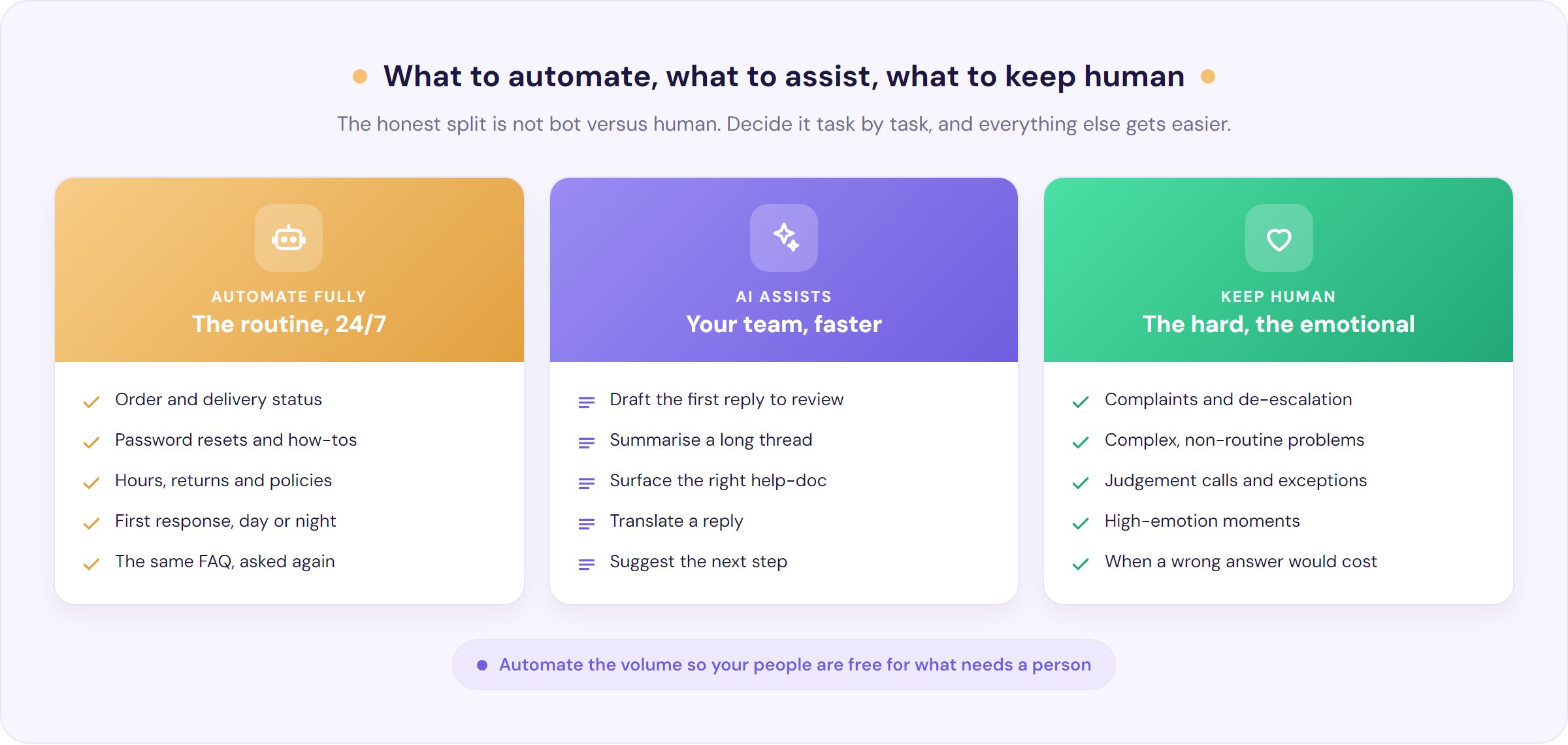
The honest way to think about AI in support isn’t “bot versus human.” It’s deciding, task by task, what to automate fully, what to let AI assist a human with, and what to keep entirely human. Get that split right and everything else gets easier.
Here is a practical starting point:
| Automate fully | Let AI assist your team | Keep human |
|---|---|---|
| Order and delivery status (“where’s my order?”) | Draft the first reply for an agent to review | Complaints and de-escalation |
| Password resets and account how-tos | Summarise a long or messy thread | Complex, non-routine problems (the “weird stuff”) |
| Opening hours, returns and policy questions | Surface the right help-doc mid-conversation | Judgement calls and exceptions |
| First response and simple answers, 24/7 | Translate a reply into another language | High-emotion moments where being heard matters most |
| The same FAQ asked the fiftieth way | Suggest next steps or related answers | Anything where a wrong answer would be costly |
Notice what’s in the right-hand column. Customers already self-select this way. As one commenter described their own habit, they save contact for “the weird stuff that they just aren’t going to anticipate.” A bot that nails the routine 24/7 does not steal the meaningful conversations. It clears the load so your team can be present for exactly the queries customers already reserve for a human.
And the pro-automation crowd cares less about clever technology than about a fast resolution. “Important is to get things done,” as one commenter put it. Frame your automation around speed to a correct answer, not around the fact that it’s AI. If you want to go deeper on this, our guide to customer service automation covers how to roll it out without making things worse.
Scripts that work: say this, not that
There’s an old debate about whether scripts kill authenticity. The best support people have already settled it: use structure as your delivery, and bring genuine care as the thing that makes it land. As one long-serving rep explained, “customers say the same crap, all of them, all day, so you just have standard replies,” before adding the crucial part, “the thing that always made me so good at playing the part was: I actually cared.” Scripts are scaffolding, not a substitute for meaning it.
So build yourself a small bank of go-to lines, then say them like a human. Here are some reliable swaps.
| Say this | Not that |
|---|---|
| Happy to help, let me sort that out for you | No problem |
| Here’s what I can do for you | That’s against our policy |
| Let me find out and come straight back to you | I don’t know |
| You’ll have it by Thursday | It’ll be ready soon |
| Thanks for bearing with me while I fix this | Sorry for any inconvenience caused |
| Good question, here’s exactly how it works | As per the website |
One more boundary worth scripting in advance. There’s a real difference between an angry customer, who is aimed at the problem, and an abusive one, who is aimed at you. You don’t have to absorb the second kind. As one support veteran said of repeat abusers who make staff miserable, “they aren’t customers, they’re users and they are costing you money.” Warn once, calmly, and disengage if it continues. For the full method on defusing genuine anger, see our guide to dealing with angry customers.
The honest truth about AI in customer service
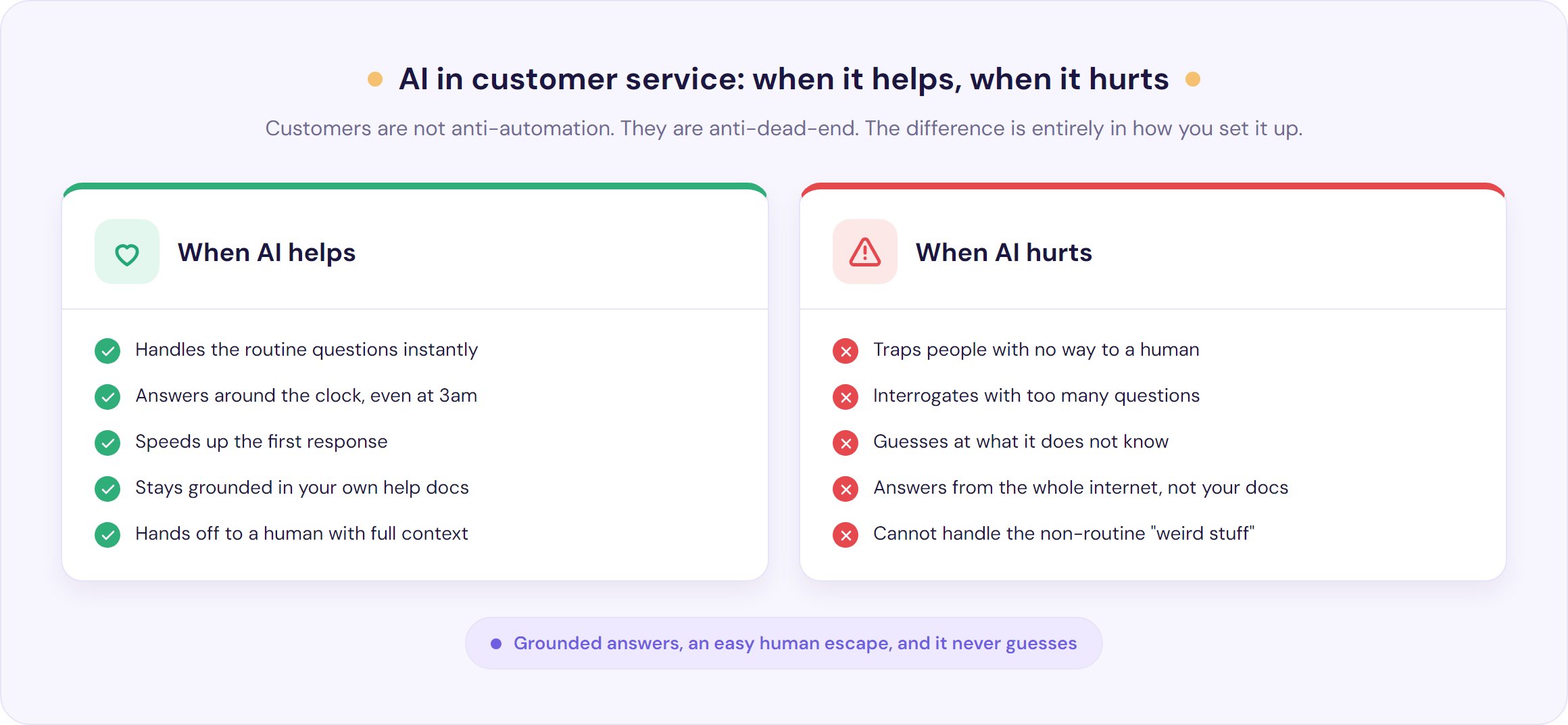
Most tips lists now include a breezy “embrace AI” line and leave it there. That’s not good enough, because AI in support helps and hurts in very specific, predictable ways. Knowing the difference is what separates a tool your customers thank you for from one they try to escape.
AI helps most when it:
- Handles the routine instantly, around the clock. As one founder put it, the value is that “someone can get an answer at 3 a.m. on a Saturday night” without anyone being on shift.
- Speeds up the first response, which, as the Salesforce data shows, many customers value more than who answers.
- Stays grounded in your own content. The same founder describes good support AI as answering “only from your own knowledge base and your own data, not the whole of ChatGPT.” That grounding is what keeps answers accurate.
AI hurts, badly, when it:
- Traps people with no way out. This is the number one complaint, and customers have built rituals to beat it, mashing “agent, agent, agent” or “representative” until a bot gives up and fetches a human. If your automation has no obvious human escape, you are manufacturing rage, not deflecting tickets.
- Interrogates the customer. A UX director’s warning is worth heeding: “asking too many questions could cause customers to abandon the conversation.” Make it easy, do not run an inquisition.
- Guesses at things it does not know. A confident, wrong answer is worse than no answer, especially to someone already frustrated.
The data is blunt about the cost of getting this wrong. Gartner found that “only 27% of customers say they would be willing to try a chatbot again after a negative experience,” and that “87% of customers say it is essential for companies to provide an option to reach a human agent when using GenAI.” People aren’t anti-automation. They’re anti-dead-end.
This is exactly the model we build towards. Our AIChatbot answers from your own knowledge base with citations on by default and a money-backed accuracy guarantee, so it sticks to what your own material actually says rather than guessing, and it hands off to a real person the moment a query is complex or emotional, passing the full conversation along so nobody has to repeat themselves.
Used that way, AI in customer service protects your team’s people skills rather than replacing them, and it buys back the time they need to use them. If you’re weighing up how conversational AI for customer service should behave, the short version is simple: fast and grounded on the easy questions, and out of the way fast on the hard ones.
How to measure customer service: pick three metrics
You don’t need a wall of dashboards. For most teams, three numbers tell you almost everything:
- First response time. How long a customer waits for any reply, and often the first thing they judge you on.
- First contact resolution. The share of issues solved in one go, without the customer having to come back. High FCR is the quiet signature of a good support operation.
- CSAT. A simple “how did we do?” after a resolution, which tells you how the interaction actually felt.
Start there, watch the trend rather than obsessing over any single day, and only add more once these three are healthy. If you want a quick, benchmarked read on where you stand, our free CSAT calculator scores your result against industry data. Measured well, support stops looking like a cost centre and starts proving its value, the shift Zendesk describes as turning a team into “a value center instead of a cost center.”
Customer service tips for small teams and solo founders
Most customer service advice quietly assumes a contact centre sits behind you. If you’re a founder or a team of one or two, it doesn’t. You’re the front line and the manager, and every minute counts double.
A few things matter more when you are small:
- Get the routine off your plate first. The founder buried in “where’s my order?” is the most common story there is. One built a bot on their own help docs and, in their words, went from “drowning in customer questions” to having “time to focus on the big stuff.” Automating your top five repeat questions is often the single highest-leverage move a small team can make, and it’s one of the most effective ways to reduce your support ticket volume overall. An AI chatbot for small business earns its keep precisely here.
- Protect the human moments. Clearing the routine load is about more than efficiency. A cashier once described a customer who said she was the only person she’d spoken to all day, then started crying. Those moments are the whole point of the job, and you can’t be present for them while you’re answering the same delivery question for the ninth time.
- Buy honest time. You don’t have to solve everything on the spot. “Give me until this afternoon and I’ll come back with a proper answer” is completely fair, and it beats a rushed, wrong reply.
- Pre-write your hardest replies while calm. Draft your refund line, your out-of-stock apology and your abuse boundary now, and save them. You won’t find the right words with your pulse racing.
Frequently Asked Questions
What are the most important customer service tips?
The highest-impact customer service tips are: listen fully before fixing, lead with empathy, use positive language, reply quickly and set expectations, personalise with context, own the problem and offer choices, follow up after the fix, and turn repeat questions into self-service. Underneath them all, clear the repetitive load so your team has time to deliver the rest.
How can a small business improve customer service?
Small teams improve service fastest by getting the routine off their plate. Automate your top five repeat questions, keep your help content current, reply quickly with honest time expectations, and pre-write your hardest replies in advance. That protects your limited hours for the complex, emotional conversations that genuinely need a person.
Which customer service tasks should you automate?
Automate high-volume, low-judgement tasks: order and delivery status, password resets, opening hours, returns and policy questions, and first responses around the clock. Let AI assist humans with drafting, summarising and surfacing help docs. Keep complaints, de-escalation, complex non-routine issues and high-emotion moments human, and always leave a one-click path to a person.
Should customer service teams use scripts?
Yes, used well. Scripts give you reliable, consistent replies for the questions you hear every day, which saves energy and reduces mistakes. The key is to treat them as scaffolding, not a substitute for genuinely caring. Personalise the wording, match the customer’s situation, and never sound like you are reading from a card.
What customer service metrics should I track?
For most teams, three metrics are enough: first response time (how long customers wait for a reply), first contact resolution (issues solved in one interaction), and CSAT (how satisfied customers were afterwards). Watch the trend rather than daily noise, and only add more metrics once these three are consistently healthy.
How do you handle a rude or difficult customer?
Stay calm, do not take it personally, and keep the focus on the problem rather than the person. Acknowledge the frustration, offer a clear next step, and give honest options. If a customer becomes genuinely abusive, warn them once calmly and disengage if it continues. Our full guide to dealing with angry customers covers the step-by-step method.
The bottom line
Good customer service is less a personality trait than a set of habits, plus the time and headspace to use them. The tips in this guide work, but only if your team isn’t drowning in repetitive volume while they try to apply them.
Four things to put in place this week:
- Automate your top five repeat questions, so your team gets their attention back.
- Add a visible, one-click path to a human wherever you use automation, so nobody gets trapped.
- Pick three metrics (first response time, first contact resolution, CSAT) and start watching the trend.
- Pre-write your three hardest replies while you are calm, and save them.
Our AIChatbot answers your customers from your own knowledge base, with citations on by default and a human handover built in, so the routine questions get handled instantly and your team is free for the conversations that need a person. You can start a 30-day free trial with no credit card, from $35 a month. Give your team back the time to be great at the human part.