
You added live chat so customers could reach a real person. Now the chats arrive at 10pm, on Sunday mornings and halfway through your sales calls, and every one of them expects a reply in minutes.
Chatbot vs live chat comes down to who replies. Live chat puts a person on your team in a chat window on your website. A chatbot replies automatically, at any hour, from scripts or, if it’s an AI chatbot, from your own help content.
For most small teams the answer is both: an AI chatbot takes the first reply, at any hour, and your team takes the chats that need a person. The short version:
- Keep live chat alone if your volume is low, you reply within minutes and most chats need judgement, such as sales or complaints.
- Add an AI chatbot when the same questions repeat, chats arrive out of hours or customers are left waiting.
- Run them in the same chat window, with an obvious route to a person and the conversation handed over in full.
Disclosure: we make Resolve247, an AI chatbot that can answer inside HubSpot and Crisp live chat. So we’ve stuck to sourced numbers, and we say where live chat alone is the better choice.
Chatbot vs Live Chat: What’s the Difference?
Live chat connects a website visitor with a person on your team, who types replies in real time. A chatbot is software that replies on its own, at any hour, from fixed scripts and buttons or, if it’s an AI chatbot, in its own words from your content. Many businesses now run both in the same chat window.
In practice, people mean one of three things, and the difference between the last two matters most:
- Live chat. A person on your team answers in a chat window on your website, using a tool such as Crisp, HubSpot’s chat, Tidio or LiveChat.
- Rule-based chatbot. A scripted bot with buttons and fixed paths (“Track my order”, “Returns”). It’s predictable and cheap, but it hits a dead end when a question falls outside the paths someone built. (See rule-based chatbots.)
- AI chatbot. It reads the question in the customer’s own words and answers from the content you give it: help articles, website pages, policies. It copes with open, oddly worded questions. Its weak spot is an answer that sounds certain but is wrong, a risk that’s highest when it isn’t kept to your content.
Much of what’s written about chatbots still judges them on the rule-based kind. An AI chatbot trained on your help pages changes the setup work and the cost, and brings its own risk, covered below. (A bot that also looks things up or takes actions, such as checking an order or issuing a refund, is an AI agent; see AI agents for customer service.)
Chatbot vs Live Chat at a Glance
Here’s how the three compare on what a small team usually cares about.
| Live chat | Rule-based chatbot | AI chatbot (trained on your content) | |
|---|---|---|---|
| Who replies | A person on your team | Pre-written scripts | AI, from your help content |
| When | Only when someone’s online | Any hour | Any hour |
| Reply speed | Under a minute to a few minutes when staffed; longer at busy times | Instant | A few seconds |
| Unusual or open questions | Yes | No, only the paths you built | Yes, if the answer is in your content |
| A specific order or account (“where’s my order?”) | Yes, the person looks it up | Only if it’s connected to your systems | Only if it’s connected; otherwise it explains the policy and offers a person |
| Judgement and empathy | Yes | No | Follows your rules; can’t make exceptions |
| Main risk | Waits, missed chats, a tired team | Dead ends that frustrate people | A confident wrong answer, especially if it isn’t kept to your content |
| How the cost grows | With the hours you cover and the people you need | A monthly subscription | Monthly plan, or a fee for each conversation it resolves |
| Setup work | Install the widget, then staff it | Build and maintain the flows | Point it at your content, test it, keep the content current |
| Best for | Sales conversations, complaints, tricky cases | Simple routing and forms | Repeat questions, out-of-hours, the first reply |
Curious how an AI chatbot would answer your own customers? Our free Chat With Your Website tool reads your site and lets you ask it questions, with no signup.
Pros and Cons of Live Chat
Pros
- A person answers. They can ask a question back, hear frustration in a short message, bend a rule and close a sale. Judgement is the thing live chat has that no bot does.
- It’s fast when it’s staffed. Across LiveChat’s customers, the first reply arrives in 35 seconds on average (55 seconds in retail), based on 1.68 billion chats (data last updated 2024).
- Customers still value it. In Five9’s 2026 survey of 3,000 consumers in the US, UK and Germany, 80% were willing to use AI customer service, but two-thirds still preferred speaking with a person.
Cons
- It only works while someone’s there. Outside your hours, the best a visitor gets is an “away” message and a form.
- Busy moments mean queues. When every agent on LiveChat is at their limit, customers queue for 4 minutes 18 seconds on average, and 27.4% leave before anyone answers.
- “Online” doesn’t always mean answered. When SuperOffice tested 1,000 US and European company websites in 2020, during their support hours and only when chat showed as available, 21% of chats got no reply at all. The average wait was 2 minutes 40 seconds.
- One person can only juggle so many chats. LiveChat’s agent handbook suggests three at once for new agents and up to six for experienced ones, and a peer-reviewed field study found that juggling more chats means longer waits, fewer problems solved and lower satisfaction.
- It turns patient questions into urgent ones. One startup founder on Hacker News found live chat brought in maybe 10% more contacts, but “about half of the contact that would have come through our email form (and not required an immediate response) was now coming through chat. This meant that we needed to respond immediately”. And every extra hour of cover means more people, as the cost section below shows.
Pros and Cons of Chatbots
These chatbot pros and cons apply to both kinds of chatbot unless noted. The cons are where the two kinds differ most.
Pros
- Every hour, every day. A chatbot answers at 11pm on a Sunday as readily as at 11am on a Tuesday. Expectations have moved: in Zendesk’s CX Trends 2026 survey of 6,182 consumers, 74% said AI has made them expect customer service to be available 24/7.
- No queue. It answers many customers at once, in seconds, so a launch, a sale or an outage doesn’t leave people waiting.
- Consistent answers. It doesn’t have off days. A rule-based bot gives the same reply every time; an AI chatbot kept to your content gives the same substance, though its wording can vary from one chat to the next.
- Customers don’t mind a bot that solves their problem. On LiveChat, bot-handled chats scored 64.7% satisfaction against 64.2% for all rated chats (2024 data; only 6.7% of chats get a rating), with bots doing better in retail (74.4%) than in SaaS (59.2%). Bots usually get the simpler chats, so read it as “fine for routine questions”, not “bots beat people”.
Cons
- Rule-based bots trap people. A scripted bot dead-ends on any question outside its paths, and the US Consumer Financial Protection Bureau warned in 2023 that chatbots can trap customers in “doom loops” of repetitive, unhelpful answers “without an offramp to a human customer service representative”. (See automating customer support without trapping people.)
- AI chatbots can be confidently wrong. Air Canada’s website chatbot told a customer booking a flight after a death in the family that a bereavement fare could be claimed after travelling, contrary to the airline’s own bereavement page, which the chatbot itself linked to. In 2024, a Canadian tribunal held Air Canada responsible and ordered it to pay about C$812, noting that “It makes no difference whether the information comes from a static page or a chatbot.” The best defence is a bot kept to your own content that says “I don’t know” when the answer isn’t there, tested against your policies before customers see it. That lowers the risk; it doesn’t remove it. (See our glossary entry on AI hallucination.)
- A bad bot burns goodwill fast. In Gartner’s 2026 survey, only 27% of customers would try a chatbot again after a bad experience, and 87% said access to a human agent is essential when companies use generative AI.
- It’s only as good as your content. An AI chatbot answers from your help pages and policies, so gaps and out-of-date pages turn into gaps and out-of-date answers. Someone has to own that content. And unless it’s connected to your systems, it can’t see a particular customer’s order or account: it can explain your delivery policy, but “where’s my order?” still needs a person or an integration.
What Live Chat Cover Costs, and How a Chatbot Compares
Live chat software is cheap. The biggest cost difference in chatbot vs live chat is staffing: keeping someone watching the window, which grows with every hour you promise to cover.
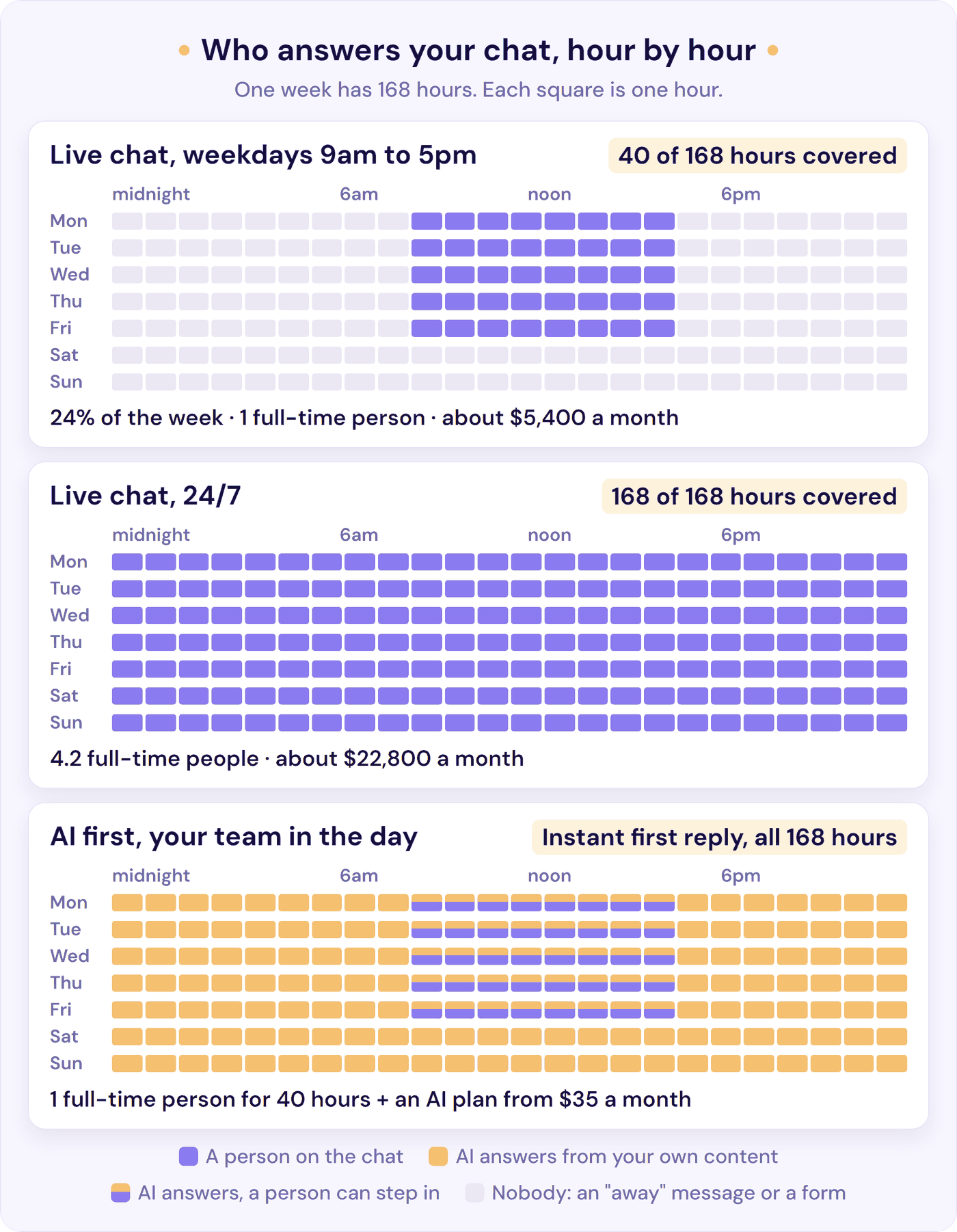
A week has 168 hours. Office-hours live chat (weekdays, 9am to 5pm) covers 40 of them, under a quarter. Here’s what it takes to keep one person on the chat for longer:
| Live chat cover | Hours a week | Share of the week | Full-time people needed | Cost a month (US median pay plus benefits) |
|---|---|---|---|---|
| Weekdays, 9am to 5pm | 40 | 24% | 1 | About $5,400 |
| Weekdays, 8am to 8pm | 60 | 36% | 1.5 | About $8,100 |
| Every day, 8am to 10pm | 98 | 58% | 2.5 | About $13,300 |
| 24/7 | 168 | 100% | 4.2 | About $22,800 |
Based on the US median pay for customer service representatives, $44,770 a year in May 2025. Adding benefits (wages are 68.7% of what employers pay for office and admin roles) brings it to about $31 an hour. That’s one person on the chat at a time, before any cover for holidays, sick days and breaks, so treat each figure as a floor.
If it’s you on the chat, the bill is your time instead. At, say, 150 chats a month and six minutes each, that’s 15 hours, nearly two working days. And that’s just the typing. Staying close enough to the widget to answer within a minute or two takes far more of your day. If you’re a SaaS founder, our guide to customer support for SaaS puts hours a week on when to add docs, AI, or help.
AI chatbots are priced as a flat monthly plan, a credit or conversation allowance, or a fee for each conversation the AI resolves. Per-resolution list prices run from $0.50 (HubSpot’s Customer Agent) to $2.00 (Zendesk, pay as you go), usually on top of helpdesk seats (our AI chatbot pricing guide compares 13 providers). Resolve247’s plans start at $35 a month for 2,000 AI replies, roughly 800 conversations at about 2.5 replies each. At that volume, if the AI resolved half of them, per-resolution pricing would come to $200 a month with HubSpot’s Customer Agent or $396 with Fin, before seat fees.
On a flat plan, a busy month doesn’t change the bill on its own. If you go over your Resolve247 allowance, the AI keeps answering and we talk with you about whether a bigger plan makes sense, with no automatic overage charges.
A chatbot doesn’t replace the person. It means the hours nobody wants to staff stop leaving customers waiting. Our guide to 24/7 customer support costs the other ways to cover them, from an honest auto-reply to an answering service. For cost per ticket and the cheaper fixes to make first, see how to reduce customer support costs.
When Live Chat Alone Is the Right Call
In the live chat vs chatbot decision, a bot isn’t always the next step. Live chat on its own is the better choice when:
- Your volume is low and you answer fast. If you get a handful of chats a day and reply within a couple of minutes, customers already get what a bot would give them, plus a person. As one commenter put it on Reddit, “for 100-150 visitors a day you probably don’t need automation yet, just do live chat when you’re available and email for everything else.”
- Most chats are sales conversations. Large or high-value B2B deals are won by someone who can ask questions back, read hesitation and offer a call.
- The subject is sensitive. Complaints, billing disputes, health or money worries need judgement and the authority to make an exception. (Our guide on how to deal with angry customers explains why these belong with a person.)
- You want every conversation. In the early days, reading every chat yourself is market research you can’t buy.
- Your help content isn’t written yet. An AI chatbot can only answer from what you give it. With no help articles or clear policies, write those first; you’ll need them either way.
If that’s you, keep live chat and set honest expectations on the widget. One small business owner’s widget now says “We typically respond within 2 hours during business hours” instead of pretending to be instant: “That alone removed the pressure.” Revisit the decision when one of the signs below starts to show.
Signs You Need a Chatbot as Well as Live Chat
Your last few weeks of chats already hold the answer. Export them, or scroll back through your inbox, and check for these five signs:
- The same questions keep coming. Tag two weeks of chats by topic, and note which saved replies your team pastes most. A handful of topics (delivery times, pricing, password resets, “do you integrate with X?”) often make up most chats. If the answers already sit in your help pages, a bot can take those. A good test from one Reddit commenter: “could you type the answer into a doc right now without thinking about their specific situation. If yes, automate it.”
- Chats arrive when nobody’s there. In the same sample, note when each chat arrived. Every one outside your hours got an “away” message instead of an answer. It’s often a bigger share than owners guess. Small Business Chatbot, an AI chatbot provider, analysed 7,159 website chats it handled for 19 US small businesses: 38% arrived outside 8am to 6pm on weekdays, with weekends alone accounting for 18% of all chats.
- Customers wait, or leave before you reply. Your live chat tool’s reports show your first response time and how many chats went unanswered. Customers’ bar is high: in HubSpot research dating from 2019 or earlier, 90% rated an immediate response to a support question as important or very important, and almost two-thirds expected a reply to any inquiry within 10 minutes.
- You can’t step away from the widget. Count how often in a day you drop other work to answer a chat. If the chat decides when you can take a call or a break, the real cost is your focus, not the minutes.
- Volume is growing faster than you can hire. Compare chats per month over the last six months with your team’s hours. If the gap is widening, you need either another person or fewer chats that need one.
Two or more of these, and an AI chatbot taking the first reply is likely to pay for itself. At about $31 an hour for staff time, a $35 plan covers its cost if it saves just over an hour a month.
Just one? Fix that one first. If the only issue is evenings, an honest “we’re back at 9am, leave your email” message may be enough for now. When you do start comparing tools, our guide to how to choose an AI customer support chatbot covers what to check.
How to Use a Chatbot and Live Chat Together
For most small teams, the answer to chatbot vs live chat is both. The AI takes the first reply in the same chat window, and people take the conversations that need them.
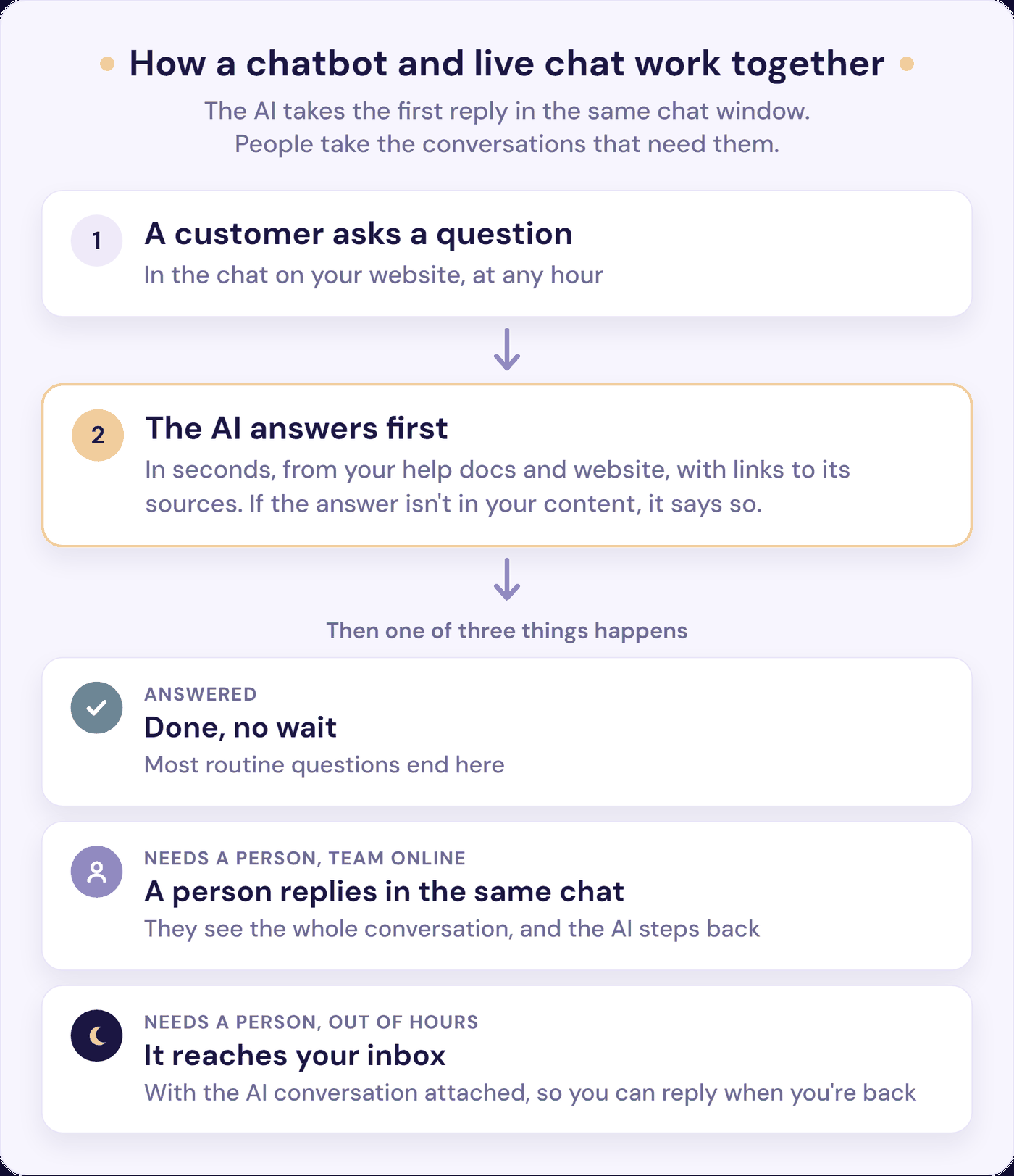
Five things decide whether the combination feels helpful or like a wall:
- Put the AI inside the chat customers already use. Nobody should have to choose between a “bot” window and a “human” window. The AI replies first, and a person can join the same conversation.
- Make the route to a person obvious. A visible “talk to a person” option, and a bot that understands “can I speak to someone?” in plain words. As one commenter noted on Reddit, “people trust the bot more when they know they are not trapped in it.”
- Hand over the conversation, not just the customer. Whoever picks it up should see what was already asked and answered, so nobody repeats themselves. This is where hybrids often fall down: in Five9’s survey, 83% of consumers said they still have to repeat themselves at least sometimes after being transferred. Out of hours, the message and the AI conversation should land in your inbox, and the customer should be told honestly when to expect a reply. Our chatbot human handoff guide gives the exact words for each step, including what to say when nobody is in.
- Say it’s an AI. Introduce it as an AI assistant in the greeting. In April 2025, Cursor’s AI support bot, signing its emails as “Sam”, invented a one-device policy that didn’t exist. Users took it as an official answer from a person, and the co-founder had to apologise and start labelling AI replies. Since 2 August 2026, the EU’s AI Act also requires that people are told they’re interacting with an AI system unless it’s obvious.
- Keep it to your content, and read what it couldn’t answer. Set the bot to show where each answer came from, and to say it doesn’t know and offer a person rather than guess. For the first two weeks, read every AI conversation. After that, read the ones it couldn’t answer each week and add the missing answers to your help content. After a month, compare unanswered chats and first response time with the month before. Our guide to AI support chatbot accuracy shows how to test a bot for made-up answers before customers see them.
Already offered AI by your live chat tool? Most now sell their own: HubSpot has Customer Agent, Crisp has Hugo and Tidio has Lyro. That keeps everything in one product. Hold it to the five points above, then check how it charges: these meter by resolution, credit or conversation, so the bill grows with your volume (how each provider charges).
Where Resolve247 Fits
Resolve247’s AIChatbot is built to take that first reply. It answers from your own website and help content, links each answer to the page it came from (in its own widget and in HubSpot), and is set to say it doesn’t know rather than guess. If there is ever a hallucination, you get that month’s chatbot free.
If you use HubSpot’s chat (on any plan, including free) or Crisp, the AI answers inside that same chat and every conversation stays in your inbox. Your team can reply at any point, and the AI steps back when they do. You can also set it to hand over when a customer asks for a person or the answer isn’t in your content.
If your live chat runs on another tool, or you don’t have one, Resolve247’s own chat widget answers instead and introduces itself as your AI assistant. Its “Contact a Human” button sends the customer’s message and the AI conversation to your email or Help Scout, so you reply by email. On our own figures, it answers 82% of customer questions instantly. Plans start at $35 a month, with a 30-day free trial and no card needed.
Frequently Asked Questions
What is the difference between a chatbot and live chat?
Live chat connects a website visitor with a person on your team, who replies in real time while they’re online. A chatbot replies automatically at any hour, either from fixed scripts and buttons or, with an AI chatbot, in its own words from your help content. Many businesses use both: the bot answers first and a person takes over when needed.
Is a chatbot cheaper than live chat?
For routine questions, yes. One person on live chat for weekday office hours costs about $5,400 a month at US median pay plus benefits, and 24/7 cover needs at least 4.2 people. Resolve247’s flat plans start at $35 a month; per-resolution AI from providers such as HubSpot, Fin and Zendesk costs $0.50 to $2.00 per resolved conversation, plus seats. You still need people for the chats a bot can’t solve.
What are the disadvantages of chatbots?
Rule-based chatbots dead-end on any question outside their script. AI chatbots can give a confident wrong answer, especially if they aren’t kept to your own content. Neither has judgement or empathy, and a bad experience puts customers off: only 27% would try a chatbot again afterwards (Gartner, 2026). A visible route to a person and well-kept help content fix most of this.
Do customers prefer chatbots or live chat?
Most still prefer a person: two-thirds said so in Five9’s 2026 survey of 3,000 consumers, even though 80% were willing to use AI customer service. Speed matters too: in HubSpot research dating from 2019 or earlier, 90% rated an immediate response to a support question as important or very important. The practical answer is both: a bot for quick answers, a person for the rest.
Should a chatbot tell customers it’s a bot?
Yes. Five9’s 2026 survey found 71% of consumers think it’s very or extremely important to know when they’re talking to AI. Since 2 August 2026, the EU’s AI Act requires that people are told they’re interacting with AI unless it’s obvious, and California’s bot disclosure law (SB 1001) makes it unlawful to use a bot that misleads people about being a bot to drive a sale. Introduce it as an AI assistant in the greeting.
The Bottom Line
In the chatbot vs live chat decision, the bigger difference is between the two kinds of bot. A rule-based bot dead-ends; an AI chatbot kept to your own content can take the first reply on most routine questions, while your team takes the rest.
Start with your own chats. This week, tag two weeks of them by topic, note when each one arrived, and list your 10 most common questions. That tells you how much a chatbot could take off your plate, and which hours you’re covering.
If the answer is “a lot”, start a free 30-day trial (no card needed) and put those 10 questions to it before any customer does. Already on HubSpot or Crisp? It answers inside the chat you already have. Or see plans and pricing first.