
Introduction
You know the feeling. You ring a company with a simple question, and a cheerful recorded voice sends you into a maze. You press “0”. Nothing. You say “agent”, and it asks you to describe your problem instead. Two minutes in, one wrong option and it hangs up, so you start again.
Then you finally reach a person, and they ask for every detail you just gave the machine.
That’s customer service automation done badly, and it’s why so many people say they can’t stand it.
So let’s be clear from the start: the problem isn’t automation, it’s bad automation. Done well, customer service automation answers your customers in seconds, at any hour, without making anyone beg for a human. Done badly, it just builds a wall between people and the help they need.
This guide is about that difference. We’ll cover what customer service automation is, the main types, and the benefits, then the two things almost every other guide skips: exactly what you should automate (and what you should never hand to a bot), and how to build an easy door back to a human so customers never feel trapped. If you’d rather see accurate automated answers in action first, you can watch our AIChatbot handle real questions.
What is customer service automation?
Customer service automation is the use of technology, mainly AI, chatbots, self-service tools, and workflow rules, to handle routine customer requests with little or no human effort. It answers common questions, routes issues to the right place, and completes simple tasks, freeing your team to focus on the conversations that genuinely need a person.
You’ll also see it called automated customer service or customer support automation. These phrases all mean the same thing: using software to resolve or speed up support that a human would otherwise handle one message at a time. The goal is to free your team from the same 10 questions all day, so they can spend their time where it counts.
How customer service automation works
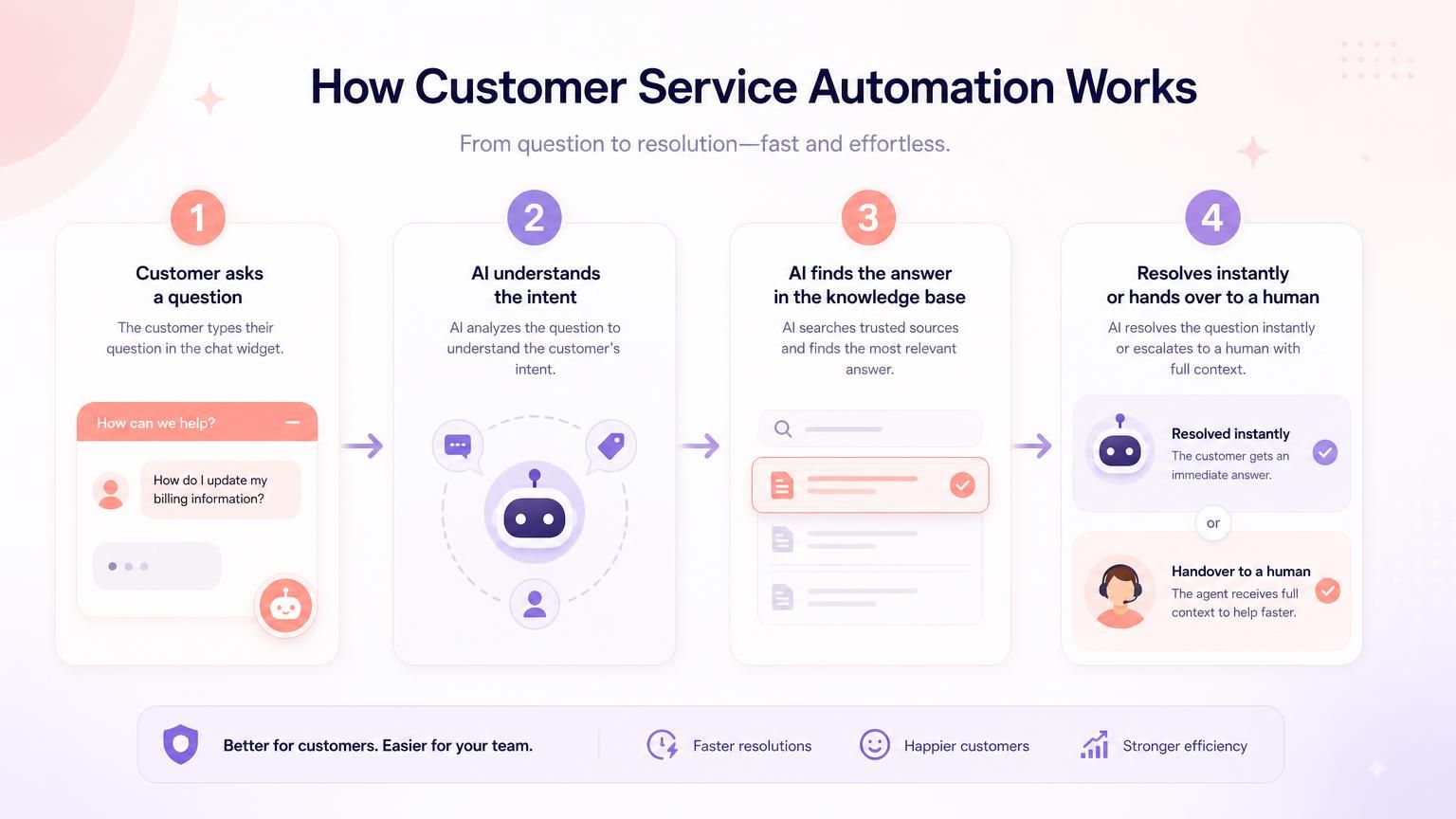
Most customer service automation follows the same simple loop. Take one of the most common requests any support team gets: “Where’s my order?”
- The customer asks in their own words, through your website chat, help centre, or messaging app.
- The AI works out what they mean. It recognises an order-status question even when the wording is odd, rather than matching exact keywords.
- It finds the answer from your content. A good system only uses your knowledge base, help articles, and connected data, so it gives your real delivery policy instead of a guess. That’s what keeps the AI grounded in your facts rather than making things up.
- It resolves or hands over. If it can answer, it does, instantly. If the question is complex, the customer is upset, or it simply doesn’t know, it passes the conversation to a human with the full context attached.
That last step is what separates good automation from the kind people complain about, and it matters enough that we’ll give it its own section below. The bots running this loop range from simple scripted flows to conversational AI. For the full breakdown of the main platforms, our customer service chatbots guide compares seven of them.
The 4 types of customer service automation
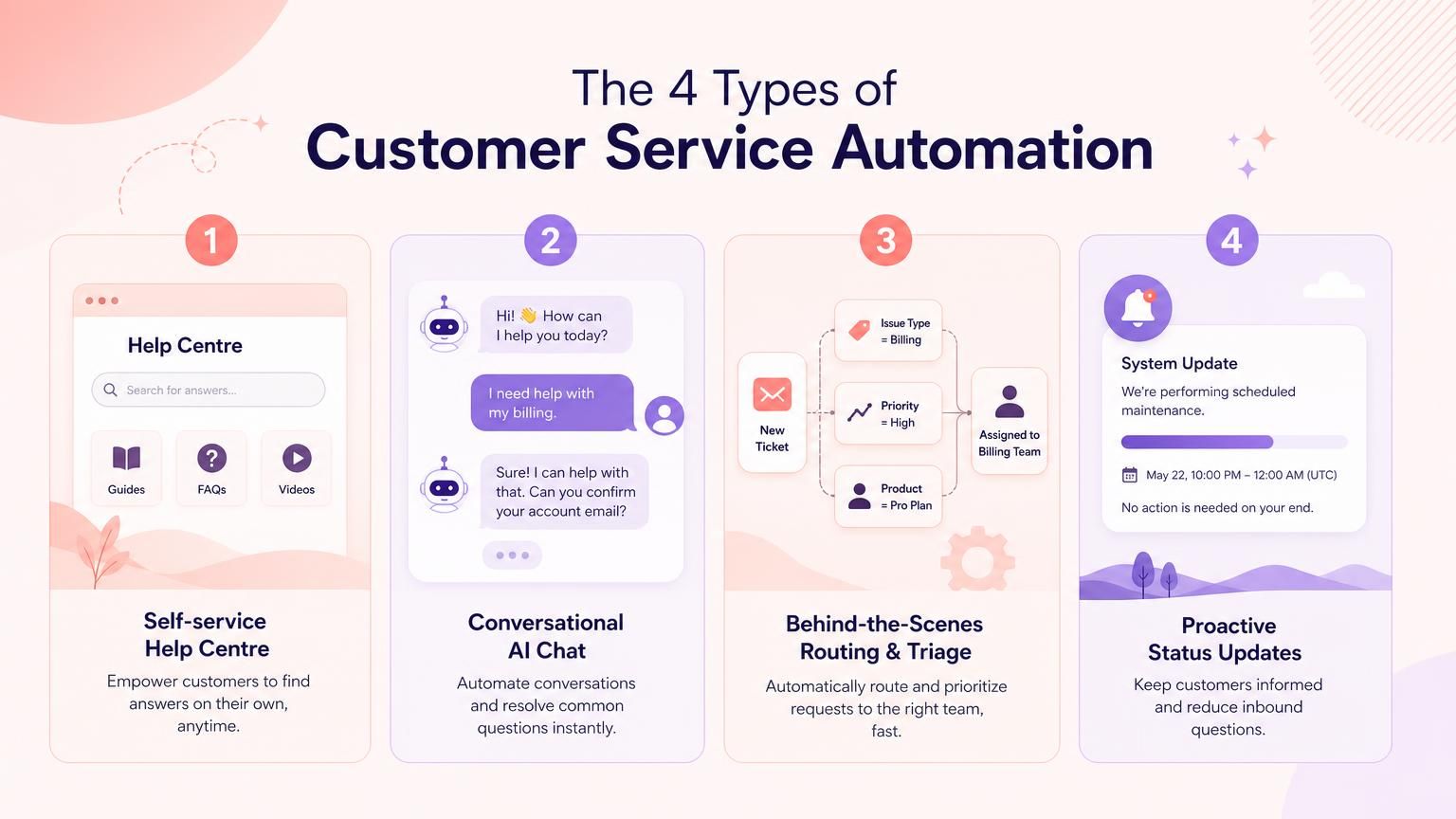
Customer service automation is broader than a chatbot. It really covers four main types, and most businesses end up using a mix of them. AI is the newest layer of this: our guide to AI in customer service covers what it does, its benefits and real examples.
1. Self-service automation
Anything that lets customers help themselves: a searchable help centre, clear FAQ pages, or a knowledge base chatbot that answers straight from your documentation. Strong self-service clears your highest-volume questions, like opening hours and password resets, before they ever become tickets.
2. Conversational automation
AI that answers in natural language, in a chat widget or messaging app, the way a person would. It follows the thread of a conversation and understands intent instead of matching keywords. For a closer look at this layer, see conversational AI for customer service.
3. Process and routing automation
The part that works behind the scenes. It reads an incoming message, tags it, and sends it to the right team automatically, so a billing query never lands in the returns queue. Intelligent routing means customers wait less and agents pick up issues they can actually solve.
4. Proactive automation
Rather than waiting to be asked, this reaches out first: an automatic “your order has shipped” message, a heads-up during an outage, or a renewal reminder. Done well, it prevents tickets by answering the question before the customer even thinks to ask.
What to automate (and what to keep human)
This is the decision most guides skip. They tell you to automate; they rarely tell you where to stop. Get this line right and customer service automation feels like a fast lane. Get it wrong and it feels like the maze from the start of this article.
The simple version: automate the routine, and keep humans for the moments that need judgement or care.
| Automate this | Keep a human for this |
|---|---|
| High-volume, repeated questions (hours, order status, password resets) | Complex or unusual problems your content doesn’t cover |
| Simple, factual answers from your knowledge base | Emotional or high-stakes moments (complaints, cancellations) |
| Status lookups, tagging, and routing | Anything where a wrong action is costly (refunds, account changes) |
| After-hours cover for common queries | Judgement calls, exceptions, and negotiations |
The pattern is easy to feel out once you’ve seen it. A customer asking “what are your opening hours?” wants a fast, factual answer, and a human adds nothing to that exchange except delay. A customer writing “this is the third time I’ve been charged and I want to cancel” needs a person, quickly.
There’s a sharper test underneath it, too. An automated answer that’s wrong is annoying, but an automated action that’s wrong, a mistaken refund or a wrongly closed account, is far worse. So the more consequential the task, the more a human should be in the loop. Accurate answering is the foundation everything else is built on.
And automating the routine tends to reshape what your team does more than it replaces them. In a 2026 Gartner survey, 85% of service and support leaders said they were expanding their human agents’ responsibilities as they adopt AI.
This is exactly what our AIChatbot is designed for: it resolves the repetitive questions from your own content, and passes everything else to your team.
Design the escape hatch: automation people don’t want to bypass
Remember the maze from the start? Almost every complaint about automated customer service comes down to a single feeling: being trapped. The fix isn’t less automation. It’s designing the way out so well that customers never go looking for it.
Three rules make the difference.
1. Always show an easy path to a human. Not buried, not hidden behind five menus. A visible “talk to a person” option, offered early and honestly. Counterintuitively, an obvious exit can mean fewer people feel the need to use it, because they trust the bot to hand over the moment it’s needed. Our guide to chatbot vs live chat shows how to run a bot and a person in the same chat window. And the stakes are real: Zendesk found that 63% of customers would switch to a competitor after just one bad experience, and being trapped by a bot is exactly the kind of experience they mean.
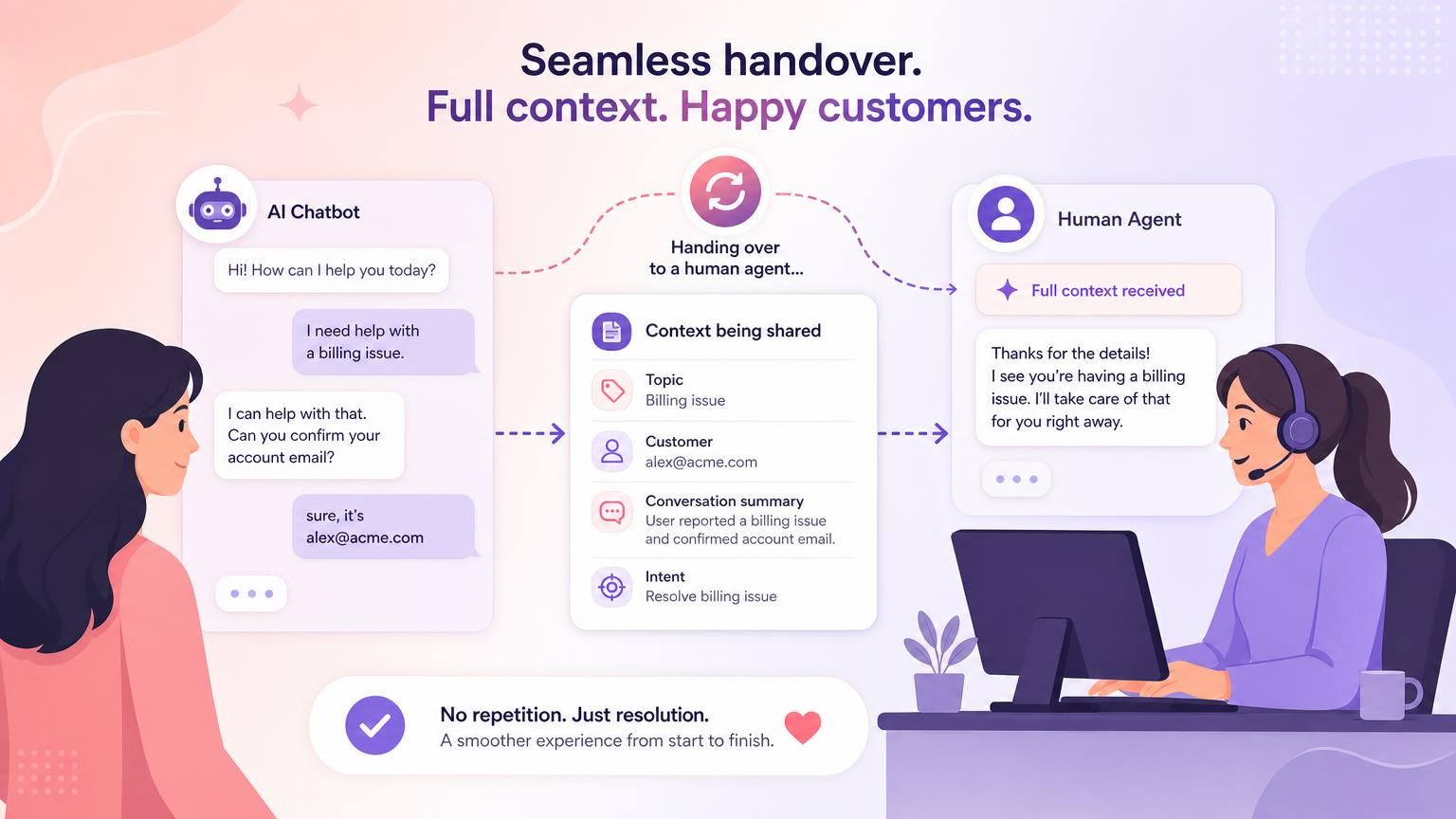
2. Never make customers repeat themselves. The quickest way to enrage someone is to have them explain everything to the bot, then explain it all again to the agent.
Picture the difference. In a bad handover, the customer re-types their order number, the problem, and their mood from scratch. In a good one, the agent opens the chat and already sees the full history: the order, the question, and what the bot tried. When automation hands over, the context has to travel with it. Our AI to human handoff guide shows what the person taking over should see, and what the customer is told while they wait.
3. Never let the bot guess. A confident wrong answer erodes trust faster than an honest “I’m not sure”. Good automation is grounded in your content, and when it doesn’t know, it says so and brings in a human rather than inventing something. That’s the whole point of our anti-hallucination approach: the AIChatbot answers from your knowledge base, and hands over cleanly when it can’t.
Get these three right and something quietly important happens. “Resolved” starts to mean the customer actually got helped, not that they gave up and went away.
Benefits of customer service automation
Set up with those guardrails, the benefits of customer service automation stack up fast:
- Faster answers. Customers get a reply in seconds instead of waiting in a queue, which pulls your first response time right down.
- Round-the-clock cover. Common questions get answered at 2 a.m. on a Sunday without anyone working a night shift.
- Lower workload and cost. Every question the AI resolves is one your team doesn’t have to, which lifts your deflection rate and keeps support costs flat as you grow.
- Consistency. The hundredth customer gets the same accurate answer as the first.
- Better use of your team. Agents stop firefighting repetitive tickets and spend their time on the complex, human conversations where they genuinely add value.
The prize isn’t only efficiency, it’s a better experience on both sides: customers wait less, and your team does work that’s actually worth their skills. To put rough numbers on it, Resolve247’s AIChatbot resolves around 82% of routine questions on its own, so a small team can handle far more without adding headcount. For the full cost breakdown, see our guide to how AI chatbots reduce support costs.
How to automate customer service (step by step)
Ready to actually do it? Here’s a practical sequence a small team can follow to put customer service automation in place, and you can have a first version live within a week or two.
- List your top questions. Spend an hour pulling the 10 to 20 questions you answer most often from your inbox and chat logs. This is the single most useful thing you can do, because it tells you exactly what to automate first.
- Turn your content into a knowledge base. Point the AI at your website, help docs, and FAQs so it answers from your real information. If your docs are thin, this step doubles as a spring-clean of your help content.
- Start with the high-volume, low-risk questions. Automate the safe, repetitive queries first (hours, order status, policies). Leave the sensitive tasks manual until you’ve built confidence.
- Set your escalation rules. Decide when the bot should hand over, and make sure it carries the context across when it does. This is the escape hatch from the last section, and it isn’t optional. Then agree who on your team picks each one up, and how fast, with our escalation procedure for small teams.
- Measure what actually matters. Deflected-ticket counts flatter you; what you really want to know is whether customers were genuinely helped. (More on the numbers to watch in the next section.)
- Expand from what works. Once the safe questions run smoothly, widen the scope, add channels, and keep feeding the AI the gaps it couldn’t answer.
One common mistake is worth calling out: don’t switch everything on at once. The teams whose customers end up in the maze are usually the ones that automated their trickiest queries on day one. Start narrow, prove it works, then grow.
This guide won’t tell you which specific tool to buy, because that deserves its own checklist. That’s exactly what our guide to choosing an AI support chatbot is for.
How to tell if your automation is working
Here’s where a lot of teams fool themselves. It’s tempting to measure success by how many tickets the bot “deflected”, but deflection only counts if the customer actually got helped. If they gave up, or quietly switched to a competitor, that’s a deflected ticket and a lost customer. Our guide to reducing support ticket volume shows how to tell a real drop from customers giving up.
So measure the outcome, not just the volume. A few numbers are worth watching:
- Resolution rate: the share of conversations the automation genuinely resolved, not just closed. See our definition of resolution rate for how to calculate it.
- Re-contact rate: how often customers come back with the same problem within a few days. High re-contact is the tell-tale sign of hollow “resolutions”.
- Escalation rate and handover quality: how often the bot hands to a human, and whether those customers arrive with their context intact.
- Customer satisfaction (CSAT) on automated chats specifically, so you can see how the experience actually feels from the other side.
Track these from day one and you’ll spot the difference between automation that’s helping and automation that’s just tidying tickets out of view. The goal was never a big deflection number on a dashboard. It’s customers who got what they needed without ever wishing they’d reached a human sooner.
Frequently Asked Questions
What is customer service automation?
Customer service automation is the use of technology, mainly AI, chatbots, self-service tools, and workflow rules, to handle routine customer requests with little or no human effort. It answers common questions, routes issues to the right team, and completes simple tasks, so staff can focus on the conversations that need a person.
What are the main types of customer service automation?
There are four main types: self-service (help centres and FAQ bots), conversational automation (AI chat that answers in natural language), process and routing automation (triage and assignment behind the scenes), and proactive automation (status updates and alerts sent before customers ask). Most teams use a blend of all four.
What should you automate first, and what should you never automate?
Automate high-volume, repetitive, low-emotion questions first, such as opening hours, order status, and password resets. Keep humans for complex, emotional, or high-stakes issues, like complaints, cancellations, and anything involving refunds or account changes, where a wrong action is costly.
Can customers still reach a human easily?
Yes, and they should. Good automation always offers a visible, early option to reach a person, and hands over the full conversation so customers never repeat themselves. Making the human path obvious can actually reduce how often people use it, because they trust the system to escalate when it’s needed.
How do you stop automated customer service from making things up?
Use a system that only answers from your own approved content and is designed to say “I don’t know” rather than guess. When the AI isn’t confident, it hands over to a human instead of inventing an answer. This is how Resolve247’s anti-hallucination approach keeps automated answers accurate and trustworthy.
The bottom line
Done well, customer service automation hands your repetitive questions to software that answers them accurately and instantly, freeing your people for the work that needs a human. The businesses that win with it do three things: they automate the routine, they measure real resolution rather than vanity deflection, and they always leave an easy door to a human.
Here’s where to start this week:
- List your 10 most-repeated questions. That’s your automation shortlist.
- Check your help content. If the answers aren’t written down anywhere, the AI can’t use them.
- Design the handover before you launch. Decide how customers reach a person, and make sure their context follows them.
The quickest way to tell whether this fits your business is to watch it work on your own questions. Try the Resolve247 AIChatbot demo and see how accurate automated answers feel from the customer’s side. When you’re ready to go further, there’s a 30-day free trial, and no card required.