
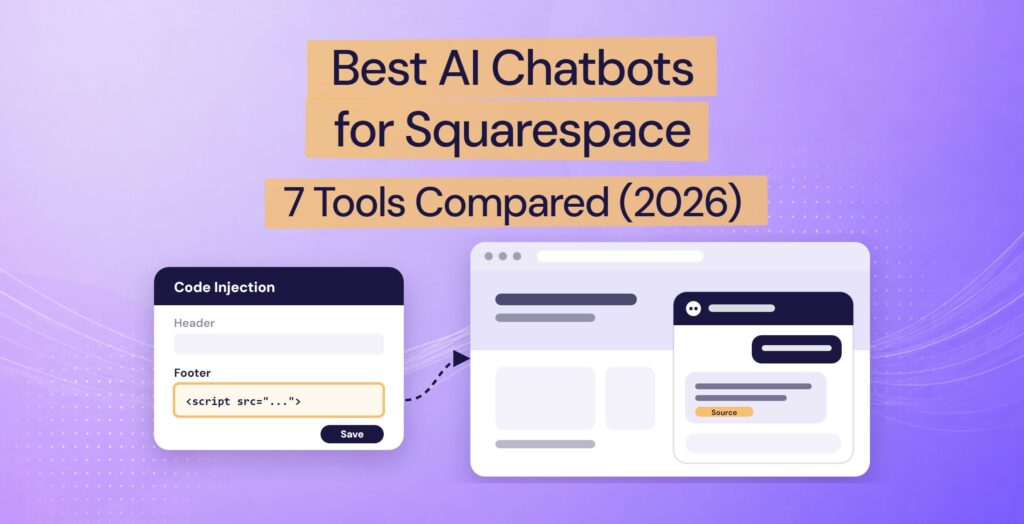
Squarespace has no chatbot of its own for your visitors, so the best chatbots for Squarespace all come from other providers. You add one by pasting its code into Squarespace’s Code Injection panel, which puts it on every page, or into a code block on one page. Either way, you need the Core, Plus, or Advanced plan, not Basic (see the plans).
Live chat tools with AI, such as Tidio, Crisp, and tawk.to, suit teams that want to chat with visitors themselves. If you’d rather have an AI answer for you, Resolve247, the chatbot we make, answers from your own pages and shows the source of each answer. Visitors can ask for a person at any time, and the chat goes to your email, Slack, or Help Scout, so there’s no new inbox to watch.
We read each provider’s pages on 9 November 2026 for what the AI costs, what happens when you hit your plan’s limit, and how a visitor reaches a person. Then we worked out the cost of 300 chats a month and wrote a 15-minute test to run on your shortlist.
Already picked one? Jump to the install steps.
Disclosure: we make Resolve247, one of the seven tools here. We picked tools that work on Squarespace today, with AI that answers your visitors. The reviews are in alphabetical order and cover the same points for every tool. Where another tool is the better fit, we say so.
Quick Verdict: The Best Squarespace Chatbot by Type
Which Squarespace chatbot suits you depends on who should answer your visitors. That choice also decides what you pay for the AI and where your team picks up a chat. The tools fall into two types:
- Live chat tools with AI (Crisp, tawk.to, Tidio): your team chats with visitors from an inbox, and an AI agent can answer for you.
- Standalone AI chatbots (Chatbase, DocsBot, Elfsight, Resolve247): an AI chatbot answers visitors on your site. They differ most in where a chat goes when a visitor needs a person.
| Chatbot and type | Pick it if you want… | Where your team takes over |
|---|---|---|
| Crisp Live chat and shared inbox, with AI |
A shared inbox with AI, priced per workspace rather than per user | Crisp’s inbox |
| tawk.to Free live chat, with an AI add-on (free tier, then paid) |
Free live chat your team answers, with AI when you want it | tawk.to’s inbox and apps |
| Tidio Live chat and help desk, with AI |
Live chat and an AI agent in one tool, for a small shop | Tidio’s inbox |
| Chatbase Standalone AI chatbot |
A wide choice of AI models, plus AI Actions, such as booking a meeting | Chatbase’s Helpdesk or your help desk, from its Basic plan ($150 a month) |
| DocsBot Standalone AI chatbot |
A free plan to try, many content sources, and channels such as WhatsApp from Personal ($49 a month) | Another tool’s chat; tickets from Standard ($149 a month) |
| Elfsight Widget library with an AI chatbot |
The lowest paid price, for a few chats a month, if you pay for a year up front | WhatsApp, email, or phone, outside the chat window |
| Resolve247 Standalone AI chatbot for any website, or AI inside HubSpot or Crisp chat |
AI answers from your own pages, with a route to a person on every plan, at a flat monthly price | Your email, Slack, or Help Scout, or your HubSpot or Crisp chat |
The 7 Best Chatbots for Squarespace at a Glance
| Chatbot | Free option | AI included from (a month) | At your limit |
|---|---|---|---|
| Chatbase | 7-day trial | Chatbase Hobby: $40, or $32 billed yearly, for 140 to 700 AI replies | Stops answering, unless auto-recharge is on |
| Crisp | Free live chat, no AI | Crisp Mini: $45 (no yearly price published), for around 90 AI conversations | Its AI, Hugo, stops; new chats go to your team |
| DocsBot | 100 AI credits a month, “for personal use” | DocsBot Personal: $49, or $41 billed yearly, for 100 to 5,000 AI replies | Stops answering and shows an error |
| Elfsight | 50 messages a month | Elfsight Basic: $5, paid annually (no monthly option), for 300 messages | The chatbot is hidden from visitors |
| Resolve247 | 30-day trial, no card | Resolve247 Starter: $35, or $29 billed yearly, for 2,000 AI messages | Keeps answering; nothing charged automatically |
| tawk.to | Free live chat; 100 AI credits a month | tawk.to AI Assist Growth: $29, or $290 a year, for about 333 AI replies (1,000 on the model tawk.to recommends) | AI stops joining new chats |
| Tidio | 50 AI conversations in total | Tidio Lyro AI Agent: $39, or $32.50 billed yearly, for 50 AI conversations | On new monthly Tidio projects, upgrades at 95% by default |
Prices are in US dollars, from each provider’s own page on 9 November 2026. Tidio and Crisp count whole conversations; the others count AI replies or messages, and a typical chat has about three. Chatbase, DocsBot, and tawk.to charge more credits a reply on some AI models, so what you get depends on the model you pick.
Does Squarespace Have a Built-In Chatbot?
No. Squarespace has no chatbot or live chat for your site’s visitors. Its AI tools, including Clarkson AI chat, help you build and edit your site (Squarespace Help Center). Squarespace Assistant is the support bot you chat with when you contact Squarespace.
Both are for you, the site owner, so a Squarespace AI chatbot for your visitors has to come from another provider.
Squarespace does have an app marketplace, Squarespace Extensions, but it has no chat category. On 9 November 2026, a search for “chat” found one app, LiveChat (more below), and a search for “chatbot” found none (Squarespace Extensions).
None of the seven chatbots below has an Extension. Each goes on your site as a script, a short piece of code you paste in. Squarespace’s own help pages list live chat as one use for code injection (Squarespace Help Center).
Which Squarespace Plan Do You Need for a Chatbot?
To add a chatbot to Squarespace, you need the Core, Plus, or Advanced plan. Squarespace’s Help Center articles on Code Injection (updated September 2026) and JavaScript in code blocks say both need one of those plans. So a chatbot script pasted into either won’t run on Basic.
| Squarespace plan | Billed yearly (a month) | Billed monthly | Code Injection |
|---|---|---|---|
| Basic | $16 | $21 | No |
| Core | $23 | $32 | Yes, site-wide and per page |
| Plus | $39 | $48 | Yes, site-wide and per page |
| Advanced | $99 | $119 | Yes, site-wide and per page |
Prices in US dollars from Squarespace’s pricing page on 9 November 2026.
Many guides, and some AI answers, still say you need the “Business plan or higher”, or that “Personal” plans can’t add code. Those are older Squarespace plan names. On today’s plans, Code Injection starts at Core, from $23 a month billed yearly. Some legacy plans, which older sites may still be on, include it too.
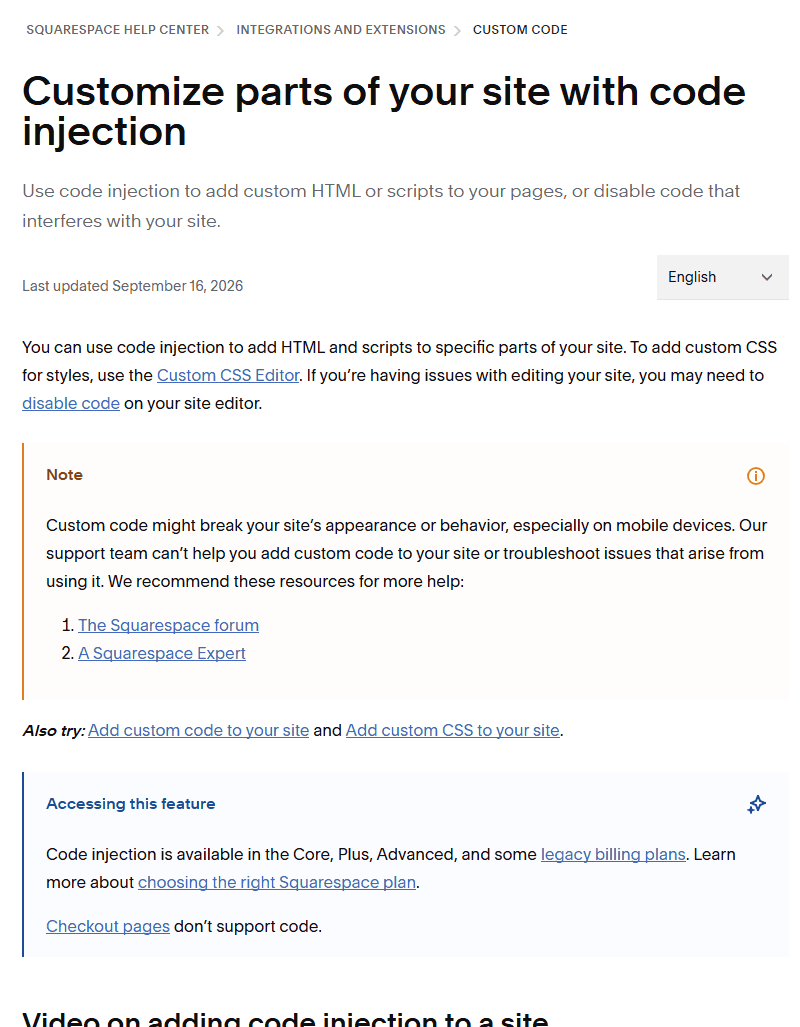
Image: Squarespace Help Center
Three more things to know before you choose:
- On Basic, the LiveChat Extension still works, because Squarespace lets you connect Extensions on all plans. It adds live chat your team answers. LiveChat’s AI agent installs with a code snippet, so it needs Core or above (more below).
- Checkout pages don’t support code, so no chatbot appears at checkout.
- Squarespace’s support team can’t help with third-party code, so keep your provider’s install guide to hand.
Squarespace’s 14-day trial includes “most premium features”. Its help pages refer to adding JavaScript “while on a trial” (Premium features). The only code blocked during the trial is code for the lock screen, the page visitors see on a password-protected site. So if you’re building a new site, you should be able to test a chatbot script during its trial, before you choose a plan.
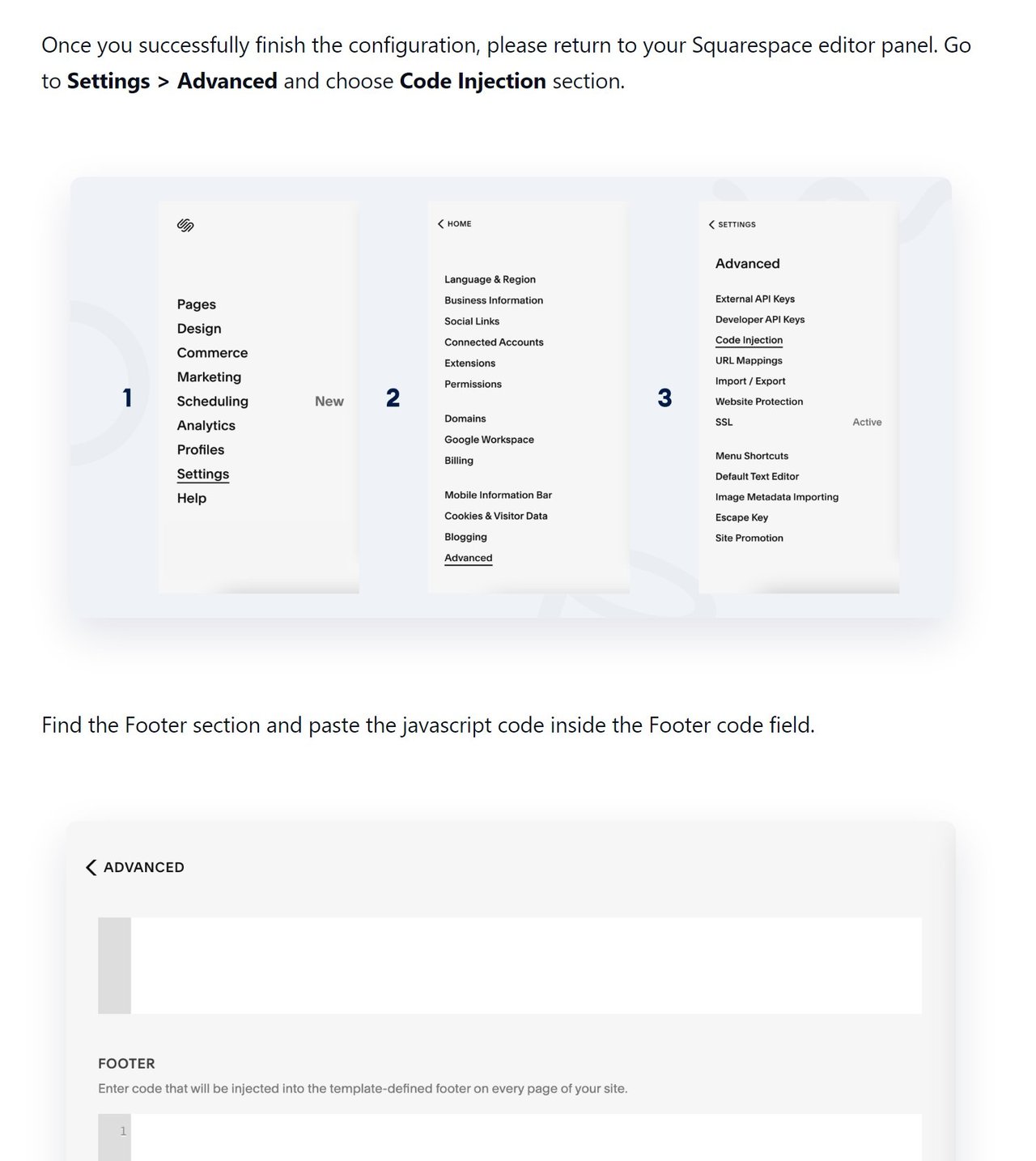
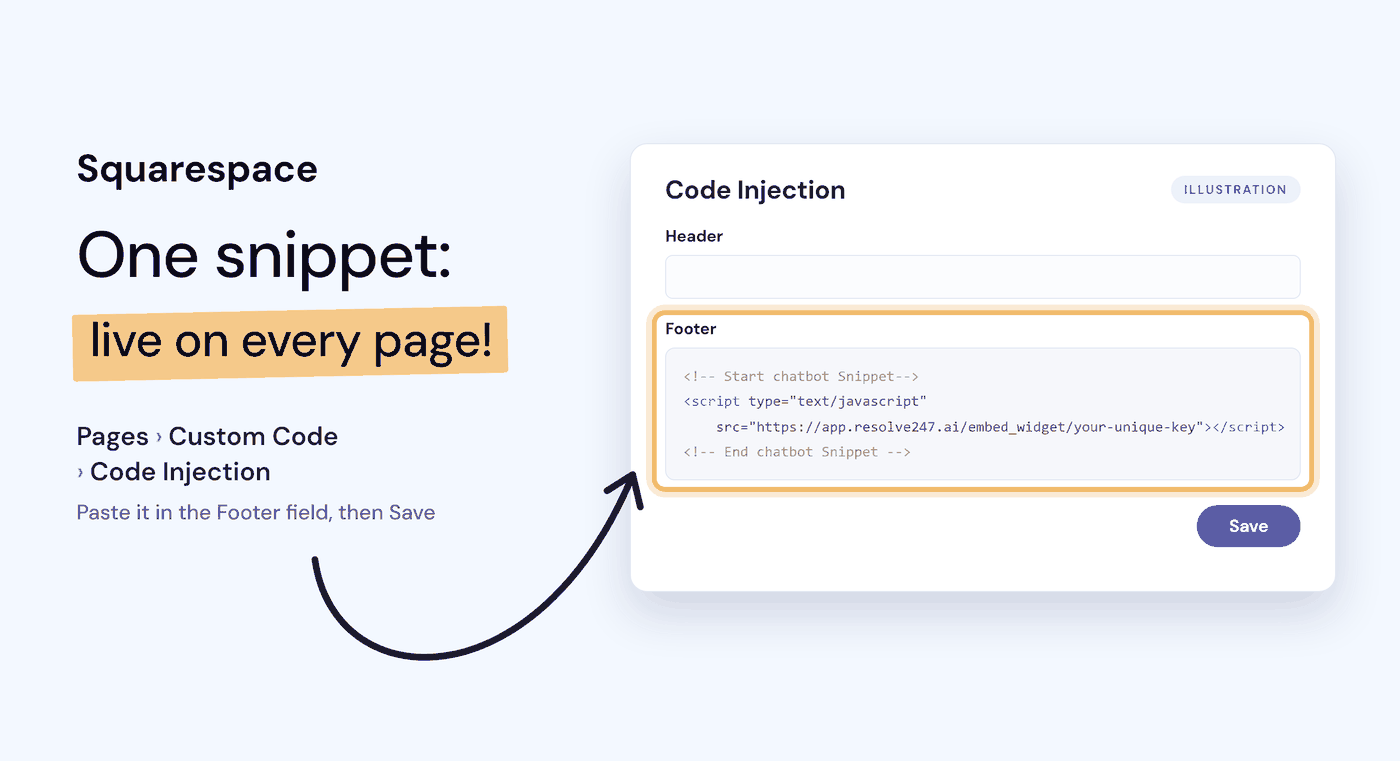
Once you’re on Core or above, adding a chatbot takes three steps: copy the chatbot’s script, open Pages > Custom Code > Code Injection, then paste it in the Footer field and click Save.
The 7 Best Chatbots for Squarespace, Reviewed
Chatbase
Chatbase is an AI agent platform with a wide choice of AI models.
Best for: teams that want to pick their AI model and set up AI Actions, which let the agent do tasks such as booking a meeting or collecting leads.
On Squarespace: you paste Chatbase’s website widget script into the Code Injection Footer field.
Answers from: files, your website, text, Q&A, and Notion pages. Chatbase Basic and above re-read your site weekly; on Hobby, you click Resync now.
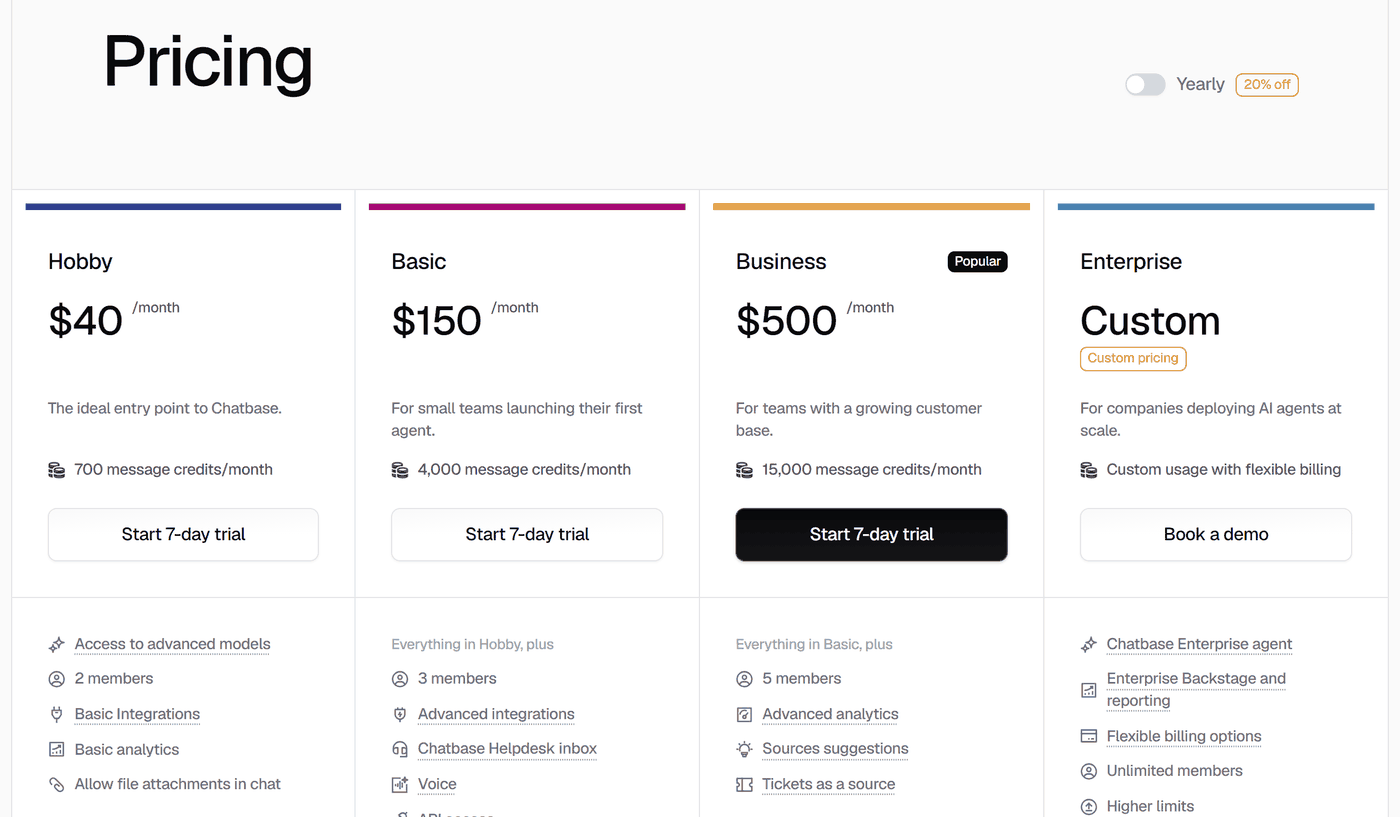
Pricing: Hobby is $40 a month, or $32 billed yearly, for 700 message credits: 700 AI replies on a 1-credit model, or 140 on a 5-credit one. Chatbase Basic is $150 a month, or $120 billed yearly (Chatbase pricing).
At your limit: the agent stops answering until your credits renew on the 1st of the month, unless auto-recharge ($40 per 1,000 credits) is on (Chatbase docs).
Human handover: on Chatbase Basic and above, it can pass a chat to its Helpdesk inbox, or open a ticket in a help desk such as Zendesk or Help Scout.
Good to know: removing Chatbase’s branding costs $99 a month. More in our Chatbase review.
Crisp (Hugo)
Crisp is live chat with a shared inbox, plus an AI agent, Hugo, from the Mini plan.
Best for: teams that want their chat inbox and AI in one tool, priced per workspace rather than per user.
On Squarespace: Crisp’s guide has you paste its chatbox script in the Code Injection Footer field (Crisp help).
Answers from: your website, files, Q&A snippets, and your Crisp knowledge base, which retrains Hugo when you edit an article.
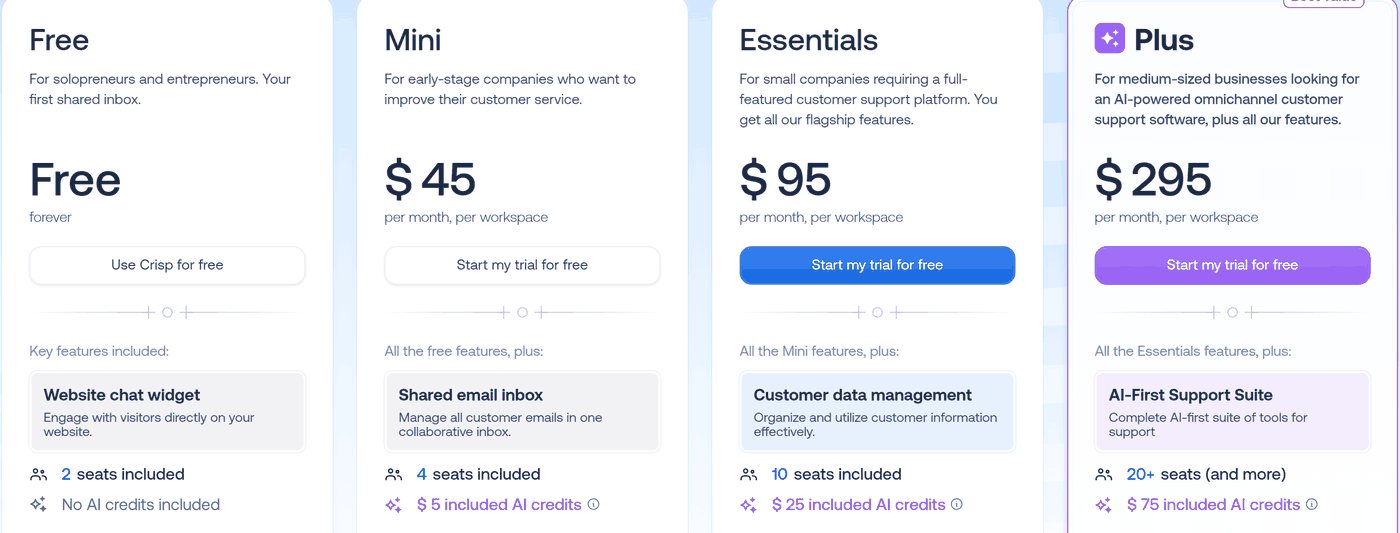
Pricing: the free plan (two seats, or team logins) has no AI. Mini is $45 a month per workspace (no yearly price), with four seats and $5 of AI credits: around 90 conversations, by Crisp’s estimate (Crisp pricing).
At your limit: Hugo stops and passes new chats to your team until credits reset on the 4th of the month, unless pay-as-you-go is on (Crisp help).
Human handover: built in. Hugo offers a person when it can’t find an answer, or when a visitor asks or seems frustrated.
Good to know: removing the “We run on Crisp” branding needs Crisp’s Plus plan ($295 a month). See our Hugo AI pricing guide. Resolve247 can also answer inside your Crisp chat.
DocsBot
DocsBot is a standalone AI chatbot that answers on your site and on channels such as WhatsApp.
Best for: teams that want to try an AI chatbot on a free plan, with many content sources. Paid plans add channels such as WhatsApp.
On Squarespace: DocsBot’s guide covers both routes: the Code Injection Footer for every page, or a Code block for one page (DocsBot docs).
Answers from: 28 or more source types, from websites to PDFs and spreadsheets. DocsBot’s Personal plan refreshes them monthly, and Standard weekly.
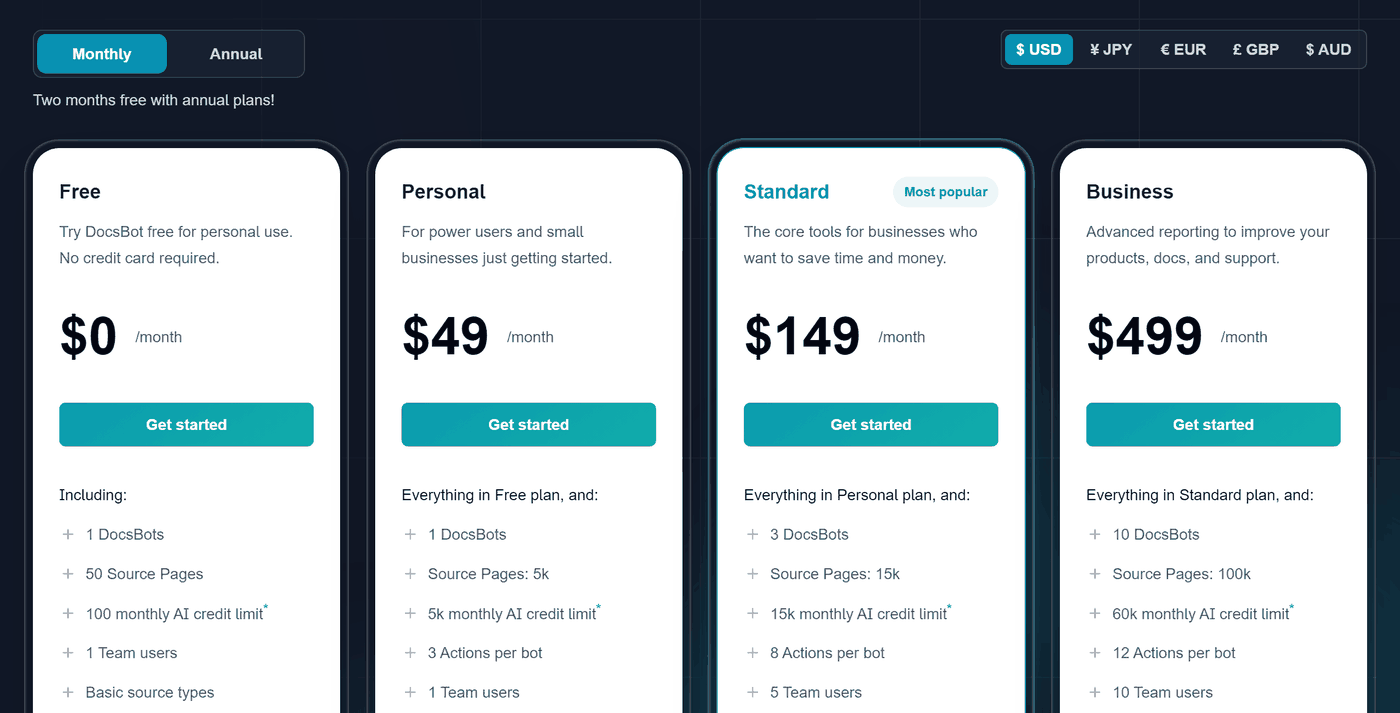
Pricing: the free plan gives one bot and 100 AI credits a month, and DocsBot describes it as “for personal use”. Personal is $49 a month, or $41 billed yearly, for 5,000 credits (DocsBot pricing): 5,000 AI replies on a 1x model such as GPT-6 Luna, or 100 on GPT-6 Astra, which uses 50 credits a reply.
At your limit: the bot shows visitors an error message until the next month, unless you upgrade or switch on auto-add credits. Auto-add raises your limit by 5,000 credits for $49 a month, and keeps it there until you scale it back.
Human handover: a “get support” link in the widget opens another tool’s chat, such as your live chat. Turning a chat into a ticket for your team needs DocsBot’s Standard plan ($149 a month).
Good to know: removing DocsBot’s branding needs its Business plan ($499 a month). More in our DocsBot review.
Elfsight AI Chatbot
Elfsight makes a library of website widgets, including this AI Chatbot.
Best for: sites with few chats, or that already use Elfsight widgets.
On Squarespace: Elfsight gives two routes: a floating chat bubble on every page, through the Code Injection Footer, or the chatbot inside one page through a Code block. Its guide still uses the older “Business or higher” plan name.
Answers from: your website, files, text, and Q&A. When your content doesn’t cover a question, Elfsight says the AI either answers from the AI model’s general knowledge or replies that it doesn’t have the information (Elfsight).
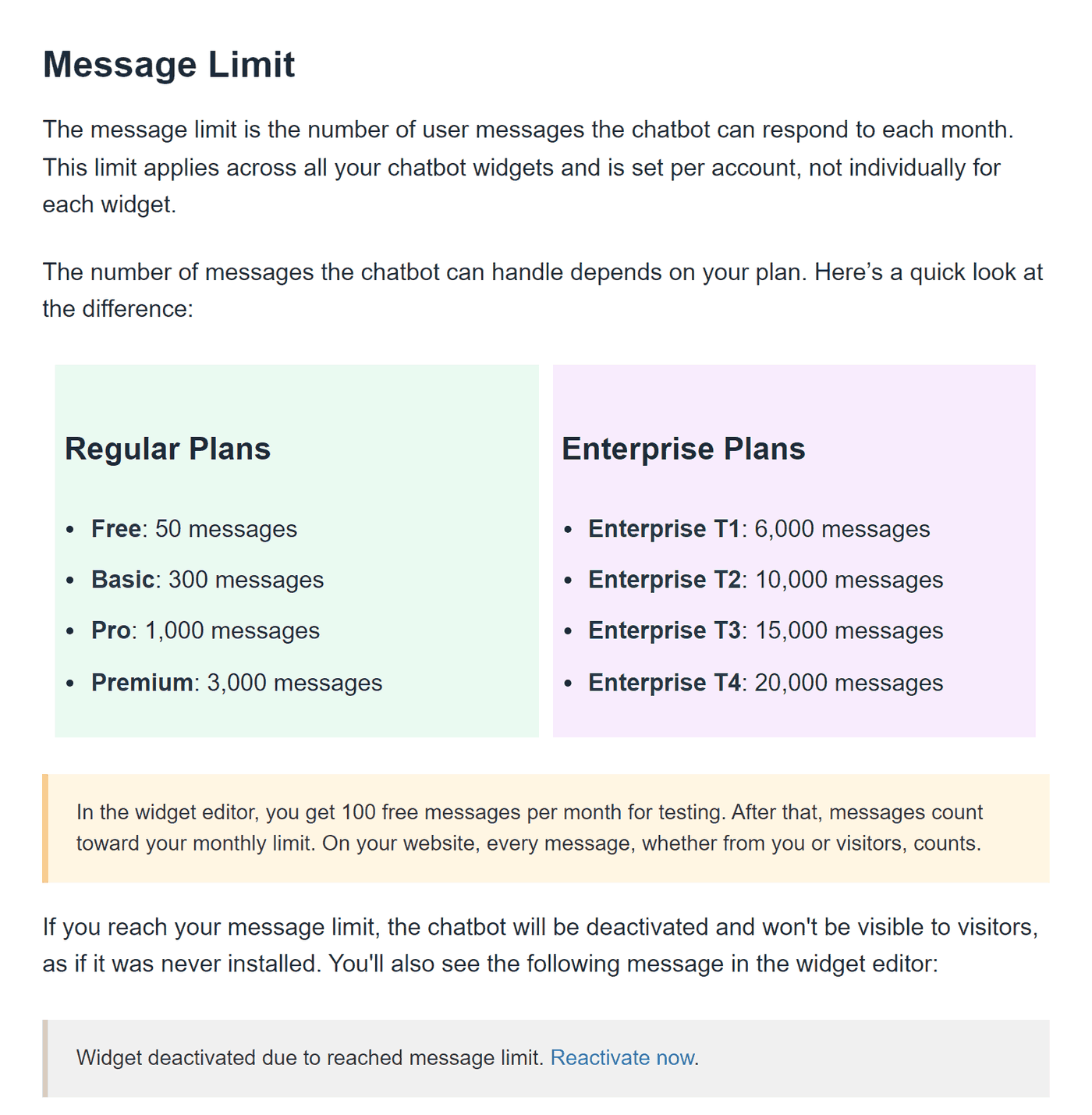
Pricing: the free plan includes 50 messages and 200 widget views a month (a view is any page load with the chatbot on it). Elfsight Basic is $5 a month, billed yearly only, for 300 messages and 5,000 views (Elfsight pricing).
At your limit: “the chatbot will be deactivated and won’t be visible to visitors” until your allowance resets, or until you upgrade (Elfsight help). The views limit works the same way.
Human handover: a Contact Human skill sends visitors to your WhatsApp, email, or phone, and Elfsight can email you each chat’s transcript.
Good to know: the free plan shows Elfsight’s logo on the chatbot, and any paid plan removes it (Elfsight help).
Resolve247
Resolve247 is the AI support chatbot we make for small and medium businesses. It runs on any website, or as the AI inside your HubSpot or Crisp chat, so your team doesn’t need a new inbox. It answers 82% of customer questions without a human (from 71% to 94%, depending on the business). Elston Baretto, founder of the web host Tiiny Host, says it “has reduced our support workload by 50%” (his figure, on our testimonials page).
Best for: small teams that want AI answers from their own pages, each with its source, at a flat monthly price.
On Squarespace: you paste one script into the Code Injection Footer field.
Answers from: your Squarespace pages, files, Notion, and Q&A you type in. Every answer shows its source, and it replies in your customer’s language. If it ever hallucinates, that month is free. With Tool Use, on every plan, you can also connect it to your own API, so it can look up live details such as an order’s status.
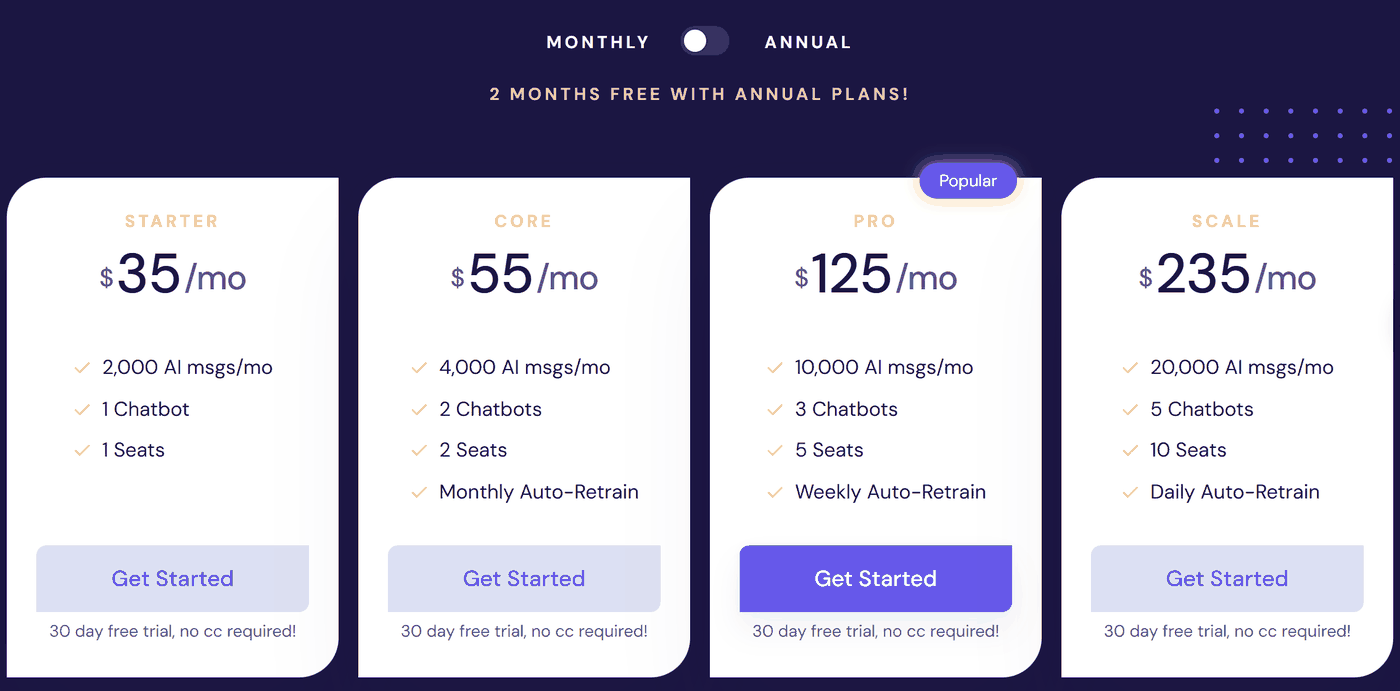
Pricing: Starter is $35 a month, or $29 billed yearly, for 2,000 AI messages (each AI reply is one message), and the 30-day free trial needs no card. One click re-reads all your pages on any plan, and Resolve247 Core ($55 a month, or $45 billed yearly) also does it every month (Resolve247 pricing).
At your limit: it keeps answering. The allowance is a soft limit. If you regularly go over it, we get in touch to talk about your plan, and nothing is charged automatically.
Human handover: built in on every plan. Resolve247’s chat window always shows a Contact a Human button, and the AI also hands over when it isn’t sure. The chat so far goes to your email, Slack, or Help Scout mailbox, or to your team in HubSpot or Crisp chat.
Good to know: removing Resolve247’s branding costs $15 a month. If you want to chat live with visitors yourself and don’t use HubSpot or Crisp, a live chat tool such as Tidio will suit you better. If you need WhatsApp or SMS as well as website chat, a tool that covers several channels fits better.
tawk.to
tawk.to is free live chat for your whole team. Its AI agent, AI Assist, is an add-on with a free tier.
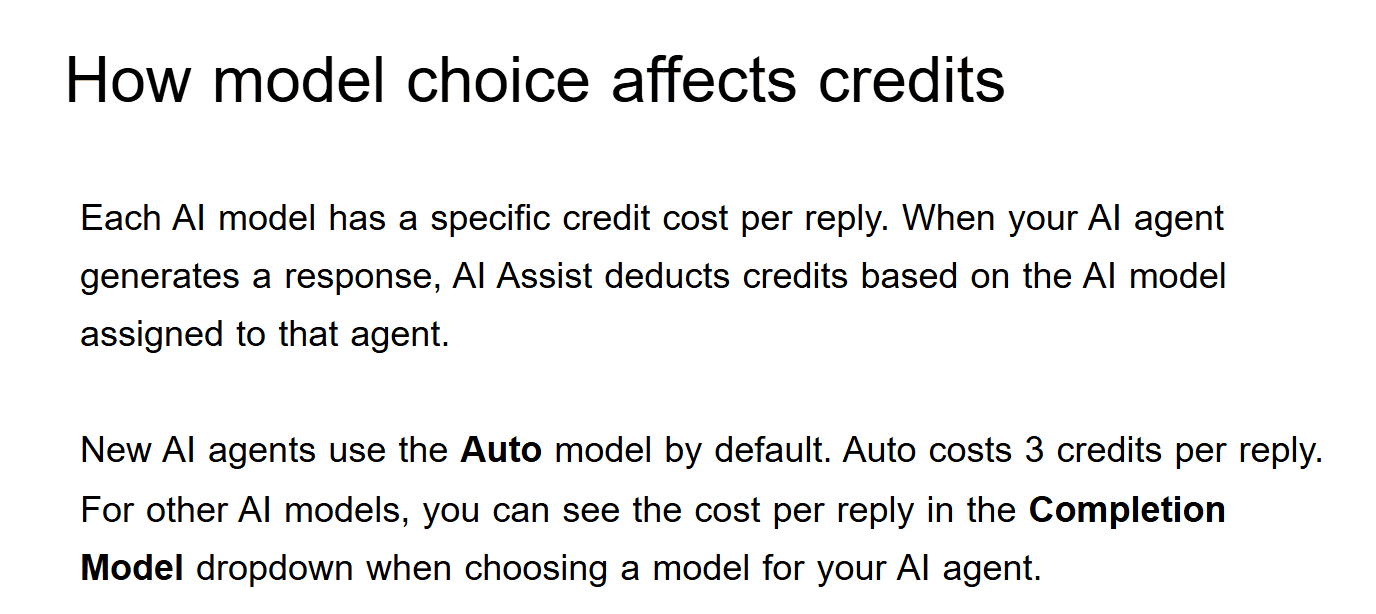
Image: tawk.to Help Center
Best for: free live chat your team answers, with AI added when you want it.
On Squarespace: tawk.to’s guide has you paste its widget code in the Code Injection Footer field (tawk.to help).
Answers from: FAQs, documents, knowledge base articles, and your website (100 pages free, 500 on Growth). On AI Assist’s Business plan ($99 a month), it re-reads your website every 12 hours.
Pricing: AI Assist’s free tier gives 100 message credits a month, and Growth is $29 a month, or $290 a year, for 1,000 credits (tawk.to help). New AI agents start on the Auto model, at 3 credits a reply, so 1,000 credits cover about 333 replies. On Claude Haiku 4.5, the model tawk.to recommends, at 1 credit a reply, they cover 1,000.
At your limit: AI Assist “won’t join new conversations” until the month resets or, on paid plans, you buy more credits ($30 per 1,000) (tawk.to help).
Human handover: built in on every plan. The AI passes a chat to your team when the visitor asks or it can’t help.
Good to know: you buy add-ons for each website separately. Removing tawk.to’s branding costs $29 a month billed yearly, or $39 month to month.
Tidio (Lyro)
Tidio combines live chat, a help desk, and an AI agent, Lyro, in one inbox.
Best for: small shops that want live chat and an AI agent in one tool.
On Squarespace: Tidio’s guide has you paste its code in the Code Injection Footer field (Tidio help).
Answers from: your website, Q&A, files, Zendesk articles, and your store’s products. After you change your site, you re-sync Lyro.
Pricing: the free plan has 50 Lyro conversations in total, not monthly, plus 50 team-answered chats a month. Lyro then starts at $39 a month, or $32.50 billed yearly, for 50 conversations a month (Tidio pricing). The 7-day trial needs no card.
At your limit: on new Tidio projects, monthly plans upgrade automatically at 95% of your allowance. This auto-upgrade is on by default, with an alert at 80%, and you can switch it off (Tidio help).
Human handover: built in. Lyro passes questions it can’t answer to your team, or answers only while your team is offline.
Good to know: team chats and Lyro conversations have separate allowances. Our Tidio pricing guide works through examples, and our Tidio alternatives guide compares ten alternatives on cost.
How Much Does a Chatbot for Squarespace Cost?
A chatbot on Squarespace costs your plan (Core, from $23 a month billed yearly) plus the chatbot’s own plan. At 300 chats a month, paying month to month, the chatbot’s plan costs from $29 (tawk.to, on the AI model it recommends) to $210 (Tidio). Elfsight is only sold yearly, at $10 a month ($120 a year). Resolve247 Starter is $35, or $29 billed yearly, and unlike Elfsight and tawk.to, it keeps answering if a busy month goes over its allowance, with nothing charged automatically.
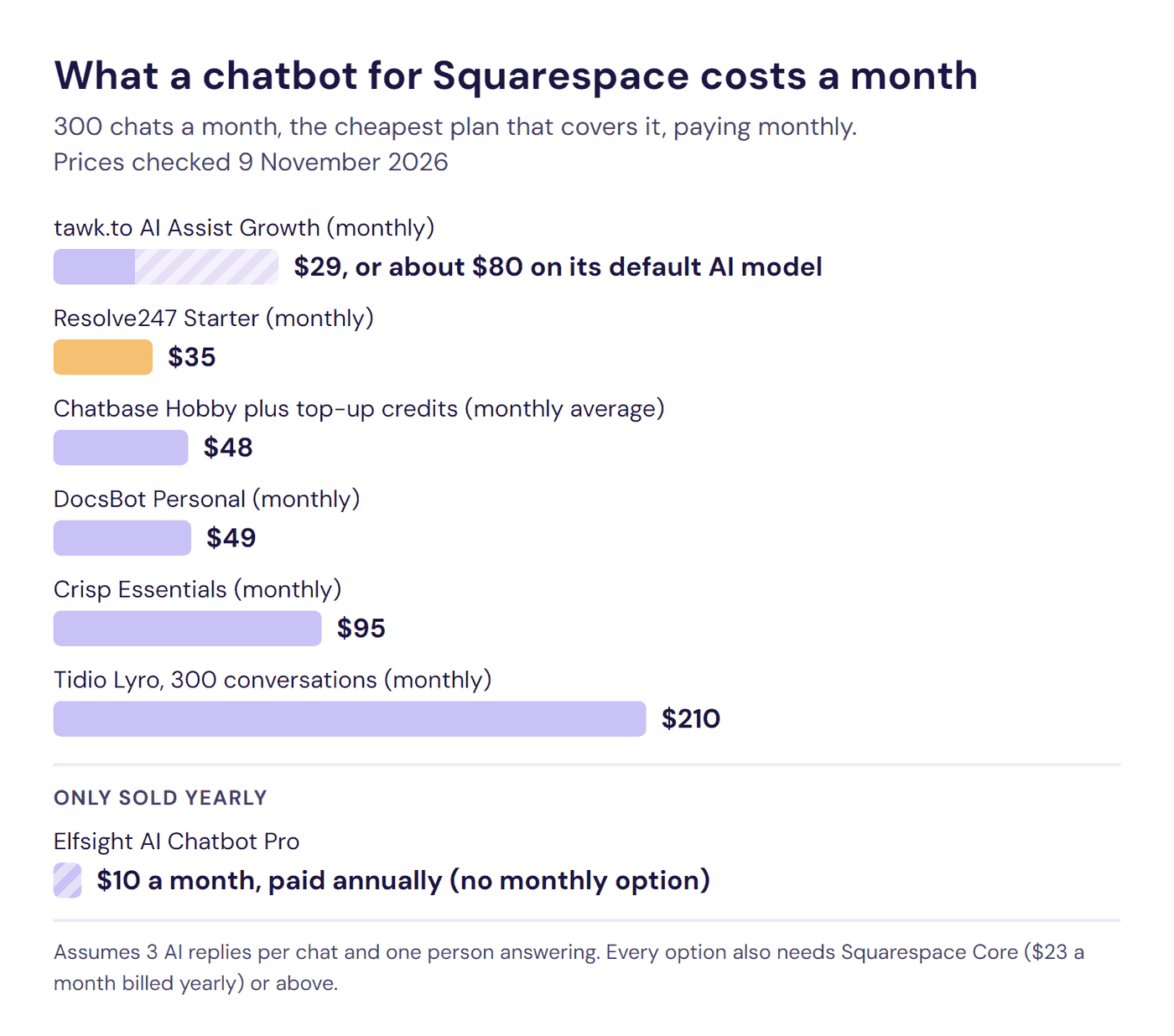
Here’s the cheapest plan that covers 300 chats a month (about 10 a day) on each tool, assuming three AI replies in a typical chat:
| Chatbot and plan | A month at 300 chats | What it covers |
|---|---|---|
| Elfsight AI Chatbot Pro | Elfsight: $10, paid annually ($120 a year; no monthly option) | 1,000 visitor messages and 50,000 widget views |
| tawk.to AI Assist Growth | tawk.to: $29, or $24.17 billed yearly | 1,000 credits; 300 chats use 900 on Claude Haiku 4.5, the model tawk.to recommends (about $80 on its default model) |
| Resolve247 Starter | Resolve247: $35, or $29 billed yearly | 2,000 AI messages; 300 chats use 900 |
| Chatbase Hobby, plus top-up credits | Chatbase: about $48, or about $40 billed yearly | 700 credits plus top-ups, on a 1-credit model |
| DocsBot Personal | DocsBot: $49, or $41 billed yearly | 5,000 credits; 300 chats use 900 on a 1x model |
| Crisp Essentials | Crisp: $95 (no yearly price published) | $25 of AI credits, around 450 conversations by Crisp’s estimate |
| Tidio Lyro, 300 conversations | Tidio: $210, or $175 billed yearly | 300 Lyro conversations, added to Tidio’s free plan |
How we worked these out, from each provider’s own page on 9 November 2026:
- For tools that charge in credits, we assumed the cheapest AI model each provider names. On a 2-credit model, Chatbase costs about $84 a month.
- Chatbase’s top-up credits don’t expire, so we spread their cost over the months they last; the month you buy a pack costs about $80.
- Elfsight’s help page says both that only visitor messages count and that every message counts. If bot replies count, 300 chats need Premium ($20 billed yearly).
What the table shows:
- Elfsight’s $10 is only sold yearly, so you pay $120 up front. Its Pro plan also caps widget views at 50,000 a month, and every page load with the chat bubble counts as one. At either limit, the chatbot disappears from your site until your allowance resets or you upgrade.
- tawk.to’s $29 depends on the AI model. New AI agents start on Auto, which uses 3 credits a reply, so 300 chats cost about $80 a month unless you switch to an older, smaller AI model (Claude Haiku 4.5). When the credits run out, its AI stops joining new chats.
- Resolve247 Starter has room to grow. 300 chats use 900 of its 2,000 AI messages, so your chats could more than double before you reach the allowance. Every plan uses the same fixed AI models, chosen for answer quality and speed, so every reply counts as one message and you never trade quality for price.
- Tidio’s 300-conversation plan upgrades itself. On new monthly Tidio projects, auto-upgrade is on by default and fires at 95% (285 conversations), so 300 chats move you to the next tier, 500 conversations for $350 a month, unless you switch it off.
At about 100 chats a month, a few prices drop: Elfsight to $5 a month (paid annually), Chatbase to $40, and Tidio to $75, where auto-upgrade works the same way. tawk.to’s $29 then covers its default model too. The other plans cost the same as at 300 chats.
Our AI chatbot pricing guide compares more providers.
Is There a Free Chatbot for Squarespace?
Yes. tawk.to’s live chat is free for your whole team, and Elfsight, DocsBot, tawk.to, and Tidio all have free AI allowances. Crisp’s free plan is live chat with no AI. Whichever you pick needs Squarespace’s Core plan or above ($23 a month billed yearly) once your Squarespace trial ends, because Basic doesn’t run chatbot code.
Free AI allowances are small: at 10 chats a day, with three AI replies in each, every AI allowance below runs out in under a week.
- Elfsight: 50 messages and 200 widget views a month.
- DocsBot: 100 AI credits a month for one bot, “for personal use”.
- tawk.to: free live chat for your whole team, plus 100 AI credits a month (about 33 replies on its default model).
- Tidio: 50 Lyro conversations in total, plus 50 team-answered chats a month.
- Crisp: free live chat for two seats, with no AI.
Chatbase shows no free plan on its pricing page. A trial of a paid plan tells you more about how a bot handles your own questions. Resolve247 gives you 30 days, Crisp 14, and Tidio 7, all with no card needed.
How to Choose the Right Squarespace Chatbot
To choose a chatbot for Squarespace, test how it handles your own questions. Run this 15-minute test on the free plan or trial of each tool you shortlist:
- Ask your five most common questions, the ones you answer by email every week.
- Ask one your site doesn’t answer. A good chatbot says it doesn’t know and offers a person.
- Check where each answer came from. If the bot shows its source, you can fix the page behind a wrong answer.
- Try it on your phone. Open a few pages on mobile, and check the chat loads every time and doesn’t cover your own buttons.
- Change a price on your site, then see how the chatbot picks it up: on a schedule, or when you click refresh.
Whichever you choose, make the route to a person easy to find, and check you can reply from your phone. Before you pay, also check what each tool does when you reach its plan’s limit: the at-a-glance table shows all seven.
You can run this test on Resolve247 for 30 days with no card: start your free trial. For a longer checklist, see how to choose an AI customer support chatbot.
How to Add a Chatbot to Squarespace
To add a chatbot to every page of your Squarespace site, paste its code into Pages > Custom Code > Code Injection > Footer and click Save. Your site needs the Core plan or above.
- Copy the chatbot’s script from your provider’s dashboard.
- Open Code Injection. Click Pages, then Custom Code at the bottom of the panel, then Code Injection.
- Paste the script in the Footer field. Squarespace adds Footer code to the end of every page, just before the closing
</body>tag. If your provider’s code has no<script>tag anywhere in it, wrap it in<script></script>tags. - Click Save.
- Check your live site in a private or incognito window. Custom code sometimes doesn’t show while you’re logged in.
On current Squarespace sites, Code Injection is under Pages > Custom Code, and on version 7.0 sites it’s under Pages > Website Tools. Guides that say Settings > Advanced may show an older menu (Squarespace Help Center).
For a chat window inside one page, such as your contact page, add a Code block, set its mode to HTML, and paste the provider’s embed code. For Resolve247, use the code for its Embedded Chat Window.
To show the chat bubble on some pages only, leave the Footer field empty and use each chosen page’s own code injection instead (the page’s gear icon, then Advanced). It puts code in that page’s <head>, at the top of the page’s code, so check that your provider’s script is meant to go there.
If your editor stops loading after you add code, click Disable Scripts in Preview at the bottom of your site. Or add /safe to the end of your editing URL, straight after /config. Turning scripts off this way doesn’t change what visitors see (Squarespace Help Center).
For other website builders, see how to add an AI chatbot to any website, or our best chatbot for WordPress and best chatbot for Wix comparisons.
Which Other Chatbots for Squarespace Are Worth Knowing?
Five more tools come up in other lists: LiveChat, Chatling, ChatBot.com, Intercom, and HubSpot. For a wider list, not only for Squarespace, see our customer service chatbots list.
- LiveChat is the only chat app in Squarespace Extensions, and its Extension adds LiveChat’s live chat on any Squarespace plan. Its AI Agent, which answers visitors on its own, is “not included in LiveChat plans” (LiveChat). It comes with plans from Text, the company behind LiveChat, starting at $19 per user a month billed yearly. Text’s install guide adds the AI Agent with a code snippet, which on Squarespace needs Core or above.
- Chatling, an AI chatbot builder, has its own Squarespace install guide.
- ChatBot.com, also from Text, goes in through an Embed block in your site’s footer.
- Intercom pairs a full help desk with its AI agent, Fin, which is billed per outcome, such as each chat it resolves.
- HubSpot‘s free live chat goes on Squarespace when you paste HubSpot’s tracking code into Code Injection (HubSpot), and Resolve247 can answer inside HubSpot’s chat.
Frequently Asked Questions
What is the best chatbot for Squarespace?
The best chatbot for Squarespace depends on who you want answering your visitors. For live chat your team answers: tawk.to, Tidio, or Crisp. For an AI that answers for you, Resolve247, which we make, answers from your own pages, with sources, on its own or inside HubSpot or Crisp chat. It costs a flat monthly price, and visitors can reach a person on every plan. Chatbase offers more AI models, DocsBot a free plan, and Elfsight the lowest yearly price.
Does Squarespace have a built-in chatbot?
No. Squarespace has no chatbot or live chat for your site’s visitors. Its AI tools, including Clarkson AI chat, help you build and edit your site. Squarespace Assistant is the support bot you chat with when you contact Squarespace. To add a chatbot, you paste a provider’s code into Code Injection or a code block, and either way you need the Core plan or above.
Which Squarespace plan do I need to add a chatbot?
You need the Core, Plus, or Advanced plan, or an older (legacy) plan that includes code injection. The Basic plan doesn’t include Code Injection and won’t run JavaScript in code blocks, so a chatbot script pasted into either won’t run on it. Core costs $23 a month billed yearly, or $32 billed monthly. Guides that say “Business plan or higher” use an older plan name.
Is there a free chatbot for Squarespace?
Yes. tawk.to’s live chat is free, and Elfsight, tawk.to, and Tidio have free AI allowances: Elfsight 50 messages a month, tawk.to 100 AI credits a month, and Tidio 50 AI conversations in total. At 10 chats a day, each runs out within a week. You still need Squarespace’s Core plan or above ($23 a month billed yearly) after your Squarespace trial. For a longer test, Resolve247 has a 30-day trial, Crisp 14 days, and Tidio 7, with no card needed.
Can a Squarespace chatbot hand visitors over to a real person?
Yes. Live chat tools such as Tidio, Crisp, and tawk.to let your team reply from their own inbox. Of the standalone AI chatbots, Chatbase hands over from its Basic plan ($150 a month), DocsBot opens tickets from Standard ($149 a month), and Elfsight points visitors to your WhatsApp, email, or phone. Resolve247 hands over on every plan and sends the chat so far to your email, Slack, or Help Scout, or to your team in HubSpot or Crisp chat.
Why isn’t my chatbot showing on my Squarespace site?
Check your plan first: injected code is switched off on Basic. Then check the script sits in the Code Injection Footer field inside <script></script> tags, and that you clicked Save. View your site logged out, in a private window. On version 7.0 sites, the Ajax loading setting may also conflict with embedded code.
Will a chatbot slow down my Squarespace site?
Only slightly, if the chatbot loads after your page content. When we measured Resolve247 in November 2026, the page’s main content appeared just as quickly. The widget added about 73 KB, plus under half a second of background processing on slower phones.
Can a Squarespace chatbot answer questions about orders?
Yes, for the questions most shoppers ask, such as shipping, returns, sizes, and delivery times. The chatbot answers these from your store’s pages. A chatbot you paste into Code Injection can’t see your Squarespace orders by itself, and checkout pages don’t run code. For order look-ups, Resolve247’s Tool Use, on every plan, lets a developer connect the chatbot to your store’s own API, so it can check an order’s status in the chat.
So, Which Is the Best Chatbot for Squarespace?
The best chatbot for Squarespace is the one that fits how you want to answer visitors. Every one here needs Core or above. Here’s our pick for each need:
- Free live chat your team answers: tawk.to, with its AI add-on when you want it.
- Live chat and an AI agent in one tool: Tidio, or Crisp if you’d rather pay one flat price per workspace, with no cap on the chats your team answers.
- The lowest price for a few chats a month, paid a year up front: Elfsight.
- A wide choice of AI models: Chatbase.
- A free plan to try, with many content sources: DocsBot.
- AI answers from your own pages, each with its source, and a route to your team on every plan: Resolve247, on its own or inside your HubSpot or Crisp chat.
Pick two of these chatbots for Squarespace, run the 15-minute test on your own questions, and check what each does at its limit before you pay.
Try Resolve247 free for 30 days, with no card needed. It keeps answering if you go over your allowance, and if it ever hallucinates, that month is free. Start your free trial or see how our AI chatbot works.