
Disclosure: we make Resolve247, an AI chatbot that runs inside Crisp’s chat box. So we compete with Hugo, Crisp’s own AI, not with Crisp itself. This Crisp Chat review draws on Crisp’s website, pricing page, help centre and terms, and on public user reviews, all checked on 17 November 2026.
Introduction
Crisp Chat puts a live chat box on your website and brings chat, email and messaging apps into one shared inbox for your team. It’s made by Crisp, a French company, for small businesses.
You pay per workspace (one Crisp setup, with its own chat box and inbox), and each plan includes a set number of seats (team members). Free is for 2, Mini is $45 a month for up to 4, Essentials $95 for up to 10 and Plus $295 for 20. Crisp’s AI agent, Hugo, is included from Mini, with a monthly allowance of AI credits (a set dollar amount of AI use). When the credits run out, Hugo stops answering and passes new conversations to your team, unless you turn on pay-as-you-go billing for extra AI use.
That covers a question one viewer asked under a Crisp video on YouTube in early 2026: “Do we need to pay extra if we use Hugo AI agent?” The answer: on a paid plan, you pay extra only once the included credits are used up, and only if you choose to.
Below: what each plan includes, what Hugo’s credits cover, what users say, and which AI to run inside Crisp. Prices are in US dollars.
Is Crisp Chat Good? Our Verdict
Crisp Chat is good value for a small team that wants website chat, email and messaging apps in one inbox at a flat monthly price. Conversations are unlimited on every plan, so what sets your plan is how many people answer, which channels you need and how much AI you use.
A strong fit for:
- Solo founders and teams of up to 20 people
- Teams moving from tools that charge per person (per seat), such as Intercom
- Teams that want an AI agent built into Crisp and on the same bill (Hugo, from Mini)
- Developers who want an open API, webhooks and chat SDKs
- Shopify and WooCommerce stores and WordPress sites (these integrations are on every plan, Free included)
Plan carefully if you need:
- More than 4 people (Essentials, $95) or more than 10 (Plus, $295). Extra seats are sold only on Plus.
- WhatsApp, Instagram, SMS, a help centre or workflows (Crisp’s no-code chatbot builder), all of which start on Essentials
- The “We run on Crisp” branding removed from your chat box (Plus only)
- More than 100 customer profiles (contacts), the Free plan’s limit. Mini holds 5,000
- More AI conversations than your plan’s credits cover: about 90 a month on Mini, 450 on Essentials and 1,350 on Plus, by Crisp’s estimate
| Crisp Chat at a glance | |
|---|---|
| What it is | A live chat box for your website and a shared inbox for chat, email and messaging apps, with an AI agent (Hugo), a help centre, contacts and workflows |
| Company | Crisp IM SAS, based in Nantes, France. Created in 2015 and self-funded (“100% Bootstrapped”, its About page says). Crisp’s site says it’s “Trusted by 10,000 companies” |
| Plans (per workspace, a month) | Free $0 (2 seats); Mini $45 (4); Essentials $95 (10); Plus $295 (20, then $10 per extra seat); Enterprise on request |
| Free trial | 14 days on any plan, no card |
| AI | Hugo, Crisp’s AI agent, from Mini, with $5, $25 or $75 of AI credits a month |
| Apps | Web, Mac, Windows, iPhone and Android, on every plan |
| Data | Hosted in the EU (the Netherlands and Germany); GDPR-compliant, Crisp says |
| Ratings | G2 4.5 (207 reviews) and Capterra 4.6 (148); more below |
| Consider Resolve247 inside Crisp if | You want AI in your Crisp chat box at a flat monthly price from $35, on any Crisp plan, Free included (and in the emails that reach Crisp, from Mini) |
What Is Crisp Chat?
Crisp Chat, usually just called Crisp, is a customer messaging platform for small and medium businesses. Its two core parts are the chat box on your website and a shared inbox for your team. Around them sit a help centre, a contact list (CRM), campaigns, a status page, workflows, co-browsing (MagicBrowse) and Hugo, its AI agent. Co-browsing lets your team browse your site alongside a visitor.
A search for “crisp chat” also turns up other Crisps. This review is about crisp.chat, not Krisp (noise-cancelling software) or the CRISP health-data portal.
The Crisp Chat Box
The Crisp live chat box (Crisp calls it the chat widget) is what your visitors see: a chat button that opens a chat window. Once you have Crisp’s help centre (Essentials and up), your help articles appear in it too. It comes in more than 60 languages, and from Mini you can change its colours, wording and position.
To add it, paste Crisp’s chat box code into your site’s HTML, before the closing </head> tag, as Crisp’s install guide explains. Or use Crisp’s WordPress plugin or Shopify app. Crisp’s help centre also has guides for more than 20 other platforms.
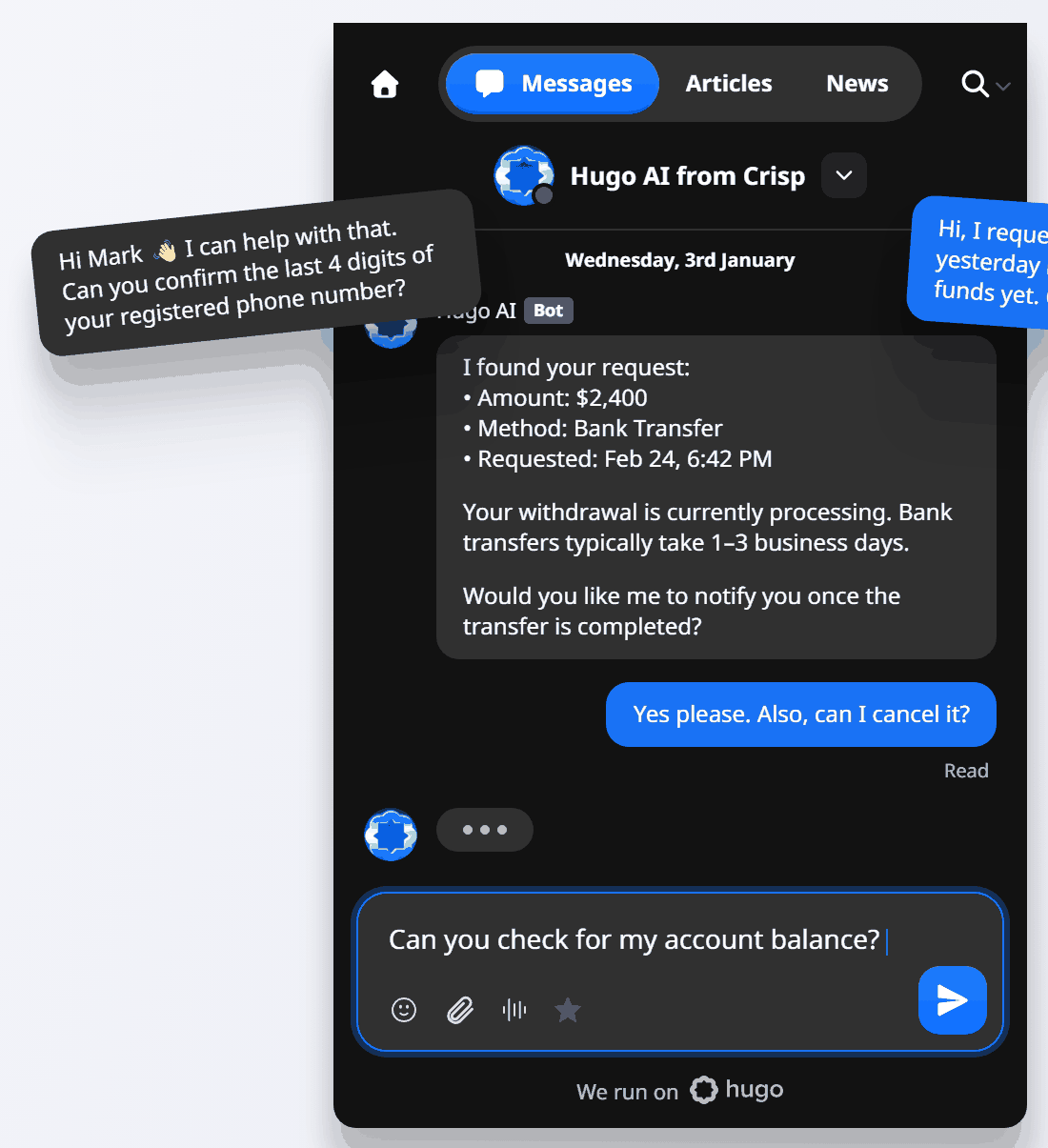
Crisp’s chat box, from Crisp’s own illustration (a mock-up, not a live chat). Image: Crisp.
Crisp Chat Features by Plan
Crisp’s plans add channels and tools in steps:
| Feature | Free | Mini | Essentials | Plus |
|---|---|---|---|---|
| Chat box, contact form and shared inbox | Yes | Yes | Yes | Yes |
| Chat box colours, wording and position | No | Yes | Yes | Yes |
| Customers can send images and files in chat | No | Yes | Yes | Yes |
| Email, Messenger, Telegram and X | No | Yes | Yes | Yes |
| WhatsApp, Instagram, SMS, Viber, LINE and phone | No | No | Yes | Yes |
| Private notes, saved replies, chat triggers and full conversation history | No | Yes | Yes | Yes |
| Hugo AI agent | No | Yes | Yes | Yes |
| Hugo training sources | No | 1 site, 1 file | 3 sites, 5 files, help centre | 10 sites, 100 files, help centre |
| Hugo Copilot (AI help for your team) and AI writing tools | No | No | Yes | Yes |
| Hugo actions through connected tools, such as refunds | No | No | No | Yes |
| Help centre (knowledge base) | No | No | Yes | Yes |
| Workflows (no-code chatbot builder) | No | No | Yes | Yes |
| Routing (assigning chats to people) | No | No | Yes | Yes |
| Sub-inboxes (folders in your inbox) | 0 | 0 | 2 | 5 |
| Analytics | No | No | Yes | Yes |
| Live translation, co-browsing, video calls, automated campaigns, status page and satisfaction surveys | No | No | Yes | Yes |
| Customer profiles (contacts) | 100 | 5,000 | 50,000 | 200,000 |
| Shopify, WooCommerce and WordPress | Yes | Yes | Yes | Yes |
| Slack | No | Yes | Yes | Yes |
| HubSpot, Zapier and Make | No | No | Yes | Yes |
| Stripe and Salesforce | No | No | No | Yes |
| Ticket portal for customers | No | No | No | Yes |
| Remove “We run on Crisp” | No | No | No | Yes |
| Mobile and desktop apps | Yes | Yes | Yes | Yes |
From crisp.chat/en/pricing. Hugo’s actions are listed under Plus in Crisp’s plan guides, and its training limits in Crisp’s training guide. Phone needs an Aircall or Ringover account, and SMS a Twilio number. Discord also connects on Essentials and Plus, through a Crisp plugin.
Two workspace rules matter if you run more than one brand. Crisp bills per workspace, not per website or sub-domain. And each workspace connects one account of each messaging channel, such as one WhatsApp number.
Email is the exception: you can connect more than one email address. For a second WhatsApp number or Instagram account, you either buy higher limits (Essentials and Plus only) or open a second workspace, billed as its own plan. See the multi-workspace discount below.
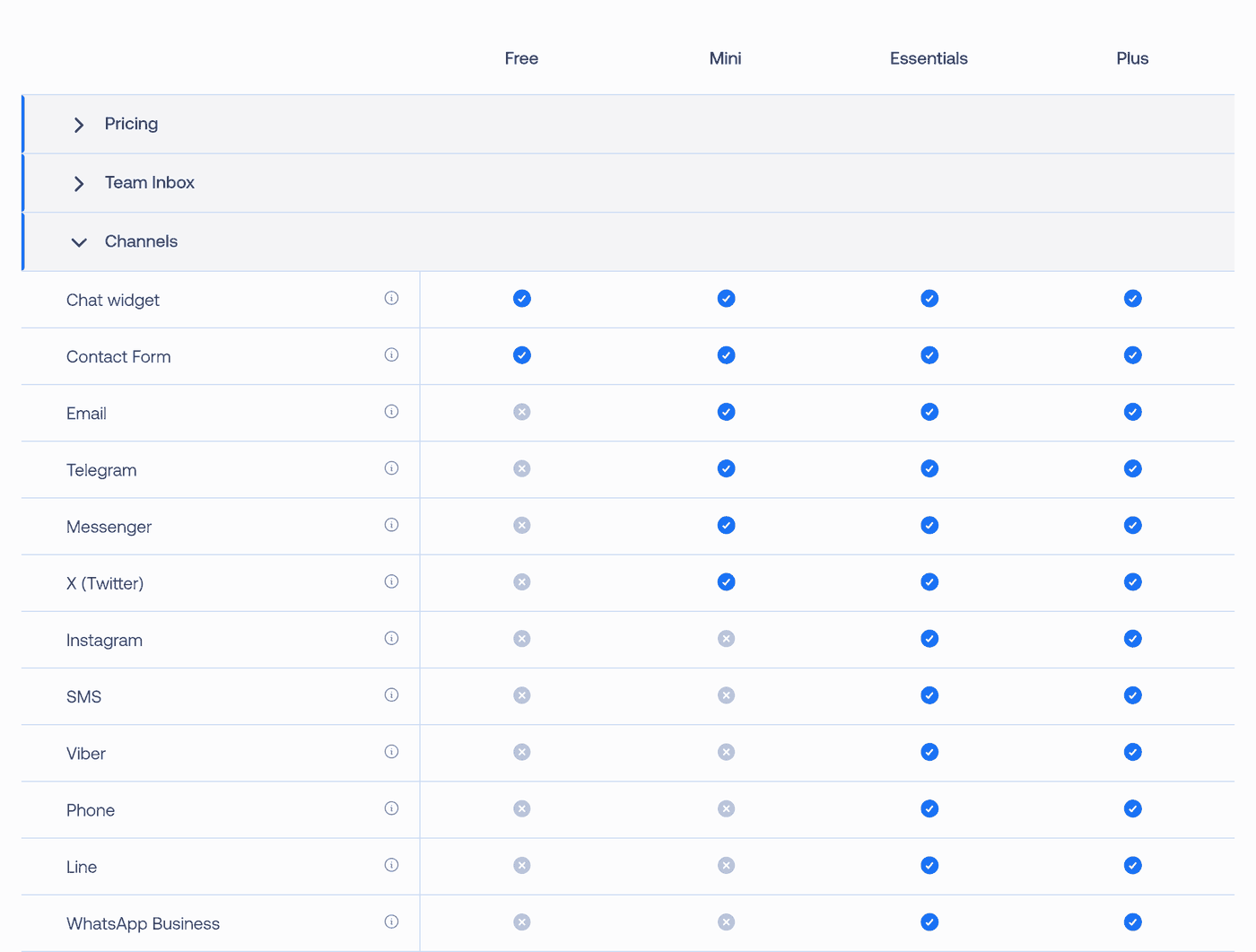
Channels by plan on Crisp’s pricing page, 17 November 2026. Image: Crisp.
What Crisp Costs in 2026
| Plan | Price a month, per workspace | Seats included | Extra seats | Hugo AI credits a month |
|---|---|---|---|---|
| Free | $0 | 2 | Not sold | None |
| Mini | $45 | 4 | Not sold | $5 (around 90 AI conversations) |
| Essentials | $95 | 10 | Not sold | $25 (around 450) |
| Plus | $295 | 20 | $10 each a month | $75 (around 1,350) |
From crisp.chat/en/pricing. The conversation estimates are Crisp’s own. Enterprise is priced on request.
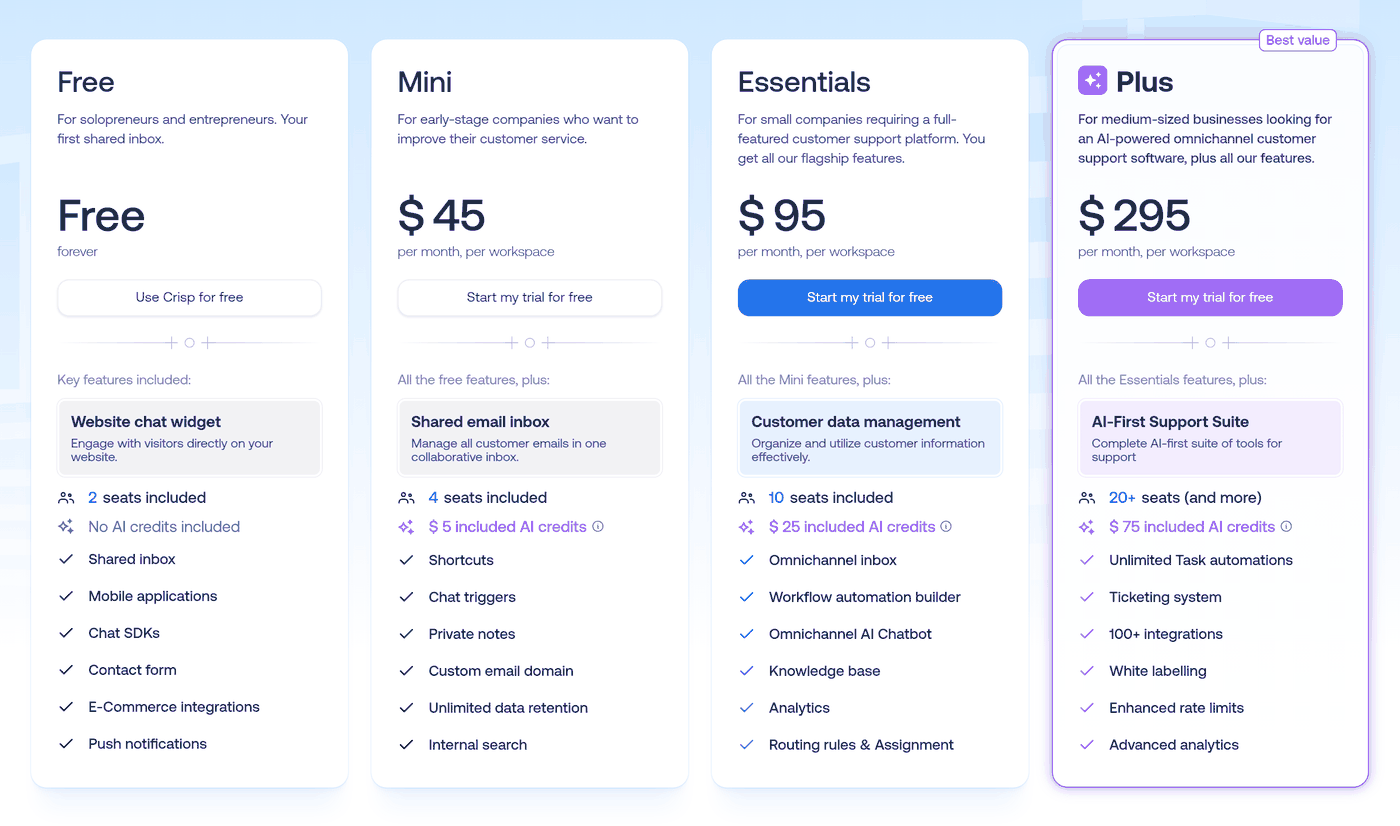
Crisp’s plans in US dollars, 17 November 2026. Image: Crisp.
What Crisp Costs at Your Team Size
Here’s where a small team lands:
| Your team | Crisp plan | Price a month |
|---|---|---|
| 1 or 2 people, website chat only, no Hugo | Free | $0 |
| Up to 4 people, with email or Hugo | Mini | $45 |
| 5 to 10 people | Essentials | $95 |
| Up to 10 people who need WhatsApp, Instagram, SMS, a help centre or workflows | Essentials | $95 |
| 11 to 20 people | Plus | $295 |
| More than 20 people | Plus, and $10 for each person over 20 | $345 for 25 people |
| Up to 20 people who want “We run on Crisp” removed | Plus | $295 |
For what AI use beyond your plan’s credits costs, see the AI cost comparison below, or our full Crisp and Hugo pricing breakdown.
Trial, Billing and Older Prices
- Free trial: 14 days on any plan, with no card needed. You get every feature except removing the Crisp branding. Using Hugo during the trial uses up AI credits, and pay-as-you-go may stay unavailable until the trial ends.
- Currency and VAT: prices exclude VAT. The page shows the same numbers in pounds or euros, depending on your time zone.
- Yearly billing: you switch it on in the Crisp app after you subscribe. It’s paid in advance and can’t be refunded, and Crisp publishes no yearly discount.
- Discounts: 50% for nonprofits and students. Businesses with 3 or more paid Essentials or Plus workspaces can ask for 20% off each additional workspace.
What older reviews get wrong:
- The plans: until early November 2024, Crisp sold Basic (free), Pro ($25 a month, 4 seats) and Unlimited ($95 a month, 20 seats), as an archived copy of its pricing page shows.
- Unlimited AI: none of the four plans includes it. “Unlimited conversations” means Crisp doesn’t cap the number of chats. Hugo’s AI replies still use your plan’s monthly credits, Plus included.
- Hugo’s plan: Hugo starts on Mini ($45), not Essentials or Plus.
- Free AI: AI replies were free until February 2026, when Crisp added credits. Its announcement said: “Until today, AI replies generated through the bot were available free of charge.”
Hugo: Crisp’s AI Agent
Hugo is Crisp’s AI agent: it answers your customers from your own content, in their language, and passes the chat to your team when it can’t help. It’s included in Crisp’s plans from Mini, with no separate subscription, and has its own website, hugo.ai, which shows “Powered by” with Crisp’s logo. It answers on the channels you choose, from those your plan includes: Crisp’s help centre names chat, email, Instagram, the contact form and WhatsApp.
Hugo hands a chat to your team when it can’t find an answer, when the customer asks for a person or seems frustrated, or in situations you describe. If one of your team replies, Hugo steps back.
It learns from Q&A snippets, websites and files (PDF, CSV and TXT), and from your help centre in Crisp, which comes with Essentials and Plus. How much depends on the plan (see the features table above and Crisp’s training guide). On Plus, Hugo can also take actions through connected tools, such as looking up an order or issuing a refund.
Crisp picks the AI model by default, and you can switch to a model from OpenAI, Anthropic, Google or Mistral, or one Crisp hosts. Two settings also let Hugo read images customers send and transcribe their voice messages.
For your team, Hugo Copilot drafts replies, summarises conversations and prepares handovers in the inbox, on Essentials and Plus. It never sends anything itself, and it uses AI credits too. Crisp has replaced its older AI, MagicReply, with Hugo: workspaces had until 30 October 2026 to move.
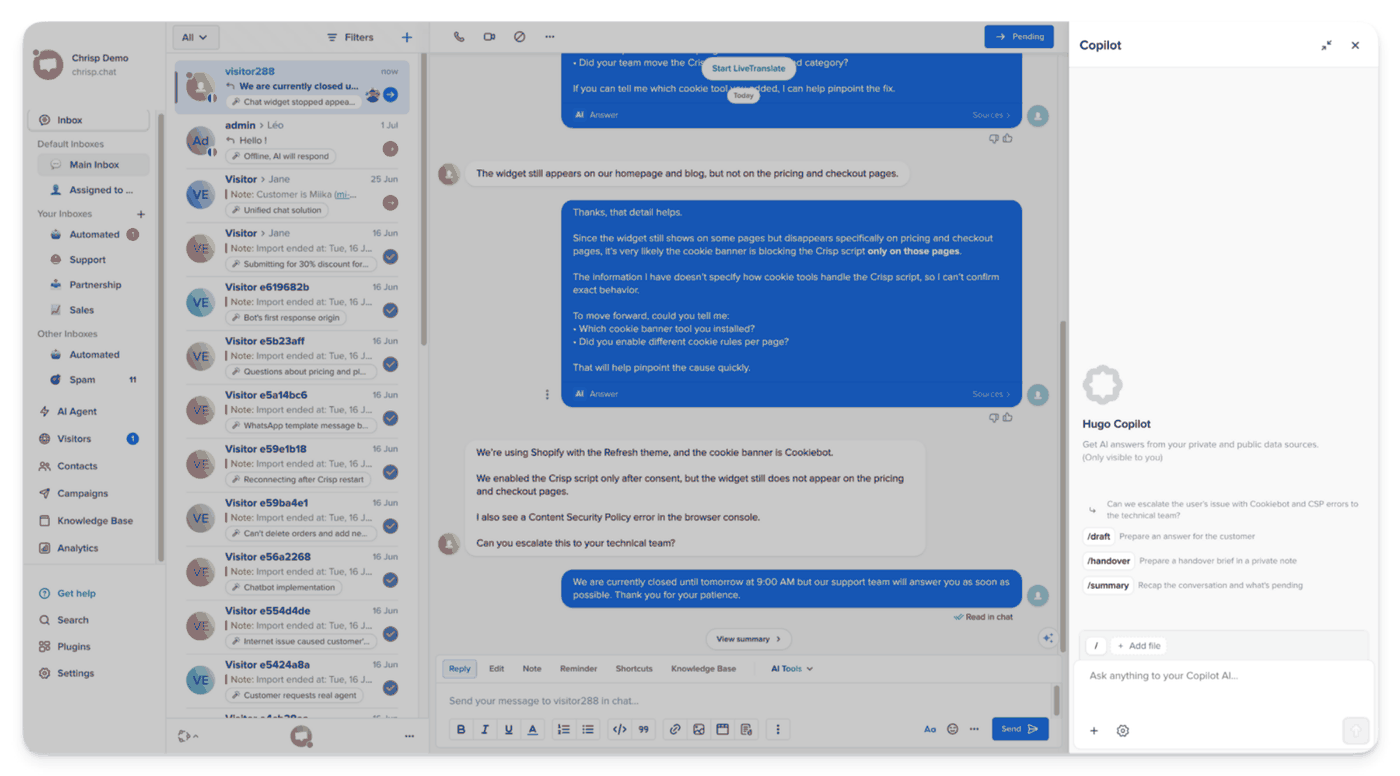
Crisp’s inbox with Hugo Copilot open (a staff name removed). Image: Crisp’s help centre.
Hugo’s Monthly AI Credits
Each paid plan includes a monthly amount of AI credits, in dollars: $5 on Mini, $25 on Essentials and $75 on Plus. Credits are based on tokens, the text the AI reads and writes, so longer conversations use more. Crisp counts one conversation from Hugo’s first reply until the chat is resolved or passed on (routed or escalated), however many messages that takes.
To estimate yours, count last month’s chats on each channel where Hugo would answer, plus emails if it will answer those. Every chat Hugo replies to counts, including the ones it then hands to your team. Crisp’s estimates of 90, 450 and 1,350 conversations a month come to about 3, 15 and 45 a day.
Crisp’s billing guide estimates $0.05 to $0.10 per conversation; another of its guides says $0.10 to $0.20. Credits reset on the 4th of each month and don’t roll over. Tests in Hugo’s Playground (its test chat) use them too.
When Hugo Stops Answering
Crisp’s billing guide is clear: “By default, once included Hugo credits are consumed, Hugo stops answering automatically and incoming conversations are escalated to human operators until credits become available again.”
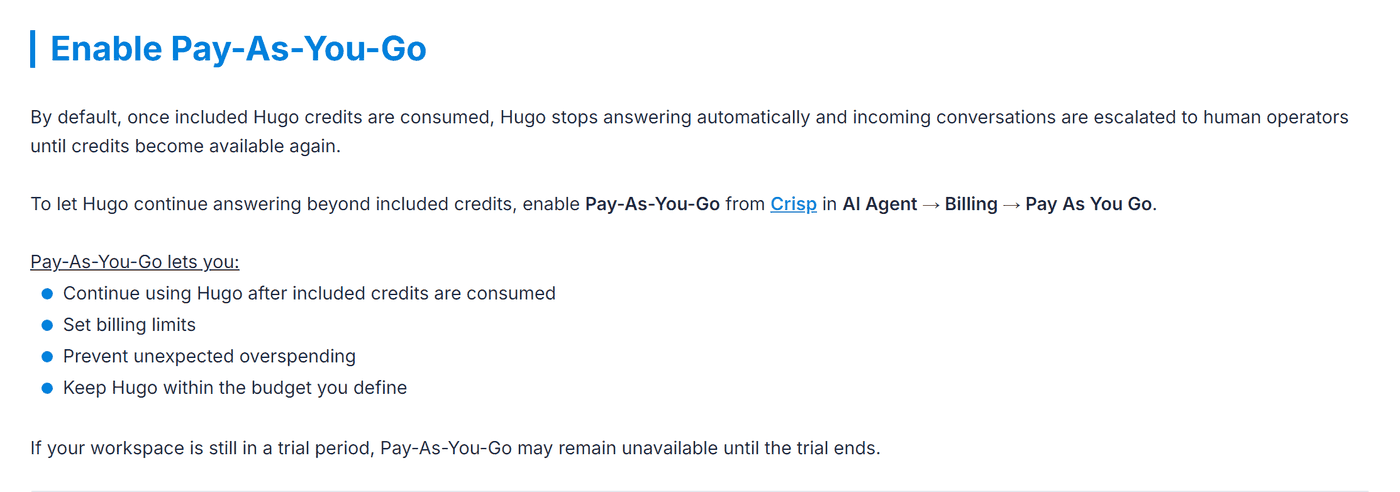
From Crisp’s help-centre guide to Hugo AI pricing and billing, updated 1 November 2026. Image: Crisp.
So by default, nothing extra is charged. To keep Hugo answering, a workspace owner turns on pay-as-you-go, which bills extra AI use up to a limit you set. Crisp doesn’t publish the rate.
You can also cap what Hugo spends in one conversation. And on Plus, when the credits run out, Hugo can hand chats to a workflow instead of your team.
A four-person team on Mini has about 300 AI conversations a month, around 10 a day. At Crisp’s estimate of $0.05 to $0.10 a conversation, Mini’s $5 of credits cover 50 to 100 of them (the pricing page says about 90).
So Hugo stops between about the fifth and the tenth day, and new chats go to the team. With pay-as-you-go on, the month costs about $10 to $25 more, as in the cost table below.
For models, training and set-up, see what Hugo AI is and how it works.
Crisp Chat Reviews: What Users Say
| Site | Rating | Reviews |
|---|---|---|
| G2 | 4.5 out of 5 | 207 |
| Capterra | 4.6 out of 5 | 148 |
| Trustpilot | 1.9 out of 5 | 56 |
| Shopify App Store | 4.0 out of 5 | 34 |
| WordPress.org plugin | 4.6 out of 5 | 73 |
| App Store (US) | 4.4 out of 5 | 522 ratings |
| Google Play | 4.0 out of 5 | 3,180 ratings |
All checked 17 November 2026.
The scores depend on who’s writing. G2’s reviewers are mostly people using Crisp day to day. Most of Trustpilot’s recent reviews are one-star complaints about sign-up checks, support, cancelling or Hugo.
What users praise:
- One inbox for every channel: “We manage live chat, email, WhatsApp, Instagram, and other channels in one unified shared inbox.” (a CTO on G2, February 2026, translated)
- Value against per-seat tools: a founder on G2 found Crisp more affordable than Intercom, which became costly as their company expanded (May 2026, translated)
- The API: a G2 reviewer says Crisp’s API “works around my own architecture instead of making me work around it” (October 2026)
- Hugo: “The Hugo AI agent I built has saved us hundreds of hours over the past couple of months.” (a customer success manager on G2, May 2026). A six-year customer says each Hugo conversation “doesn’t cost too much” (G2, April 2026).
- Set-up: it was “very easy and straightforward, with no need to even check the documentation” (the founder above, G2, May 2026, translated).
What users complain about:
- The step up from Mini: “as a long-term Mini customer, I feel that the jump to Essentials is quite significant.” (G2, June 2026)
- Hugo’s answers: the customer success manager who praised Hugo above says it “can produce hallucinated responses, reply in a different language than the user’s message, and route conversations to the wrong inboxes” (May 2026).
- The switch to Hugo: when Hugo launched in February 2026, one customer says their “previous AI workflows got deactivated without notice” (Trustpilot). Crisp replied in April: “Deactivating existing workflows without clear notice was disruptive, and we own that.”
- Support: opinions split. The CTO quoted above says “With Crisp, feedback is acknowledged” (February 2026, translated); a Trustpilot reviewer calls support “friendly but useless” (October 2026).
- Learning it: “The first few days can feel confusing simply because there are a lot of features and settings to explore” (the CTO above, G2, February 2026, translated).
- Sign-up checks: some reviewers say their account was flagged while they were testing (2025 to 2026). Crisp replies that it screens sign-ups because of how many people use it, so expect checks before you go live.
Crisp Pros and Cons
Pros:
- One flat price per workspace, with unlimited conversations on every plan (Hugo’s AI replies use monthly credits)
- A free plan with 2 seats, the chat box, the shared inbox and the apps
- 12 channels in one inbox, from the chat box and email to WhatsApp, Instagram and phone
- Hugo, its AI agent, included from Mini, built into Crisp and on the same bill
- WordPress, Shopify and WooCommerce on every plan, plus an open API, webhooks and chat SDKs
- Data hosted in the EU
- A 14-day trial of any plan, with no card
Cons:
- No extra seats until Plus: a fifth person means Essentials ($95) and an eleventh means Plus ($295)
- WhatsApp, Instagram, SMS, the help centre and workflows all start on Essentials
- “We run on Crisp” stays on the chat box unless you’re on Plus
- Hugo stops answering when its monthly credits are used up (new chats go to your team) unless you turn on pay-as-you-go, whose rate Crisp doesn’t publish
- One account of each messaging channel per workspace, unless you buy higher limits on Essentials or Plus
Hugo or Resolve247: Which AI Fits Inside Crisp?
If you choose Crisp, you still choose which AI answers in it. Hugo is built in. Resolve247, our product, is an AI chatbot that runs inside the same Crisp chat box and replies to the emails that reach Crisp, on a flat monthly plan.
It answers 82% of customer questions without a human (from 71% to 94%, depending on the business). Every answer shows the sources it came from, so your customers know it comes from your own trusted content, and can open the source to read more or check the answer for themselves. Your team keeps working in Crisp either way.
Here’s how the two compare, and which teams each one suits.
| Hugo (Crisp’s AI) | Resolve247 inside Crisp | |
|---|---|---|
| Setting it up | Built into Crisp, so there’s no second account: add your content and choose its channels in Crisp’s AI Agent settings | Three steps, in minutes: give it your website, we train the AI for you, then click Connect to Crisp |
| What it learns from | Q&A snippets, websites and PDF, CSV or TXT files: 1 website and 1 file on Mini, 3 and 5 on Essentials, 10 and 100 on Plus, plus your Crisp help centre from Essentials, updated as you edit it | Your website, help centre and other sites, with no page limit on any plan, plus files such as PDF, Word and Excel, Notion pages and typed Q&A |
| How you pay | In your Crisp bill: monthly AI credits ($5, $25 or $75), then pay-as-you-go if you turn it on | A separate flat monthly plan from $35 (Starter, with 2,000 AI messages); each AI reply is one message |
| Crisp plan needed | Mini ($45) and up | Any Crisp plan, Free included; the private-note option (see Drafts for your team, below) needs a paid Crisp plan |
| When the allowance runs out | Stops answering and passes new chats to your team (or, on Plus, to a workflow), with no extra charge; or turn on pay-as-you-go with a spending limit you set | Keeps answering and charges nothing automatically; we get in touch if you’re regularly over |
| Where it answers | The channels you choose, within your plan: Crisp names chat, email, Instagram, the contact form and WhatsApp; replies in the customer’s language | Crisp’s website chat, and the emails that reach Crisp (Mini and up); replies in the customer’s language |
| Images and files customers send | Reads images and transcribes voice messages, each with its own setting; Crisp doesn’t say whether Hugo reads PDFs or other files customers send | Reads images and files (PDF, Word, Excel, PowerPoint, CSV, text and logs, up to 10 MB) in Crisp chat and in emails; in Crisp chat, customers can send attachments from Crisp’s Mini plan |
| Handing over to your team | Offers a person when it can’t find an answer, and hands over when the customer asks or is frustrated, or in situations you list; replying yourself takes the chat over | When it isn’t sure of an answer or the customer asks for a person, your escalation rules alert your team by Slack or email. From Crisp’s Essentials plan, they can also assign the chat to someone or move it to a sub-inbox. The AI can pause when one of your team joins the chat |
| Drafts for your team | Hugo Copilot drafts, summarises and prepares handovers (Essentials and up; uses credits) | Our AI can post its answer as a private note for your team to check and send (paid Crisp plans) |
| Actions | Order lookups, refunds and more through Crisp’s connected tools, such as Stripe and Shopify (Plus) | Tool Use, on every plan: connect our AI to your own systems through their API. It can then look up live details, such as an order’s status, or take simple actions |
| AI models | Choose from OpenAI, Anthropic, Google, Mistral or Crisp-hosted models; Crisp picks one by default | One set of models we choose for support, on every plan, so there’s no model to pick |
| Other platforms | Crisp only | Our AI also answers inside HubSpot chat and on any website; in Help Scout and Front, Resolve247 drafts replies for your team |
| Trial and accuracy promise | 14-day Crisp trial of any plan, no card; hugo.ai says answers are “grounded in truth” | 30-day trial, no card; answers from your own content, with a money-back guarantee, and if the AI ever makes something up, that month is free |
Hugo checked on Crisp’s pricing page and help centre, Resolve247 on our pricing page (plans, and the FAQ on going over your allowance), our Crisp integration page and the product itself, both on 17 November 2026.
Both read the screenshots customers send. Resolve247 also reads PDFs, Word, Excel and PowerPoint files, CSVs and logs, in Crisp chat and in emails, so a customer can send a receipt or an error log and get an answer about it.
Crisp describes Hugo reading images and transcribing voice messages, but doesn’t say whether Hugo reads PDFs or other files customers send. Reading images and files comes with every Resolve247 plan, and a customer message with an image or file counts as one AI message like any other.
What the AI Costs on Top of Your Crisp Plan
| AI conversations a month | 300 | 800 | 2,000 |
|---|---|---|---|
| Crisp’s Hugo on Mini ($5 of credits) | $10 to $25 | $35 to $75 | $95 to $195 |
| Crisp’s Hugo on Essentials ($25) | $0 to $5 | $15 to $55 | $75 to $175 |
| Crisp’s Hugo on Plus ($75) | $0 | $0 to $5 | $25 to $125 |
| Resolve247, on any Crisp plan | $35 | $35 | $67 |
Monthly, with Hugo’s pay-as-you-go turned on. Crisp doesn’t publish that rate, so the Hugo figures use its billing guide’s estimate of $0.05 to $0.10 per conversation, minus your plan’s credits, as hugo.ai’s calculator does. Another Crisp guide says $0.10 to $0.20. Without pay-as-you-go, Hugo costs nothing extra and passes new chats to your team until the credits reset on the 4th.
Resolve247 counts AI replies, and we assumed 2.5 per conversation. So 2,000 conversations is 5,000 AI messages: our $55 Core plan plus 1,000 extra messages at $12. At 4 replies per conversation, Resolve247 would be $35, $55 and $103.
Hugo is cheaper at 300 conversations on every plan. Where Resolve247 becomes the cheaper of the two depends on which end of Crisp’s estimate you use. On Mini it’s between about 400 and 1,050 conversations a month, on Essentials 600 and 2,100, and on Plus 1,300 and 4,500. Above those, Resolve247 costs less.
On Crisp’s Free plan, Hugo isn’t available, so you’d move to Mini ($45, with two more seats and email). Resolve247 works on Free, in the chat box, for $35.
With the Crisp plan included, a four-person team on Mini with 300 AI conversations a month pays $55 to $70 in total with Hugo’s pay-as-you-go on, or $80 with Resolve247. A five-person team on Essentials with 800 pays $110 to $150 with Hugo, or $130 with Resolve247.
Choose Hugo if you want AI on WhatsApp or Instagram as well as chat (Essentials and up), one bill, a choice of AI model, voice-message transcription, or ready-made actions through Crisp’s Stripe and Shopify connections (Plus). It also costs nothing extra while your AI conversations stay within your plan’s credits. Resolve247 answers in Crisp’s website chat and the emails that reach Crisp, not in WhatsApp, Messenger, Instagram or Crisp’s other connected channels, so teams that want AI on WhatsApp or Instagram are better matched to Hugo.
Choose Resolve247 if you want a flat bill and an AI that keeps answering in a busy month, or AI on Crisp’s Free or Mini plan without counting credits. It also suits teams on Crisp Mini and up whose customers send documents, such as receipts or error logs, and teams that want a guarantee behind the AI’s answers. And it’s the same provider if you use HubSpot, Help Scout or Front as well. See AI for Crisp, our guide to the best AI chatbot for Crisp, and how to connect Crisp to Resolve247.
Crisp Chat Alternatives
Good alternatives to Crisp chat are Intercom, HubSpot, Help Scout, Front, Tidio and tawk.to. Which one fits depends on what you want instead:
- An all-in-one support platform with its own AI agent: Intercom, whose AI agent is called Fin. See our HubSpot vs Intercom comparison.
- A CRM with free live chat: HubSpot.
- A shared inbox built around email: Help Scout or Front. See our Help Scout pricing and Front pricing guides.
- Live chat with an AI add-on: Tidio, covered in our Tidio alternatives guide.
- Free live chat: tawk.to.
Or keep Crisp and change the AI that answers in it (see above).
Crisp Apps and Login
The Crisp app is your team’s side of Crisp: the shared inbox where you read and answer conversations from your chat box and other channels. You log in to Crisp Chat at app.crisp.chat in your browser, or use the desktop apps for Mac and Windows (downloaded from Crisp’s site) and the mobile apps for iPhone and Android. Crisp’s apps page lists them all.
Frequently Asked Questions
What is Crisp chat used for?
Crisp chat is used to talk to customers from one place. Businesses add Crisp’s chat box to their website, then answer chats, emails and messaging apps such as WhatsApp and Instagram from one shared inbox. Depending on the plan, Crisp also includes an AI agent called Hugo, a help centre, contacts and workflows.
Is Crisp chat free?
Yes. Crisp’s Free plan costs $0 and includes 2 seats, up to 100 customer profiles (contacts), the website chat box, a contact form, the shared inbox and the mobile and desktop apps. Crisp’s AI agent (Hugo), email and full conversation history start on Mini, at $45 a month. A new workspace starts on a 14-day trial that can show paid features, so check what the Free plan includes on Crisp’s pricing page before you build around a feature.
Which Crisp plan includes Hugo AI?
Hugo, Crisp’s AI agent, is included from the Mini plan ($45 a month), with $5 of AI credits a month: about 90 conversations, by Crisp’s estimate. Essentials ($95) includes $25 and Plus ($295) includes $75. When the credits are used up, Hugo passes new chats to your team, unless you turn on pay-as-you-go billing for extra AI use.
Does Crisp have desktop and mobile apps?
Yes. Crisp has a web app at app.crisp.chat, desktop apps for Mac and Windows, and mobile apps for iPhone and Android. They come with every plan, Free included. There’s no Linux app, so Linux users work in the web app.
Is Crisp safe to use?
Crisp says it stores its data in the EU, with messaging data in the Netherlands and plugin data in Germany, and that it is GDPR-compliant (Crisp’s GDPR page). It offers a data processing agreement on every plan. Crisp IM SAS is a French company, and its data protection authority is France’s CNIL.
How much does Crisp chat cost?
Per workspace, Crisp costs $0 on Free (2 seats), $45 a month on Mini (4 seats), $95 on Essentials (10 seats) and $295 on Plus (20 seats, then $10 for each extra seat). Our Hugo AI pricing guide has the full breakdown, including Hugo’s AI use.
Conclusion: Is Crisp Chat Right for You?
Crisp Chat gives a small team website chat, email and messaging apps in one inbox, at a flat price per workspace, with AI credits for Hugo included from Mini. Before you choose, do three checks:
- Count your people and channels to find your plan: more than 4 people, or WhatsApp, means Essentials; more than 10 people means Plus.
- Estimate your AI conversations a month against your plan’s credits (about 90, 450 or 1,350).
- Decide what should happen when the AI’s allowance is used up: pass chats to your team, or keep the AI answering.
If you’d like AI in your Crisp chat box that keeps answering all month on one flat monthly plan, try Resolve247 free for 30 days. It starts at $35 a month, you don’t need a card, and there’s a money-back guarantee. If the AI ever makes something up, that month is free.