
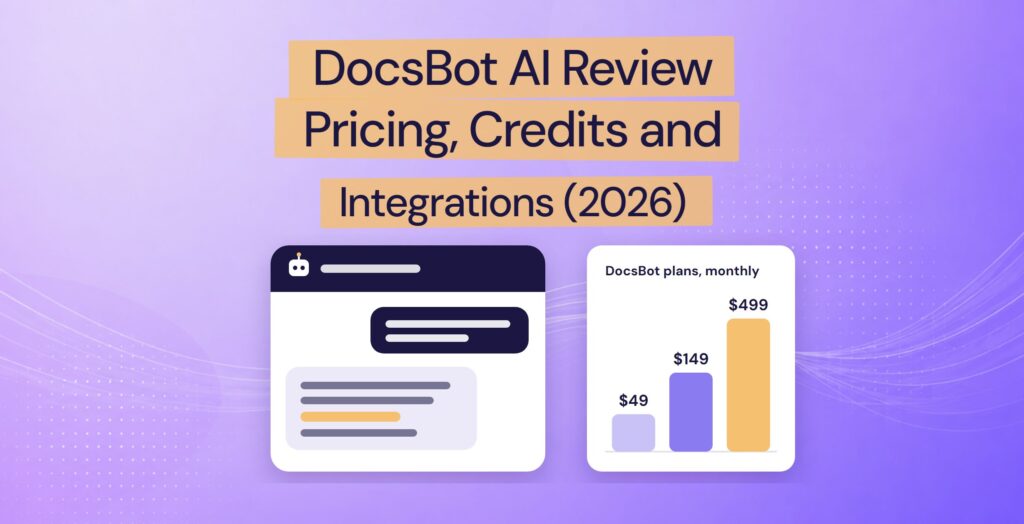
Disclosure: we make Resolve247, an AI support chatbot that competes with DocsBot. Our claims about DocsBot come from its website, documentation and terms, the chatbot on its website, and public user reviews, all checked on 28 October 2026.
Introduction
DocsBot (docsbot.ai), also called DocsBot AI, is an AI chatbot platform that answers your customers from your own content, with a free plan and paid plans from $49 a month. DocsBot suits teams that want many content sources, messaging channels such as WhatsApp, or an AI assistant for their own team in Slack. Your DocsBot bill depends on the AI model you choose: each reply uses 1 to 50 of your monthly AI credits. Escalation tickets (the bot writes up the chat as a ticket for your team) and the Help Scout integration need the $149 Standard plan, and removing DocsBot’s branding needs the $499 Business plan.
If you already use a help desk, check how DocsBot connects to it. With HubSpot, Intercom or Zendesk, DocsBot doesn’t integrate with your chat: it just opens your help desk’s chat widget when a visitor asks for a person, and nothing from the AI chat goes across. DocsBot’s own website bot confirmed this for HubSpot when we asked.
Below you’ll find our verdict, then pricing, credits, integrations, user reviews and a plain comparison to help you decide whether DocsBot fits.
Is DocsBot AI Good? Our Verdict
DocsBot AI is a strong option for teams that want one bot trained on many kinds of content and answering on several channels, as long as they are happy to manage AI credits. It learns from dozens of source types, including YouTube videos, audio and your past help desk tickets. The same bot can answer on WhatsApp and Messenger, and your team can ask it questions in Slack. Its Skills feature lets it run tasks such as Stripe billing lookups.
The catch for a small support team is the bill and the fit. Bigger AI models use more credits per reply. When the month’s credits run out, the bot stops answering unless you switch on auto-add (automatic top-ups). For HubSpot, Intercom and Zendesk, DocsBot just opens that tool’s chat widget when a visitor asks for a person, and nothing from the AI chat goes across.
DocsBot is a strong fit for:
- Teams that want WhatsApp, Messenger or phone support (phone in beta) from the same bot
- Teams that want to train the bot on videos, audio or cloud drives
- An AI assistant for your own team in Slack
- Anyone who wants a free plan to experiment on
Look elsewhere if you need:
- A predictable monthly bill, with no credits to track
- AI answering inside your own HubSpot or Crisp chat widget
- An unbranded chat widget (no “Powered by DocsBot”) without a $499 plan
- AI-drafted replies in Help Scout or Front for less than $149 a month
| DocsBot at a glance | |
|---|---|
| What it is | An AI chatbot platform that answers from your own content |
| Company | UglyRobot, LLC; founder and CEO Aaron Edwards; self-funded |
| Scale | 3,000+ businesses, says DocsBot |
| Paid plans | $49, $149 and $499 a month; two months free on yearly billing |
| Channels | Website widget, WordPress plugin, WhatsApp, Messenger, Telegram (beta), Slack, voice (beta) |
| Security | SOC 2 Type II, GDPR; doesn’t train AI on your data; US or EU storage; HIPAA on Enterprise |
| Consider Resolve247 instead if | You want a flat monthly fee, a bot that keeps answering past its allowance, AI inside HubSpot or Crisp chat, or AI drafts in Help Scout or Front |
How we checked: on 28 October 2026 we asked DocsBot’s own website bot ten buyer questions and quote two of its answers below. We also read reviews and user comments on Product Hunt, WP Mayor and YouTube. Prices are in US dollars on monthly billing unless stated.
What Is DocsBot AI?
DocsBot is a platform for building AI chatbots that answer from your own content. To set one up, you:
- Add sources such as your website, PDFs, Word files, YouTube videos, Notion pages or Google Drive. From the Standard plan it can also learn from closed help desk tickets, which it turns into general questions and answers.
- Write the bot’s instructions.
- Add the bot to your website or a messaging channel (see below).
You can put the bot on your website as a floating chat button or inside a page, or add it to WordPress with DocsBot’s official plugin. It also works on WhatsApp and Messenger, and as an assistant for your own team in Slack.
DocsBot is made by UglyRobot, LLC. Its founder and CEO, Aaron Edwards, previously led engineering at WPMU DEV. DocsBot describes itself as bootstrapped, with more than 3,000 business customers.
If you searched for DocsBot’s free AI tools, such as its YouTube summariser or text humaniser, those are separate web tools. This review covers the support chatbot. DocsBot is also a different product from DocsGPT and DOCBOT, which show up in some searches for it.
DocsBot Pricing in 2026
DocsBot costs $0 on the Free plan, $49 a month on Personal, $149 on Standard and $499 on Business, with custom pricing for Enterprise.
| Plan | Monthly | AI credits a month | Bots |
|---|---|---|---|
| Free | $0 | 100 | 1 |
| Personal | $49 | 5,000 | 1 |
| Standard | $149 | 15,000 | 3 |
| Business | $499 | 60,000 | 10 |
| Enterprise | Custom | Custom | Custom |
Billed yearly, the paid plans cost $41, $124 and $416 a month (two months free). Personal, Standard and Business include 5,000, 15,000 and 100,000 source pages and 1, 5 and 10 team users; Free has 50 pages and 1 user. A source page is about 5,000 characters of training content.
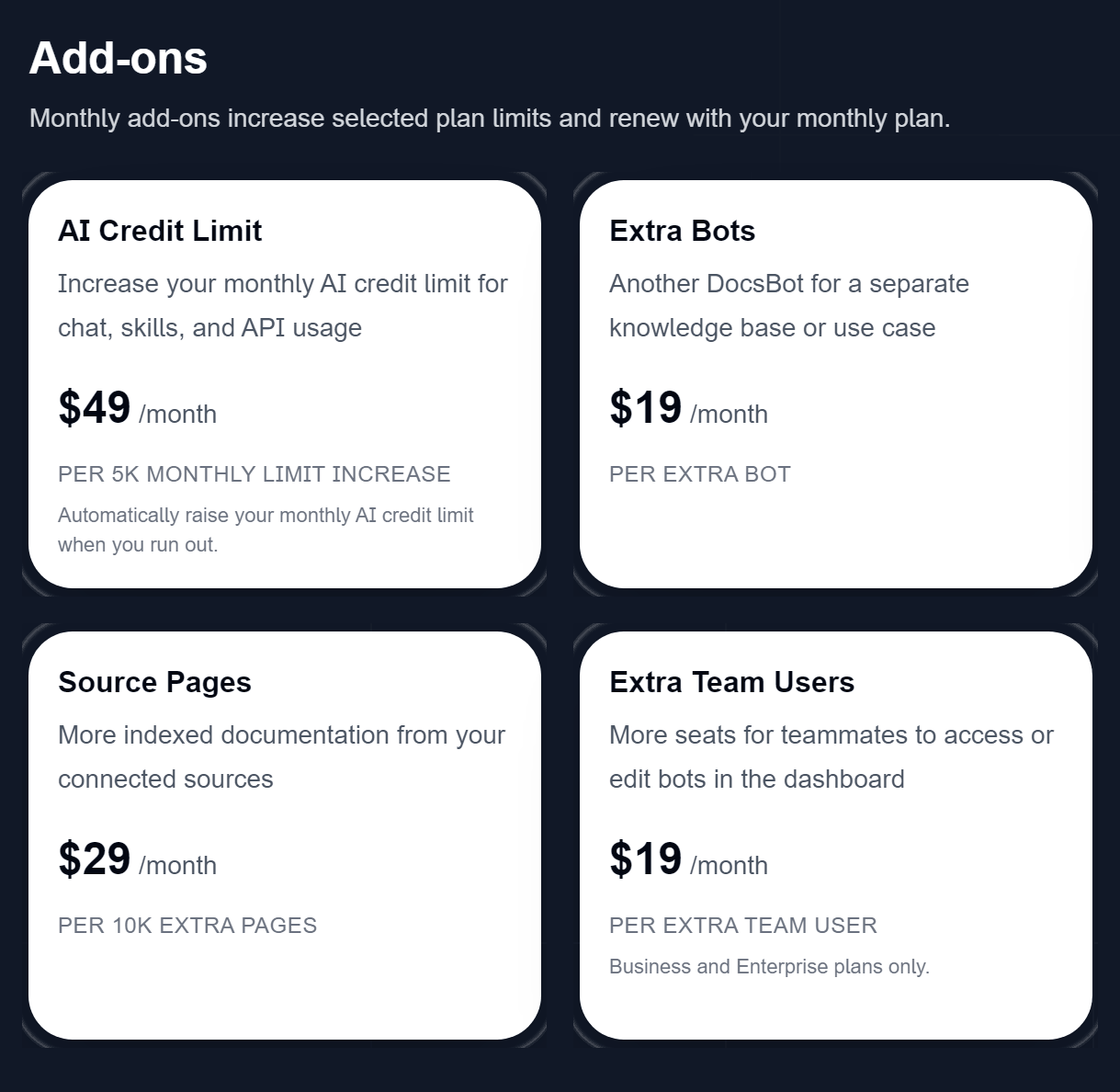
Add-ons are billed monthly: 5,000 more AI credits for $49, an extra bot for $19 and 10,000 more source pages for $29. Extra team users cost $19 each, on Business and Enterprise only.
What the higher plans add for a support team:
- Standard ($149): escalation tickets, the Help Scout integration, HubSpot contact sync (beta), training on past tickets, conversation analytics, Skills, web search and voice agents.
- Business ($499): the unbranded chat widget, topic and sentiment reports, and removing personal details from messages in the visitor’s browser, before they’re sent.
- Enterprise: SSO, HIPAA and data residency options.
The free plan is enough to try DocsBot on a small set of content. Eligible businesses can also ask for a Standard plan trial. DocsBot’s terms, last updated in November 2025, say trials need payment details.
Paid plans come with a 14-day money-back guarantee. After that, refunds are at DocsBot’s discretion and carry a 5% fee, and none are given on subscription payments more than 30 days old.
Why some sites list $19 or $99 plans: older reviews quote a $19 Hobby plan and a $99 Pro plan. DocsBot closed both to new customers in May 2025. Since 1 March 2026, it has been moving remaining Pro customers to the $149 Standard plan when they next renew (DocsBot’s plan update FAQ).
Prices checked on DocsBot’s pricing page on 28 October 2026.
How DocsBot Credits Work, and What Happens When They Run Out
Each DocsBot reply uses 1 to 50 AI credits, depending on the model you choose, so the 5,000 credits on the $49 Personal plan cover between 100 and 5,000 replies a month. Credits are used per answer, not per chat, so a chat where a visitor asks three questions uses three answers’ worth. AI actions, building Skills and advanced document reading (2 credits a page) use credits too.
| DocsBot model | Credits per reply | Replies on Personal (5,000 credits) |
|---|---|---|
| GPT-6 Luna | 1 | 5,000 |
| GPT-5.4 mini | 3 | about 1,670 |
| GPT-6.1 Terra | 5 | 1,000 |
| GPT-6.1 Sol | 10 | 500 |
| GPT-6 Astra | 50 | 100 |
Models and credit costs from DocsBot’s pricing page, checked 28 October 2026.
You can connect your own OpenAI account to make any model cost 1 credit a reply, but you then pay OpenAI for the model as well.
When the month’s credits are used up, DocsBot’s pricing FAQ says your bot stops responding and shows visitors an error message:
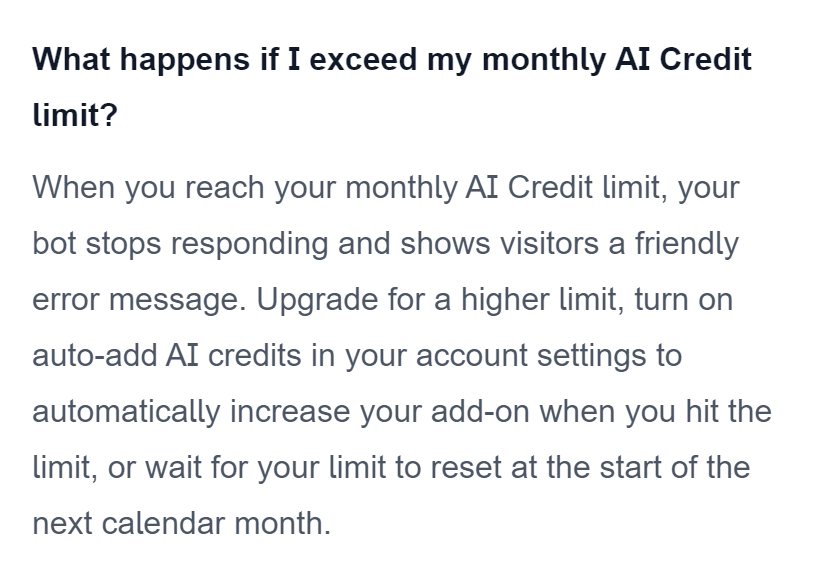
To keep the bot answering, you can upgrade or switch on auto-add, which adds 5,000 credits for $49 when you run out. DocsBot’s add-ons FAQ says your account then stays at the new, higher credit level until you choose to scale it back down. Credits reset on the 1st of each calendar month, and DocsBot’s own bot confirmed that “unused AI Credits do not roll over”.
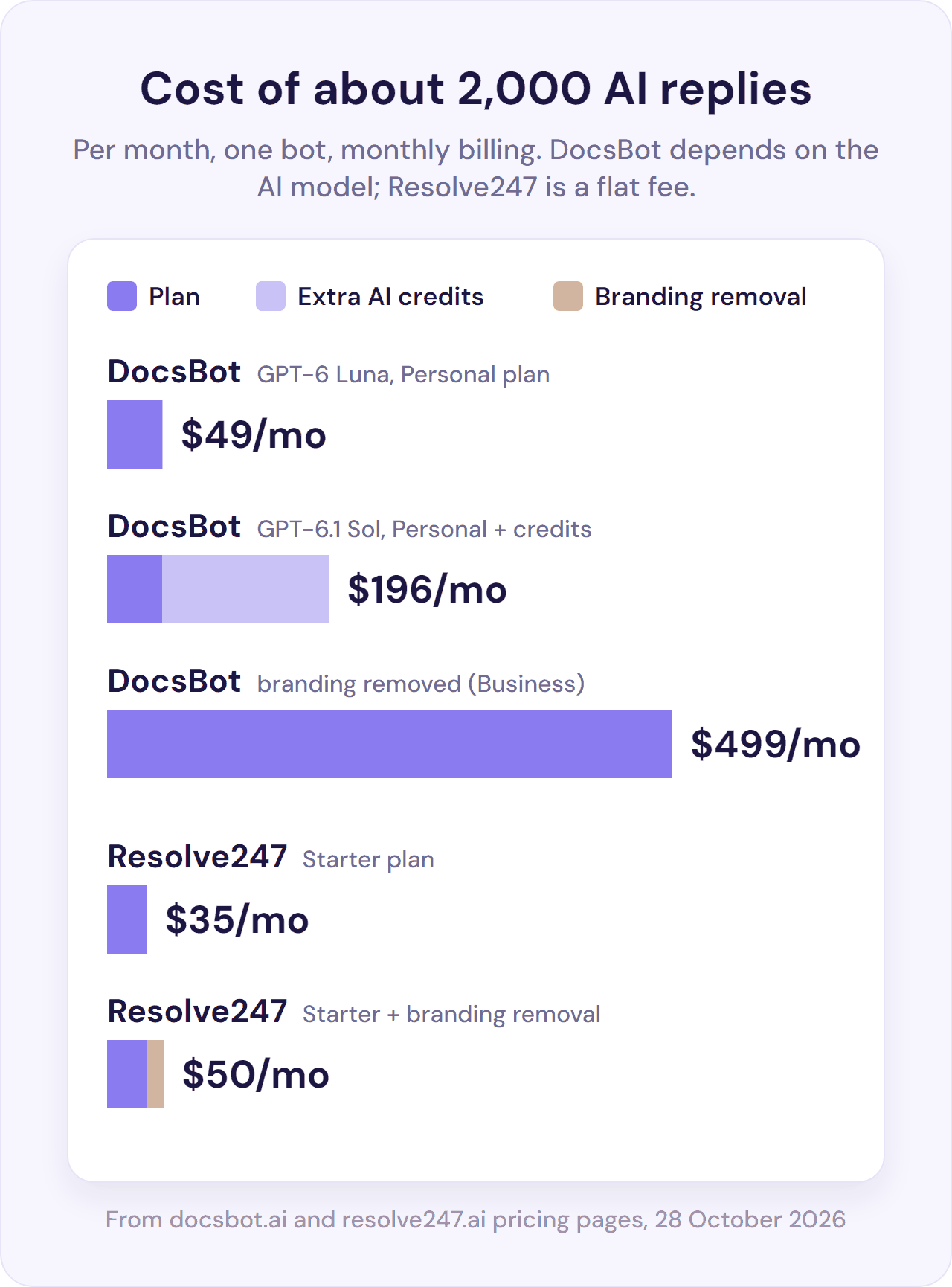
A worked example. A small business sending about 2,000 AI replies a month from one bot, or roughly 700 chats of three questions each, would pay DocsBot:
- $49 a month on GPT-6 Luna (1 credit a reply), within Personal’s 5,000 credits.
- $98 a month on GPT-6.1 Terra (5 credits), which needs 10,000 credits: Personal plus one $49 add-on.
- About $196 a month on GPT-6.1 Sol (10 credits), which needs 20,000 credits: Personal plus three add-ons.
- $499 a month to remove the DocsBot branding, because that needs the Business plan. Its 60,000 credits cover any of these three models.
To compare credit pricing with flat-fee and per-resolution pricing across providers, see our AI chatbot pricing guide.
Does DocsBot Integrate With HubSpot? No, It Just Opens HubSpot’s Chat
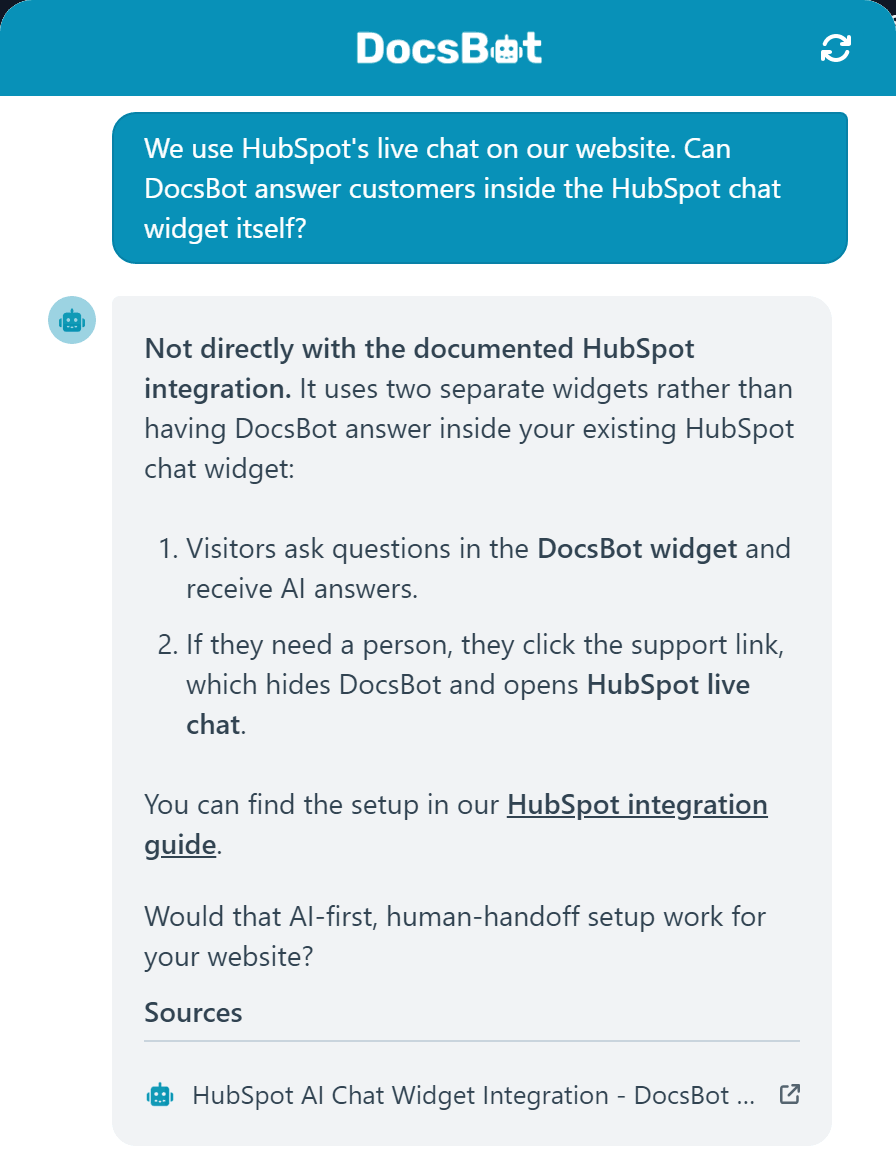
No. DocsBot’s AI answers in its own chat widget, and its HubSpot set-up just opens HubSpot’s chat widget when a visitor asks for a person. Nothing from the AI chat goes across to HubSpot. The only data DocsBot sends to HubSpot is new leads from its lead form, as contacts (in beta, on the $149 Standard plan).
With Help Scout, DocsBot does work inside the inbox, from its $149 Standard plan, and its docs list no Crisp integration (checked 28 October 2026).
Most of DocsBot’s help desk integrations work the same way. When a visitor wants a person, they click a support link, DocsBot’s widget closes, and your help desk’s own chat or contact form opens.
For HubSpot, Intercom and Zendesk, nothing from the AI chat goes across, so your team starts from scratch. For Help Scout, Freshdesk, Gorgias and LiveChat, it can fill in the visitor’s details and, from the Standard plan, an AI-written ticket.
You set this up by adding a short code snippet to your site, not by installing an app. DocsBot’s HubSpot guide shows the code, and DocsBot’s own bot described the same two-widget set-up when we asked:
| Tool | What DocsBot’s docs say it does | Plan |
|---|---|---|
| HubSpot | Just opens HubSpot’s chat widget; nothing from the AI chat goes across. Separately, new leads can go to HubSpot as contacts (beta), and you can build your own HubSpot Skill | Lead delivery and Skills: Standard ($149) and up |
| Help Scout | Draft replies or private notes on new conversations, an optional automatic first reply, learning from closed conversations, and a hand-off to Help Scout’s Beacon chat that can be prefilled with an AI-written ticket | Inbox drafts, ticket training and the AI-written ticket: Standard ($149) and up |
| Intercom, Zendesk | Just opens their chat widget; nothing from the AI chat goes across. DocsBot can also learn from solved Zendesk tickets | Ticket training: Standard and up |
| Freshdesk, Gorgias, LiveChat | Opens their chat or ticket form, which can be prefilled with the visitor’s details and an AI-written ticket; DocsBot can also learn from Freshdesk tickets | AI-written ticket and ticket training: Standard and up |
| Front | No built-in integration; you can build your own Skill for it | Skills: Standard and up |
| Crisp | Not in DocsBot’s docs (checked 28 October 2026) | n/a |
| Slack | DocsBot answers your own team inside Slack | Personal ($49) and up |
Help Scout is the exception: DocsBot works inside Help Scout’s inbox. You connect your own Help Scout app and webhook. DocsBot then writes a draft, or a private note listing the sources it used, on each new conversation for your team to review. The integration and ticket training start on DocsBot’s $149 Standard plan, on top of your Help Scout plan (DocsBot’s Help Scout guide).
Resolve247, our product, answers inside HubSpot’s and Crisp’s own chat widgets, on any HubSpot or Crisp plan, including HubSpot’s free plan, and your team takes over in that same chat. It also replies to customer emails that arrive in HubSpot or Crisp, and its ResponseAssistant drafts replies in Help Scout or Front from $35 a month. Our guide to chatbot-to-human handoff covers what a good hand-off looks like. See how Resolve247 works inside HubSpot chat, inside Crisp chat and with Help Scout.
DocsBot Features That Matter for Support Teams
Sources and training
DocsBot can train on dozens of source types: websites and sitemaps, documents, YouTube, audio and video files, Notion, Confluence, Google Drive, a WordPress export and Q&A pairs. Standard adds closed tickets from Help Scout, Zendesk, Freshdesk and others. You can schedule sources to refresh monthly on Personal and weekly on Standard and Business.
Channels
DocsBot includes WhatsApp and Messenger from the $49 Personal plan, and Telegram is in beta. Voice agents can answer out loud in the widget or on the phone, with a Twilio number or SIP line; they’re in beta and need Standard. DocsBot says it answers in more than 100 languages.
Skills, actions and MCP
DocsBot’s Personal plan includes 3 actions per bot, such as lead forms, Calendly, Cal.com or TidyCal bookings and Zapier workflows. Standard includes 8 and Business 12.
From Standard, Skills let you describe a task in plain language, such as checking an order’s status or creating a help desk ticket, and DocsBot builds it for you. Standard also adds ready-made Stripe billing support actions. MCP connections link the bot to other apps.
Analytics
DocsBot’s Personal plan has basic analytics and chat history. Standard adds question and conversation analytics, including answer, resolution and deflection rates. Topic reports, sentiment analysis and DocsBot’s data explorer need Business.
What DocsBot Reviews Say
DocsBot’s main public rating is on Product Hunt, where it scores 4.8 out of 5 from 15 reviews. Ten were written on its April 2023 launch days and three on a July 2025 relaunch day (checked 28 October 2026).
What users praise: how easy it is to train DocsBot on your own docs and add its widget, and how much repetitive work it takes off a support team.
What users complain about: price jumps between plans. WP Mayor’s September 2025 review scored DocsBot 4.5 out of 5 but flagged the size of those jumps. In October 2025, DocsBot’s founder said on WP Product Talk: “We did just raise some prices.”
We didn’t find public complaints about billing, refunds or support.
DocsBot Pros and Cons
Pros
- A free plan, and paid plans from $49 a month
- Dozens of source types, including past tickets, YouTube and audio
- WhatsApp, Messenger and a Slack assistant from the Personal plan
- AI drafts, notes and ticket training inside Help Scout
- Skills, MCP connections and Stripe billing actions
- Voice agents (beta)
- SOC 2 Type II and GDPR
Cons
- Credit maths: 1 to 50 credits a reply, depending on the model
- The bot stops answering at the limit unless auto-add is on, and auto-add keeps you at the higher level until you scale back
- Escalation tickets, Help Scout and conversation analytics need the $149 plan
- An unbranded widget needs the $499 plan
- Extra team users can only be added on Business and Enterprise
- No HubSpot chat integration: it just opens HubSpot’s chat widget, and nothing from the AI chat goes across
- Refunds after 14 days are at DocsBot’s discretion, with a 5% fee, and none on payments more than 30 days old
DocsBot vs Resolve247: Which Fits?
DocsBot fits teams that want one bot on WhatsApp and Messenger, a Slack assistant for their own team, or training on many kinds of content. Resolve247, our product, fits small teams that want a flat monthly fee and an AI chatbot on any website or inside their HubSpot or Crisp chat. We also make ResponseAssistant, for AI-drafted replies in Help Scout and Front. Here’s how the two compare, including where DocsBot is the better choice.
| DocsBot | Resolve247 | |
|---|---|---|
| How you pay | Monthly plan plus AI credits (1 to 50 per reply, by model) | Flat monthly plan from $35, with 2,000 AI messages on Starter; each AI reply counts as one message |
| Past your allowance | Bot stops until next month, unless you upgrade or use auto-add ($49 per 5,000 credits) | Keeps answering, so customers are never cut off (soft limit); we get in touch if you’re regularly over; nothing is charged automatically |
| Example: about 2,000 AI replies a month | $49 on a 1-credit model, about $196 on GPT-6.1 Sol; $499 with branding removed | $35, or $50 with branding removed (Starter $35 + $15) |
| Try it free | Free plan (100 credits a month); Standard trial on request; 14-day money-back guarantee | 30-day free trial on any plan, no card needed |
| Guarantees | 14-day money-back; no accuracy guarantee published | Money-back guarantee, and if the AI ever makes something up, that month is free |
| HubSpot and Crisp | HubSpot: no chat integration; it just opens HubSpot’s chat widget, and nothing from the AI chat goes across (new leads can go to HubSpot as contacts: beta, $149+). Crisp: not in its docs (checked 28 October 2026) | AI answers inside HubSpot and Crisp chat, on any HubSpot or Crisp plan |
| Help Scout and Front | Help Scout: drafts, notes and ticket training (Standard, $149+). Front: build your own Skill (Standard) | ResponseAssistant drafts replies in your Help Scout or Front inbox from $35, learning from your team’s past replies |
| Channels | Website widget, WordPress plugin, WhatsApp, Messenger, Telegram (beta), Slack, voice (beta) | Any website, including WordPress, as a chat button or a built-in chat window; inside HubSpot and Crisp chat; and AI replies to customer emails that reach HubSpot or Crisp |
| Training sources | Dozens of types, including past tickets, YouTube and audio; source pages capped by plan | Your whole website, files such as PDF, Word and Excel, Notion and typed Q&A; unlimited training pages on every plan |
| AI models | Choose from five listed models; credit cost varies by model | The same industry-leading models on every plan, so every reply gets the same quality and counts as one message |
| Actions | 3 to 12 actions per bot, Skills, MCP and Stripe billing actions | Tool Use on every plan: connect it to your own API to look up live details, such as an order’s status, or take simple actions |
| Bots included | 1 on Personal ($49), 3 on Standard ($149), 10 on Business ($499); extras $19/mo | 1 on Starter ($35), 2 on Core ($55), 3 on Pro ($125), 5 on Scale ($235); extras $30/mo |
| Branding removal | Business plan ($499/mo) | $15/mo add-on, on any plan |
DocsBot checked on its pricing page and docs, Resolve247 on our pricing page, both on 28 October 2026. The cost examples use monthly billing and one bot.
Choose DocsBot if you want WhatsApp, Messenger or phone support (phone in beta) from the same bot. It also suits teams that want an AI assistant in Slack, training on videos or audio, or a free plan to start on. Resolve247 is built for your website, HubSpot and Crisp chat, and the emails that reach HubSpot or Crisp, so teams that need the same bot on WhatsApp, Messenger or the phone are better matched to DocsBot.
Choose Resolve247 if you want a flat monthly bill and a bot that keeps answering in a busy month.
Resolve247 runs on any website, and in HubSpot or Crisp it works inside your chat on any HubSpot or Crisp plan. It also answers the emails that arrive in your HubSpot or Crisp inbox. In Help Scout or Front, ResponseAssistant’s AI-drafted replies start at $35. Branding removal is $15 a month.
DocsBot Alternatives
If DocsBot doesn’t fit, four alternatives we cover in depth are Chatbase, Help Scout’s own AI, HubSpot’s Customer Agent and Resolve247:
- Chatbase: one AI agent across your website, WhatsApp, Instagram, email and phone, with dozens of AI models, on message credits. See our Chatbase review.
- Help Scout’s own AI: Scout (formerly AI Answers) answers customers in Help Scout’s chat for $0.75 per resolution, through the Envoy add-on. See our Help Scout pricing guide.
- HubSpot’s Customer Agent: HubSpot’s own AI agent for HubSpot Professional and Enterprise customers, billed in HubSpot Credits at $0.50 per resolved conversation. See our HubSpot Customer Agent review.
- Resolve247: a flat monthly AI support chatbot from $35 that works on any website and inside HubSpot and Crisp chat, with ResponseAssistant drafting replies in Help Scout and Front.
Alternatives checked on each provider’s website on 28 October 2026. We compare more tools in our guide to customer service chatbots.
Frequently Asked Questions
Is DocsBot free?
DocsBot has a free plan with one bot, 50 source pages and 100 AI credits a month, which is enough to try it on a small set of content. Paid plans start at $49 a month and come with a 14-day money-back guarantee. Eligible businesses can also ask for a Standard plan trial.
How much does DocsBot cost?
DocsBot costs $49 a month for Personal, $149 for Standard and $499 for Business, or $41, $124 and $416 a month billed yearly. Each plan includes monthly AI credits (5,000, 15,000 and 60,000), and each reply uses 1 to 50 credits depending on the AI model you choose. Extra credits cost $49 per 5,000.
What happens when DocsBot runs out of credits?
When DocsBot runs out of credits, your bot stops responding and shows visitors an error message until the credits reset at the start of the next calendar month. To keep it answering, upgrade or turn on auto-add, which adds 5,000 credits for $49 and keeps your account at that level until you scale it down. Unused credits don’t roll over.
Does DocsBot integrate with HubSpot?
No. DocsBot answers in its own chat widget, and its HubSpot set-up just opens HubSpot’s chat widget when a visitor asks for a person, with nothing from the AI chat going across. The only data DocsBot sends to HubSpot is new leads from its lead form, as contacts (in beta, on the $149 Standard plan).
Does DocsBot work with Help Scout?
DocsBot works inside Help Scout’s inbox from its Standard plan ($149 a month): it writes a draft reply or a private note on each new conversation for your team to review, and can send the first reply automatically if you turn that on. It can also learn from closed Help Scout conversations and hand visitors to Help Scout’s Beacon chat.
Does DocsBot use ChatGPT?
DocsBot uses OpenAI’s GPT models, the family behind ChatGPT. Its pricing page lists five, from GPT-6 Luna at 1 credit a reply to GPT-6 Astra at 50. The model you choose changes how fast you use your credits. You can also connect your own OpenAI account to make any model cost 1 credit a reply.
What are DocsBot’s free AI tools?
Alongside its support chatbot, DocsBot offers free AI tools on its website, such as a YouTube summariser, a text humaniser and a prompt library. They’re separate from the chatbot. This review covers the chatbot: an AI assistant that answers your customers from your own content.
Conclusion
Whether DocsBot AI suits you depends on how you want to pay and where your support already lives.
Before you choose:
- Do the credit maths: multiply your monthly replies by your model’s credits per reply, then check which plan you’d need for escalation tickets, Help Scout or an unbranded widget.
- Check what “integrates with” means for your help desk: AI working inside it, or a hand-off to its chat.
If you’d rather pay a flat monthly fee from $35, with a bot that keeps answering when you pass your allowance, on your website or inside your HubSpot or Crisp chat, try Resolve247 free for 30 days. You don’t need a credit card, and there’s a money-back guarantee. Every answer shows its sources, and if the AI ever makes something up, that month is free.