
Disclosure: we make Resolve247, an AI support chatbot and an AI reply drafter for help desks. This guide uses OpenAI’s own pricing, help and developer pages (checked on 17 November 2026) and public posts from people who run support.
Introduction
Yes, you can use ChatGPT for customer service. It’s best at the work behind the scenes: drafting and rewriting replies, summarising long threads, writing saved replies and help articles, and translating. On its own, it doesn’t answer your customers. When ChatGPT alone isn’t enough, you can add AI that drafts replies in your help desk, or a support chatbot that answers customers from your own content.
Custom GPTs (ChatGPT set up for one job) can’t be that chatbot: OpenAI says they aren’t a way to put ChatGPT on your website.
If you already paste a customer’s email into ChatGPT to tidy a reply, you’re using it the way it works best. ChatGPT doesn’t know your business unless you tell it. So give it the facts, then check its draft before you send it.
This guide compares ChatGPT with a support chatbot. Then it covers what ChatGPT does well, where it falls short, what’s safe to paste in and what it costs a small team.
Chatbot vs ChatGPT: What’s the Difference for Customer Service?
ChatGPT is a chatbot: a general assistant made by OpenAI that you and your team use for almost any task. A support chatbot is built for your customers. It sits on your website or in your live chat, answers from your own help content, and passes the customer to a person when it can’t help.
Many AI support chatbots run on the same kind of AI model as ChatGPT. The difference is who they talk to and what they’re allowed to answer from.
| ChatGPT | An AI support chatbot | |
|---|---|---|
| Who uses it | You and your team | Your customers |
| Where it runs | ChatGPT’s website and apps, not your website | Your website, or inside your live chat |
| What it answers from | Its training, plus whatever you paste in, upload or connect | Your help articles, web pages and policies |
| When it isn’t sure | It can still sound confident, so you check | A good one says so and hands over to a person |
| Out of hours | Doesn’t reply to customers | Answers day and night |
| Other jobs | Writes almost anything: emails, posts, plans, translations | Sticks to your customers’ questions |
| Cost | Free Plus: $20 a month Business: $25 a seat a month, at least 2 seats (the plan for customer data) |
Standalone: usually $35 to $59 a month to start In a help desk: often $0.50 to $2.00 per resolved conversation See what AI chatbots cost |
You can use both: ChatGPT for your team’s writing, and a support chatbot for customers’ questions.
What ChatGPT Does Well for Customer Service
ChatGPT is very good with words, and most support work is writing. Here are five jobs it handles well, each with a prompt you can copy. Fill in the square brackets and paste the message after each prompt.
- Draft a reply from your notes. “Write a reply to this customer email. Facts to include: [refund approved, 3 to 5 working days, no need to return the item]. Don’t add any other facts, promises or numbers. If something is missing, write CHECK so I can fill it in. Keep it under 120 words, warm and plain. Sign off as [name].”
- Rewrite a tricky reply. “This customer is angry about [a late delivery]. Rewrite my draft so it apologises once, explains what happens next and stays calm. Here’s my draft: [paste].”
- Summarise a long thread. “Summarise this email thread for a colleague taking over: what the customer wants, what we’ve already tried, and what’s still open. Use bullet points.”
- Turn repeat questions into saved replies or help articles. “Here are five ways customers ask about [changing their delivery address]. Write one saved reply that answers all of them, and a short help article with steps.”
- Translate a reply. “Translate this reply into [Spanish], keeping the same friendly tone.” Have a fluent speaker check anything important.
Two tips make the drafts sound more like you. First, describe your tone in the prompt (“short sentences, friendly, no exclamation marks, sign off with first names”). Second, save that description and your key policies in a ChatGPT Project (a folder for related chats), so every chat in that project starts with them.
ChatGPT can now also connect to some help desks through plugins (add-ons that connect ChatGPT to other apps). OpenAI’s plugin directory lists HubSpot, Zendesk, Front and Gorgias. Once you connect one, you can ask ChatGPT to read a ticket and draft a reply, within the permissions you set.
OpenAI says that on personal plans, it may use information ChatGPT reads from connected apps to train its models (OpenAI’s apps article). So switch training off before you connect one.
Where ChatGPT Falls Short for Customer Service
It doesn’t know your business. Your returns policy, prices and opening hours aren’t in ChatGPT unless you paste, upload or connect them. Without them, it answers from its general training or a web search, which can turn up an old price or policy. When a policy changes, every saved prompt and file that mentions it needs updating too.
It can sound sure and still be wrong. OpenAI’s own help article on accuracy warns that ChatGPT can sound confident when it’s wrong, and advises: “Use ChatGPT as a first draft, not a final source.” So check every ChatGPT draft before it goes out. A support chatbot works from your own help content instead, and hands over to a person when it can’t help (more on AI support chatbot accuracy).
It doesn’t reply to customers out of hours. A question that arrives at 9pm waits until someone picks it up. ChatGPT’s scheduled tasks and workspace agents (shared team assistants) can run overnight, but only for your team. One AI chatbot provider found that 38% of website chats at 19 US small businesses arrived outside 8am to 6pm, Monday to Friday (more in our guide to 24/7 customer support).
It doesn’t go on your website. OpenAI’s help centre says so directly:
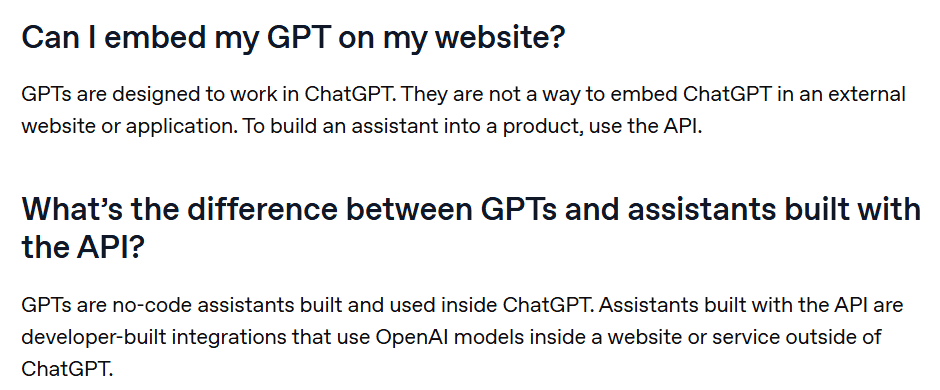
OpenAI also plans to retire custom GPTs on 11 December 2026, and personal plans (Free, Go, Plus and Pro) can no longer create new ones.
Its drafts can sound like ChatGPT wrote them. In a Reddit thread about ChatGPT and other AI tools, one commenter went back to typing client emails themselves. Their AI drafts sounded too polished, and they had to rewrite half of the text anyway. The tone tips above help.
Order look-ups still go through a person. For example, once you connect OpenAI’s Shopify plugin, ChatGPT can review orders and customer details. But someone has to ask it, check the answer and paste it into a reply.
Is It Safe to Paste Customer Data Into ChatGPT?
It depends on your ChatGPT plan. On personal plans, OpenAI can use your conversations to train its models unless you switch that off. On Business, Enterprise and OpenAI’s API, it doesn’t by default.
| ChatGPT plan | Used to train OpenAI’s models by default? | How to switch it off | Data processing agreement (a data protection contract) offered? |
|---|---|---|---|
| Free, Go, Plus, Pro (personal) | Yes | Settings > Data controls > turn off “Improve the model for everyone” | Not on OpenAI’s list (it names Business, Enterprise and the API) |
| Business | No | Already off | Yes |
| Enterprise | No | Already off | Yes |
| OpenAI API (your own build) | No | Already off | Yes |
Sources: OpenAI’s data controls article and enterprise privacy page, checked 17 November 2026.
On a personal plan, giving a reply a thumbs up or down lets OpenAI use that whole conversation for training, even with training off (OpenAI’s data article).
Removing customer details before you paste helps, but the habit slips. As one commenter in a small business thread put it: “we just redact names and numbers before pasting but half the time someone forgets.” So don’t rely on habit alone. Make these team rules:
- Use a ChatGPT Business workspace for customer work, or at least switch off training on every personal account your team uses.
- Never paste card numbers, passwords or ID documents into ChatGPT.
- Swap names, emails and order numbers for placeholders such as [Customer] and [Order] where you can.
- Use Temporary Chat for one-off questions. OpenAI doesn’t train on these chats while they stay temporary, but may keep them for up to 30 days.
In the UK, a customer’s name and contact details are usually personal data under UK GDPR, the UK’s data protection law (ICO guidance). Check that your privacy notice covers sharing customer messages with an AI provider, and ask whoever looks after data protection for your business.
Four Ways to Use ChatGPT-Style AI in Customer Service
“ChatGPT for customer service” can mean four different set-ups. What changes is who the AI talks to, what it answers from, and whether it answers customers while you’re offline.
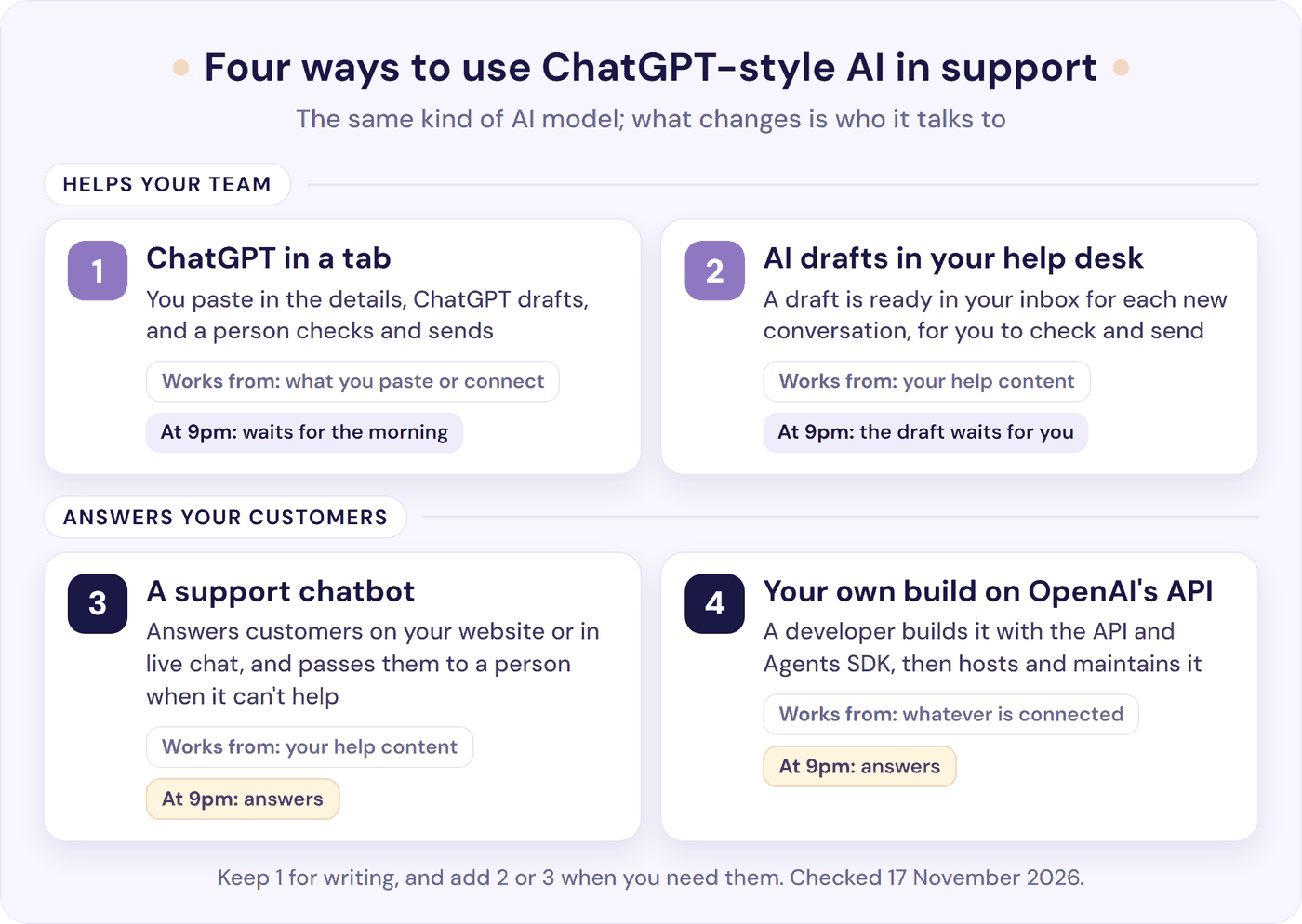
1. ChatGPT in a tab, or a Business workspace. A person asks ChatGPT for a draft, then sends it. It’s the cheapest start and the right tool for writing, rewriting and saved replies. You paste in your details each time, or keep them in a Project.
2. AI drafts inside your help desk. For each new conversation, a draft reply waits in your inbox. It’s written from your help content and, with some tools, your past replies. You read it, edit if needed, and send.
There’s no copying between tabs, and the conversation stays in your help desk. Setting up means switching on your help desk’s AI or connecting an add-on.
Some help desks offer their own AI drafts. HubSpot’s AI customer agent can suggest replies in the help desk on HubSpot’s Professional and Enterprise plans. Help Scout’s AI Drafts work on its Plus and Pro plans (see our guides to HubSpot Breeze and Help Scout’s AI). Resolve247’s ResponseAssistant drafts replies inside HubSpot, Help Scout, Crisp and Front, and learns from your past replies to match your team’s tone.
3. A support chatbot that answers your customers. The chatbot sits on your website or inside your live chat and answers customers day and night from your own content. When it can’t help, it passes the conversation to a person.
You connect your help pages and policies, then paste a code snippet into your site or connect your live chat. When a policy changes, you update the help article and refresh the chatbot, not every saved prompt. This is usually what people mean when they ask how to put ChatGPT on their website.
Resolve247’s AIChatbot works this way, on any website or inside HubSpot and Crisp chat. It answers only from your content and shows its sources with every answer. If the AI ever makes something up, that month is free. Teams whose customers mostly contact them on WhatsApp, Messenger, SMS or the phone are better matched to other tools.
For other options, see our guide to customer service chatbots.
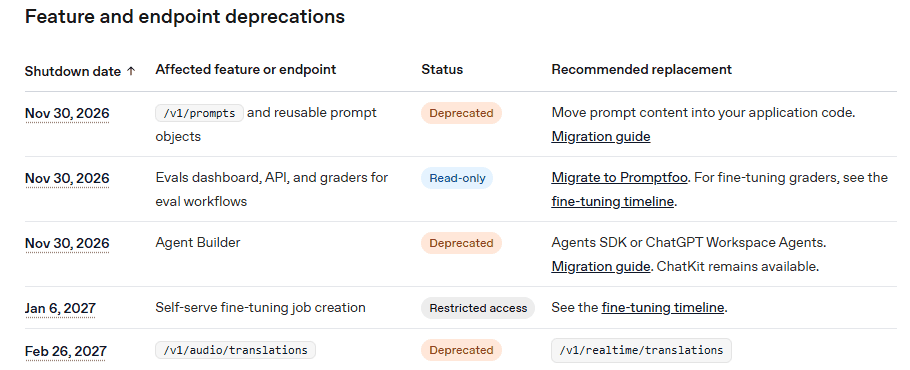
4. Your own build on OpenAI’s API. A developer builds a chatbot with OpenAI’s developer tools (its API and Agents SDK), and hosts the chat window on your own server. OpenAI’s no-code Agent Builder has a shutdown date of 30 November 2026, so new builds need code:
OpenAI’s fees are the smallest part of this route’s cost. By our estimate, a four-reply conversation costs about 1.4 to 4.6 cents at OpenAI’s API prices for two of its lower-priced models (GPT-6 Luna and GPT-6.1 Terra). The bigger costs are a developer’s time to build and host the chatbot and keep its answers accurate. Our guide to putting ChatGPT on your website and our Agent Builder alternatives go into detail.
OpenAI’s new business agents are different again: they answer product questions inside ChatGPT, not on your website. For now, only eligible US ecommerce and online service businesses can publish one.
You can keep ChatGPT for writing and add a support chatbot or AI drafts in your help desk.
What Does ChatGPT Cost for a Support Team?
ChatGPT Plus costs $20 a month per person. ChatGPT Business costs $25 a Standard seat a month, or $20 billed yearly, with at least two seats. Premium seats, with more usage, cost $125 a month or $100 billed yearly (OpenAI’s Business overview). In the UK, OpenAI’s pricing page shows £18 a Standard seat monthly, or £15 billed yearly.
These tools do different jobs, so you may pay for ChatGPT and another set-up (see other providers’ prices).
| Team size | OpenAI ChatGPT Plus | OpenAI ChatGPT Business | Resolve247 (drafts plus a chatbot) |
|---|---|---|---|
| 1 person | $20 | $50 ($40 yearly), as Business needs 2 seats | $35 Starter ($29 yearly) |
| 3 people | $60 | $75 ($60 yearly) | $85 (Core plan plus a $30 extra seat) |
| 5 people | $100 | $125 ($100 yearly) | $125 Pro ($104 yearly) |
| 10 people | $200 | $250 ($200 yearly) | $235 Scale ($195 yearly) |
Monthly prices in US dollars, checked 17 November 2026; “yearly” means the monthly price when billed yearly.
- ChatGPT Business for one person: OpenAI says some new Business workspaces can start with one seat.
- Resolve247 seats are for people using ResponseAssistant drafts. The chatbot needs no seat, so a chatbot-only team can start on Starter at $35 a month.
- Resolve247 volume: each AI reply or draft is one AI message. Plans include 2,000 (Starter) to 20,000 (Scale) AI messages a month, so Starter covers about 500 four-reply chatbot conversations. Past that, the chatbot keeps answering and nothing is charged automatically. If you often go over, we’ll talk with you about whether a bigger plan fits (pricing).
- Your own build on the API: about $14 to $46 per 1,000 four-reply conversations in OpenAI fees (our estimate: each reply runs a file search, with about 6,000 tokens in and 600 out). Add a developer’s time to build, host and maintain it.
Plus is a personal plan: training is on by default, and OpenAI doesn’t list it among the plans with a data processing agreement. For customer data, Business is the safer ChatGPT plan. Resolve247 doesn’t use your data to train AI models, and processes it under a data processing agreement (privacy policy).
How to Start Using ChatGPT for Customer Support This Week
- Pick the plan first. Move customer work to a Business workspace, or switch off training on every personal account your team uses.
- Write one shared prompt. Keep your tone, key policies and sign-off in a shared ChatGPT Project, so every draft starts from them.
- Check every ChatGPT draft before it’s sent. ChatGPT doesn’t know your business unless you tell it, so you check the facts and you send.
- Keep your saved replies outside ChatGPT too. Your help desk or a shared document should hold the master copy, so nothing depends on one tool.
- List the questions you answer, and when each one arrives. A week of notes shows which ones repeat and how many come in after hours.
- Add the next stage when the list shows it. If the same questions keep coming, or many arrive after hours, add AI drafts in your help desk or a support chatbot.
Frequently Asked Questions
Can I use ChatGPT for customer service?
Yes. ChatGPT is good at drafting and rewriting replies, summarising threads, writing saved replies and help articles, and translating. It doesn’t know your business unless you tell it, so check each draft before sending. To answer customers on your website or in live chat, add a support chatbot that answers from your own content and hands over to a person.
How much does ChatGPT cost for a support team?
ChatGPT Plus is $20 a month per person. ChatGPT Business is $25 a Standard seat a month, or $20 a seat billed yearly, with a two-seat minimum. So a team of three pays $75 a month on Business, or $60 billed yearly. We took these prices from OpenAI’s pricing pages on 17 November 2026.
Is ChatGPT a chatbot?
Yes. ChatGPT is a general assistant from OpenAI for almost any task. A support chatbot is built for your customers. It answers from your own help content, works on your website or in your live chat, and passes customers to a person when it can’t help. Many AI support chatbots use the same kind of AI model as ChatGPT.
Does ChatGPT use our conversations to train its models?
Yes, on personal plans (Free, Go, Plus and Pro), unless you switch off “Improve the model for everyone” in Settings > Data controls. On Business, Enterprise and the OpenAI API, OpenAI doesn’t train on your content by default. On a personal plan, a thumbs up or down on a reply lets OpenAI train on that whole conversation, even with training off.
Can ChatGPT write replies inside HubSpot, Help Scout, Crisp or Front?
ChatGPT has plugins for HubSpot and Front (and Zendesk and Gorgias) that let it read a ticket and draft a reply when you ask. To have a draft waiting on every new conversation, use your help desk’s own AI or an add-on. Resolve247’s ResponseAssistant, for example, works in HubSpot, Help Scout, Crisp and Front.
How does an AI chatbot hand a conversation to a person?
When the chatbot can’t answer, or the customer asks for a person, it passes the conversation to your team. Depending on the tool, that’s a live chat in your inbox, a new ticket, or an email or Slack alert. A good handover passes on the chat so far, so the customer doesn’t have to repeat themselves.
How do I contact ChatGPT’s own support?
Go to OpenAI’s help centre and click the chat bubble. OpenAI says you’ll start with its virtual assistant, and a person can join if the assistant can’t sort out your issue.
So, Should You Use ChatGPT for Customer Service?
Yes, for the writing. In customer service, ChatGPT works best as your team’s drafting partner, with a person checking every draft before it goes out. Put customer work on a Business workspace, or switch off training, and keep card details and passwords out of it.
When the same questions keep arriving, or customers ask while you’re offline, add the next stage:
- AI drafts in your help desk if your team answers everything and wants a head start on each reply.
- A support chatbot if customers need answers on your website or in live chat, day and night.
- Your own build if you have a developer and want full control.
If a support chatbot fits, Resolve247’s AIChatbot answers from your own content, shows its sources and passes customers to your team when it can’t help. If drafts fit better, our ResponseAssistant writes them in HubSpot, Help Scout, Crisp or Front. Plans start at $35 a month. Start a 30-day free trial, with no card needed.