
Disclosure: we make Resolve247, an AI support chatbot that competes with Botpress. This Botpress review draws on Botpress’s own website, documentation, terms and public code, the chatbot on its website, and public user reviews. We checked all of them on 13 November 2026.
Introduction
Botpress is a platform for building your own AI agent. You design it on a visual canvas, describe it in plain English, or write it in code, then put it on your website, WhatsApp, Messenger and other channels. It suits teams that want custom multi-step flows (step-by-step conversations you design) or many channels, and that have someone to build and look after the bot.
For a small support team, Botpress’s paid plans start at $189 a month ($150 billed yearly), for 250 conversations and up to 3 people. When you near your conversation limit, Botpress automatically adds packs of 100 conversations, at $65 each.
If you already use a help desk, check how Botpress connects to it. Botpress’s AI answers in its own chat widget and channels, and inside Intercom and Zendesk Messaging. With HubSpot, the bot updates your HubSpot records and can pass a chat to HubSpot’s inbox (on HubSpot’s Professional plans or higher). We found no integration for Crisp, Help Scout or Front.
In a 2026 post, Botpress itself says its managed plan is right for you if “Your team doesn’t have the internal capacity or technical expertise to build, deploy, and maintain an AI agent.” That line sums up this review: Botpress is powerful, and someone has to build the agent and look after it.
Is Botpress Good? Our Verdict
Botpress is a strong choice for teams that want to build their own AI agent and run it on many channels.
For a small support team, the catch is the build effort and the way you’re billed. Someone has to build and maintain the agent, and Botpress adds to the bill automatically as conversations grow. If more than 3 people use Botpress, you need the Team plan ($939 a month).
A strong fit for:
- Teams that want WhatsApp, Messenger, Instagram or Telegram support from one bot
- Custom flows that look up accounts and take actions, built with code where needed
- Agencies and multi-brand teams that need many bots
- Teams on Intercom or Zendesk
Look elsewhere if you need:
- A support bot that answers from your help content, with nothing to build
- A flat monthly bill, with nothing added to it automatically
- AI answering inside your HubSpot or Crisp chat
- AI-drafted replies in Help Scout or Front
| Botpress at a glance | |
|---|---|
| What it is | A platform for building AI agents and chatbots on a visual canvas, from a plain-English description, or in code |
| Company | Canadian; building AI agents since 2017; raised $25 million from investors in June 2025 (its Series B round) |
| Help desks | Answers inside Intercom and Zendesk Messaging. With HubSpot, works with records and tickets, and hands chats to HubSpot’s inbox (needs HubSpot Professional). No Crisp, Help Scout or Front integration found |
| Plans | Free; Plus $189 a month ($150 billed yearly); Team $939 ($750 billed yearly); Enterprise on request |
| Channels | Website chat, WhatsApp (listed on every plan), Messenger, Instagram, Telegram, SMS and email through Gmail; Slack and Microsoft Teams for your own team; voice listed on Enterprise |
| Security | SOC 2, GDPR, hosted on AWS |
| Consider Resolve247 instead if | You want AI inside your HubSpot or Crisp chat, on a flat monthly price, without building a bot |
How we checked: we asked the chatbot on Botpress’s website five factual questions and quote three of its answers. Prices are in US dollars on monthly billing unless stated.
What Is Botpress?
Botpress is a cloud platform for building AI agents and chatbots, made by a Canadian company that has been building AI agents since 2017. It says more than 750,000 agents have been built on it. It gives you three ways to build one, plus a help desk for your team:
- Botpress Viber: describe what the agent should do in plain English, and Viber builds, tests and publishes it. Viber’s product page says there’s no visual builder or flow diagram to work with.
- Botpress Studio: a visual canvas where you lay out a conversation’s steps and branches, with a code editor for custom actions. Its AI step, the Autonomous Node, decides what to say and which tools (actions the bot can take) to use.
- The ADK (Agent Development Kit): a kit for developers to write agents, workflows and tools as code.
- Botpress Desk: its own help desk, where your team answers the chats the bot hands over.
Agents answer from Knowledge Bases, the collections of content you give them: website pages, files, tables, web search results, and content from tools such as Notion and Google Drive. Botpress’s integrations directory, the Hub, lists 88, from WhatsApp and Slack to HubSpot and Salesforce.
Botpress started as an open-source project, and older reviews still describe self-hosting it (running it on your own servers). Its docs now say the self-hosted version (v12) has been officially retired and can no longer be bought, downloaded or used for new set-ups. So new bots run on Botpress Cloud. Its integrations, plugins and developer kit (SDK) are still open source in its GitHub repository, under the MIT licence.
Botpress Pricing in 2026
Plans and Prices
| Plan | Price a month | Conversations included | AI usage included | Seats (people) |
|---|---|---|---|---|
| Free | $0 | 100 (see below) | Included | 3 |
| Plus | $189, or $150 billed yearly | 250 a month, then $65 per extra 100 | $25 | 3 |
| Team | $939, or $750 billed yearly | 1,500 a month, then $50 per extra 100 | $150 | Unlimited |
| Enterprise | On request | Custom | Included | Unlimited |
From botpress.com/pricing, checked 13 November 2026.
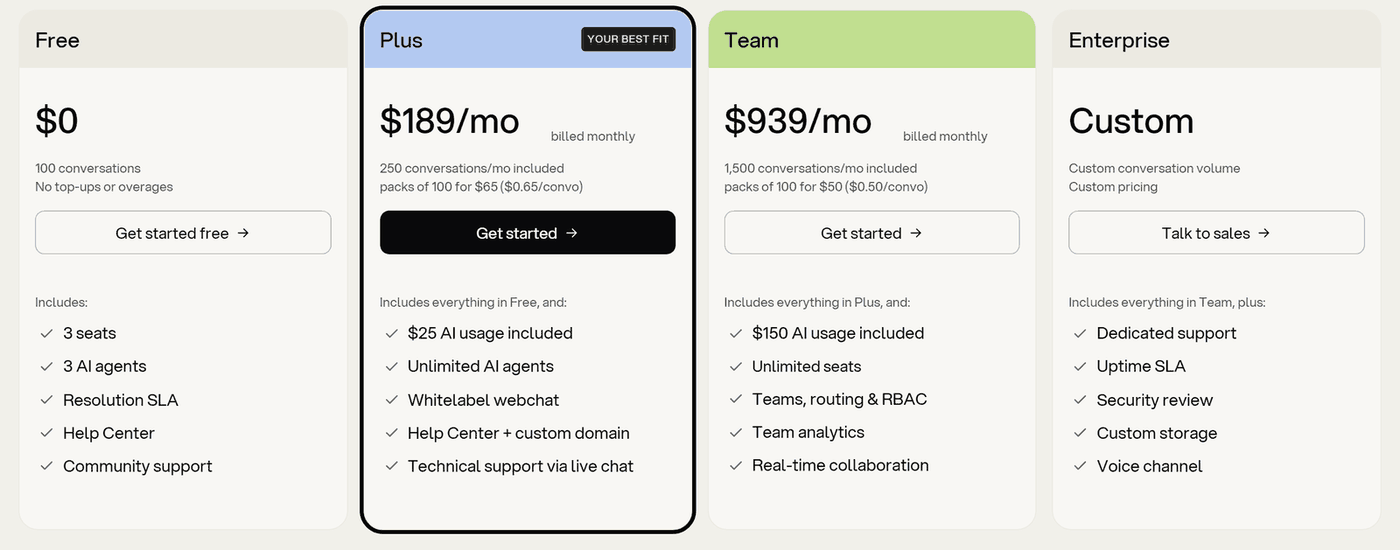
- Free includes 100 conversations and 3 AI agents (bots), with no top-ups. The pricing page doesn’t say whether they reset. Botpress’s own website bot told us they’re “a one-time total, not a monthly allowance”, and that new conversations are capped once they’re used. Chats in the emulator, the built-in window where you test your bot, count toward the 100 too, so watch how many you’ve used while you build. The chat widget carries Botpress branding.
- Plus adds unlimited AI agents, removes the branding and adds live-chat support from Botpress’s engineers.
- Team adds unlimited seats, rules for routing chats to the right team, permission roles, and team analytics. Botpress’s pricing page lists voice (phone calls) on Enterprise only.
- No trial of the paid plans: you start on Free. Within 7 days of a charge, you can ask for a refund of its subscription part (the plan price). You can do this once a year, and the refund cancels the subscription. Outside that window, charges aren’t refunded, including the unused part of a yearly plan.
Why some sites list $89 or $495: those were Botpress’s prices before 14 May 2026. On that date, Botpress moved from charging per message, with AI usage billed on top, to charging per conversation, with AI usage included. Its May 2026 pricing post says that, for now, the new pricing applies only to workspaces (Botpress accounts) created after 14 May 2026, and older workspaces keep their plans. So $89 and $495 are still true for some existing customers, but a new sign-up today pays the prices above.
What Counts as a Conversation
The pricing page defines a conversation as “any exchange with at least two messages from the end user in the billing month”. A few details matter for your estimate:
- A conversation that runs across two months counts in both.
- Separate visits by an anonymous visitor, one the chat can’t identify, count as separate conversations.
- Chats your team handles in Desk count the same as AI chats.
- Test conversations in the built-in emulator count too.
To estimate your number, take last month’s website chats and keep the ones where the customer wrote at least twice. A chat the bot starts and your team finishes counts only once, so don’t add those again. Add only the chats your team would answer in Desk with no bot involved, and allow some for testing. For scale, 250 conversations a month is about eight a day.
What Happens When You Reach the Limit
On paid plans, Botpress buys more conversations for you rather than pausing the bot. Its pricing FAQ says: “Once you reach 95% of your quota, a pack of 100 conversations is automatically added to your account.” Your quota is the conversations you’ve paid for, and each pack costs $65 on Plus or $50 on Team. It notifies you at 75% and 100% of your quota and on every pack it adds.
You can’t switch the packs off. Asked whether you can, Botpress’s pricing FAQ says: “No. Pausing conversations means pausing the product entirely.” It suggests using the early warnings to move to the right plan before extra charges start.
Packs stay on your bill from month to month until you remove them in billing settings, and unused conversations in a pack expire at the end of the month.
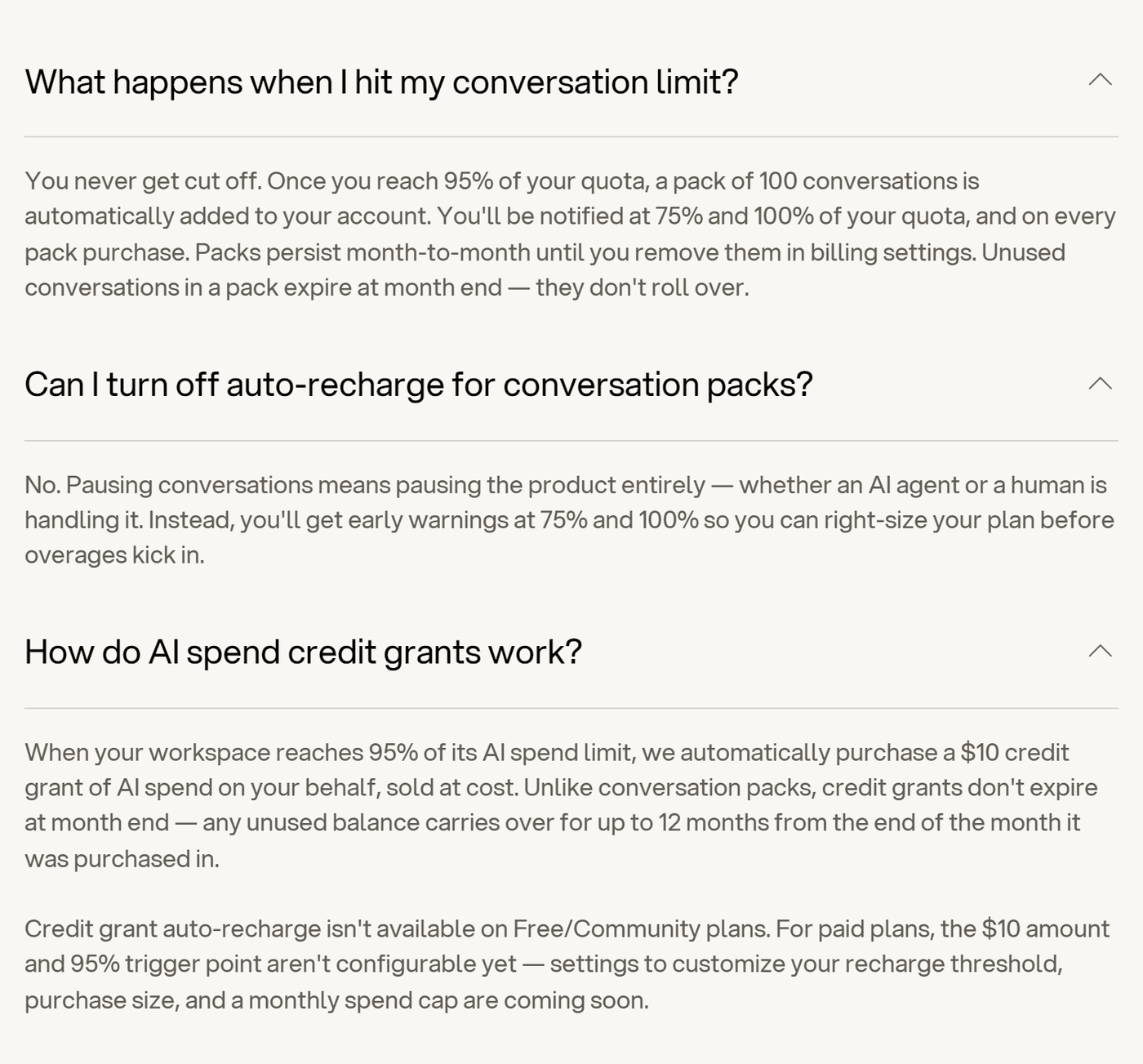
Here’s how that plays out. Say a launch month brings 400 conversations on Plus. Botpress adds a pack at 238 conversations and another at 333, so that month costs $319 instead of $189. Both packs stay on next month’s bill unless someone removes them.
AI usage, the cost of the AI models your bot runs on, has its own allowance, shown in the plans table above. When you’ve used 95% of it, Botpress buys $10 of extra AI credit for you, at cost, and any unused credit lasts about a year. A monthly spending cap is “coming soon”.
What Botpress Costs at Your Volume
The cheapest Botpress plan at each volume, from its own pricing calculator:
| Conversations a month | Botpress plan | Monthly billing | Billed yearly |
|---|---|---|---|
| Up to 100 in total | Free (Botpress branding, no top-ups) | $0 | $0 |
| Up to 237 (95% of 250) | Plus | $189 | $150 |
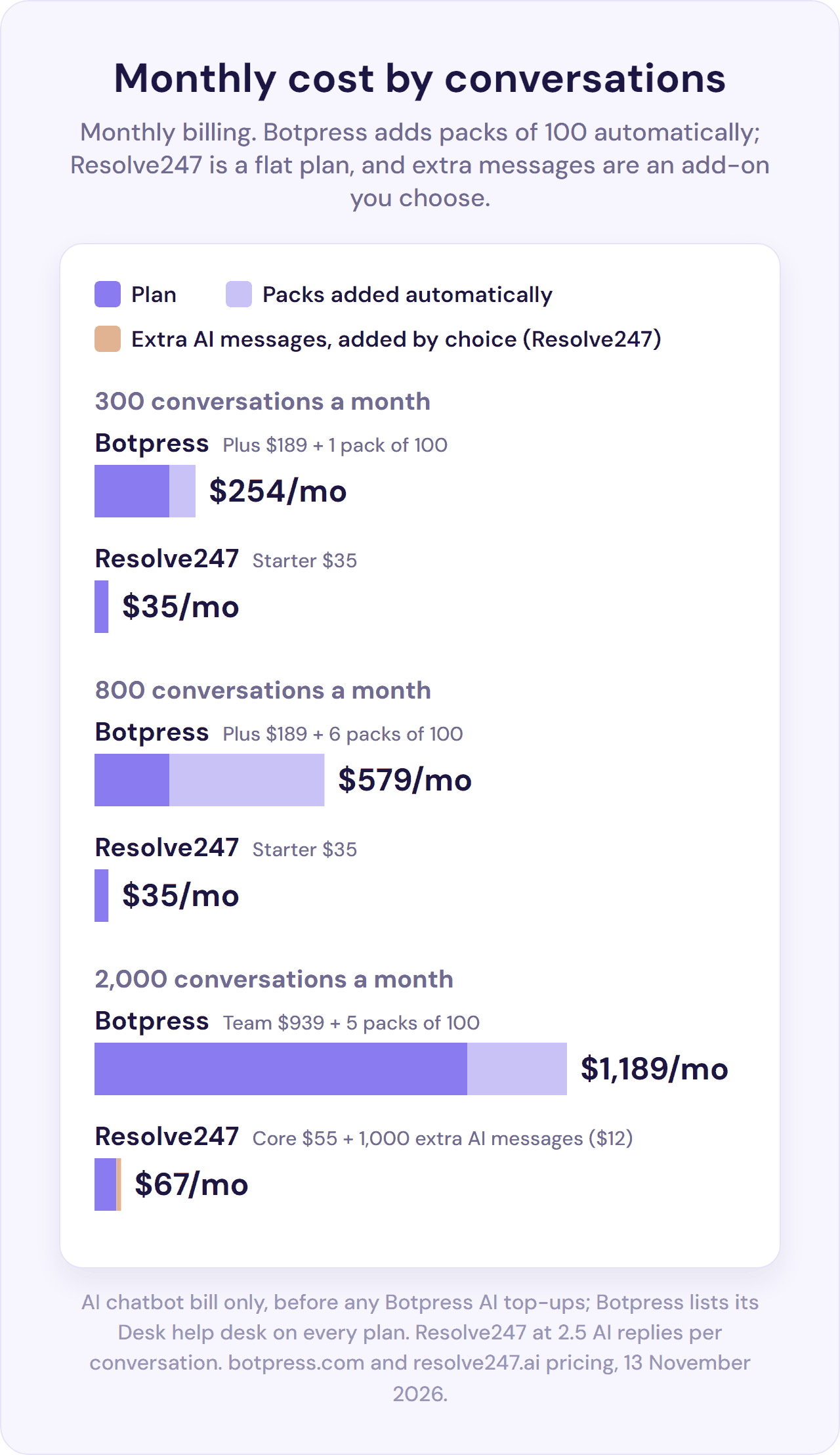
| 300 | Plus + 1 pack | $254 | $215 |
| 800 | Plus + 6 packs | $579 | $540 |
| 2,000 | Team + 5 packs | $1,189 | $1,000 |
| Any volume, if more than 3 people use Botpress (whoever builds the bot plus everyone answering chats in Desk) | Team | From $939 | From $750 |
Botpress’s own figures, before any AI top-ups (it doesn’t publish how much AI usage a conversation takes). The optional storage add-on (extra space for your bot’s content and files) is $40 a month on Plus or Team.
To work out your own month: read literally, Botpress’s FAQ adds a pack each time you reach 95% of the conversations you’ve paid for, packs included.
- Count the packs. On Plus, the first comes at your 238th conversation, then one every 95 conversations after that (333, 428, 523 and so on). On Team, the first comes at your 1,425th conversation, then one every 95.
- Price them at $65 each on Plus or $50 each on Team.
- Add the plan price: $189 for Plus or $939 for Team.
Botpress’s own pricing calculator, which the table above uses, adds one pack for each 100 conversations, or part of 100, over 250 on Plus or 1,500 on Team. So it can show fewer packs than the 95% rule. At 1,000 conversations on Plus, it shows 8 packs ($709) where the rule gives 9 ($774). At 2,000 on Team, it shows 5 ($1,189) where the rule gives 7 ($1,289).
Team becomes cheaper than Plus at about 1,280 to 1,350 conversations a month on monthly billing, or about 1,090 to 1,150 billed yearly. The lower figures follow the 95% rule, and the higher ones Botpress’s calculator.
Seats matter as much as volume. A seat is one person who can log in and work in Botpress. Botpress charges no fee per seat, but Plus includes 3 seats (people) in total, and every person who answers chats in Desk uses one.
Botpress’s own website bot told us: “Up to 3 support agents can work in Botpress Desk on Plus.” So if more than 3 people need to use Botpress, you need Team, whatever your volume.
If the bot hands chats to your own help desk instead (HubSpot’s inbox, Zendesk or Intercom), your team answers them there and doesn’t use Botpress seats. The HubSpot route needs HubSpot Professional, though (see below).
In Botpress’s favour, it lists Desk on every plan, so a team without a help desk gets one with the bot. For how this pricing compares with other chatbots, see our AI chatbot pricing guide.
Does Botpress Integrate With HubSpot and Other Help Desks?
Here’s what Botpress does with each help desk, checked in its Hub, docs and integration code on 13 November 2026:
| Help desk | What Botpress does | What reaches your team | What you need |
|---|---|---|---|
| HubSpot | Records, tickets, handoff to HubSpot’s inbox or Help Desk; bot answers in Botpress’s chat | A title and description, then the customer’s next messages | HubSpot Sales or Service Hub Professional or higher for the handoff |
| Zendesk | Bot can answer in Zendesk Messaging; handoff creates a ticket | A ticket with the full bot conversation | Zendesk Support Professional with Messaging, for answers inside Zendesk |
| Intercom | Bot answers inside Intercom conversations; separate handoff integration | The conversation itself | An Intercom admin user for the bot to reply as |
| Crisp, Help Scout, Front | No integration found | Nothing; handovers go to Botpress Desk, or to a custom connection you build | Desk seats (3 on Plus) |
HubSpot: Records, Tickets and Handoffs; the Bot Answers in Its Own Chat
Botpress’s official HubSpot integration lets your bot work with your HubSpot records. For example, it can create and update contacts, deals and leads, update companies, and create tickets. The integration doesn’t put the bot inside HubSpot’s chat widget.
When we asked Botpress’s own website bot, it said: “Botpress doesn’t plug its AI directly inside HubSpot’s own chat widget UI.” It suggested using Botpress’s chat widget on your site instead, so in practice you’d swap HubSpot’s chat for Botpress’s.
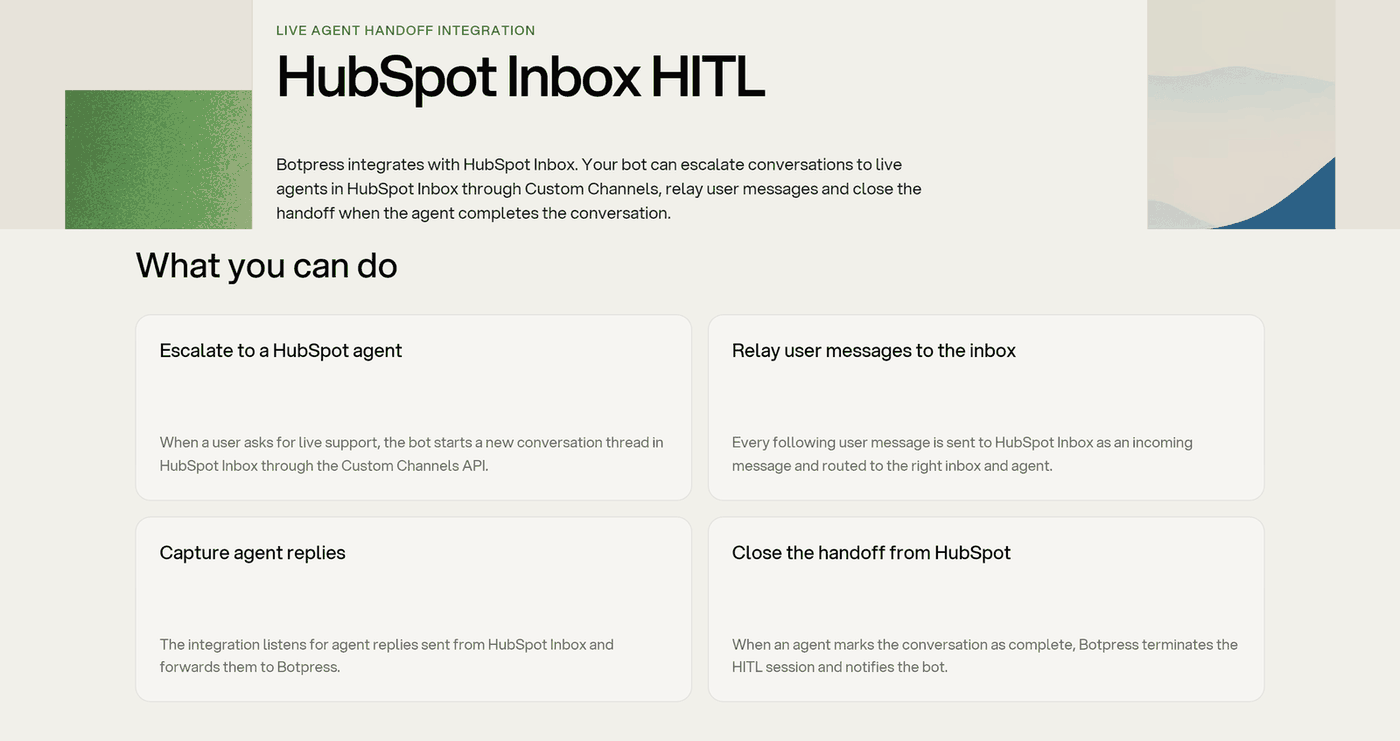
Botpress can also hand a live chat to a person on your team in HubSpot’s inbox or Help Desk:
- What you need: HubSpot Sales Hub Professional or Service Hub Professional, or higher, according to Botpress’s page for the handoff. HubSpot lists Service Hub Professional from $90 a seat a month billed yearly ($100 billed monthly), plus a required one-time $1,500 onboarding fee. So unless you’re already on Professional, a handoff into HubSpot’s inbox starts at about $289 a month on monthly billing, plus $1,500 up front. That’s Botpress Plus and one Service Hub Professional seat.
- Set-up: for Botpress’s HubSpot Inbox handoff integration, you create a HubSpot public app (a developer app in HubSpot). Then you paste six keys and IDs into Botpress: a developer API key, app ID, client ID, client secret, inbox ID and refresh token.
- What your team sees: a new conversation in HubSpot’s inbox with a title and description, then the customer’s next messages. The earlier bot conversation isn’t included unless whoever builds the bot adds it.
- The customer: must give an email address or phone number that matches one of your HubSpot contacts (Botpress’s pages say the handoff won’t start otherwise). They stay in Botpress’s chat and get your team’s replies there.
Zendesk and Intercom: the Bot Can Answer Inside Them
Botpress goes further with these two. The bot can reply inside Intercom conversations and inside Zendesk Messaging, Zendesk’s chat (this needs Zendesk Support Professional with Messaging switched on). When the bot hands over to Zendesk, the ticket carries the full bot conversation. Botpress Desk can also sync its tickets with either tool.
Crisp, Help Scout and Front: No Integration Found
We found no Botpress integration for Crisp, Help Scout or Front in its Hub, its documentation or its public integration code, checked on 13 November 2026. So the bot answers in Botpress’s own chat widget, in place of (or next to) your Crisp chat, Help Scout’s Beacon chat widget or Front Chat. Chats it hands over go to Desk, a second inbox for your team (up to 3 people on Plus), or to a custom connection you build with Botpress’s API.
Handing Over to a Person, Plan by Plan
- In new workspaces, the bot hands over to Desk, which Botpress lists on every plan. Existing workspaces can keep the older handoff integration, which needs Plus or higher.
- What the customer sees: they stay in the same chat. By default, the bot tells them: “I have escalated this conversation to a human agent.”
- Other help desks: besides those in the table above, Freshchat, LiveChat and Zoho SalesIQ have handoff integrations.
For what makes a handover work for the customer, see our guide to chatbot to human handoff.
Resolve247 works the other way round in HubSpot and Crisp. Our AI answers inside HubSpot’s or Crisp’s own chat widget, on any HubSpot or Crisp plan (HubSpot’s free plan included), and your team takes over in that same chat. Our AI also replies to customer emails that reach your HubSpot or Crisp inbox.
For Help Scout and Front, our ResponseAssistant drafts replies in your inbox, from $35 a month for one person. With Help Scout, our chatbot runs in its own widget on your site, and its “Contact a Human” button opens a Help Scout conversation with the chat history. See Resolve247 for HubSpot, AI for Crisp and AI for Help Scout.
How Much Building Botpress Takes
Every AI support bot, Botpress included, needs your help content, kept up to date as your products and policies change. Here’s what Botpress adds on top:
- Designing the agent. In Viber you describe it, and Viber sets it up for you to check and adjust: the agent’s instructions, playbooks, knowledge, tools, and when to hand over to a person. In Studio or code you build the flows yourself, and custom logic means writing JavaScript code in Execute Code cards, blocks of code inside a flow.
- Connecting each channel and integration. The HubSpot Inbox handoff integration alone needs a HubSpot public app and six keys or IDs.
- Setting up where handed-over chats go: Desk, or your help desk through its integration.
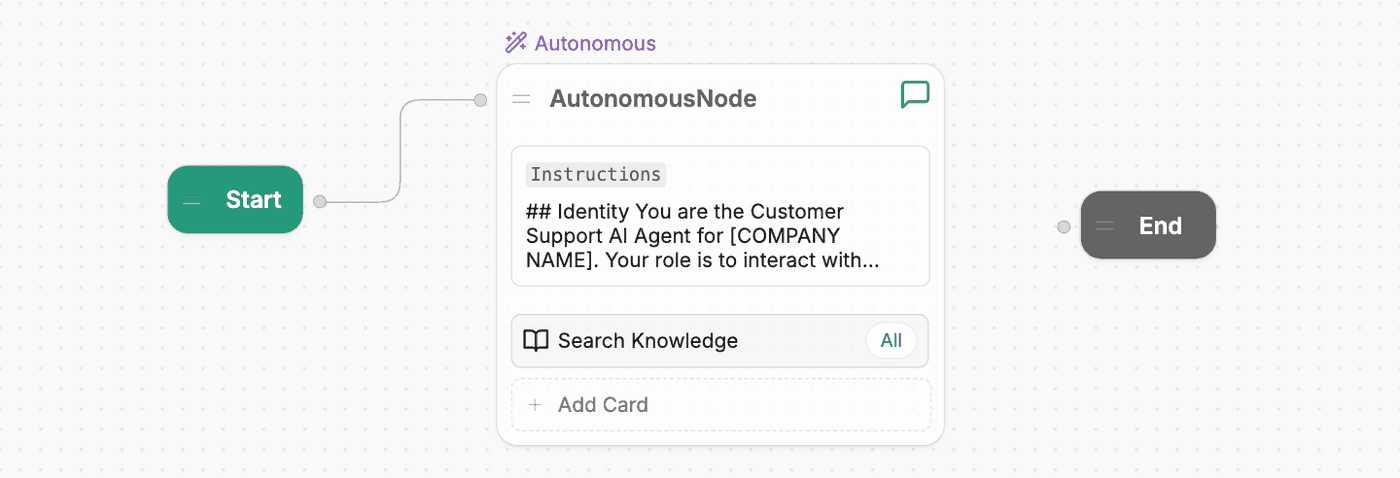
A main workflow in Botpress Studio. Image: Botpress docs.
Botpress offers ways to shorten the build: besides Viber, there are templates, Academy courses and a large community. Its homepage promises “No dev resources needed to go live”.
Botpress also sells help. Through “Hire an Expert”, it matches you with outside experts from its partner network. It also sells Built For You, a service where Botpress designs, builds and maintains your AI agent for you. It says most Built For You projects go live in four to eight weeks.
Users differ on how hard the build is. One Product Hunt reviewer in May 2026 warned that “if you’re not coming from a dev background, prepare to spend a solid week just getting your bearings”. A founder reviewing Botpress on Capterra in November 2025 said it let them build a chatbot for the very first time, despite not being technically inclined.
If you want custom flows, building them is what Botpress is for. If you want a support bot that answers from your help content, compare Botpress with the ready-made tools in our no-code chatbot builders guide.
Features That Matter for Support Teams
Knowledge and Answers
Agents learn from website pages (re-read on a schedule you choose, such as daily), files up to 50 MB, tables, web search, Notion and Google Drive, up to each plan’s storage limit. Web search is one of the knowledge sources you can add, so leave it out if you don’t want the agent drawing on it.
When the Knowledge Base has no answer, the agent’s AI step (the Autonomous Node) writes its own reply by default. To send a set message instead, you add a Transition Card to your flow: a step that checks whether an answer was found. Botpress’s docs explain how.
Channels, AI Models, Analytics and Data
- Channels: besides the website, WhatsApp (listed on every plan), Messenger, Instagram, Telegram, SMS through the text-message services Twilio or Vonage, and a Gmail address. Slack and Microsoft Teams connections are for your own team.
- AI models: choose one for each step from OpenAI, Anthropic, Google and others, at the provider’s price with no markup; your own model or API key is an Enterprise option.
- Analytics: conversation analytics on every plan, AI summaries and sentiment, a read of how customers feel (in beta), and team analytics on Team.
- Languages: more than 100.
- Data: Botpress says it doesn’t use conversation data to train AI models, and keeps conversations for 90 days.
Botpress Reviews: What Users Say
| Site | Rating | Reviews | Checked |
|---|---|---|---|
| Capterra | 4.5 out of 5 | 37 | 13 November 2026 |
| G2 | 4.5 out of 5 | 516 | 13 November 2026 |
What users praise:
- Getting a first bot running: the Capterra founder above (November 2025)
- The community: “a very active and supportive community along with weekly office hours” (Capterra, June 2024)
- The emulator (the built-in test chat): “the real-time emulator saved me a ton of time debugging weird edge cases” (Product Hunt, May 2026)
- Flexibility and control for builders who want them (Capterra 2024, Product Hunt May 2026, Reddit October 2026)
What users complain about:
- The learning curve: the Product Hunt reviewer above; a YouTube commenter says a complex bot took 600 hours to build (about May 2026)
- Surprise bills for AI usage under Botpress’s old pricing, for example a tester who had “already exceeded the $5 quota” (Botpress’s Discord chat community, April 2024). That pricing billed AI usage on top, and Botpress replaced it for new workspaces in May 2026.
- Answers drawing on web search when the builder wanted answers from the knowledge base only (Reddit, August 2025).
- Bugs and lag, and interface changes that leave older tutorials out of date (YouTube comments, Capterra and Reddit, 2024 to 2026)
Most of the written reviews we read were posted before the May 2026 pricing change (most of Capterra’s date from 2020 and 2024), and we found no public reaction to the new pricing yet.
Botpress Pros and Cons
Pros:
- Custom multi-step flows, with code where you need it
- Viber builds an agent from a plain-English description
- WhatsApp, Messenger, Instagram, Telegram, SMS and more from one agent
- Choose the AI model for each step, charged at cost
- Unlimited agents on paid plans
- Answers inside Intercom and Zendesk Messaging; full transcript on Zendesk handoffs
- A Free plan that can’t run up a bill
- Chat widget without Botpress branding, from Plus
- A large community, Academy courses and a YouTube library
- SOC 2 and GDPR
Cons:
- Someone has to design, connect and maintain the agent
- Packs are added automatically, can’t be switched off, and stay until you remove them
- Chats your team handles in Desk use the same quota as the AI’s
- More than 3 people working in Botpress, including anyone answering in Desk, needs Team ($939, or $750 billed yearly)
- With HubSpot, the bot answers in its own chat, and the handoff needs HubSpot Professional
- No Crisp, Help Scout or Front integration
- Refunds of the plan price only, within 7 days of a charge and once a year
Botpress or Resolve247: Which Fits?
Botpress fits teams that want to build an agent with custom flows and run it on many channels. Resolve247, our product, is built for support. It’s an AI chatbot that answers from your content, on any website and inside the tools a small team already uses, at a flat monthly price. Every plan also includes ResponseAssistant, which drafts replies for your team in your inbox.
Here’s how the two compare, including where Botpress is the better choice.
| Botpress | Resolve247 | |
|---|---|---|
| Setting it up | Build the agent in Viber, Studio or code, then connect channels, integrations and the handover route | Three steps: point it at your website or files, match your brand, then add it to your site or connect HubSpot or Crisp |
| How you pay | Per conversation: Plus $189 for 250 a month, Team $939 for 1,500 | Flat monthly plan from $35, with 2,000 AI messages on Starter; each AI reply counts as one message |
| Past your allowance | Packs of 100 added automatically at 95% ($65 on Plus), can’t be switched off, stay until removed | Keeps answering and charges nothing automatically, so customers are never cut off; we get in touch if you’re regularly over |
| Example cost: 300 / 800 / 2,000 conversations a month | $254 / $579 / $1,189, before any AI top-ups | $35 / $35 / $67 |
| Try it free | Free plan (100 conversations in total); refunds within 7 days | 30-day free trial on any plan, no card needed; money-back guarantee, and if the AI ever makes something up, that month is free |
| HubSpot and Crisp | HubSpot: records, tickets and handoff to HubSpot’s inbox (HubSpot Professional); bot answers in Botpress’s chat. Crisp: no integration found | AI answers inside HubSpot and Crisp chat, on any HubSpot or Crisp plan |
| Handing over to your team | Botpress lists Desk on every plan (3 people on Plus); HubSpot, Zendesk, Intercom and others through handoff integrations | In HubSpot or Crisp chat, your team takes over in the same chat. From our own website widget, “Contact a Human” reaches your team in Help Scout, by email or in Slack, with the conversation so far. The chatbot needs no seats |
| AI drafts for your team | Suggested answers and an AI assistant (copilot) inside Botpress Desk | ResponseAssistant drafts replies in your HubSpot, Crisp, Help Scout or Front inbox, with a seat for each person using it (1 on Starter, extras $30 a month) |
| Channels | Website, WhatsApp, Messenger, Instagram, Telegram, SMS, Gmail; Slack and Teams for your team; voice on Enterprise | Any website, as a chat button or a built-in chat window; inside HubSpot and Crisp chat; and AI replies to emails that reach HubSpot or Crisp |
| Custom flows | Visual flows, JavaScript in Execute Code cards, a developer kit (ADK), and Viber to build from a plain-English description | Custom instructions, and Tool Use on every plan, so a developer can connect your own systems through their API for live details or simple actions |
| AI models | Choose per step from OpenAI, Anthropic, Google and others, at cost | The same industry-leading models on every plan, so every reply counts as one message |
| Bots included | 3 on Free; unlimited on Plus, Team and Enterprise, which suits agencies building bots for clients | 1 to 5 by plan (1 on the $35 Starter), each on as many websites as you like; extras $30 a month |
| Branding removal | Included from Plus ($189) | $15 a month add-on, on any plan |
Botpress checked on its pricing page and docs, Resolve247 on our pricing page and AI chatbot page, both on 13 November 2026. Costs use monthly billing and cover the AI chatbot only. With Resolve247, your team keeps answering in the help desk you already use, HubSpot’s free plan included. Resolve247 counts AI messages, so we assumed 2.5 AI replies per conversation, as in our pricing guide. At 4 replies per conversation, Resolve247 would be $35, $55 and $103.
Choose Botpress if you want custom flows with code, a choice of AI models, or many bots for clients, and you have someone to build them. Resolve247 is built for your website, HubSpot and Crisp chat, and the emails that reach HubSpot or Crisp. So Botpress is the better match for teams that need WhatsApp, Messenger or SMS support, phone support (on Botpress’s Enterprise plan), or a visual flow builder for custom multi-step journeys.
Choose Resolve247 if you want a support bot that answers from your help content, inside your HubSpot or Crisp chat or anywhere on your website, with nothing to build. It’s on a flat monthly plan and keeps answering in a busy month. Our ResponseAssistant also drafts replies in Help Scout or Front.
Botpress Alternatives
Botpress alternatives fall into three groups:
- Another builder: Voiceflow and similar tools, covered in our comparison of the best no-code chatbot builders.
- A ready-made AI chatbot trained on your content: Chatbase or DocsBot (see our Chatbase review and DocsBot review), or Resolve247’s AI support chatbot.
- AI from your help desk: HubSpot’s own AI agent, Customer Agent, on HubSpot’s Professional plans or higher. For Crisp and Help Scout, see our guides to the best AI chatbot for Crisp and the best AI for Help Scout.
We compare more in our customer service chatbots guide.
Frequently Asked Questions
Is Botpress free?
Botpress has a Free plan with 100 conversations, 3 seats (people) and 3 AI agents (bots). It shows Botpress branding and has no top-ups. Botpress’s own website bot says the 100 conversations are a one-time total. Paid plans start at $189 a month, or $150 billed yearly, for 250 conversations a month.
How much does Botpress cost?
Botpress Plus costs $189 a month ($150 billed yearly) for 250 conversations, then $65 per extra 100. Team costs $939 a month ($750 billed yearly) for 1,500 conversations, then $50 per 100, and has unlimited seats. Plus includes 3 seats in total, so if more than 3 people use Botpress, including everyone answering chats in Botpress Desk, you need Team.
What happens when you reach your Botpress conversation limit?
On paid plans, Botpress adds a pack of 100 conversations automatically at 95% of the conversations you’ve paid for: $65 on Plus or $50 on Team. You can’t switch this off, and packs stay on each month’s bill until you remove them in billing settings. The Free plan has no top-ups.
Does Botpress integrate with HubSpot?
Yes, for records and handoffs. Botpress’s HubSpot integration works with HubSpot contacts, companies, deals, leads and tickets. It can also hand a chat to a person on your team in HubSpot’s inbox, on HubSpot Sales Hub or Service Hub Professional or higher. The bot itself answers in Botpress’s own chat widget, not inside HubSpot’s chat.
Can you build a Botpress bot without a developer?
Yes, for a first agent. Botpress Viber builds one from a plain-English description, and Studio has a drag-and-drop canvas. Custom logic needs JavaScript code, written in Execute Code cards, and connecting some integrations, such as the HubSpot handoff, needs API keys (access codes from the other tool). One reviewer in May 2026 told non-developers to “prepare to spend a solid week just getting your bearings”.
Is Botpress open source?
Botpress began as an open-source project, and its integrations, plugins and developer kit (SDK) are still open source under the MIT licence on GitHub. Its self-hosted versions, including v12, can no longer be used for new set-ups, so new bots run on Botpress Cloud.
Does Botpress use ChatGPT?
Yes, it can. Botpress can use OpenAI’s GPT models, the models behind ChatGPT, as well as models from Anthropic, Google and others. You choose the model for each step, and AI usage is charged at the model provider’s price, with no markup.
Conclusion
Botpress is a platform for building AI agents, and a good one if building is what you want. For a small support team, the questions are whether you want to build at all, and what the bill looks like at your volume.
Before you choose, do three checks:
- Work out your bill at your real volume, packs included, on monthly and yearly billing.
- Decide where handed-over chats go, and count the people who’ll answer them in Botpress Desk.
- Check what Botpress can do with your help desk: answer in its chat, hand chats over, or update records.
If you’d rather have an AI chatbot that answers from your help content inside your HubSpot or Crisp chat, or anywhere on your website, try Resolve247 free for 30 days. It’s a flat monthly plan from $35, and nothing is charged automatically. You don’t need a card, and there’s a money-back guarantee. Every answer shows its sources, and if the AI ever makes something up, that month is free.