
“AI agent” and “chatbot” are mostly marketing labels, and they overlap. A tool sold as an AI agent might only answer questions from your help docs, while a tool called a chatbot might also look up orders, read screenshots and update details in your systems. Neither name tells you what a tool can do, so check what it does, not just the name.
As an example, our own product is called AIChatbot, but it can “do things” like take actions, look up orders in your systems and read customers’ screenshots etc, which some might assume a “chatbot” couldn’t do!
This AI agent vs chatbot guide explains how the two terms are usually used and why they overlap. It then lists eight things a support AI can do, with a quick test for each, and a way to work out which ones your business needs. Everything below is something you can test for yourself in a free trial.
AI Agent vs Chatbot: How the Terms Are Used and Why They Overlap
For customer support tools, the usual definitions don’t fit. They often say a chatbot answers questions and an AI agent takes actions, such as looking up an order or changing a booking. That split fails for two reasons.
First, “chatbot” covers two different things. Rule-based chatbots follow a script: the customer clicks buttons, and anything off the script hits a dead end. AI chatbots understand questions in the customer’s own words, using the same large language models (LLMs) as agents, and many can connect to your systems to look things up and take actions. Comparisons that set agents against the rule-based kind make every chatbot look more basic than it is.
Second, the two words describe different parts of a tool. “Chatbot” describes how customers talk to the AI: in a chat window. “Agent” describes what the AI does: work towards a goal, using connections to other systems. ServiceNow, a business software company that sells AI agents, puts it this way: “‘Chatbot’ describes an interaction pattern, not a fixed level of intelligence” (ServiceNow).
Anthropic, the company behind the Claude AI models, describes agents as “systems where LLMs dynamically direct their own processes and tool usage” (Building effective agents). Its guide uses support as an example: “Customer support combines familiar chatbot interfaces with enhanced capabilities through tool integration.” So one product can be both: a chatbot your customers talk to, doing agent-style work behind the chat window.
One Customer Request, Three Ways
A common message for an online shop: “Can you change the delivery address on my order? I’ve just moved.” Here’s how three kinds of tool handle it.
| What it does | Work left for your team | |
|---|---|---|
| A rule-based bot | Shows a menu that ends in a contact form. The customer fills it in and waits | The whole request |
| An AI that answers (some are sold as AI agents) | Explains how the customer can change the address in their account before the order ships | Customers who can’t change it themselves |
| An AI that answers and acts (some are sold as chatbots) | Asks for the order number, checks it hasn’t shipped, updates the address and confirms | None, unless the order has shipped |
If the order has already shipped, the third tool hands the conversation to your team.
To know which kind you’re getting, send the tool this request yourself.
Why the Names Don’t Tell You Much
In customer service, “agent” has long meant the person a customer asks for when the bot gets stuck. Over the last few years, support providers started using the word for the bots themselves.
When Intercom launched its AI, Fin, in March 2023, the announcement called it “Intercom’s AI chatbot” (Intercom, 2023). By 2025, the product page called it the “Fin AI Agent” (2025 page). Another provider, Chatbase, offered “your no-code AI chatbot” on its 2024 homepage (2024 page). Today the page says “The leading AI Agent for CX” (2026 page).
Across the market, the word “agent” spread faster than the features behind it, so the name doesn’t tell you what a given product can do. Intercom and Chatbase also gained new abilities along the way, and both now take actions in other systems for customers.
In June 2025, research firm Gartner called this “agent washing”: rebranding AI assistants, chatbots and automation tools as agents when they can do little of what an agent does. Gartner estimated that only about 130 of the thousands of companies selling AI agents were the real thing (Gartner).
A Reddit thread from September 2026 asked: “Why does every AI product have to call itself an agent now?” One reply: “Neither term is a mark of quality or how capable they are, just how they’re built” (Reddit).
The comparisons that rank on Google mostly come from companies that sell an agent. When we checked Google’s first page in the US for “AI agent vs chatbot” on 21 November 2026, all six articles came from companies selling something they call an agent, and five of the six described a chatbot as something that can’t take actions. That’s true of scripted, rule-based bots, but not of every AI chatbot.
8 Things a Support AI Can Do, and How to Test Each
Tools called chatbots and tools called agents can both do any of these jobs, and some do all eight. They run from the simplest to the most involved, and each has a quick test you can run in a free trial.
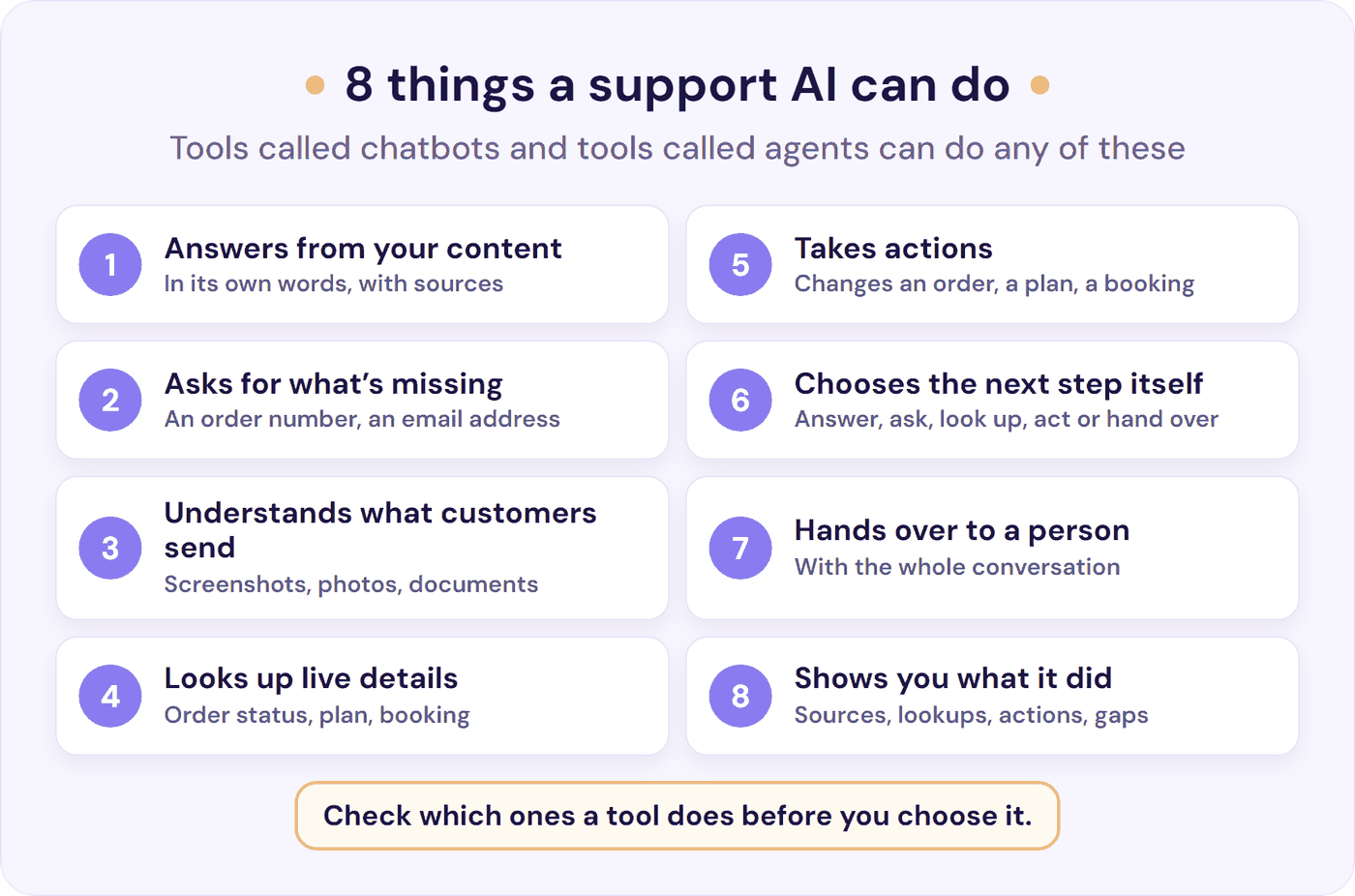
1. Answers in Its Own Words, From Your Content
The customer asks in their own words, and the AI answers in plain language from your help articles, website and policies. A good one shows the source it used. When your content doesn’t cover a question, it says so instead of guessing.
Test it: ask 10 real questions from your inbox, including two that your help content doesn’t answer. You want correct answers with sources for the eight your content covers, and a clear “I don’t have that information” with a route to a person for the other two.
2. Asks for What’s Missing
“Where’s my order?” can’t be answered without knowing which order. A capable AI asks for the order number or email address first, instead of guessing or giving a general answer about delivery times.
Test it: send half a request, such as “I need to change my booking”. It passes if it asks which booking and what to change.
3. Understands What Customers Send
Customers often explain a problem with a picture: a screenshot of an error, a photo of a damaged item, a PDF of an invoice. If the AI can read them, it answers from what they show, so the customer doesn’t have to type it all out. (See our tests of how well AI reads support screenshots.)
Test it: send the kinds of pictures and files your customers send. Check that its reply gets the details exactly right, and that it asks what the customer wants when the picture alone doesn’t make it clear.
4. Looks Up Live Details in Your Systems
Your help centre explains how delivery works, but it can’t say where this customer’s parcel is. To answer “where’s my order?” or “which plan am I on?”, the AI needs a connection to the system that holds the answer. That’s either a ready-made connector for a platform you use, or a link to your own system’s API (the access point other software uses), which usually needs a developer.
Test it: first ask the provider how their AI connects to the system that holds the answer, such as your order or booking system, and who sets that connection up. Once it’s connected, ask about a real order or account, and check the answer against your own system.
5. Takes Actions
People often say only agents change things for customers, but tools called chatbots can too. Changes include updating an address, upgrading a subscription, cancelling an order, booking a slot or creating a ticket. Treat it with the most care, because a wrong action changes a real order or account.
Test it: once it’s connected, ask it to make a change, such as a new delivery address, on a test order or account. Then check that the change shows up in your own system. Ask the provider how you choose which actions it may take, and how you control when it checks with the customer before acting.
6. Chooses the Next Step Itself
This is what people usually mean by “agentic”. Message by message, it decides whether to answer, ask a question, look something up, take an action or bring in a person. On harder requests it chains steps, such as finding the customer’s account, then their latest order, then its delivery date.
Some tools only look things up or take actions when the customer clicks through a fixed menu. Here, the AI works out the steps from what the customer writes.
Test it: send a two-step request in a customer’s own words, such as “can you send my order from Tuesday to my work address instead”. It passes if it finds that order and asks for the new address on its own, without sending the customer through a menu.
7. Hands Over to a Person, With the Conversation
Customers should be able to reach a person at any time, and the AI should offer one when it’s unsure or the request needs judgement. Your team should get the whole conversation, so the customer doesn’t have to repeat themselves. (Our guide to chatbot handoffs covers how to set this up.)
Test it: ask for a person halfway through a conversation. Check that your team gets the whole conversation, and see where it arrives.
8. Shows You What It Did
For every conversation, you should be able to see what the AI said, which sources it used and any lookups or actions it took. A good tool also lists the questions it couldn’t answer, so you can fill the gaps in your content.
Test it: after your test conversations, open the conversation history. Check that you can see each source, lookup and action, and the questions it couldn’t answer.
Accurate Answers Come Before Actions
If an AI that only answers gets something wrong, the customer reads a wrong answer and can ask again. If an AI that acts gets something wrong, it changes a real order, refund or account.
So accurate answers (task 1) matter most. An AI that answers only from your content, shows its sources and says when it doesn’t know is safer to trust with actions.
For a small team, the sensible order is: get the answers right, then add lookups, then add the actions you’re happy for it to take on its own. Our guide to AI chatbot accuracy covers how to test answers before you go live.
Which Tasks Do You Need? Sort Your Last 50 Questions
The quickest way to decide is to look at what your customers ask. Take your last 50 conversations or tickets and sort them into four piles: information, status, changes and judgement.
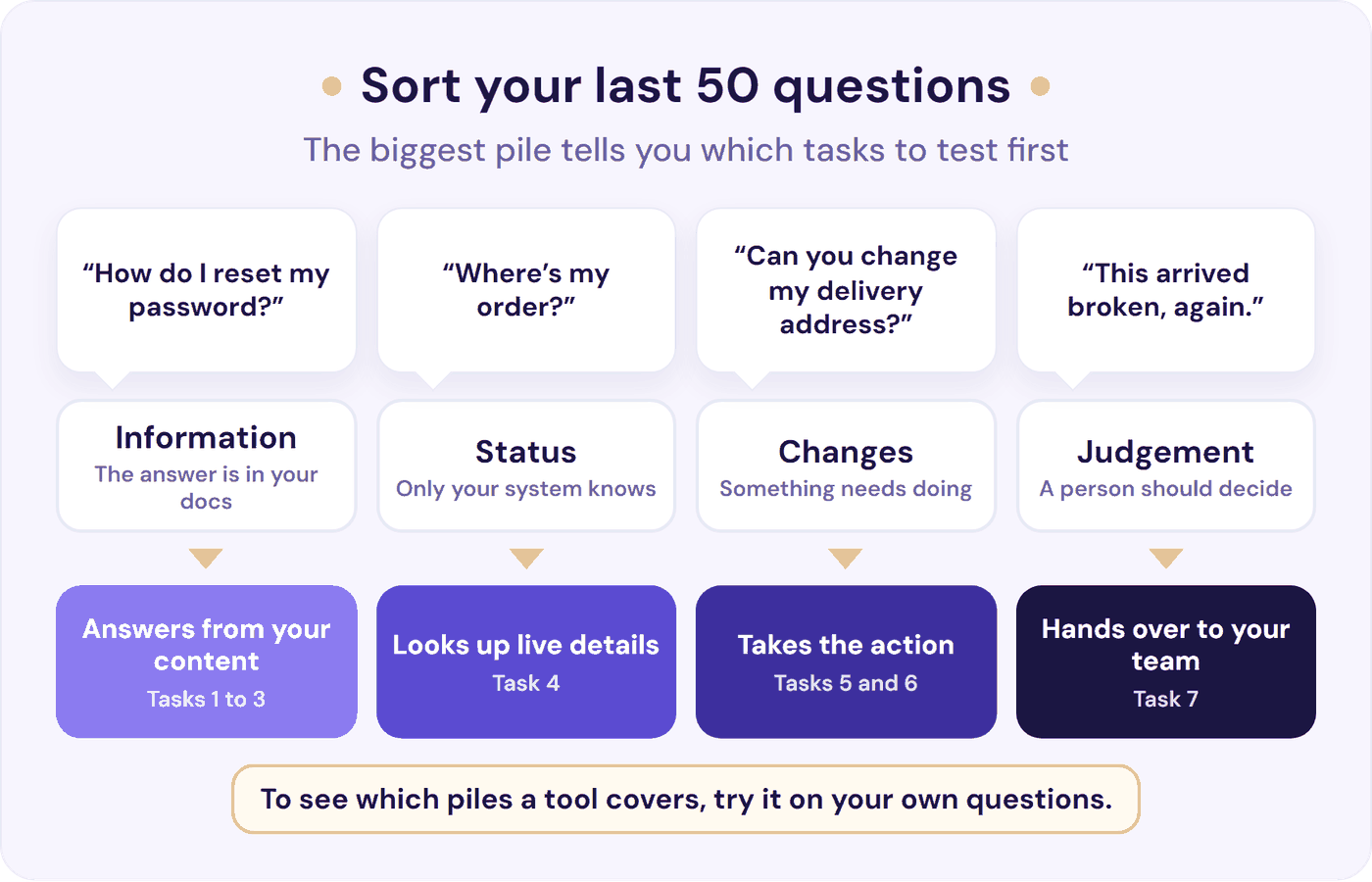
Information questions, such as “how do I reset my password?”, need answers from your content (tasks 1 to 3). Status questions, such as “where’s my order?”, need live lookups in your systems (task 4). Changes, such as “can you change my delivery address?”, need an AI that takes the action (tasks 5 and 6). Judgement calls, such as complaints and exceptions (“this arrived broken, again”), stay with your team, so test the handover to a person (task 7).
The biggest pile tells you which tasks to test first.
If most of your questions are information questions, an AI that answers well from your content covers most of the work. If status questions lead, live lookups matter most. If changes lead, look for actions you can control, and start with the ones that are easy to put right. (For a fuller way to sort your tickets, see how to reduce support tickets.)
When you’re ready to compare tools, our guide to choosing an AI support chatbot covers what else to check. For a buyer’s guide to tools sold as AI agents, see AI agents for customer service.
Where Resolve247’s AIChatbot Fits
AIChatbot has “chatbot” in its name, and it covers all eight tasks. It answers 82% of customer questions without a human (from 71% to 94%, depending on the business). Task by task:
- Answers from your content (tasks 1 and 2): it answers only from your website, help centre, files and Notion pages, and shows its sources with every answer. It asks for any detail it needs. When your content doesn’t cover a question, it says so instead of guessing. If it ever hallucinates (makes something up), that month is free.
- Understands what customers send (task 3): it reads screenshots, photos and documents such as PDFs and Word files, in chat and in email.
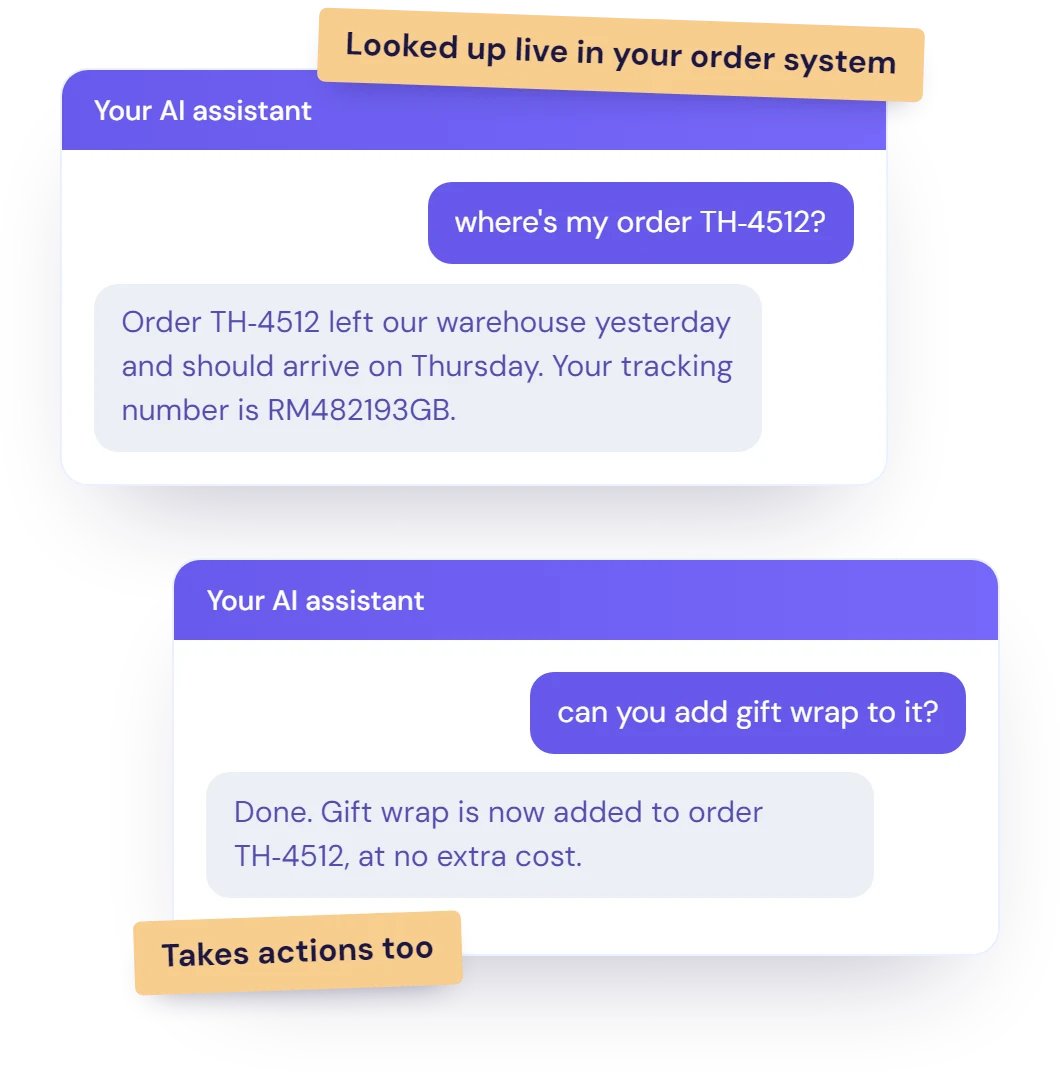
- Looks up live details and takes actions (tasks 4 and 5): our Tool Use feature is on every plan. It lets you give the AI up to 20 connections to your own systems, such as your order system or booking tool, through their API. It can then look up an order’s status or change the order in the middle of a chat. You choose which connections it has, and your written instructions guide when it uses each one, such as checking with the customer first.
- Chooses the next step (task 6): it decides when to use each connection, using several in a row when a request needs them. It uses what the customer has already said and asks for anything it’s missing.
- Hands over to your team (task 7): customers can reach a person at any time, and it hands over when it’s unsure. Inside HubSpot and Crisp, the whole chat is already in your inbox, and your rules can open a ticket, assign it or alert your team in Slack or by email.
- Shows you what it did (task 8): open any reply to see the sources, customer details and actions behind it, and check the questions your content couldn’t answer.
Add your website address, and within minutes it’s answering on any site or inside HubSpot and Crisp chat. It can reply to customer emails in HubSpot and Crisp too. Plans start at a flat $35 a month, with a 30-day free trial and no credit card needed.
Where it’s not the right fit: there are no ready-made Shopify, WooCommerce or Stripe connectors. So a store that wants order tracking or refunds switched on without a developer is better matched to a tool with built-in store connectors.
Start your free trial and test it on your own questions, or see everything AIChatbot does.
Frequently Asked Questions
Can a chatbot be an AI agent?
Yes. A chatbot that connects to your systems to look up orders or update bookings, and decides for itself when to do it, is doing what people mean by “agent”. Some providers call this an agentic chatbot. The chat window is only how customers talk to it, so check what it can do behind that window.
How are AI agents and chatbots priced?
The name doesn’t set the price, but agents and chatbots are often billed differently. Several tools sold as AI agents charge per result: Fin’s AI agent costs $0.99 per outcome (Fin pricing), and HubSpot’s Customer Agent costs $0.50 per resolved conversation (HubSpot), both checked in November 2026.
Many chatbot plans, including Resolve247’s, charge a flat monthly fee for a set number of messages. Per-result pricing rises as the AI handles more, while a flat fee is easier to predict. If you pay per outcome or resolution, ask what counts as one. Our AI chatbot pricing guide compares the models.
Can I set up an AI agent or chatbot without a developer?
Yes, for answers. Support AIs usually learn from your website, help articles and files, so you point one at your content and test it on your own questions.
Live lookups and actions need one more step: a connection to the system that holds the details, such as your order or booking system. That’s either a ready-made connector for a platform you use or a link to your system’s API, which usually needs a developer. So you can start with answers straight away and add lookups and actions when you’re ready.
Is ChatGPT a chatbot or an AI agent?
Both, depending on how you use it. In a normal conversation, ChatGPT is a chatbot: you ask, and it answers.
OpenAI, which makes ChatGPT, has also added agent features. In July 2026 it launched ChatGPT Work, which it calls “an agent in ChatGPT that helps you take on more ambitious tasks” (OpenAI). It’s a good example of one product carrying both labels. If you’re weighing ChatGPT itself for customer support, see ChatGPT for customer service.
What’s the difference between an AI agent and a bot?
“Bot” is a broad word for any automated software, from a scripted menu to an AI that takes actions. “AI agent” usually means an AI that works towards a goal and connects to other systems to get there, so every AI agent is a kind of bot. In support, check what a tool can do rather than which word it uses.
What’s the difference between an AI agent and an AI assistant?
An AI assistant usually helps a person do their work, such as drafting a reply for your team to check and send. An AI agent usually works on its own towards a goal, such as updating an order for a customer. Many support teams use both, and the names overlap, so check what a tool does.
What is agent washing?
Agent washing is calling a product an AI agent when it can’t do what the word suggests. Research firm Gartner used the term in June 2025 for chatbots, AI assistants and automation tools rebranded as agents. To spot it, test what a tool can do yourself.
What to Do Next
“AI agent” and “chatbot” both cover a wide range of tools, and neither name tells you what a product can do for your customers. Compare tools on the tasks they handle, tested on your own questions.
This week:
- Pull your last 50 customer questions and sort them into the four piles.
- Pick the tasks those piles need from the eight above.
- Run a free trial or two with your own questions, and check each task yourself, whatever the tool is called.
If you’d like to start with us, try Resolve247 free for 30 days on the questions you’ve sorted, with no credit card needed.