
Introduction
Someone on r/hubspot sat down to build a bot for their website and hit a wall almost straight away. They could build one bot as an AI live agent that “fetches information from knowledge base and answers accordingly,” or a rule-based bot with set question steps, but not both in the same place. Their question was the one most people eventually ask: “is there a way to integrate both in one chatbot?”
That question is the whole reason this guide exists. A “HubSpot chatbot” isn’t one thing. It’s at least eight different builds, running on three different engines, with very different outcomes and very different price tags.
Some of these HubSpot chatbot examples work on a free plan. Some need Professional or Enterprise plus credits. And the most useful ones, the hybrids, are the ones HubSpot makes hardest to see.
We build an AI chatbot that embeds in the HubSpot widget, so we have a horse in this race. We’re still going to tell you plainly what each option can and can’t do, and which plan you need for it. By the end you’ll know exactly which pattern fits your goal, and you can see how a grounded AI bot looks inside HubSpot if that is the route you want.
What counts as a “HubSpot chatbot”?
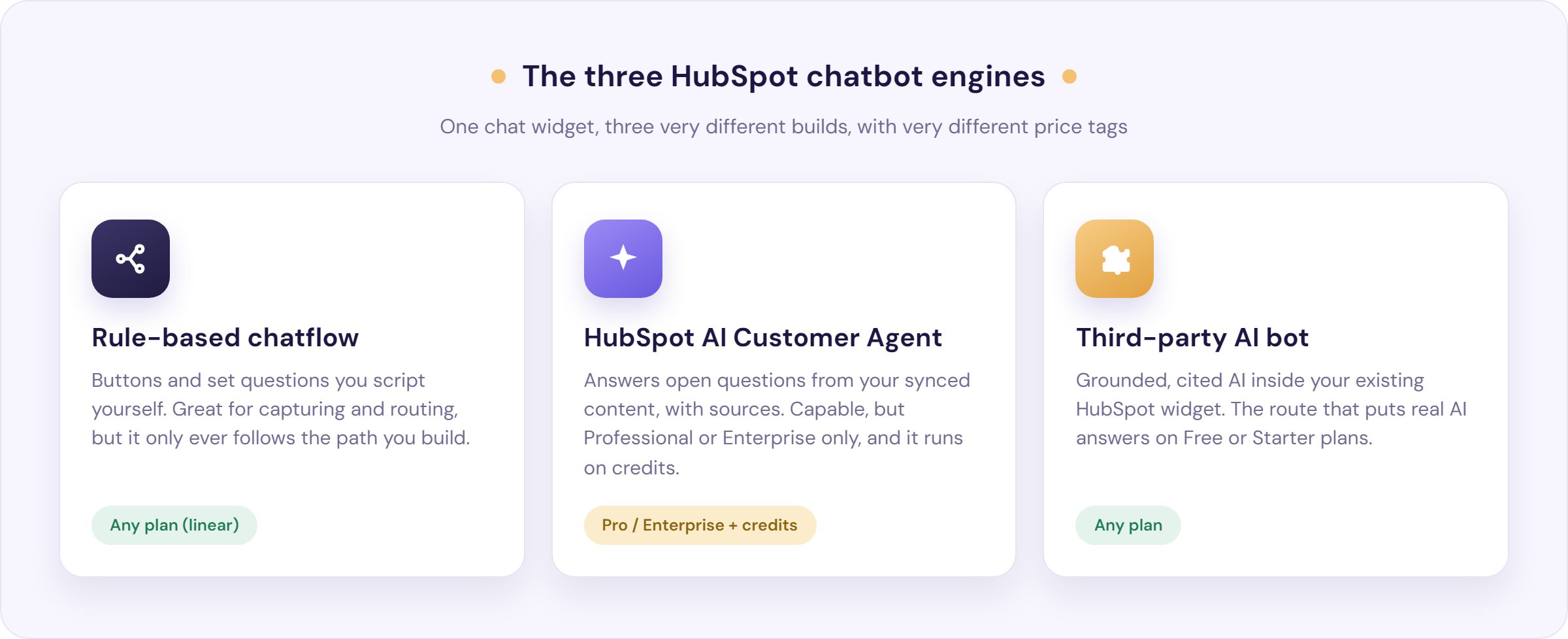
A HubSpot chatbot is an automated chat experience on your website or help desk that runs on one of three engines: a rule-based chatflow, HubSpot’s AI Customer Agent, or a third-party AI bot embedded in the HubSpot chat widget. Everything else is a variation on those three.
The rule-based chatflow is the classic rule-based chatbot: buttons, set questions and a decision tree you map out yourself. It only ever does what you scripted. As one builder on Reddit put it, a rule bot leaves visitors “railroaded by set questions,” where an AI bot lets them “ask them any questions.”
The AI Customer Agent is HubSpot’s own generative bot. It reads what a customer types and writes a natural-language answer grounded in your content, with a link to the source. If you knew this as “Breeze,” that name has stepped back: HubSpot launched Agent Hub in July 2026 and the support bot is now called the Customer Agent.
The third-party AI bot is any external tool, like Resolve247, that answers inside your existing HubSpot widget rather than sending people to a separate window. It’s the route most small teams reach for, because it puts AI answers on plans where HubSpot’s own agent isn’t available.
Method vs outcome: what each HubSpot chatbot can actually do
Before the examples, here is the honest version of the comparison every other guide skips. This is what each engine can do, and where the paywalls sit. We checked every cell against HubSpot’s own bot actions guide and Customer Agent documentation.
| What you want the bot to do | Rule-based chatflow | AI Customer Agent | Third-party AI bot |
|---|---|---|---|
| Answer open-ended questions from your own content | No | Yes | Yes |
| Show the source behind an answer | No | Yes | Yes |
| Qualify visitors and write data to your CRM | Yes | Yes | Yes |
| Route with conditional logic (if/then) | Limited (1) | Yes | Yes |
| Book a meeting in the chat | Yes (2) | Yes | Yes |
| Look up live data or complete an action | Limited (3) | Yes (4) | Varies |
| Hand off to a human with full context | Yes | Yes | Yes |
| Run on Free or Starter plans | Yes (5) | No | Yes |
| Go live without building a flow | No | Yes | Yes |
Notes: (1) HubSpot’s if/then branches are a Professional or Enterprise feature; on Free and Starter, every visitor follows the same linear path. (2) A single one-to-one scheduling link works on any plan; round-robin and group links need a paid Sales Hub seat. (3) A rule bot can reach an external system with a webhook or code action, but both need Data Hub Professional or Enterprise and run as fixed steps, not conversational lookups. (4) The Customer Agent answers FAQs from a synced snapshot of your content, but its configured actions can make live API calls to fetch real-time data or perform a task. (5) A rule bot builds on Free, but only as a linear script; branching, knowledge base lookup, workflow enrolment and webhooks all sit behind paid tiers.
The pattern in that table is the point. Rule-based is cheap but literal, and HubSpot’s AI is capable but gated behind paid plans and credits. A third-party bot is the one column that answers open questions on any plan.
Now let’s make it concrete.
8 HubSpot chatbot examples
1. A rule-based chatflow for routing and data capture

This is the HubSpot bot most teams build first. You use the “Qualify leads” template, ask a few set questions, write the answers to contact properties, and either book a meeting or send the visitor to a team member. It is fast to stand up and it works on every plan, including Free.
What it achieves: speed to lead on a high-intent page. A visitor on your pricing page gets greeted, qualified and captured before they bounce, even at 2am. Out of hours, the same bot grabs an email and promises a reply the next day.
Best for: lead capture, simple ticket creation, after-hours cover.
The honest limit: it only knows the script you gave it, and real conditional routing needs if/then branching, which is a paid feature. On Free and Starter, everyone follows one path. For the step-by-step build, see our HubSpot chatbot builder guide.
2. HubSpot’s AI Customer Agent

This is HubSpot’s generative bot. You point it at your knowledge base, website pages and uploaded files, and it answers customer questions in natural language, backed by a verifiable source. When it is unsure, it asks a follow-up or hands off to a human.
What it achieves: genuine deflection of repetitive questions (“where is my order,” “how do I reset my password,” “what is your return policy”) without a human typing every reply.
Best for: Service Hub teams on Professional or Enterprise with a solid help centre.
The honest limit: it’s Professional or Enterprise only, and it runs on credits per resolution. It’s also only as good as the content behind it. As one HubSpot consultant bluntly diagnosed the real blocker to AI chat: “Lack. Of. Content.” Another practitioner who rates it still warns it “does require a level of content auditing and testing for the agent to perform well.” Read our full Customer Agent review before you switch it on.
3. Pre-qualifying rule questions, then AI

Here is the first hybrid, and the direct answer to that Reddit question about combining both. You run a short rule-based sequence first (capture the email, ask what the visitor needs), then use the “Send to customer agent” action to hand the conversation to the AI for open-ended answering.
What it achieves: structured data capture at the top, then a real conversation underneath. You get the CRM record and the flexible answers, instead of choosing one.
Best for: teams that need clean lead data and AI deflection in the same chat.
The honest limit: the handoff to the Customer Agent needs Professional or Enterprise plus credits, and it’s still two bots chained together rather than one seamless experience. You’re stitching, not merging.
4. A third-party AI bot in the HubSpot widget

You can embed an external AI bot, like Resolve247, so it answers inside your existing HubSpot chat widget rather than in a separate window. It connects over OAuth, and conversations can still log in your HubSpot inbox. Crucially, this works on any HubSpot plan, including Free and Starter.
What it achieves: grounded, cited AI answers on a plan where HubSpot’s own agent is not available. One Reddit user does exactly this, running an external bot for customer service and keeping tight control over what it can say, partly “out of fear of price” on native upgrades.
Best for: small teams on Free or Starter who want AI answers without a Professional upgrade.
The honest limit: you own the setup, and if both the native HubSpot chat and the third-party widget render on one page they can overlap (page targeting fixes that). A good third-party bot should still answer only from your content, cite its sources and hand off cleanly. Ours is built that way, with a money-backed anti-hallucination guarantee: if it does not know, it says so and offers a human. The how to add AI to your HubSpot widget guide walks the setup on any plan.
5. A rule-based flow that hands off to a third-party AI bot

The second hybrid mirrors example 3, but on any plan. You keep a lightweight rule flow for routing and qualification, then hand open questions to an embedded third-party AI bot instead of HubSpot’s paid agent.
What it achieves: the qualify-then-answer pattern without a Professional upgrade. The rule flow does the branching-lite triage; the AI does the talking.
Best for: Free and Starter teams that still want structured routing plus real answers.
The honest limit: you’re coordinating two widgets, so plan your page targeting so a visitor only ever sees one. Done well, the customer never notices the seam.
6. A bot that completes actions and checks live data

Answering from your help centre is one thing; looking up a specific customer’s order is another. This is where teams get surprised. One user upgraded to the AI bot, loved how it summarised knowledge base articles, then found it could not read their Orders data even though it sat in the CRM: “The data is there, just not accessible via the bot.”
What it achieves: real transactional help, like checking an order status or resetting a password, when it is set up correctly. The Customer Agent does this through configured “actions” that make live API calls, which is separate from how it grounds its FAQ answers.
Best for: teams with a developer or an integration partner who can wire up the actions.
The honest limit: the AI’s answers ground on a synced snapshot of your content, so live lookups need a deliberately configured action, not magic. On a rule-based bot, the equivalent is a webhook or code step, and that needs Data Hub Professional or Enterprise.
7. A bot that books meetings

A chatbot that turns a question into a booked call is one of the highest-value patterns for sales. The rule-based “Book a meeting” action drops a scheduling link straight into the chat, and the Customer Agent can book too.
What it achieves: speed to lead. Instead of “someone will be in touch,” the visitor picks a slot while they are still interested.
Best for: sales and demo-booking flows on any plan.
The honest limit: a single one-to-one scheduling link is free, but round-robin and group links, the kind a whole sales team shares, need a paid Sales Hub seat.
8. A bot that triages and redirects to the right place

The last pattern is conversational triage: understand what the customer actually needs, then send them to the right team, inbox or article. The Customer Agent does this natively, reading intent and routing or escalating. A rule-based bot can route too, but only so far.
What it achieves: fewer misrouted tickets and faster first responses, because the conversation reaches the right person first time.
Best for: support teams juggling multiple queues or account owners.
The honest limit: a rule bot’s native routing is round-robin only. To assign by account owner, you bolt on a separate Workflow, as one team worked out when they needed tickets to reach the right account manager rather than a random rep. For smarter routing, see how we think about intelligent routing.
How to choose the right pattern
Two questions settle it: what’s the job, and what plan are you on?
Start with the goal:
- Capture and qualify leads: a rule-based chatflow is enough.
- Answer open-ended questions and deflect tickets: you need an AI engine.
- Both at once: use a hybrid (example 3 or 5).
- Look up live data or take an action: budget for the integration work in example 6.
Then check your plan, because this is where teams get stuck. HubSpot’s own AI Customer Agent is Professional or Enterprise only. That’s a real barrier for smaller teams, and a common complaint: as one small-business owner put it, “using AI with the HubSpot chatbot requires a premium plan, which can be expensive for small businesses.”
If you’re on Free or Starter and still want grounded AI answers, the third-party route (examples 4 and 5) is the one that fits. To see how that looks on your plan, our HubSpot AI chatbot page shows it running on any tier.
How to build your chosen pattern
You don’t need a build tutorial buried in an examples post, so here are the right starting points:
- Native rule-based bot: follow our HubSpot chatbot builder guide.
- Embedded third-party AI bot, any plan: use how to add AI to your HubSpot chat widget.
- Direct connection to Resolve247: see how to connect HubSpot to Resolve247.
Whichever pattern you pick, the same rule decides whether it works: the answers are only as good as the content behind them. Sketch the conversation before you build it, write the help articles the bot will lean on, and read your transcripts monthly to catch dead ends.
Frequently Asked Questions
What is the difference between a HubSpot rule-based chatbot and the AI Customer Agent?
A rule-based chatbot follows a fixed script of buttons and set questions that you map out, and it works on any plan. The AI Customer Agent reads free-text questions and writes natural-language answers grounded in your content, with source links, but it needs a Professional or Enterprise plan and runs on credits.
Can one HubSpot chatbot use AI answers and rule-based steps together?
Not as a single native bot, but you can chain them. A rule-based flow can capture details and then use the “Send to customer agent” action to hand off to the AI on Professional or Enterprise plans. On any plan, a third-party AI bot embedded in the widget can do the rule-style capture and the open answering in one place.
Which HubSpot chatbot features are free, and which need a paid plan?
A linear rule-based bot builds on Free, including asking questions, capturing data, creating tickets, sharing a booking link and handing off to a person. If/then branching, knowledge base lookup, workflow enrolment, webhooks and HubSpot’s AI Customer Agent all need paid tiers. A third-party AI bot adds grounded answers on any plan.
Can a HubSpot chatbot look up a customer’s order status or account data?
Yes, but it needs setting up deliberately. HubSpot’s AI Customer Agent can perform configured actions that make live API calls to fetch real-time data like order status. Its FAQ answers, by contrast, ground on a synced snapshot of your content, so a live lookup is a separate action, not automatic.
Can I use a non-HubSpot AI chatbot inside the HubSpot chat widget?
Yes. A third-party AI bot such as Resolve247 can answer inside your existing HubSpot widget, connecting over OAuth so conversations still log in HubSpot. It works on any HubSpot plan, including Free and Starter, which is why smaller teams use it to add AI without upgrading to Professional.
How much do HubSpot Customer Agent credits cost?
The Customer Agent is credit-metered and charges per resolution rather than a flat seat fee, which makes monthly cost hard to predict (even HubSpot experts admit they cannot forecast credit burn per run). For the current numbers and how they compare, see our HubSpot AI pricing breakdown.
The bottom line
There’s no single “HubSpot chatbot.” There are rule-based bots, AI bots, and the hybrids in between, and the right one depends on two things: the job you need done and the plan you’re on. Match those honestly and you won’t overpay for capability you can’t use, or underbuild a bot that frustrates customers.
If you want the fast version: use a rule-based chatflow to capture and route, use an AI engine to answer, and use a hybrid when you need both. And if you’re on Free or Starter, or you simply want grounded answers without Professional-tier credits, a third-party bot in your HubSpot widget is the route that fits.
That last one is what we do. You can start a free trial, point our AIChatbot at your knowledge base, and see grounded, cited answers inside your HubSpot widget on any plan, backed by an anti-hallucination guarantee and clean human handover, and if it doesn’t know an answer it says so instead of guessing. No credit card required.