
Table of Contents
- What Is HubSpot’s AI (Breeze)?
- HubSpot AI Pricing: The Credit System Explained
- HubSpot Breeze Pricing: What Each Agent Costs
- What Plan Do You Need for HubSpot AI?
- The Real Cost of Using HubSpot AI
- Hidden Costs and Gotchas to Watch For
- HubSpot AI Pricing vs. Alternatives
- Is HubSpot AI Worth the Cost?
Heads up: HubSpot’s AI pricing changed on 14 April 2026. Breeze Customer Agent moved from $1.00 per conversation (charged whether resolved or not) to $0.50 per resolved conversation. Prospecting Agent shifted to $1.00 per recommended lead. This article reflects the current pricing model. For the full change-over story, comparing new-and-old pricing, see our HubSpot Breeze pricing change explainer.
Introduction
HubSpot AI pricing can be confusing. Between credits, subscriptions, and different Breeze agents, working out what you’ll actually pay isn’t straightforward. The short answer: Customer Agent costs $0.50 per resolved conversation (moved over to outcome-based pricing in April 2026).
HubSpot Breeze pricing follows a credit-based model. You buy credits at $10 per 1,000, and different AI features consume credits at different rates.
Customer Agent now uses 50 credits per resolved conversation (down from 100 per conversation). Prospecting Agent charges 100 credits per recommended lead, or 10 credits for a research task. And you’ll need a Professional or Enterprise subscription just to access most of these features.
In this guide, we’ll break down HubSpot AI pricing in detail for 2026. You’ll learn how the credit system works under the new outcome-based model (including how HubSpot defines when a conversation is “resolved”), what subscription you need, and how to calculate realistic monthly costs. We’ll also show you where alternatives like Resolve247 can save you up to 92%.
(Already on a Free or Starter plan? You can still add AI to HubSpot on any plan through third-party integrations.)
What Is HubSpot’s AI (Breeze)?
Before diving into HubSpot AI pricing, it helps to understand what you’re actually paying for. HubSpot’s AI landscape has several layers, and the terminology gets confusing.
Understanding HubSpot’s AI Options
HubSpot offers two distinct chatbot approaches:
HubSpot Chatbot Builder is the original rule-based tool. It uses predefined conversation flows where visitors pick from scripted options. This isn’t AI-powered – it follows rigid decision trees you set up manually.
HubSpot Breeze is the newer AI suite introduced in 2025. This is where the actual artificial intelligence lives. Breeze includes several AI agents that all consume HubSpot Credits:
- Customer Agent – AI chatbot for customer support (the focus of this article)
- Prospecting Agent – for sales outreach automation
- Data Agent – for data research and insights
- Closing Agent – for insights into buyer engagement (Beta)
- Knowledge Base Agent – for keeping your documentation current (Beta)
- Personalization Agent – for tailoring website and CTAs to segments (Beta)
- and more for data enrichment, AI-assisted content writing, etc.
These agents are regularly updated, so for the latest list you can see HubSpot’s Breeze AI agents here.
This article focuses primarily on Breeze Customer Agent.
What Breeze Customer Agent Does
Breeze Customer Agent is the AI chatbot within HubSpot’s ecosystem. It uses a large language model (LLM) to answer customer questions from your knowledge base, website, and uploaded documents.
It can also route customers to the right human team or hand over to a person when needed. HubSpot opened Customer Agent access to all Professional and Enterprise customers in June 2025.
The Customer Agent works within the same HubSpot chat widget you might already use for live chat. Customers ask questions the same way they’d ask a human. Now that you understand what Breeze Customer Agent is, let’s look at HubSpot AI pricing in detail.
Exploring other options? Our guide to the top AI chatbots for HubSpot compares the leading solutions available today.
HubSpot AI Pricing: The Credit System Explained
Understanding HubSpot’s credit system is essential before you commit. Get this wrong, and monthly costs spiral fast. We’ll explain how credits work under the current outcome-based model, then cover the key things to watch for.
How HubSpot Credits Pricing Works
Every Breeze AI feature consumes HubSpot Credits. This is a combined pool (previously, Intelligence and Customer Agent had separate credits).
HubSpot includes a small number of credits with each plan for testing.
You can pre-purchase a bundle of credits on a Custom HubSpot Bundle or purchase them in batches of 1,000. The HubSpot credits pricing is the same either way: $10 per 1,000 credits (monthly) or $9 per 1,000 (annually).
The conversion rate is straightforward. There’s no bulk discount beyond the 10% annual saving:
- 1 credit = $0.01 USD (can’t be used for anything on its own)
- 10 credits = $0.10 USD (one research task from Prospecting Agent)
- 50 credits = $0.50 USD (one resolved Customer Agent conversation)
- 1,000 credits = $10.00 USD (bought in bundles; 20 resolved conversations or 100 research tasks)
Here’s what credits cost across the different Breeze agents:
| Breeze Agent | Credit Cost | What It Does |
|---|---|---|
| Customer Agent | 50 credits ($0.50) per resolved conversation | AI chatbot for customer support |
| Prospecting Agent (outreach) | 100 credits ($1) per recommended lead | Sales outreach monitoring |
| Prospecting Agent (research) | 10 credits ($0.10) per company research | Deep research on companies |
| Data Agent (Beta) | 10 credits ($0.10) per response | Data research and insights |
| All other Agents (Beta) | Not yet defined during Beta | Various tasks |
HubSpot credit rates verified September 2026 against HubSpot’s published Products & Services Catalogue. HubSpot can change these rates, so check their current pricing before you budget.
Some Beta agents are currently free. But that won’t last. HubSpot states they’ll “aim to provide 30 days notice before beta features start to consume credits.”
Watch for unexpected costs if you use Beta agents. See the full list under Beta Features in HubSpot’s catalogue.
Here are two important things to know about HubSpot credits pricing. We’ll cover both in more detail below.
Exceeding Your Credits and Forced Upgrades
If you exceed your credit allowance, HubSpot handles it one of three ways:
- Pause your account: If you’ve never purchased additional credits, HubSpot pauses usage when you hit your limit.
- Auto-upgrade: This is the default. Once you’ve purchased any additional credits, exceeding your monthly allowance automatically upgrades you to a higher plan for the remainder of your contract. One spike in demand locks you into a higher plan.
- Overage charges: The alternative is “Overages,” which charges you pay-as-you-go for extra credits used. Your monthly plan stays the same. The rate is currently identical to the standard rate, but check the current Pay-As-You-Go price as this could change.
Tip: Switch to Pay-As-You-Go Overage.
If you’re going to use Breeze agents, change to Pay-as-you-go Overage instead of Auto-upgrade. You won’t be locked into a higher monthly contract because of one busy month. You’ll pay based on actual usage instead.
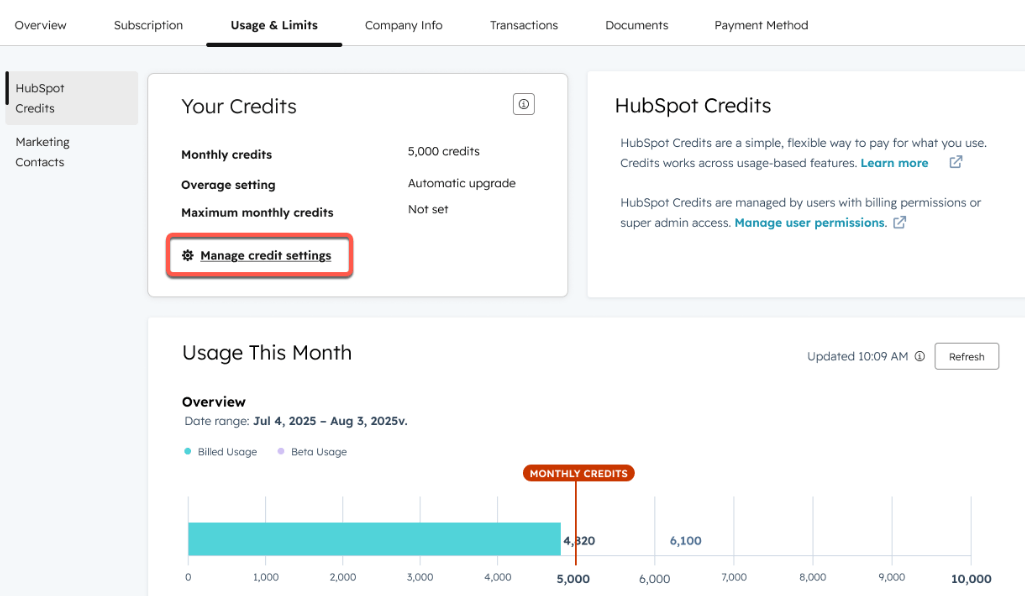
To turn on Pay-as-you-go Overage:
You’ll need to be an appropriate Admin and have purchased additional credits previously. Then:
- Go to “Account & Billing” then “Usage & Limits”
- Under “HubSpot Credits” go to “Manage credit settings”
- Select “Pay-as-you-go” and click Next
- Set a maximum monthly credit limit, and click Next
- Review the settings and click Save
You Can’t Easily Cancel or Downgrade Credits
If you end up on a higher credit package than you need, you can only cancel or downgrade at the end of your HubSpot contract. This is another reason to use the Overage option instead.
To downgrade or cancel HubSpot credits, contact HubSpot support before your renewal date.
What Does a Customer Agent Conversation Cost?
Since 14 April 2026, each resolved Customer Agent conversation uses 50 credits. That’s $0.50 per resolution at the standard $10 per 1,000 credit rate. Conversations that don’t resolve cost nothing.
The good news: you are only charged for the conversations that HubSpot measures as “resolved” by the AI (just bear in mind how HubSpot define “resolved” which we’ll come onto shortly). The old model charged a flat $1.00 per conversation regardless of outcome.
The per-resolution model is reasonable in principle. But at $0.50 per “resolution”, costs add up quickly (particularly as HubSpot’s definition of “resolved” doesn’t always mean the customer got the help they needed).
Several alternatives to HubSpot AI pricing use per-message allowances instead. This is a fairer way to measure usage and still comes at a much lower cost than the new HubSpot model. See the alternatives section below.
Skip the credit maths altogether. Resolve247 adds an AI chatbot to any HubSpot plan (including Free and Starter tiers) for a flat monthly fee, with no credits to track and no auto-upgrades. Start a free 30-day trial – no card required.
What Counts as a “Resolved” Conversation in HubSpot?
A HubSpot Customer Agent conversation is ‘resolved’ when the agent shares a knowledge source or completes an action with no human handoff within 72 hours, OR when a lead is marked qualified, partially qualified, or not qualified. Each resolution costs $0.50 credits (50 credits).
In more detail, under HubSpot’s official definition, a Customer Agent conversation resolves when either of the following is true:
- Content or action + no handoff: The agent shares a content source (like a knowledge base article, the source of the answer to the question) or performs an action (like a password reset, data lookup etc), and handoff to a human did not occur within 72 hours of the AI agent’s final message (implying that the customer got the answer they needed).
- Lead qualification: A lead is marked as qualified, partially qualified, or not qualified by Customer Agent.
The 72-hour assessment window starts after the agent’s final message. Once it closes, “subsequent activity, such as messages from a live agent, a transfer request, or negative feedback, will not change the resolution status.”
So if a customer responds after the 72-hour window, HubSpot treats it as a new conversation (when charging for AI credits). The window resets, and you can be charged a second time if the agent shares a help doc in the new conversation. It is therefore possible for one conversation to trigger two or three resolutions on what feels like a single thread.
Later in this article, we’ve modelled real-world scenarios to show total costs you can expect. Beyond per-conversation credit costs, there are also subscription, onboarding, and plan costs to factor in.
HubSpot Breeze Pricing: What Each Agent Costs
HubSpot Breeze AI pricing varies depending on which agent you’re using. While Customer Agent gets the most attention, understanding the full picture helps you budget accurately.
Breeze Customer Agent
This is HubSpot’s AI-powered support chatbot. Since April 2026 it costs 50 credits ($0.50) per resolved conversation and requires a Professional or Enterprise subscription.
Included credits by plan:
| Plan Tier | Monthly Credits | Customer Agent Resolutions |
|---|---|---|
| Professional Hub | 3,000 credits | ~60 resolved conversations |
| Enterprise Hub | 5,000 credits | ~100 resolved conversations |
For most businesses handling more than a handful of support conversations daily, the included credits won’t last long.
Breeze Prospecting Agent
Used for sales outreach, Prospecting Agent has two cost structures:
- Recommended outreach: 100 credits ($1) per recommended lead
- Company research: 10 credits ($0.10) per research task
Available only with Sales Hub Professional or Enterprise.
Breeze Data Agent
The most affordable Breeze agent at 10 credits ($0.10) per response. It’s available on Starter plans and above across most Hubs.
Breeze Intelligence
Breeze Intelligence handles data enrichment, buyer intent, and form shortening. It also draws from the same credit pool. This matters for budgeting. If your marketing team uses Intelligence credits heavily, that directly cuts the credits available for Customer Agent.
Why This Matters for Budgeting
All Breeze agents share one credit pool. You can’t allocate credits separately. If your sales team runs a heavy prospecting campaign, those credits disappear from your support budget. This makes HubSpot Breeze pricing harder to predict than it first appears.
For a detailed review of what Customer Agent can and can’t do, see our HubSpot Customer Agent review.
What Plan Do You Need for HubSpot AI?
HubSpot AI pricing isn’t just about credits. You also need the right subscription to access Breeze agents in the first place.
Subscription Requirements
Some agents are locked to specific Hubs. Customer Agent is available on several Professional and Enterprise Hubs, while Prospecting Agent only comes with Sales Hub. Customers on HubSpot’s free plan can’t use any agents at all.
Generally, agents require a Professional or Enterprise plan. The exceptions are Data Agent and some early-stage Beta agents, which are available on Starter.
For the full list of what’s included in your current tier, check the HubSpot Product & Services catalogue. Here’s a summary:
| Agent | Tier | Hub Subscription |
|---|---|---|
| Data agent | Starter, Professional, Enterprise | CRM Hub, Marketing Hub, Sales Hub, Service Hub, Data Hub |
| Customer agent | Professional, Enterprise | Marketing Hub, Sales Hub, Service Hub, Content Hub, Data Hub |
| Prospecting agent | Professional, Enterprise | Sales Hub |
| Knowledge base agent | Professional, Enterprise | Service Hub |
| Closing agent | Professional, Enterprise | Commerce Hub |
| Beta/Early stage agents | Starter, Professional, Enterprise | Any |
There’s a longer list of Breeze AI agents in the HubSpot Marketplace including Beta agents for specific tasks.
Remember: being on the required plan gives you access to the agent. The cost of actually using it still comes from HubSpot Credits on top of your plan.
HubSpot Plan Pricing Overview
For most Hubs, the Starter tier costs $20/month/seat. However, Professional pricing varies hugely, from $100/mo/seat to $800/mo. See the full Hub and Tier breakdown here.
If you’re already on a Professional or Enterprise plan with the right Hub, you only need to think about credit costs. But if you’re not, upgrading solely for agent access is almost never cost effective. Here’s why.
Let’s say you want Customer Agent. The cheapest route to upgrade to is Service Hub Professional at $100/mo/seat ($90/mo/seat billed annually). With one seat, your included credits (3,000, enough for 60 resolutions) work out at around $1.67 per resolved conversation ($1.50 on annual billing) before usage even begins. And that doesn’t include the mandatory one-off onboarding fee of $1,500. Once you need more than 60 resolutions, each additional one costs $0.50. Multiple seats don’t give you extra credits either. Five seats still only get the same 3,000 credits.
So upgrading your plan for the sake of getting Customer Agent is not cost effective at all.
Only upgrade if you need the higher plan for other reasons. If you’re on Free or Starter, there are much more cost-effective ways to add AI to HubSpot. We’ll cover those in the alternatives section.
Monthly Credit Allowances by Plan
HubSpot includes minimal credits with each tier:
| Plan Tier | Monthly Credits Included | Resolutions |
|---|---|---|
| Starter Hub | 500 credits | N/A (Customer Agent not available) |
| Professional Hub | 3,000 credits | 60 resolutions |
| Enterprise Hub | 5,000 credits | 100 resolutions |
These allowances are enough for basic testing but insufficient for most businesses with active support operations. Also not every plan includes every feature – specifically, Starter Hub doesn’t include access to Customer Agent, but those AI credits can be used for other HubSpot AI features instead.
Regardless of your plan, you can still add AI to HubSpot on any plan through third-party integrations.
The Real Cost of Using HubSpot AI
Let’s put HubSpot AI pricing into real-world context. These scenarios assume you’re already on a Professional tier with access to Customer Agent. (Upgrading solely for Customer Agent isn’t cost effective, as we’ve covered.)
| Resolutions/Month | Extra Credits Required | Extra Credit Cost | |
|---|---|---|---|
| Small Business | 500 | 22,000 | $220/month |
| Growing Business | 2,000 | 97,000 | $970/month |
| High Volume | 5,000 | 247,000 | $2,470/month |
| 3,000 credits included in Professional plan | Plus subscription cost |
These numbers add up fast. A growing business handling 2,000 resolutions monthly pays nearly $1,000 in credits alone – plus the team workload to deal with the unresolved queries. Jump to the cost comparison to see how alternatives stack up.
Important: These figures assume you’re using credits only for Customer Agent. If your team also uses Prospecting Agent, Data Agent, or Breeze Intelligence, your actual Customer Agent capacity drops – or you’ll need even more credits.
For more on reducing these costs, see our guide on how to reduce HubSpot AI chatbot costs.
Hidden Costs and Gotchas to Watch For
Beyond the headline HubSpot AI pricing, several factors can inflate your monthly bill unexpectedly. These apply whether you’re using Customer Agent alone or combining it with other Breeze features.
Automatic Tier Upgrades
By default, HubSpot automatically upgrades your credit tier when you run out. This happens without manual approval and could surprise you with higher charges.
A viral marketing campaign or product issue that drives support volume could exhaust your credits mid-month. HubSpot’s system would then purchase additional credits automatically.
It doesn’t have to be a viral support spike, either. One HubSpot user reported accidentally enriching a large contact list and watching helplessly as credits burned through thousands of dollars in minutes. Because HubSpot uses annual contracts, a single mistake like that can multiply across the entire year.
Switch to Pay-as-you-go Overage (described earlier) to avoid being locked into a higher plan for the rest of your contract. You can also set spending limits for safety.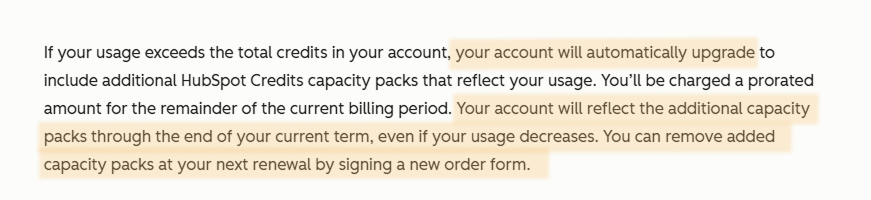
Reopened Conversations Can Trigger Multiple Charges
This one is new under the outcome-based pricing. If a customer replies more than 72 hours after the agent’s last message (not unlikely over a weekend) HubSpot treats it as a new “resolution”, so you would be charged for both the earlier part and later part of the conversation as separate resolutions.
One potential method to prevent the 72 hour timer “running out” while the customer might in fact still have questions would be to set a workflow to follow-up with the customer while still within the 72 hour window. So you either get confirmation that the customer is satisfied, or nudge the customer to follow up with any other queries they might have (which would then be within the same “resolution window”).
Shared Credit Pool Problem
All Breeze features draw from one credit pool. Customer Agent, Prospecting Agent, Data Agent, and Breeze Intelligence all compete for the same credits.
This creates real budgeting challenges. If your sales team runs heavy prospecting campaigns (100 credits per recommended lead), those credits disappear from your support budget. Data Agent research (10 credits per response) chips away at your allowance too.
HubSpot doesn’t offer a way to reserve credits for specific features. Everything pulls from one pot.
Monthly Reset Without Rollover
Unused credits don’t carry forward. Every month, your allocation resets to zero. Buy 50,000 credits for a busy month that never comes? Those credits are gone.
Because Pay-as-you-go credits cost the same as bundled credits, there’s currently no benefit to pre-purchasing bundles. Unused bundled credits just increase your effective cost per resolution.
HubSpot AI Pricing vs. Alternatives
HubSpot’s credit-based model isn’t the only option. There are cheaper ways to do this.
Why Businesses Look for Alternatives
The most common concerns with HubSpot Breeze AI pricing include:
- Unpredictable costs from usage-based credits shared across AI features
- High subscription requirements (Professional or Enterprise only)
- No access for Starter or Free plan users
- $0.50 per “resolution” regardless of conversation length (ie a simple search for one help doc would cost $0.50 each time)
- Multiple charges for long conversations where a conversation extends beyond the 72 hour window
- Shared credit pools where different teams compete for the same credits
For businesses wanting predictable, affordable costs, these factors often drive them to explore third-party options.
AI Chatbot Pricing Comparison
Here’s how HubSpot AI pricing compares to Resolve247’s AIChatbot. We’ve also published a full comparison of Breeze Customer Agent and Resolve247 to help you decide.
| Conversations/month (messages/month) | HubSpot Breeze Customer Agent | Resolve247 AIChatbot | Cost Saving with Resolve247 |
|---|---|---|---|
| 800 conversations (2,000 messages) | $250/mo (560 resolutions) | $35/mo (656 resolutions) | $215 saving (86%) |
| 1,600 conversations (4,000 messages) | $530/mo (1,120 resolutions) | $55/mo (1,312 resolutions) | $475 saving (90%) |
| 4,000 conversations (10,000 messages) | $1,370/mo (2,800 resolutions) | $125/mo (3,280 resolutions) | $1,245 saving (91%) |
| 8,000 conversations (20,000 messages) | $2,770/mo (5,600 resolutions) | $235/mo (6,560 resolutions) | $2,535 saving (92%) |
| 16,000 conversations (40,000 messages) | $5,570/mo (11,200 resolutions) | $499/mo (13,120 resolutions) | $5,071 saving (91%) |
| Based on average 2.5 messages per conversation | Based on HubSpot’s 70% resolution rate | Based on Resolve247’s 82% resolution rate |
The above price comparison is based on HubSpot’s stated 70% resolution rate (because they charge by “resolution”). For comparison purposes we have shown Resolve247’s resolution rate (82%), but please note Resolve247 uses a simple low-cost flat-rate subscription instead of variable pricing to give cost certainty at an affordable level.
HubSpot’s Breeze Customer Agent is more tightly integrated into HubSpot’s ecosystem than any third-party tool. That said, the important parts are there with third-party options too – human handover, HubSpot ticket creation, and more. The trade-off is cost. Customer Agent is significantly more expensive.
Why Consider Resolve247
Resolve247’s HubSpot integration offers several advantages for cost-conscious businesses:
- Works on any HubSpot plan, including Free and Starter tiers
- Predictable flat-rate pricing with no auto-upgrades
- 86-92% cost savings compared to Breeze Customer Agent
- Custom instructions to adjust how the AI behaves (not available with Customer Agent)
- No credit system to monitor or manage
- 30-day free trial with no credit card required
- Anti-hallucination guarantee for accurate responses
Businesses have seen comparable (and even improved) AI capabilities at a fraction of the cost by switching to Resolve247. View Resolve247’s pricing to compare specific tiers.
Want to explore other options too? See our roundup of HubSpot AI chatbot alternatives.
When HubSpot’s AI Agent Makes Sense
Breeze Customer Agent isn’t wrong for everyone. It makes sense when:
- You’re already on an Enterprise plan with budget allocated for credits
- You need deep native integration with HubSpot’s CRM data and deal information
- Your conversation volume stays low (under 100 resolutions/month)
- You’re using multiple Breeze features and want everything from one vendor
- You value a single ecosystem over cost optimisation
Is HubSpot AI Worth the Cost?
It depends on your situation. Let’s look at both sides honestly.
Pros of HubSpot’s Breeze Customer Agent
- Native CRM integration makes it simple to connect with advanced HubSpot workflows
- Unified ecosystem keeps Customer Agent alongside Prospecting Agent, Data Agent, and Intelligence for one invoice
Cons of HubSpot’s Breeze Customer Agent
- Expensive subscription requirements lock out Free and Starter users
- Credit-based pricing creates unpredictable monthly costs
- $0.50 per “resolution” which may or may not actually help the customer
- Multi-resolution risk on long-running threads (one thread can trigger multiple charges)
- Shared credit pool means different teams compete for the same credits
- Automatic subscription increases can generate surprise charges
- No custom instructions to adjust AI behaviour beyond content training
The Bottom Line
For large enterprises already invested in HubSpot’s ecosystem with no budget limitations, Breeze Customer Agent offers convenience and native integration. If you’re also using Prospecting Agent, Data Agent, and Breeze Intelligence, having everything in one credit system simplifies vendor management.
For small-to-medium businesses, startups, and cost-conscious organisations, HubSpot AI pricing creates genuine challenges. High subscription requirements, unpredictable expensive credits, and shared credit pools make budgeting difficult.
Third-party alternatives like Resolve247 offer comparable AI chatbot capabilities at predictable costs. They work across all HubSpot plan levels, removing the Professional or Enterprise requirement entirely.
If you only need an AI chatbot for customer support, a specialist provider typically delivers better value.
Conclusion
HubSpot AI pricing works out at $0.50 per resolved Customer Agent conversation once you’re on a Professional tier subscription. Each resolved conversation consumes 50 credits, purchased at $10 per 1,000 credits. Other Breeze agents draw from the same credit pool, making HubSpot Breeze pricing tricky to budget for if you’re using multiple AI features.
Before committing, do the maths. Multiply the number of conversations by the resolution rate (70%), then multiply by $0.50. Add any other agent usage, and factor in your subscription costs. Then compare that total against alternatives.
If you’re looking for affordable AI chatbot support that works on any HubSpot plan, the savings are substantial. Most businesses save 86-92% compared to HubSpot AI pricing.
Want AI-powered customer support without confusing pricing? Try Resolve247 free for 30 days – it integrates directly with HubSpot on any plan, including Free and Starter tiers. No credit card required.
FAQ
What are HubSpot credits?
HubSpot credits are a single virtual currency that powers every Breeze AI feature. You buy them in bundles (at $10 per 1,000, or $9 per 1,000 on annual billing) and each AI action spends a set number from one shared pool. Breeze Customer Agent spends 50 credits per resolved conversation, Prospecting Agent 100 per recommended lead, and Data Agent 10 per response.
How much do HubSpot credits cost?
HubSpot credits cost $10 per 1,000 on monthly billing, or $9 per 1,000 billed annually (a 10% saving). That works out at $0.01 per credit, so a 50-credit Customer Agent resolution costs $0.50. There is no bulk discount beyond the annual rate.
Do HubSpot credits roll over?
No. Unused HubSpot credits do not roll over. Your allowance resets to zero every month, so any credits you have bought but not used are lost. Because pay-as-you-go credits cost the same as bundled credits, there is no benefit to pre-purchasing large bundles.
What uses HubSpot credits?
Every Breeze AI feature draws from the same credit pool: Customer Agent (50 credits per resolved conversation), Prospecting Agent (100 per recommended lead or 10 per research task), Data Agent (10 per response), and Breeze Intelligence for data enrichment. Because they share one pool, heavy prospecting or enrichment use leaves fewer credits for customer support.
How much does HubSpot AI cost per conversation?
Breeze Customer Agent conversations cost 50 HubSpot Credits per “resolved” conversation, which equals $0.50 at the standard rate of $10 per 1,000 credits. Annual plans drop the cost of credits to $9 per 1,000 credits.
What counts as a resolved conversation in HubSpot?
HubSpot defines a conversation as resolved when the Customer Agent either:
– shares a content source or performs an action with no handoff to a human within 72 hours of the agent’s last message,
– or when a lead is marked qualified, partially qualified, or not qualified.
If a customer replies more than 72 hours later, the conversation is treated as a new resolution, triggering another $0.50 charge for the same conversation.
How does HubSpot AI pricing work?
You need the right HubSpot plan (Professional or higher) and the right Hub. Then each AI agent action consumes HubSpot Credits from a shared pool. Customer Agent is now billed on outcome ($0.50 per resolution), while Data Agent and Prospecting Agent research tasks are billed per action. A small number of credits is included with each plan, and you can purchase more in bundles or as pay-as-you-go.
Can I use HubSpot’s AI chatbot on the free or starter plan?
No. Breeze Customer Agent requires a Professional or Enterprise subscription. Free and Starter users can’t access HubSpot’s native AI chatbot. However, third-party alternatives like Resolve247 add AI chatbot functionality to any HubSpot plan.
What HubSpot plan do I need for Breeze Customer Agent?
You need Professional or Enterprise on a relevant Hub (Marketing, Sales, Service, Content, or Data). The Customer Platform Professional bundle starts at around $1,300/month. Alternatively, use a third-party option like Resolve247 on any HubSpot plan.
Is HubSpot’s AI chatbot worth it?
For companies already on Professional plans with low conversation volumes (under 60 resolutions/month), Breeze Customer Agent offers convenient native integration. For businesses with higher volumes or those on Starter/Free plans, third-party alternatives offer significantly better value.
How much does HubSpot Breeze cost?
HubSpot Breeze pricing depends on which features you use. Credits cost $10 per 1,000. Customer Agent uses 50 credits ($0.50) per resolved conversation, while Prospecting Agent uses 10-100 credits per action. All features share one credit pool, so total cost depends on combined usage.
What is HubSpot credits pricing?
HubSpot credits pricing is $10 per 1,000 credits on a monthly plan, or $9 per 1,000 on an annual plan. Credits are shared across all Breeze AI features. A small allocation is included free with each tier: 500 for Starter, 3,000 for Professional, and 5,000 for Enterprise.
What’s the cheapest way to add an AI chatbot to HubSpot?
Third-party integrations like Resolve247 offer the most affordable option, starting at $35/month for approximately 800 conversations (2,000 AI responses). This works on any HubSpot plan, including Free and Starter.
How does HubSpot AI pricing compare to other AI chatbots?
HubSpot charges $0.50 per resolved conversation through its credit system, plus requires a Professional subscription. Alternatives like Resolve247 work out at roughly $0.04 per conversation (starting at $35/mo for 2,000 AI responses) and work on any HubSpot plan.