
Disclosure: we make Resolve247, an AI chatbot that runs inside HubSpot’s chat widget and replies to customer emails in HubSpot. So we compete with Customer Agent, HubSpot’s own AI, not with Service Hub itself. This HubSpot Service Hub review draws on HubSpot’s pricing page, product catalogue, help docs and terms, and on public user reviews, all checked on 24 November 2026.
Introduction
HubSpot Service Hub puts your support chats, emails and tickets on each customer’s HubSpot record, next to their deals, so everyone sees one history. It’s free for up to 2 users, and paid plans list at $20 to $150 a seat a month (US prices).
Starter lists at $20 a seat (one user’s licence) a month, or $7 on annual billing for new customers, for a limited time. Professional is $90 a seat a month on annual billing, plus a required one-time $1,500 onboarding fee for HubSpot’s set-up help. Enterprise is $150 a seat a month, plus $3,500 for onboarding.
The help desk, where each chat and email becomes a ticket, starts at Professional. So do the knowledge base and Customer Agent, HubSpot’s AI that answers customers for $0.50 per resolved conversation. So what you pay depends on which plan and which seats your team needs. One HubSpot user asked about this on Reddit in January 2026: “Which plan/seat do we need for THIS specific feature?”
This review answers that question for support teams: what each plan includes, what you pay once seats, onboarding and HubSpot credits (which pay for AI features) are added, what users say, and which AI to run in your HubSpot chat. Prices are HubSpot’s US prices; UK readers see a different plan, which has its own section.
Jump to: HubSpot Service Hub pricing, What it costs for your team, Which AI fits in HubSpot.
Is HubSpot Service Hub Worth It? Our Verdict
HubSpot Service Hub is worth it if your business already runs on HubSpot’s CRM and you want support on the same record as sales and marketing. Starter is a low-cost shared inbox with basic tickets. The help desk starts at Professional, with SLAs (response-time targets), a knowledge base and a customer portal where customers can check their own tickets. On Professional, you pay for each person who answers tickets, plus the one-time onboarding fee.
A strong fit for:
- Teams already using HubSpot’s CRM, Marketing Hub or Sales Hub
- B2B and service firms that want a customer portal and a knowledge base in the same system as their CRM (Professional)
- Small teams that want live chat, email and Facebook Messenger in one inbox for $0 to $20 a seat a month
- Teams whose sales or customer success colleagues need to follow tickets: on paid plans, anyone who only views tickets and adds notes gets a free View-only Seat
Plan carefully if you need:
- The help desk, SLAs, a knowledge base, a portal or surveys: they start at Professional (see where the help desk starts)
- HubSpot’s AI to answer customers: Customer Agent needs Professional, then costs $0.50 per resolved conversation beyond the included credits (see HubSpot’s AI)
- Complex ticketing: one TrustRadius reviewer (January 2025) says Service Hub isn’t the best choice for organisations with complex ticketing needs
| HubSpot Service Hub at a glance | |
|---|---|
| What it is | Shared inbox, tickets, help desk, live chat and customer portal on HubSpot’s CRM |
| Made by | HubSpot, Boston, USA (founded 2006; “306,000 customers”, per HubSpot) |
| US prices, per seat a month | Free (up to 2 users); Starter $20 ($7 on annual billing for new customers, limited time); Professional $90 on annual billing or $100 monthly; Enterprise $150, billed annually |
| Onboarding | $1,500 on Professional, $3,500 on Enterprise, one time |
| HubSpot credits included | 500, 3,000 or 5,000 a month (Starter, Professional, Enterprise) |
| Free trial | 14 days of Starter, Professional or Enterprise, with no automatic charge |
| AI | Breeze Assistant, an AI helper for your own team, on every plan; Customer Agent, which answers customers, from Professional at $0.50 per resolved conversation |
| Channels | Team email, live chat and Messenger on every plan; HubSpot calling from Starter; WhatsApp from Professional |
| Ratings | G2 4.4/5 (3,017 reviews), Capterra 4.4/5 (194), checked 24 November 2026 |
| Consider Resolve247 inside HubSpot if | You want AI answers in your HubSpot chat and email on any HubSpot plan, at a flat price from $35 a month |
What Is HubSpot Service Hub?
HubSpot Service Hub is HubSpot’s customer service software. It’s built on HubSpot’s Smart CRM, so every ticket sits on the same contact and company record as your deals, emails and marketing. That shared record is the main reason teams pick it.
It brings together:
- A shared inbox for team email, live chat, Facebook Messenger and, on paid plans, calls and WhatsApp
- HubSpot’s ticketing system: tickets and ticket pipelines (the stages each ticket moves through)
- The help desk workspace, where agents work tickets from every channel in one view (launched in spring 2024)
- Rule-based chatbots, a knowledge base, a customer portal and feedback surveys
- A customer success workspace, reporting and AI (Breeze Assistant and Customer Agent)
The features table shows which plan includes what.
Service Hub is one of HubSpot’s products, which it calls hubs. If you also buy Marketing Hub or Sales Hub, they share one CRM and one set of seats. Your monthly credits then come from your highest plan across those hubs, and the hubs’ credits aren’t added together.
HubSpot Service Hub Features by Plan
Every HubSpot Service Hub plan, Free included, has a shared inbox, live chat, tickets and Breeze Assistant. The help desk workspace, SLAs, the knowledge base, the customer portal, surveys and Customer Agent start at Professional.
Here’s what each plan includes for a support team, from HubSpot’s Product & Services Catalog and help docs, checked on 24 November 2026.
| Feature | Free | Starter | Professional | Enterprise |
|---|---|---|---|---|
| Users | Up to 2 | Paid Core Seats, plus free View-only Seats | Paid Service Seats for agents, plus Core and free View-only Seats | Same as Professional |
| Shared inboxes | 1 | 1 | 100 | 200 |
| Pipelines (shared with deals and other records) | 1 | 15 | 100 | 350 |
| Tickets, created by hand or by a chatbot | Yes | Yes | Yes | Yes |
| Tickets created from inbox chats and emails | No* | No* | Yes, in the help desk | Yes, in the help desk |
| Help desk workspace | No | No | Yes | Yes |
| Automatic routing | Not listed | Needs Professional seats** | Round robin, load balanced or random | Adds skills-based routing |
| SLAs | No | No | Yes | Adds conditional SLAs |
| Live chat | With HubSpot branding | Branding removed | Branding removed | Branding removed |
| If/then branches in chatbots | No | No | Yes | Yes |
| No | No | 1,000 messages a month | 1,000 messages a month | |
| HubSpot calling minutes (per account) | None | 500 a month | 3,000 a month | 12,000 a month |
| Knowledge base | No | No | 1, up to 2,000 articles | Several, 10,000 articles in total |
| Customer portal | No | No | Yes | Yes |
| CSAT, NPS and CES surveys | No | No | Yes | Yes |
| Workflows | No | 50, with restricted triggers and actions | 300 | 1,000 |
| Custom reports | No | No | 100 | 500 |
| Breeze Assistant (AI for your team) | Yes | Yes | Yes | Yes |
| Customer Agent and help desk AI | No | No | Yes (Customer Agent uses credits) | Yes (Customer Agent uses credits) |
| HubSpot’s own support | Community | Chat and email | Chat, email and phone | Chat, email and phone |
*For accounts created after 1 April 2024. **According to HubSpot’s routing help doc; the catalogue lists conversation routing on Starter.
Service Hub Starter vs Professional: Where the Help Desk Starts
Free and Starter include live chat on your website, with team email and Messenger in the same shared inbox. Tickets come with a pipeline, and chatbots that open tickets work in the chat widget.
Breeze Assistant and HubSpot’s own Slack, Jira and Zoom apps are included too. Our guide to HubSpot integrations for customer support shows which plan each app needs. Smart Transfer imports your data from tools such as Zendesk. Starter adds branding removal, 15 pipelines, 500 calling minutes, service analytics and simple automations.
Free is tight for daily support, though. It has 3 snippets (saved text blocks for replies), as few as 3 email templates, 10 custom properties (your own record fields) in total and 30 days of dashboard history. For help from HubSpot, Free has only the community forum. Starter raises the limits to 5,000 snippets, 10,000 templates and 1,000 custom properties per object (such as contacts or tickets), with full dashboard history.
The help desk itself starts at Professional:
- The help desk workspace, where each chat and email becomes a ticket. Outside the help desk, HubSpot’s inbox help doc says accounts created after 1 April 2024 “cannot create tickets from channels connected to the inbox”. So on Free and Starter, you create tickets by hand or with a chatbot’s “submit a ticket” action. Or an add-on such as Resolve247, which we make, can open them for you.
- Automatic routing, which shares new chats and emails out among your agents. HubSpot’s help docs say it needs Professional seats (Starter’s catalogue listing is less clear).
- SLAs, the knowledge base, the customer portal and surveys.
- Full workflows, WhatsApp and if/then branches in chatbots.
- Every HubSpot AI feature that answers customers or helps agents inside tickets.
So the choice is a shared inbox with basic tickets on Starter, or a full help desk on Professional. For 3 agents on annual billing, that step takes you from $60 a month (Starter at list price) to $270 a month, plus the $1,500 onboarding fee. In the first year, that’s $4,740 instead of $720.
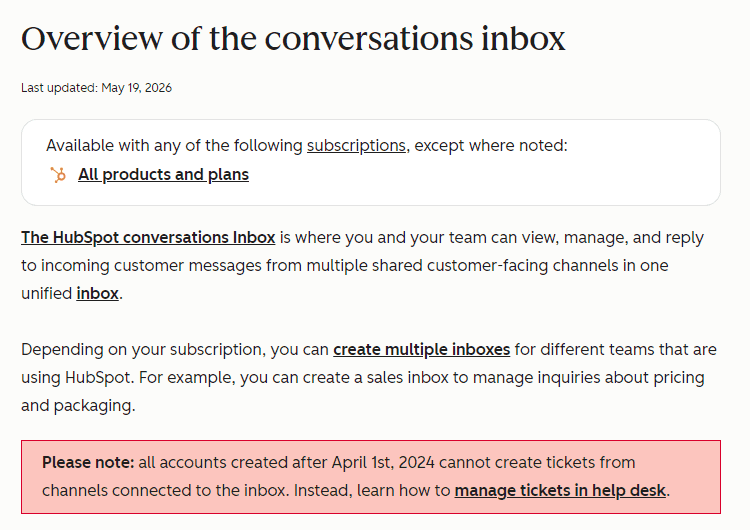
Image: HubSpot Knowledge Base, “Overview of the conversations inbox”, 24 November 2026.
HubSpot Service Hub Pricing in 2026
HubSpot Service Hub costs from $0 to $150 a seat a month, plus a one-time onboarding fee on Professional and Enterprise (US prices, checked 24 November 2026). It’s free for up to 2 users, and Starter is $20 a seat a month at list price. For a limited time, new customers get Starter for $7 a seat on annual billing, or $10 on monthly billing. Professional is $90 a seat a month on annual billing ($100 monthly), plus a one-time $1,500 onboarding fee. Enterprise is $150 a seat a month, billed annually, plus a one-time $3,500 onboarding fee. Starter, Professional and Enterprise include 500, 3,000 and 5,000 HubSpot credits a month for AI features.
Here’s the full US price list, from HubSpot’s pricing page and catalogue.
| Service Hub plan (US) | Free | Starter | Professional | Enterprise |
|---|---|---|---|---|
| List price, per seat a month | $0 | $20 | $100 | $150 |
| On annual billing | $0 | $7 for new customers, limited time | $90 | $150 |
| On monthly billing | n/a | $10 for new customers, limited time | $100, with a 12-month commitment | Not offered |
| Seat for each agent | Up to 2 users | Core Seat | Service Seat | Service Seat |
| Core Seat for other colleagues | n/a | Same Core Seat as agents | $50 ($45 on annual billing) | $75 |
| One-time onboarding | None | None | $1,500 | $3,500 |
| HubSpot credits each month | None | 500 | 3,000 | 5,000 |
The $45 Core Seat price on annual billing comes from a worked example in HubSpot’s seats help doc. HubSpot’s footnote says the Starter discount is for “new customers only”. If you already pay HubSpot for a plan, ask whether it applies before you budget on $7. For totals for 3, 5 or 10 agents, onboarding included, see what it costs for your team.
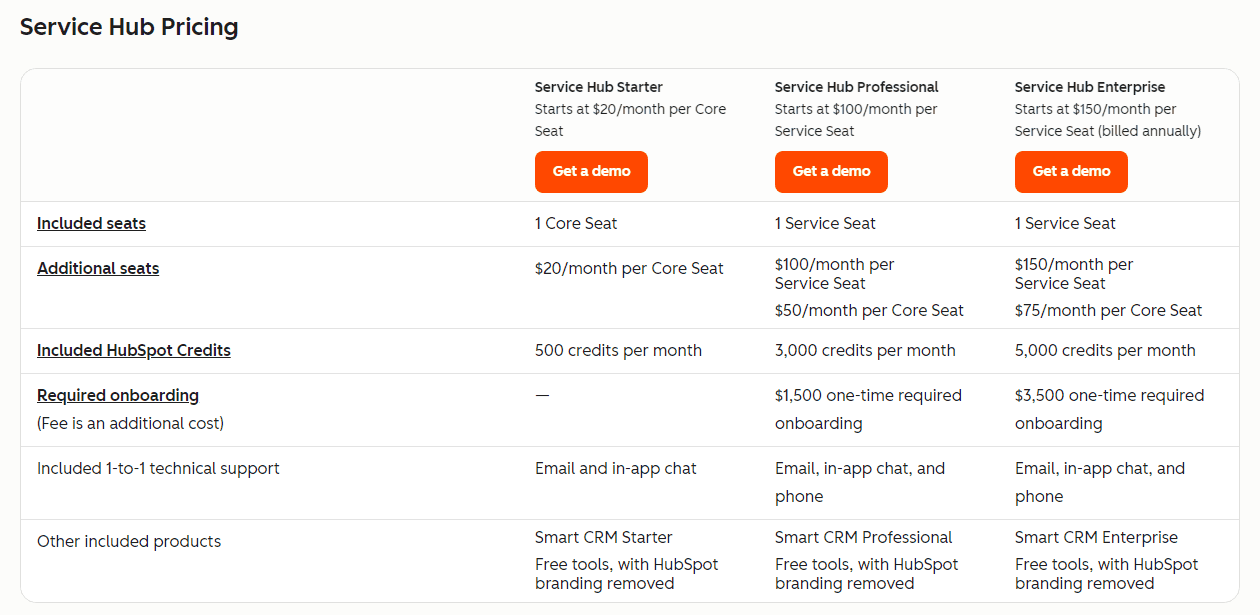
Image: HubSpot Product & Services Catalog (list prices), 24 November 2026.
Extra Costs: What Adds to a HubSpot Service Hub Bill
A HubSpot Service Hub bill grows beyond the seat price in six ways:
- Onboarding: $1,500 on Professional and $3,500 on Enterprise, once (see onboarding fees).
- Seat types: on Professional and Enterprise, agents who answer chats and tickets need Service Seats, and other colleagues need Core Seats (see seats).
- Your highest plan: if any hub you own is on Professional, all your Core Seats are priced at the Professional rate. Take 4 sales reps who already use Sales Hub Starter at $20 a seat. If you move support to Service Hub Professional, their Core Seats cost $45 each on annual billing: $180 a month instead of $80.
- Credits beyond your allowance: AI features such as Customer Agent use credits, and extra credits cost $0.01 each (see credits).
- Renewal at list price: the $7 Starter offer can rise to the $20 list price when you renew (see contracts).
- Other hubs: Marketing Hub, Sales Hub and the rest are priced separately.
Seats: Service, Core and View-Only
On Professional and Enterprise, the seat you give each person decides what they can do:
- Service Seat ($90 a month on annual billing, or $100 monthly, on Professional; $150 on Enterprise): for anyone who answers chats, emails and tickets. Automatic routing only sends chats and emails to paid Service Seats (or Sales Seats, from Sales Hub). HubSpot’s help desk doc says advanced help desk features, such as custom views, SLAs and reply recommendations, need a Service Seat. HubSpot’s customer success workspace doc says the same for that workspace. Writing knowledge base articles and creating feedback surveys need “an assigned Service Hub seat”.
- Core Seat ($50 a month, or $45 on annual billing, on Professional; $75 on Enterprise): for colleagues who edit customer records and use Breeze Assistant. It doesn’t cover working the support queue, writing help articles or building surveys. On Starter, every paid user has a Core Seat at $20 list.
- View-only Seat (free on every paid plan): for people who only need to see tickets and reports and add notes.
Budget a Service Seat for every agent. One team found this out in March 2026, when it moved its inbox into the help desk. As the team wrote on the HubSpot Community: “none of the users with Core (high-tier) seats were able to access Helpdesk, so we had to roll the migration back”.
A few more rules from HubSpot’s seats help doc and catalogue:
- Free covers up to 2 users. When you upgrade to Starter, those free seats are removed, so each person who edits records needs a paid seat.
- You can buy any paid plan with a single seat.
- Since 15 October 2026, during your contract, you can swap unassigned seats (paid for but not given to anyone) for credits or a different seat type.
Onboarding Fees
Professional and Enterprise come with a required, one-time onboarding fee: $1,500 and $3,500. HubSpot says its Service Hub onboarding is “designed for new customers using Service Hub software for the first time”. It’s delivered remotely, with technical advice on setting up Service Hub and guidance on serving your customers. Starter needs no onboarding.
Some buyers report getting the fee waived (r/hubspot, May 2025 and August 2026). They describe three routes: taking certifications in HubSpot Academy (HubSpot’s online training), buying through a HubSpot partner agency, or signing at the end of a sales quarter. These are their reports, not HubSpot policy, so ask your sales rep.
HubSpot Credits in Service Hub
Credits pay for HubSpot’s AI features. Your account gets 500 a month on Starter, 3,000 on Professional or 5,000 on Enterprise, however many seats it has. They reset monthly and don’t roll over. Extra credits cost $0.01 each on pay-as-you-go (billed for what you use), or $10 a month for each 1,000-credit pack.
In Service Hub, Customer Agent uses 50 credits ($0.50) per resolved conversation.
When the included credits run out and you haven’t bought extra, features that use credits pause until your monthly reset. So nothing extra is charged, and Customer Agent takes no new conversations until the reset. HubSpot explains why: “We provide tools, like spend caps and feature pausing, to give customers control.”
If you buy extra credits, anything beyond your monthly total is charged at $0.01 a credit. That’s pay-as-you-go, the default for credits bought since 16 September 2026. Charges can go up to a spend cap (a spending limit), which HubSpot sets 50% above your monthly credits. Credit packs you add can only be reduced at renewal.
For the full rate sheet and examples, see our guide to HubSpot AI pricing.
Contracts, Renewals and Downgrades
HubSpot’s paid plans run on terms that renew automatically. Before you sign, know these rules from HubSpot’s terms of service:
- You can’t cancel, get a refund or downgrade during your term. Downgrades take effect at renewal, on a new order form.
- Seats you’ve added can only be removed at renewal.
- To try before you commit, start a 14-day free trial of Starter, Professional or Enterprise from inside your HubSpot account. HubSpot doesn’t charge you when it ends, though some features may be restricted during a trial.
- At renewal, HubSpot can raise your price up to its list price, with at least 30 days’ notice. That matters if you start on the $7 Starter offer.
- To stop a renewal, turn off auto-renewal in HubSpot’s Account & Billing settings before the term ends.
Starter can be billed monthly with a monthly commitment. Professional’s monthly billing still commits you for 12 months; one Trustpilot reviewer (November 2026) wrote that “month-to-month billing does not mean month-to-month cancellation”.
HubSpot Pricing in the UK: One All-in-One Plan
If you open HubSpot’s Service Hub pricing page from the UK, it sends you to a single all-in-one HubSpot plan instead (checked 24 November 2026). It’s priced per seat, on annual billing: Starter £7 a month (a limited-time offer), Professional £81 and Enterprise £155, or $7, $90 and $175 in US dollars. Prices exclude VAT.
The plan includes more credits (5,000, 10,000 or 15,000 a month), and Starter takes up to 10 users. Professional and Enterprise still require onboarding, though the page shows no fee. On this plan, emails sent through HubSpot (other than one-to-one emails) and workflow actions also use credits.
HubSpot calls the plan a “Limited Release”, one it doesn’t offer in every country. Its terms also give euro prices, so some European readers see it too. The seat rules in this review don’t apply there as written: HubSpot says customers on this plan “do not have access to Core, Sales, Service, or Revenue Seats”. Instead, the plan’s terms price GTM (go-to-market) Seats, plus Ops (operations) Seats on Professional and Enterprise.
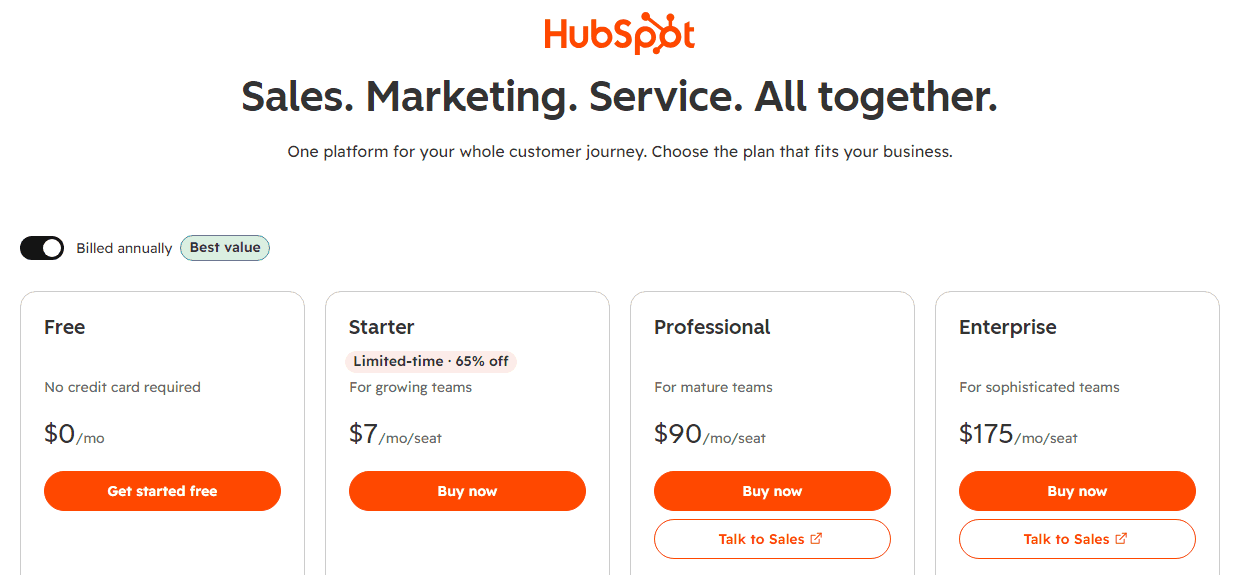
Image: HubSpot’s pricing page opened from the UK, shown in US dollars, 24 November 2026. This is the all-in-one plan UK readers see; US Service Hub prices are in the table above.
Why Older Reviews Show Different Prices
If another HubSpot Service Hub pricing guide quotes different numbers, it’s probably out of date. HubSpot’s own archived pages show:
- Before 5 March 2024, Service Hub was sold in bundles of users. Starter listed at $50 a month for 2 users, Professional at $500 for 5 and Enterprise at $1,200 for 10. That’s where the “10-seat minimum” on Enterprise comes from. Today one seat is enough.
- In spring 2024, Starter was shown at $15 a seat on annual billing.
- Enterprise was $130 a seat until 24 June 2024, then $150.
- Some reviews quote $9. In 2023, HubSpot’s pricing page showed each extra Starter user at $9 a month on annual billing; today each Starter seat lists at $20. Others quote extra credits at $9 per 1,000, but HubSpot’s catalogue prices them at $10 per 1,000-credit pack, or $0.01 a credit.
- Customer Agent cost $1 per conversation until 14 April 2026, when it moved to $0.50 per resolved conversation.
How Much HubSpot Service Hub Costs for Your Team
Here’s what HubSpot charges common support teams on annual billing (US prices, checked 24 November 2026). Only the Customer Agent row adds AI costs on top of each plan’s included credits.
| Team | HubSpot plan | A month | First year, with onboarding |
|---|---|---|---|
| 2 people | Free | $0 | $0 |
| 3 agents | Starter, list price | $60 | $720 |
| 3 agents | Starter, new-customer offer | $21 | $252 (up to $720 in year two) |
| 3 agents | Professional | $270 | $4,740 |
| 3 agents, plus Customer Agent at 500 chats a month | Professional | $415 | $6,480 |
| 3 agents and 2 colleagues on Core Seats | Professional | $360 | $5,820 |
| 5 agents | Professional | $450 | $6,900 |
| 10 agents | Professional | $900 | $12,300 |
| 5 agents | Enterprise | $750 | $12,500 |
To work out your own team’s first year on Professional, on annual billing: Service Seats x $90 x 12, plus Core Seats x $45 x 12, plus the $1,500 onboarding fee. On monthly billing it’s $100 and $50 a seat.
Already on Sales Hub or Marketing Hub Starter? Count your colleagues’ Core Seats at the Professional rate too ($45 each on annual billing), not $20.
The Customer Agent row assumes it resolves 70% of the 500 chats, HubSpot’s stated average. That’s 350 resolutions: 60 covered by the included credits and 290 at $0.50, so $145 a month. The AI cost table shows other volumes.
HubSpot’s AI in Service Hub: Breeze Assistant and Customer Agent
Service Hub has two kinds of AI. Breeze Assistant is an AI assistant for your team across HubSpot, on every plan, without using credits. Customer Agent answers your customers itself.
Customer Agent comes with the Professional and Enterprise plans of any HubSpot hub. It answers in live chat, email, forms, WhatsApp and Messenger, with voice and SMS in beta (SMS needs HubSpot’s SMS add-on). It “takes action in your CRM” and hands conversations to your team with context. It also reads the images customers share in chat and the PDFs they attach.
HubSpot’s Customer Agent page states a “70% average resolution rate”. Professional also includes AI tools for agents in the help desk, such as reply recommendations, which don’t use credits.
Customer Agent costs $0.50 per resolved conversation (50 credits). Professional’s included credits cover about 60 resolutions a month and Enterprise’s about 100, if nothing else uses them.
A conversation counts as resolved when Customer Agent shares a source or takes an action, and the customer doesn’t ask for a person within 72 hours of their last reply. For what happens when the credits run out, see HubSpot credits.
Once you’re on Professional or Enterprise, you can use Customer Agent free for 14 days. If you start that free access after 17 November 2026, HubSpot’s help doc says it stays on afterwards and starts using your credits. Turn it off before day 14 if you don’t want that.
For the full maths, see HubSpot AI pricing explained; for set-up and training, see our HubSpot Customer Agent review.
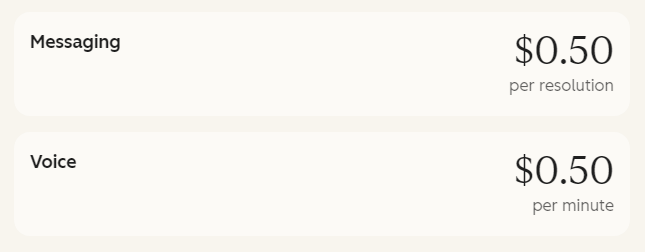
Image: HubSpot’s Customer Agent page, 24 November 2026. Customer Agent needs a Professional or Enterprise plan. Voice is in beta.
HubSpot Service Hub Reviews: What Users Say
HubSpot Service Hub is rated 4.4 out of 5 on both G2 and Capterra (checked 24 November 2026). The users quoted below like the customer portal and having support on the same record as sales. They want better email handling in the help desk.
| Site | Rating | Reviews |
|---|---|---|
| G2 | 4.4 / 5 | 3,017 |
| Capterra | 4.4 / 5 | 194 |
| Gartner Peer Insights | 4.2 / 5 | 26 |
| TrustRadius | 7.9 / 10 | 60 |
What users like:
- A help desk that works for small and mid-sized teams. A user who moved from Zendesk wrote a year later that “HubSpot HelpDesk is absolutely usable if you’re not a massive support organisation or looking for the latest bells and whistles” (Reddit, July 2025).
- Split tickets. A team that moved to the help desk had “a HUGE win with the ‘split ticket’ feature” (Reddit, May 2026). The feature turned one email with three requests into three tickets for three teams.
- The customer portal. A small web agency said letting clients “track their own tickets instead of emailing for status updates has been a godsend” (Reddit, January 2025).
- HubSpot’s support. Another team that left Zendesk found HubSpot’s own support better than Zendesk’s (Reddit, October 2025).
What users want fixed:
- Email inside the help desk. When someone copied (CC’d) on a ticket email sends an out-of-office auto-reply, your team’s next reply can go to that person only. HubSpot’s community team says “there is currently no setting to make Help Desk always retain all recipients” (November 2026). Replies an agent sends from Outlook, rather than from HubSpot, can miss the ticket unless the mailbox is connected to HubSpot directly (November 2026).
- Two help desk requests. Users have asked for built-in time tracking (October 2025) and a holiday calendar that pauses SLA timers (May 2026).
HubSpot Service Hub Pros and Cons
Pros:
- Support, sales and marketing on one customer record
- A free plan with live chat, team email, Messenger and tickets
- Low-cost Starter seats, and free View-only seats on every paid plan
- A full help desk on Professional, with SLAs, routing, a knowledge base, a portal and surveys
- 14-day free trials of every paid plan, with no automatic charge
- Seat swaps during your contract, and spend caps on credits
- More than 2,700 apps in the HubSpot Marketplace
Cons:
- There’s a big price step from Starter to Professional (see where the help desk starts)
- The seat type decides what each person can do (see seats)
- Professional’s monthly billing still commits you for 12 months (see contracts)
- HubSpot’s credit features, Customer Agent included, pause at the monthly credit limit unless you buy more credits (see credits)
- Gaps users report in how the help desk handles email
Customer Agent or Resolve247: Which AI Fits in HubSpot?
If you choose HubSpot, you still choose which AI answers your customers. Customer Agent is built into Professional and Enterprise. Resolve247, our product, is an AI chatbot that runs inside the same HubSpot chat widget on any HubSpot plan, Free included. It also replies to customer emails in your HubSpot inbox, for a flat monthly price.
It answers 82% of customer questions without a human (from 71% to 94%, depending on the business). Elston Baretto, founder of the web host Tiiny Host, says our chatbot “has reduced our support workload by 50%” (his own figure, on our testimonials page). Every answer shows its sources, so your customers know it comes from your own trusted content. They can open the source to read more or check the answer for themselves.
Your team keeps working in HubSpot with either AI. Here’s how the two compare, and which teams each one suits.
| Resolve247 inside HubSpot | Customer Agent (HubSpot’s AI) | |
|---|---|---|
| HubSpot plan needed | Any plan, Free included | Professional or Enterprise |
| Setting it up | Three steps, in minutes: give it your website, we train the AI for you, then click Connect to HubSpot | Built into HubSpot: no second account, and one bill |
| How you pay | A flat monthly plan from $35, or $29 a month on annual billing (our Starter plan, with 2,000 AI messages); each AI reply is one message | $0.50 per resolved conversation, after the credits included with your plan |
| When the allowance runs out | Keeps answering and charges nothing automatically; we get in touch if you’re regularly over | Takes no new conversations until your monthly reset, with no extra charge; or keeps going on pay-as-you-go once you’ve bought extra credits |
| Where it answers | HubSpot live chat, and the emails that reach your HubSpot inbox; replies in the customer’s language | Live chat, email, forms, WhatsApp and Messenger; voice and SMS in beta (SMS needs HubSpot’s SMS add-on) |
| Images and files customers send | Reads images and files (PDF, Word, Excel, PowerPoint, CSV, text and logs, up to 10 MB) in HubSpot chat and in emails | Reads images shared in chat, and PDFs |
| Handing over to your team | Creates or updates a ticket in the pipeline you choose, with a handover summary, on every HubSpot plan; pauses when a teammate replies | Hands off to your team with full context, and can post an AI handoff summary as a note (in beta) |
| Actions | Tool Use, on every plan: connect it to your own systems through their API, so it can look up live details such as an order’s status | Takes action in your HubSpot CRM |
| Trial and accuracy promise | 30-day trial, no card; answers from your own content, with a money-back guarantee, and if the AI ever makes something up, that month is free | 14 days of free access on Professional or Enterprise |
Resolve247 checked on our pricing page, our HubSpot integration page, its HubSpot Marketplace listing and the product itself; Customer Agent on HubSpot’s Customer Agent page, pricing page, help docs and product-update notes; all on 24 November 2026.
What the AI Costs on Top of Your HubSpot Plan
| Extra AI cost a month | 100 chats | 300 chats | 1,000 chats | 3,000 chats |
|---|---|---|---|---|
| Resolve247, on any HubSpot plan | $35 | $35 | $47 | $103 |
| HubSpot’s Customer Agent, on Professional | $5 | $75 | $320 | $1,020 |
Resolve247: we assumed 2.5 AI replies per chat, on the cheapest mix of our plans and extra 1,000-message packs at $12 (at 3,000 chats, our $55 plan with four packs). At 4 replies per chat, Resolve247 would be $35, $35, $55 and $149. Customer Agent: HubSpot’s stated 70% resolution rate at $0.50 each, minus the 60 resolutions that Professional’s included credits cover. Our HubSpot savings calculator works out other volumes.
Count the emails the AI answers as well as chats: Customer Agent charges per resolved conversation on email too, and Resolve247 counts each AI reply.
On Professional, Customer Agent costs nothing extra up to about 85 chats a month, while the included credits last. Up to about 185 chats, it costs less than our $35 plan. Above that, Resolve247 costs less.
On Free or Starter, Customer Agent first needs a Professional plan, which also brings the help desk, knowledge base and SLAs. For 3 agents, that’s $4,740 in the first year instead of $720 on Starter (the step in full). Resolve247 works on the plan you already have.
Choose Resolve247 if you’re on Free or Starter and want AI answers without the move to Professional. On those plans, HubSpot’s inbox can’t create tickets from its channels for accounts created after 1 April 2024. Resolve247 opens the ticket for your team when a customer needs a person.
Resolve247 also suits Professional teams with more than about 185 AI chats a month, and teams that want a flat bill and an AI that keeps answering all month. It reads the documents customers send, too, such as receipts or error logs. See Resolve247 for HubSpot and our guide to adding AI to the HubSpot chat widget on any plan.
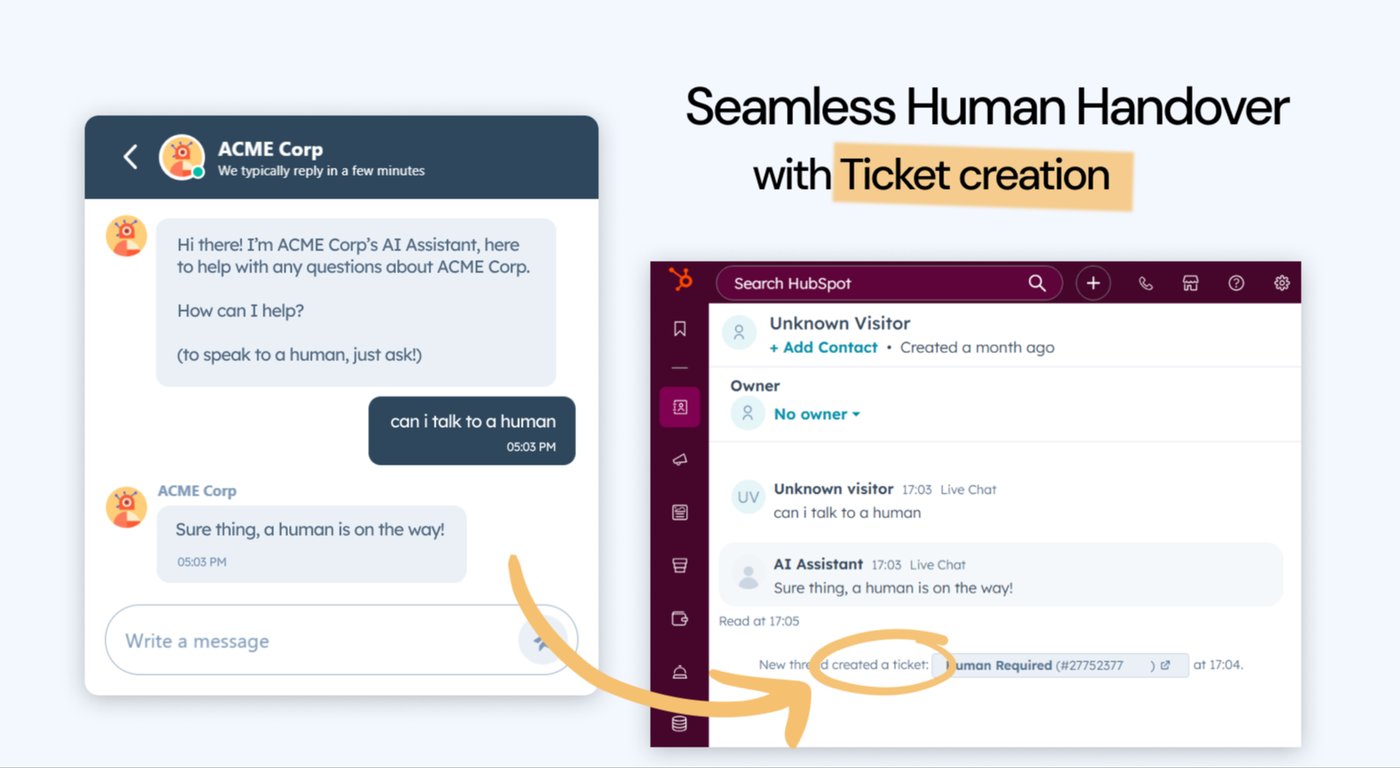
Image: a customer asks for a person in HubSpot chat, and Resolve247 opens a “Human Required” ticket in HubSpot, on any HubSpot plan. From Resolve247’s HubSpot Marketplace listing.
Choose Customer Agent if you’re on Professional with fewer than about 185 AI chats a month, or on Enterprise with fewer than about 240. It also suits teams that want one bill from HubSpot. Resolve247 answers in HubSpot chat and email, not on WhatsApp, Messenger, SMS or the phone. Teams that want AI on those channels are better matched to Customer Agent, and large enterprises to other tools.
If you go with Customer Agent, test it during the 14 days of free access and decide before day 14 (see HubSpot’s AI). Once you buy extra credits, check that the spend cap fits your volume. Our Customer Agent review covers set-up and training, and our list of top AI chatbots for HubSpot covers other options.
Help Desks to Compare If You Don’t Use HubSpot’s CRM
If you don’t use HubSpot’s CRM, a dedicated help desk may suit you better. Zendesk, Freshdesk and Help Scout focus on ticketing, Intercom on chat-first support with its own AI, and Front on a shared inbox built around email. Our guide to HubSpot Service Hub alternatives compares them, and we’ve compared HubSpot vs Zendesk and HubSpot vs Intercom head to head. Resolve247 also adds AI to Help Scout, Crisp and Front. If you want to stay on HubSpot and use a different AI to answer customers, see which AI fits in HubSpot.
Frequently Asked Questions
How much is HubSpot Service Hub?
HubSpot Service Hub costs from $0 to $150 a seat a month, plus a one-time onboarding fee on Professional and Enterprise (US prices, checked 24 November 2026). It’s free for up to 2 users, and Starter is $20 a seat a month at list price. For a limited time, new customers get Starter for $7 a seat on annual billing, or $10 on monthly billing. Professional is $90 a seat a month on annual billing ($100 monthly), plus a one-time $1,500 onboarding fee. Enterprise is $150 a seat a month, billed annually, plus a one-time $3,500 onboarding fee. Starter, Professional and Enterprise include 500, 3,000 and 5,000 HubSpot credits a month for AI features.
Is HubSpot Service Hub a CRM?
Service Hub is the customer service part of HubSpot’s CRM platform. It’s built on HubSpot’s Smart CRM, so tickets, chats and emails sit on the same contact and company records as your deals and marketing. You can start on the free plan, for up to 2 users.
Which HubSpot plan includes the help desk?
The help desk workspace comes with Service Hub Professional and Enterprise. Each agent who works in it needs a Service Seat ($90 a month on annual billing, on Professional). Free and Starter have a shared inbox with tickets, without the help desk workspace or SLAs.
Which seats does a support team need in HubSpot?
On Professional or Enterprise, give a Service Seat to every agent who answers chats, emails and tickets. Colleagues who edit customer records but don’t work the support queue need a Core Seat. Anyone who only needs to see tickets and reports can have a free View-only Seat. On Starter, every paid user has a Core Seat.
How much does HubSpot cost in the UK?
In the UK, HubSpot costs £7 a seat a month on Starter (a limited-time offer), £81 on Professional and £155 on Enterprise, on annual billing, plus VAT. That’s one all-in-one plan, which HubSpot’s pricing page shows UK visitors instead of Service Hub. It includes 5,000 to 15,000 credits a month. HubSpot calls it a Limited Release, a plan it doesn’t offer in every country. See HubSpot pricing in the UK.
When can you remove seats or downgrade HubSpot?
At renewal. From your next renewal date, HubSpot’s terms let you downgrade and remove seats you’ve added, using a new order form. During your contract, you can swap unassigned seats for credits or a different seat type instead. Turn off auto-renewal before the term ends if you plan to change.
How do you get tickets from HubSpot chat on Free or Starter?
Add Resolve247, our AI chatbot. It answers in your HubSpot chat and creates a ticket in your pipeline when a customer needs a person, on every HubSpot plan. That helps on Free and Starter, because HubSpot’s help doc says accounts created after 1 April 2024 “cannot create tickets from channels connected to the inbox”. Without an add-on, you create tickets by hand or with a chatbot’s “submit a ticket” action.
Conclusion: Is HubSpot Service Hub Right for You?
HubSpot Service Hub makes most sense when your business already runs on HubSpot’s CRM, because support then sits on the same record as sales and marketing. Before you choose a plan, do four checks:
- List who answers chats and tickets (Service Seats on Professional) and who only needs to see them (free View-only Seats).
- Decide whether you need the help desk, a knowledge base, a portal or SLAs. If you do, budget for Professional and its $1,500 onboarding fee.
- Decide which AI answers your customers, and what should happen when its allowance runs out.
- Try the plan you need in a 14-day free trial before you sign.
If you’d like AI in your HubSpot chat and email on the plan you have now, try Resolve247 free for 30 days. The trial needs no card. Resolve247 works on every HubSpot plan and starts at $35 a month. If you go over your monthly messages, it keeps answering, with nothing charged automatically. There’s a money-back guarantee, and if the AI ever makes something up, that month is free.