
Contents:
- Reasons to look for HubSpot AI Chatbot Alternatives
- HubSpot AI Chatbot Alternatives Comparison Table
- Alternatives Explained
- Choosing the Right Alternative
- Next Steps
- FAQ
Introduction
In this article we run through HubSpot AI chatbot alternatives that include both alternative products but also native HubSpot settings that solve specific issues you might be having. Whether you’re looking to reduce cost, want more control over AI behaviour, or need more features, the right alternative depends on your exact pain point.
HubSpot’s Breeze Customer Agent is a capable AI chatbot. It integrates natively with HubSpot CRM, handles customer queries automatically, and works within the familiar HubSpot interface. For some businesses, it’s the default choice because it’s within the HubSpot ecosystem.
But “default” doesn’t mean “perfect for everyone.”
Some teams find the $1-per-conversation pricing unmanageable. Others need knowledge sources that Breeze doesn’t support. And businesses on HubSpot Free or Starter plans can’t access Customer Agent at all.
This article covers solutions for these scenarios and more. Some alternatives are third-party products. Others are HubSpot configurations you might not be aware of yet. We’ll match each pain point to the solutions that actually fix it.
Reasons to Look for HubSpot AI Chatbot Alternatives
If you’re looking for Breeze Customer Agent alternatives, you might be interested in one or more of the categories we’ve put together. Understanding what you’re looking to “fix” with HubSpot’s AI Chatbot will then help you identify the most relevant solution.
Cost and Pricing Concerns
HubSpot’s high cost credit-based pricing creates a few reasons you might want to look for an alternative. Each has different solutions.
(For a detailed breakdown on reducing costs, see our guide on reducing HubSpot AI chatbot costs by 96%.)
I want to keep Breeze Customer Agent but reduce credit consumption.
You don’t necessarily need to switch products. HubSpot offers a visitor verification feature (reCAPTCHA) that requires users to prove they’re human before starting a conversation. This filters out bots and reduces frivolous interactions that consume credits.
Another approach: use a rule-based chatflow to collect information first. By asking for an email address or name before routing to Customer Agent, you filter out users who aren’t serious about getting help.
Both methods keep you using Breeze Customer Agent, but reducing credit consumption.
HubSpot’s credits are too expensive ($1 per conversation).
At $1 per conversation, costs scale directly with traffic. A busy site handling 500 conversations monthly adds $500 to your HubSpot bill. This can quickly become unmanageable, however there are alternatives with much cheaper pricing structures. Resolve247 charges 96% less than HubSpot (starting from $35 for 2,000 AI messages, equivalent to $0.04 per conversation). This provides more cost-effective costs for your AI conversations, so you can reliably scale customer support without worrying about cost.
Auto-upgrade and wasted credits concern me.
HubSpot’s default behaviour will automatically upgrade your plan when you exceed credit limits, committing you to that higher charge for the rest of your contract. To prevent unexpected charges, enable Pay-As-You-Go (PAYG) in your HubSpot settings and configure a credit limit. This caps your exposure while maintaining access to Customer Agent.
I want pricing based on resolution, not per conversation.
HubSpot charges based on conversation, however Intercom’s Fin AI Agent charges $0.99 per resolution. The key difference: you are charged when the customer confirms satisfaction or exits without requesting further help. Although this is still at a high overall cost, the resolution based pricing structure should provide a small cost saving compared to the cost of credits used by HubSpot’s Customer Agent.
I want pricing based on messages, not per conversation.
Conversation-based pricing treats a two-message exchange the same as a twenty-message support session, which feels inefficient. Resolve247 uses message-based pricing instead (from $35 for 2,000 messages), which is more directly related to what’s actually consumed. For comparison purposes, charging this way results in an equivalent cost of approximately $0.04 per conversation – a huge saving.
Control Versus Automation
Whether you are looking for more control, or easier automation, here are some solutions for you.
I want more control over AI behaviour.
Breeze Customer Agent offers limited customisation for how the AI responds. If you need to enforce specific behaviour, alternative platforms that have a custom instructions feature will provide more granular control. You could look into Resolve247, Intercom or Cognigy as an alternative as these platforms all have a Custom Instructions feature to let you define exactly how your AI should handle specific scenarios.
I want exact control of every conversation path.
Sometimes AI flexibility is the problem, not the solution. HubSpot’s native chatflow builder lets you build a rule-based chatflow (pre-defined questions/answers throughout the conversation). You script every possible path, ensuring consistent responses without any variation by an AI. This approach requires more upfront work and limits the conversation route, but guarantees very predictable behaviour (although less flexible).
Availability and Ecosystem
HubSpot plan restrictions limit options for many companies, and some just don’t want a solution tied in to HubSpot.
I need an AI chatbot available on any HubSpot plan.
Breeze Customer Agent requires Professional or Enterprise plans. If you’re on HubSpot Free or Starter, you’re locked out. To add AI to your HubSpot account without needing a higher tier hubspot plan, you can use Resolve247 (directly within the HubSpot widget and inbox), Intercom (as a separate widget that syncs with your HubSpot inbox) or Cognigy (as a separate widget that syncs with your HubSpot inbox). Although HubSpot’s rule-based chatflow builder (without AI) is available on lower tiers, it’s functionality is severely limited on lower plans (basically limited to data collection followed by live chat).
For a specific article on just this topic, you can read our dedicated article on How to add AI to HubSpot chat widget, on any plan.
I want an AI chatbot not tied to the HubSpot ecosystem.
Maybe you’re moving away from HubSpot, want the flexibility to move away in the future, or use multiple CRM platforms. A platform-agnostic solution will provide you flexibility. Resolve247, Intercom and Cognigy can operate independently from HubSpot while still supporting integration when needed.
Quality and Safety
AI reliability isn’t the same across platforms, maybe you’re looking for something more reliable.
I want a guarantee against hallucinations.
Generative AI can produce confident-sounding incorrect information if the system has not been built with safe-guards. If accuracy is important to you, two approaches exist. Using a Rule-based chatflow eliminates AI hallucination entirely by using only pre-written responses. But if you want an AI solution, then Resolve247 offers an anti-hallucination guarantee to back up the reliability and accuracy of their AI.
I need HIPAA compliance.
Healthcare organisations handling protected health information need platforms built for compliance. Cognigy can be HIPAA compliant, making it suitable for healthcare contact centres and organisations with strict regulatory requirements.
More Knowledge Sources
Breeze Customer Agent has limitations on where it pulls information, here’s how you can open that up.
I want to use data from Notion.
If your documentation lives in Notion (either private or public pages), you’ll need a platform that supports direct Notion integration. Both Resolve247 and Intercom can connect to Notion workspaces, meaning you can simply leave your Notion information as it is, no need to migrate your information over to HubSpot.
I want to use private data behind authentication.
Some knowledge might live on webpages that require authentication to access – maybe it’s just for your internal team, or locked down for only your existing customers. Resolve247 can be trained on this information by providing your Authentication URL, without needing to expose the information publicly.
Analysis and Insights
Understanding what customers ask helps improve your support and your product over time. Having the right tools to see and understand this data is important.
I want to see frequently asked questions.
Identifying common queries helps prioritise documentation improvements and product decisions. Resolve247 and Intercom both provide FAQ analysis dashboards showing question frequency and patterns.
I want to see knowledge gaps.
When AI can’t answer a question, that’s valuable intelligence. Both Resolve247 and Intercom surface these “knowledge gaps” so you can expand training materials where it’s most needed.
HubSpot AI Chatbot Alternatives Comparison Table
This table shows which solutions address which pain points. No single alternative solves everything, so we’ve mapped capabilities so you can pick the option that best suits your needs.
| reCAPTCHA | Rule-Based Chatflow | HubSpot PAYG | Resolve247 | Intercom Fin | Cognigy | |
|---|---|---|---|---|---|---|
| Cost and Pricing | ||||||
| Reduce credits | ✔ | ✔ | ||||
| Lower cost | ✔ | |||||
| No auto-upgrade | ✔ | |||||
| Resolution-based | ✔ | |||||
| Message-based | ✔ | |||||
| Control | ||||||
| Custom AI instructions | ✔ | ✔ | ✔ | |||
| Exact control | ✔ | |||||
| Availability | ||||||
| Any HubSpot plan | ✔ | ✔ | ✔ | |||
| Platform agnostic | ✔ | ✔ | ✔ | |||
| Quality and Safety | ||||||
| Anti-hallucination | ✔ | ✔ | ||||
| HIPAA compliance | ✔ | |||||
| Knowledge Sources | ||||||
| Notion integration | ✔ | ✔ | ||||
| Private URLs | ✔ | ✔ | ||||
| Analysis | ||||||
| FAQ insights | ✔ | ✔ | ||||
| Knowledge gaps | ✔ | ✔ |
Individual Alternatives Explained
Each alternative has specific strengths and limitations. This section provides details about each alternative so you have the information you need to make an informed choice.
reCAPTCHA (Visitor Verification)
What it is: A HubSpot setting that adds human verification before chat conversations begin.
ReCAPTCHA is a method of preventing spam bot activity, powered by Google.
New Customer Agent chatflows will have this enabled by default, existing chatflows will need to opt-in to enable this feature. To enable Visitor verification, within your Chatflow Options tab, in the Security & spam prevention section, look for Visitor verification and switch it on.
We HIGHLY recommend that you test this feature before implementing it, to make sure your real customers are not being blocked. During our testing, some human chat messages were blocked with no visual indication or warning, so it simply appeared that the team were ignoring the message – and because the message doesn’t appear in the inbox (as its intending to remove spam) you wouldn’t even know this was an issue. Please test this yourself before implementing.

Pain points addressed:
- ✔ Reduce credit consumption
When it’s a good fit:
If you’re satisfied with Breeze Customer Agent but want to reduce bot traffic and casual interactions consuming credits. You’re happy to add the extra verification step, in order to reduce bot traffic. Setup is as simple as turning it on in settings.
When it’s not a good fit:
You want the chat experience to be seamless and convenient for your customers. If you don’t get a lot of bot traffic, but do want to reduce the cost of your AI conversations, this option won’t help much. reCAPTCHA only addresses bot filtering, by adding a human-verification step.
Rule-Based HubSpot Chatflow
What it is: HubSpot’s native chatflow builder where each step in the conversation can be specified. This can be used to pre-script every conversation path, or can be used to start the conversation and then handover to Customer Agent after collecting some data, such as email (available if you are on Professional or Enterprise plan).
Collect data, then handover to AI: Asking a question before handing over to AI should reduce the quantity of nonsense chat messages (by providing a small friction step) and reduce chance of bots being able to send a chat message. To handover to AI after asking a question: within your rule-based chatflow, first use “Ask question” and then use “Send to Customer Agent“
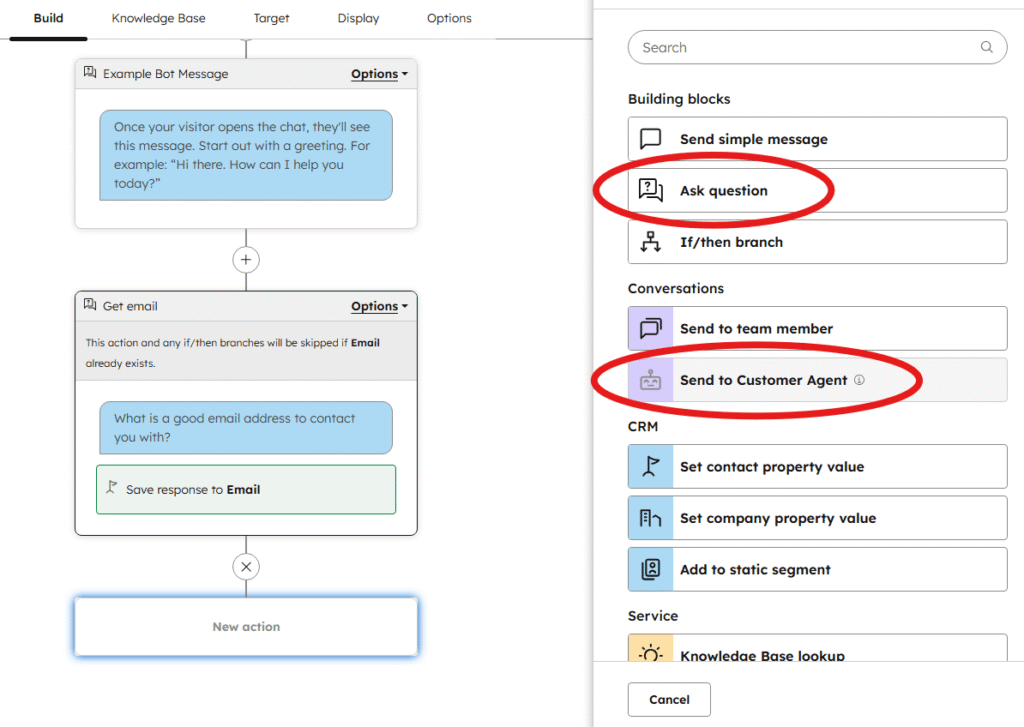
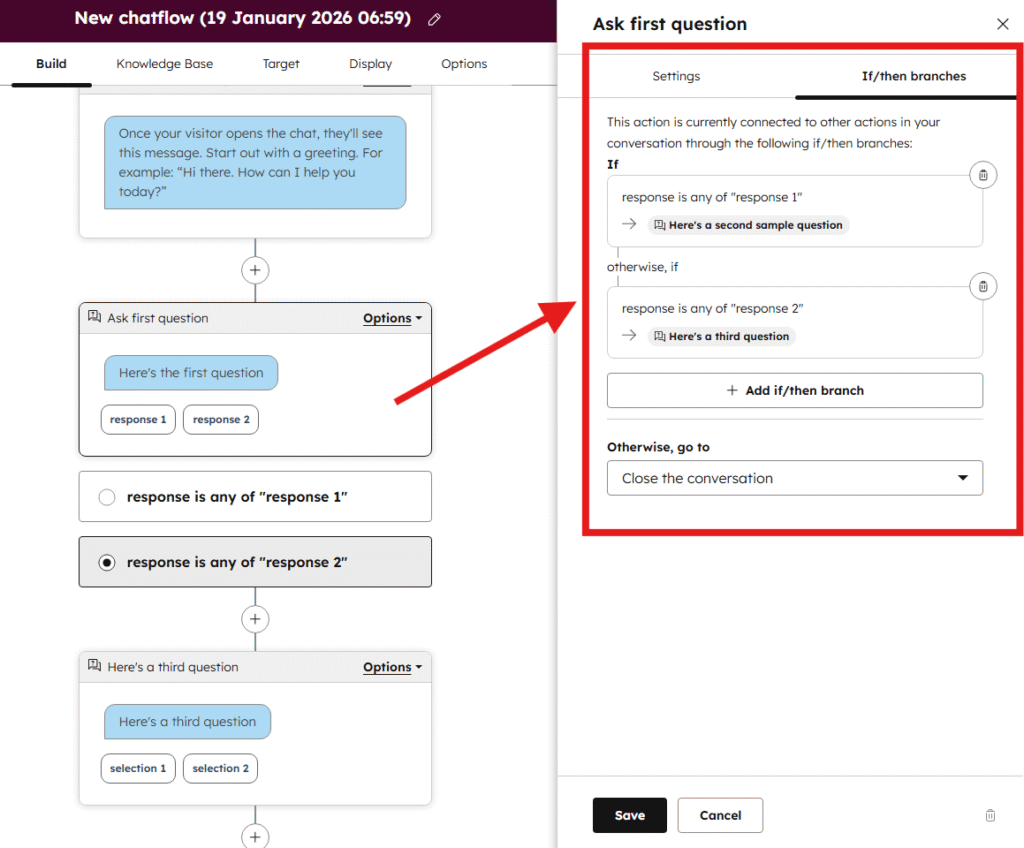
Fully scripted conversation: If you are on the Professional or Enterprise tiers, you can also use a rule-based chatflow to fully script the entire conversation (if/then branches not available on Free/starter plans). This would give you total control over the questions and answers, with the restriction of limiting the conversation to only those pre-specified questions. To do this, within your rule-based chatflow:
- You can add a new action and choose the “Ask question” block and enter the question you want the customer to answer, providing the specific answers they can choose from.
- You can then add additional questions in the same way, until you want to branch between different routes.
- To split the conversation depending on the customers response, underneath the question block you should add a “If/then branch” block where you can choose different next steps depending on the customers answer.
Pain points addressed:
- ✔ Reduce credit consumption
- ✔ Exact conversation control
- ✔ Anti-hallucination guarantee
When it’s a good fit:
When you are happy to introduce the extra friction to your customers, to reduce spam messages that consume your AI credits. And if you want absolute control of every path of the conversation. Every answer is pre-written, eliminating any risk of AI unpredictability. Works well for situations where questions are predictable and highly repeated.
When it’s not a good fit:
You want to handle open-ended questions or scale support without scripting every possible conversation path. Rule-based chatflows require significant maintenance as your product evolves.
Note: Full chatflow functionality (such if/then branching) requires Professional or Enterprise HubSpot tiers. Free and Starter tiers include basic data collection and live agent handoff but no routing logic.
HubSpot PAYG with Credit Limits
What it is: HubSpot’s Pay-as-you-go billing setting (also called Overages) charges you for the number of credits used at the end of your period; instead of the default auto-upgrade option that would pre-commit you to buy bundles of credits you may not use. At the time of writing the pay-as-you-go rate is the same as the monthly rate, you can see the latest Overage price here.
To turn on Pay-as-you-go overages, under “Account & Billing” go to “Usage & Limits”, then under “HubSpot Credits” go to “Manage credit settings” and select “Pay-as-you-go”. While there, we suggest setting a maximum monthly credit limit, which will avoid an unexpected spike of conversations causing you to spend more than you like. For HubSpot documentation on this, see their details on Pay-as-you-go overages.
Pain points addressed:
- ✔ Prevent auto-upgrade and wasted credits
When it’s a good fit:
You want to keep using Breeze Customer Agent but don’t want one month of high demand to commit you to that same high volume for all future months. You don’t like pre-paying for a bundle of credits that sometimes go unused and are wasted. If you are continuing to use Customer Agent, we would recommend you use this Pay-as-you-go option so you can be cost effective.
When it’s not a good fit:
Your concern is the high price, or the per-conversation pricing, as choosing PAYG doesn’t change this.
Resolve247
What it is: A specialist AI chatbot platform that is fully integrated with HubSpot’s live chat widget or can work completely independently of HubSpot. Resolve247 can be used on any HubSpot plan, and is integrated to still allow seamless human handover and creating tickets in HubSpot. With per-message pricing and a significant 96% reduction in AI costs (equivalent to $0.04/conversation), using Resolve247 as your AI provider can be an easy win if you’re looking for cost effective alternatives to HubSpot’s AI Chatbot.
As an AI specialist, the high quality AI (even providing an anti-hallucination guarantee) will mean you can confidently use Resolve247 to help answer your customers’ questions without worrying about cost. Extra features help you get the most out of this specialist AI tool, including Custom Instructions (allowing you to optionally control how the AI behaves), Insights (to see your most frequently asked subjects), Knowledge Gap assessment (to see where new documentation needs to be added) and more knowledge sources (including Notion, private web pages, and more).
Pain points addressed:
- ✔ Lower per-conversation cost
- ✔ Message-based pricing
- ✔ Custom AI instructions
- ✔ Any HubSpot plan
- ✔ Platform agnostic
- ✔ Anti-hallucination guarantee
- ✔ Notion integration
- ✔ Private URL support
- ✔ FAQ insights
- ✔ Knowledge gap reporting
When it’s a good fit:
You want predictable pricing at a cost-effective rate. You want to use AI to help your customers, but without the high cost of HubSpot credits. Teams handling high volumes see huge cost savings. Small teams can use AI without needing to upgrade their tier.
Resolve247 works within HubSpot’s chat widget (keeping the familiar interface for customers) or as a standalone solution. This flexibility suits teams considering future CRM changes.
Custom instructions let you define AI behaviour precisely, while the anti-hallucination guarantee provides commercial backing for accuracy.
When it’s not a good fit:
You require HIPAA compliance for healthcare data. You prefer resolution-based pricing where you only pay for successful outcomes (although at a much higher price). You’re already satisfied with Breeze and just need minor tweaks.
Intercom Fin
What it is: Intercom is a Customer Service Suite that is AI focused, and Fin is Intercom’s AI Agent. To use Fin, you would use Intercom’s chat widget and inbox (instead of the HubSpot chat widget and inbox) which can sync behind-the-scenes with your HubSpot account, on any HubSpot plan.
Pricing is $0.99 per resolution – measured if the customer exits without asking for further help, or confirms their satisfaction (such as by saying “ok thanks”). More details on resolutions here.
As an AI specialist, the platform is AI focused, so if you are looking to move away from the HubSpot chat widget and ecosystem then Intercom could be a high quality choice. Premium features help you use the platform effectively, including Guidance (to change how the AI behaves), Insights (to see your most frequently asked subjects), Unresolved Questions report (to see where new documentation could be added) or using other knowledge sources (such as Notion).
Pain points addressed:
- ✔ Resolution-based pricing
- ✔ Custom AI instructions (via “Guidance”)
- ✔ Any HubSpot plan
- ✔ Platform agnostic
- ✔ Notion integration
- ✔ Private URL support
- ✔ FAQ insights
- ✔ Knowledge gap reporting
When it’s a good fit:
You want closer alignment between your AI charges and conversation outcomes. Intercom only charges when customers leave without requesting more help or confirm satisfaction. Failed interactions don’t incur costs.
You are happy to move to use another provider as your support inbox to respond to conversations, but still want to sync those conversations back to HubSpot for the record. The platform offers strong analytics, Notion integration, and custom guidance features. Intercom operates its own chat widget, which hands off to HubSpot for human conversations when needed.
When it’s not a good fit:
At $0.99 per resolution, costs are still significant, and wont deliver much of a cost reduction, even when priced per “resolution”.
If you want to continue using HubSpot’s chat widget and inbox. Using Intercom means you’ll need to move aways from using HubSpot as your day-to-day support inbox, using the Intercom widget/inbox instead, and sync with HubSpot for the record. The separate widget means customers see an Intercom interface rather than native HubSpot chat.
Cognigy
What it is: An enterprise-grade conversational AI platform with comprehensive compliance certifications. A separate platform to HubSpot that can sync behind-the-scenes to keep your records up to date within HubSpot, or be used completely standalone from HubSpot.
With a focus on large enterprise customers, Cognigy are fully capable of satisfying strict compliance requirements of legislated industries such as Healthcare.
Pain points addressed:
- ✔ Custom AI instructions
- ✔ Any HubSpot plan
- ✔ Platform agnostic
- ✔ HIPAA compliance
When it’s a good fit:
Healthcare organisations or enterprises requiring HIPAA, PCI compliance, etc. Cognigy.AI suits regulated industries where compliance isn’t optional.
The platform handles voice, chat, and multi-channel deployments at enterprise scale. Major brands including Lufthansa, Mercedes-Benz, and DHL use Cognigy for customer service automation.
When it’s not a good fit:
SMBs and startups. Cognigy serves enterprise contact centres with pricing and complexity to match. If your needs are simpler or budget-constrained, other alternatives offer better value.
Choosing the Right Alternative
Start with your primary pain point rather than feature comparisons.
Cost concerns: If HubSpot’s high pricing is the primary issue, Resolve247’s significant cost saving is a good choice, or Intercom’s resolution-based pricing can also provide a smaller cost saving. For minor savings but while still using Breeze Customer Agent, HubSpot’s reCAPTCHA and data collection chatflows reduce unnecessary credit consumption.
Control requirements: Custom instructions (Resolve247, Intercom) or predefined chatflows (HubSpot native flow builder) address different needs. Decide whether you want AI with guardrails or scripted paths without AI variation.
Plan restrictions: HubSpot Free and Starter users need third-party solutions. Resolve247 and Intercom both work regardless of your HubSpot tier.
Compliance needs: HIPAA requirements narrow options significantly. Cognigy addresses this specifically; many other alternatives don’t.
Knowledge source limitations: If your documentation lives in Notion or behind authentication, Resolve247 and Intercom can help with a wider choice of knowledge sources.
No alternative is universally superior. The comparison table above shows clear trade-offs. Match your specific constraints to the solutions designed for them.
Next Steps
If cost reduction is your priority, start with our detailed guide on reducing HubSpot AI chatbot costs by up to 96%. It covers native HubSpot optimisations before considering alternatives.
For a broader comparison of AI chatbots that integrate with HubSpot, see our analysis of the top AI chatbots for HubSpot or our breakdown of the best HubSpot AI chatbot options.
Ready to explore high quality AI with a cost-effective price tag? Try Resolve247 free for 30 days and you’ll instantly see massive savings while keeping your customers happy.
How to test alternatives
You will probably want to test your chosen alternative before using the new option with your customers. To do this, we would suggest you use a “test” HubSpot chatflow so you can see the customer experience with no surprises.
If you have an existing chatflow, you can duplicate your existing chatflow and make changes to the duplicated chatflow. Or you can create a new chatflow from scratch, and only use that for testing to begin with.
During testing or during implementation, if you have any problems seeing the right chatflow, or your hubspot chat widget not displaying at all, we have an article to help with how to fix HubSpot widget problems.
Frequently Asked Questions
Can I use an AI chatbot on HubSpot Free or Starter tier?
HubSpot’s native Breeze Customer Agent requires Professional or Enterprise plans, but third-party solutions like Resolve247 and Intercom work with any HubSpot tier, including the free tier.
Do third-party chatbots integrate with HubSpot CRM?
They can do, in different ways. For example, Resolve247 works directly within HubSpot’s chat widget and inbox, while Intercom uses their own interface and syncs conversation data to your HubSpot account.
Which alternative is cheapest?
If you want to continue using HubSpot’s Breeze, then the cheapest strategy is to set a reCAPTCHA or data collection step, and to enable PAYG pricing. But for real cost savings, swap to a third-party solution, such as Resolve247 that will deliver a 96% saving on HubSpot Breeze prices.
Can third-party chatbots hand off to HubSpot live chat agents?
Yes. Resolve247 works within HubSpot’s native chat widget, so handoffs happen seamlessly in the same interface. When a customer asks to talk to a human, Resolve247 can create a ticket in HubSpot to let you know that assistance is needed. Intercom uses its own widget and interface and will handover to a human within the Intercom inbox, instead of the HubSpot inbox.
Do I need a separate knowledge base for a third-party AI chatbot?
No. Most alternatives can train on your existing website content, help centre, or documentation tools. You don’t need to duplicate content into a new system. Some platforms perform better with structured knowledge bases, but it’s rarely a hard requirement.
Can I test alternatives before fully switching from Breeze Customer Agent?
Yes. Most third-party chatbots offer free trials. You can run them on a test/demo chatflow so you can see the customer experience before replacing Breeze. This lets you compare response quality and measure impact without disrupting existing support. Resolve247 provide a 30 day free trial, and Intercom provide a 14 day free trial.